1. 서론
This manual provides detailed instructions for the KOSPET TICWRIS MAX 4G/LTE Smart Watch. Please read this manual carefully before using your device to ensure proper operation and to maximize its features.
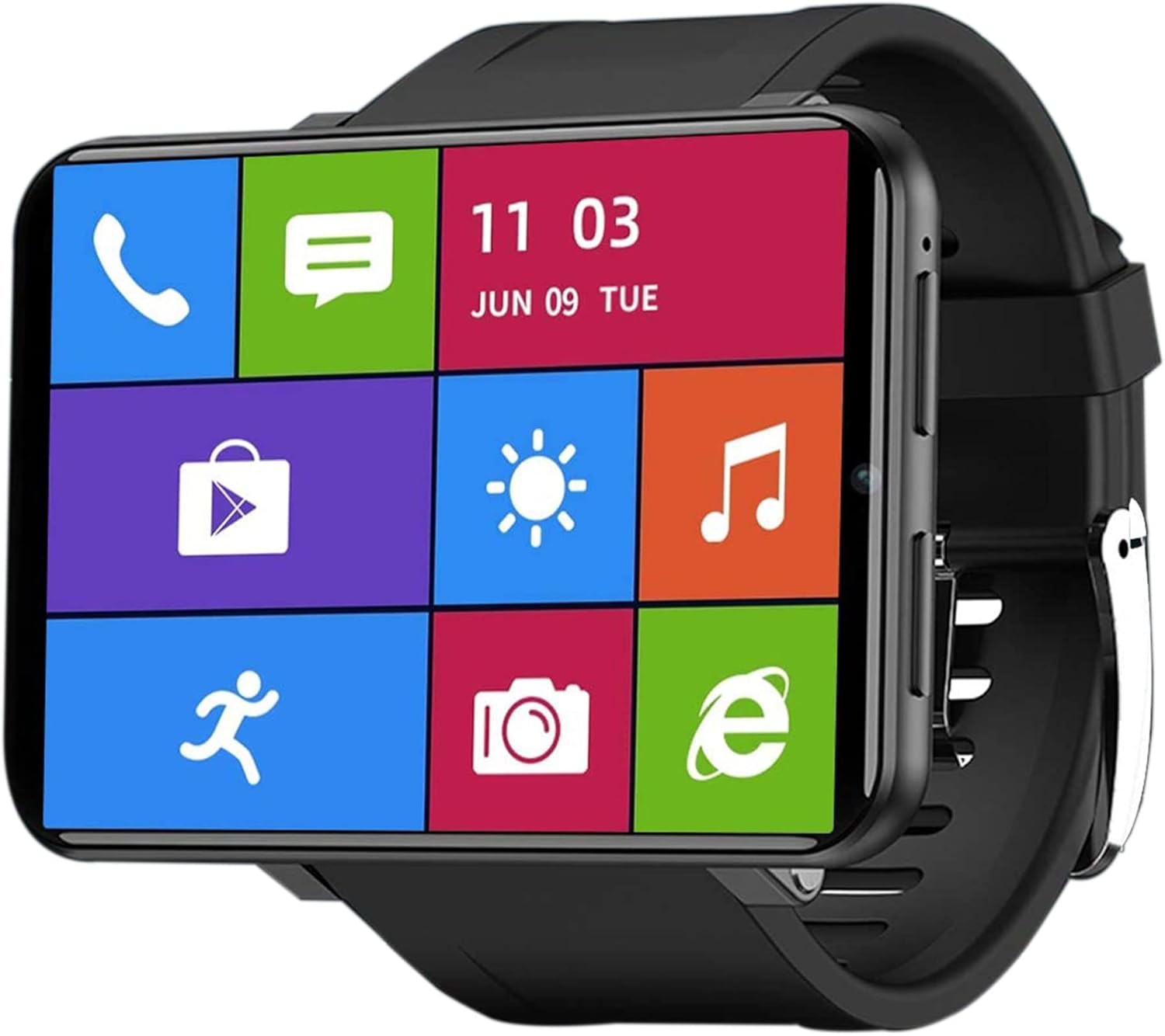
Image 1.1: The KOSPET TICWRIS MAX Smart Watch showing its vibrant main interface with quick access icons for phone, messages, time, weather, music, shopping, fitness tracking, camera, and browser.
2. 설정
2.1 패키지 내용
- KOSPET TICWRIS MAX Smart Watch
- 충전 케이블
- 사용자 설명서
2.2 장치 충전
Before first use, fully charge the smart watch. Connect the charging cable to the watch and a power source. A full charge typically takes approximately 2 hours.
2.3 SIM 카드 설치
The TICWRIS MAX supports Nano-SIM cards for 4G/LTE network connectivity. Locate the SIM card slot on the side of the watch. Carefully insert a Nano-SIM card (not included) into the slot as indicated by the diagram or markings on the device. Ensure the SIM card is correctly oriented.

Image 2.1: This image illustrates the connectivity options of the KOSPET TICWRIS MAX, including support for 4G/3G/2G cellular networks, Wi-Fi, and the use of a Nano-SIM card for independent communication.
2.4 전원 켜기/끄기
- 전원을 켜려면: 시계 측면에 있는 전원 버튼을 화면이 켜질 때까지 길게 누르세요.
- 전원을 끄려면: 전원 버튼을 길게 누른 다음, 화면에서 '전원 끄기' 옵션을 선택하세요.
2.5 스마트폰과 페어링
To receive notifications and synchronize data, pair your TICWRIS MAX with your smartphone using the 'Wiiwatch 2' application. Download the 'Wiiwatch 2' app from your smartphone's app store, then follow the in-app instructions to connect your watch.
3. 사용 설명서
3.1 Network Connectivity and Calls
With a Nano-SIM card installed, the watch supports 4G/LTE and Wi-Fi connectivity. You can make and receive phone calls, send SMS messages, and access online services directly from the watch.
3.2 알림
Once paired with the 'Wiiwatch 2' app, the watch will display notifications from your smartphone, including text messages, SNS messages, calls, and emails.
3.3 디스플레이 및 인터페이스
The TICWRIS MAX features a 2.86-inch square LCD screen with a 480x640 resolution, providing a clear and immersive visual experience for videos, games, and photos.

Image 3.1: The KOSPET TICWRIS MAX Smart Watch highlighting its expansive 2.86-inch display, designed for enhanced view참여와 상호작용.
3.4 보안 기능
The watch includes Face ID unlock technology, allowing you to unlock your device quickly and securely in approximately 0.1 seconds. Pattern unlock is also available.

Image 3.2: This image displays the security options for the KOSPET TICWRIS MAX, showing both pattern unlock and the Face ID unlock feature in action.
3.5 GPS 및 내비게이션
Integrated GPS/GLONASS allows for accurate tracking of sports data and real-time display of your exercise route on a map. You can use Google Maps for navigation, Google Search, and Google Weather while on the go.
3.6 Android Operating System and Applications
Running on Android 7.1.1 OS, the watch is compatible with a wide range of Android and iPhone devices. With 3GB RAM and 32GB ROM, you can download and install applications from the Google Play Store, store music, and save photos.

Image 3.3: The KOSPET TICWRIS MAX Smart Watch showcasing its Android 7.1.1 operating system with a variety of popular application icons, indicating its smart functionality.
3.7 카메라
The watch is equipped with an 8.0 MP HD camera, suitable for capturing photos and videos.
4. 유지관리
4.1 배터리 관리
2880mAh 배터리는 장시간 사용을 가능하게 합니다. 배터리 수명을 연장하려면 다음을 참고하세요.
- 극한의 온도를 피하세요.
- 기기를 정기적으로 충전하되, 장시간 과충전은 피하십시오.
- Close unused applications and features (e.g., Wi-Fi, GPS) to conserve power.

Image 4.1: This image details the battery performance of the KOSPET TICWRIS MAX, highlighting its 2880mAh capacity and estimated usage times for standby, video watching, daily use, continuous calls, and GPS exercise, along with charging time.
4.2 청소
Wipe the watch with a soft, dry cloth. Avoid using harsh chemicals or abrasive materials that could damage the screen or casing.
5. 문제 해결
If you encounter any issues with your KOSPET TICWRIS MAX Smart Watch, please refer to the following general advice:
- 장치가 켜지지 않음: 배터리가 충전되어 있는지 확인하십시오. 최소 30분 동안 충전기에 연결하십시오.
- 연결 문제: Check SIM card insertion, Wi-Fi connection, or Bluetooth pairing. Restart the watch and your smartphone.
- 앱이 작동하지 않습니다: Ensure the app is updated. Try reinstalling the app.
- 느린 성능: Close background applications. Clear cache if possible.
문제가 지속되거나 특정 기술 지원이 필요한 경우 고객 서비스 센터로 문의하십시오.
6. 사양
| 특징 | 사양 |
|---|---|
| 상표 | 코스펫 |
| 모델 번호 | TICWRIS MAX |
| 운영 체제 | 안드로이드 7.1.1 |
| 화면 크기 | 2.86 인치 |
| 화면 해상도 | 480 x 640 |
| 숫양 | 3GB (XNUMX기가바이트) |
| 집시 남자 | 32GB (XNUMX기가바이트) |
| 배터리 용량 | 2880 마판 리튬 이온 |
| 연결성 | 4G/LTE, Wi-Fi, Bluetooth |
| GPS | Integrated GPS/GLONASS |
| 특별 기능 | GPS, Heart Rate Monitor, Face ID Unlock |
| 호환 장치 | Huawei, Samsung, Smartphone, Xiaomi, iPhone |
| 카메라 | 8.0MP HD |
| 모양 | 직사각형 |
7. 보증 및 지원
For any questions, problems, or technical assistance regarding your KOSPET TICWRIS MAX Smart Watch, please do not hesitate to contact our customer service. Information regarding specific warranty terms may be provided with your purchase documentation.


