1. 서론
This instruction manual provides comprehensive information for the YOSUN Universal Replacement Remote Control, model RMT-TX100U. Designed for seamless compatibility with a wide range of Sony Bravia LCD LED HDTV Smart TVs, this remote offers a direct replacement solution without requiring complex programming. It aims to restore full control over your television with reliable performance and an intuitive layout.
2. 제품 특징
- 광범위한 호환성: Fully compatible with all Sony Bravia LCD LED HDTV Smart TVs.
- 프로그래밍이 필요하지 않습니다: Ready to use straight out of the box, eliminating the need for manual setup.
- 안정적인 성능: Equipped with an upgraded smart chip for consistent and reliable operation.
- 확장된 범위: Transmits signals effectively over long distances, up to 10 meters (33 feet).
- 빠른 응답 시간: Features a rapid transmission response time of approximately 0.2 seconds for immediate command execution.
- 내구성 있는 구조: Made from high-quality ABS and silicone materials for a sturdy, non-slip shell and comfortable, sensitive buttons.
- Identical Layout: Designed to be visually and functionally identical to the original Sony remote control.
- Netflix Shortcut: Includes a dedicated Netflix button for quick access to the streaming service.
3. 설정 가이드
3.1 배터리 설치
리모컨 작동에는 AAA 배터리 2개(별도 구매)가 필요합니다. 다음 단계에 따라 배터리를 설치하십시오.
- 리모콘 뒷면에 있는 배터리함 덮개를 찾으세요.
- 덮개를 아래로 밀어 수납공간을 엽니다.
- AAA 배터리 2개를 넣고 양극(+)과 음극(-) 단자가 배터리함 내부의 표시기와 올바르게 맞춰졌는지 확인합니다.
- 딸깍 소리가 날 때까지 배터리 덮개를 다시 제자리에 밀어 넣습니다.

Figure 3.1: Battery installation and remote dimensions. The remote is 7.8 inches long, 1.8 inches wide, and 0.7 inches thick. The diagram shows sliding the battery cover and inserting two AAA batteries.
3.2 초기 사용 (프로그래밍 불필요)
This YOSUN replacement remote control is designed to work immediately with compatible Sony TVs without any programming or pairing. Once batteries are installed, point the remote towards your TV and begin using it.
Video 3.2: Demonstration of the remote control's simple operation, highlighting that no pairing is required for use with Sony TVs.
4. 사용 설명서
The remote control features a standard layout with clearly labeled buttons for easy navigation and control of your Sony TV. Refer to the diagram below for button identification and their primary functions.
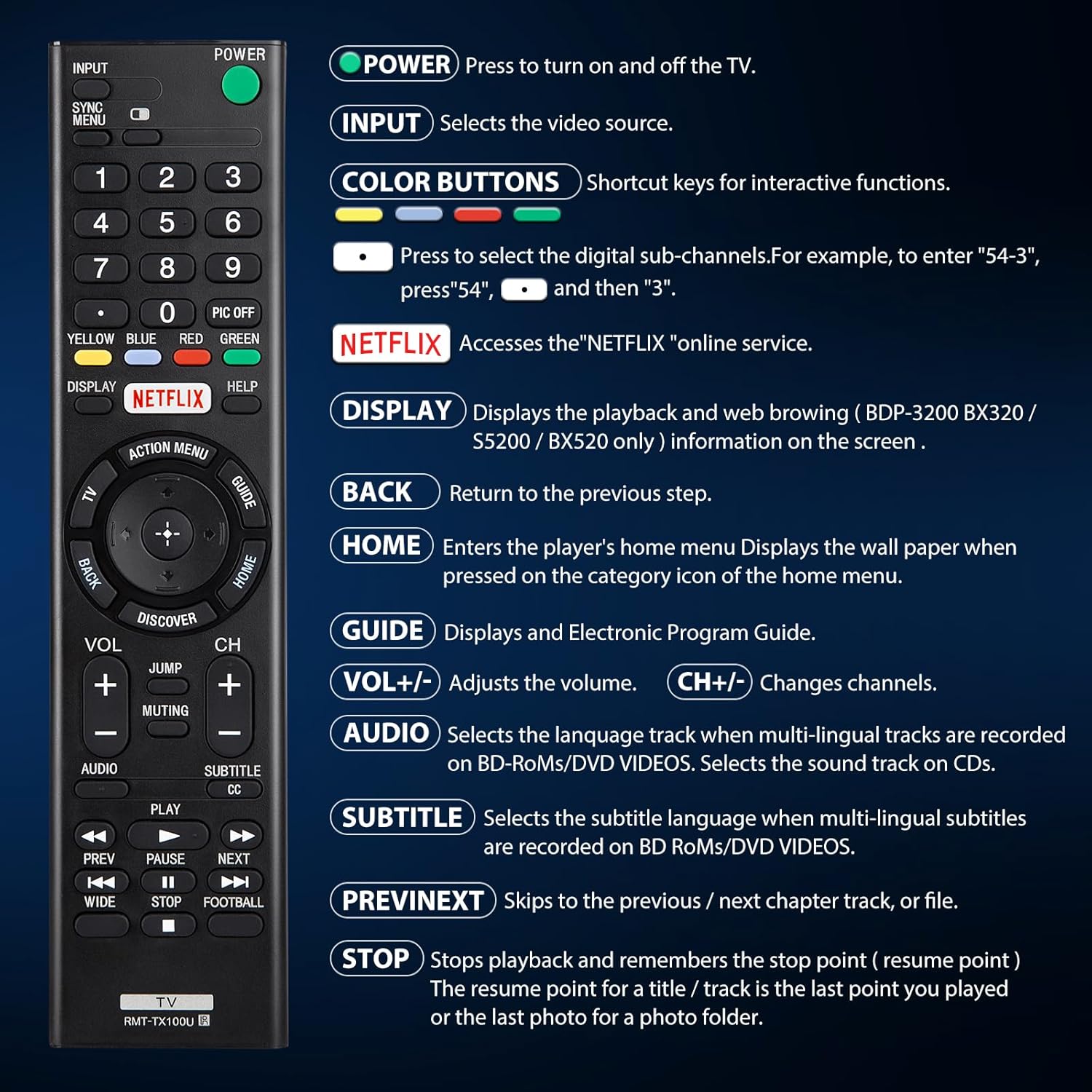
그림 4.1: 이상view 리모컨 버튼과 그 기능.
| 단추 | 기능 |
|---|---|
| 힘 | Press to turn the TV on and off. |
| 입력 | Selects the video source (e.g., HDMI 1, AV). |
| COLOR BUTTONS (Yellow, Blue, Red, Green) | Shortcut keys for interactive functions or digital sub-channels (e.g., to enter "5-4", press "5", then "4"). |
| 넷플릭스 | Directly accesses the Netflix online streaming service. |
| 표시하다 | Displays playback and web browsing information on the screen (for compatible models like BDP-3200 BX320 / S5200 / BX520 only). |
| 뒤쪽에 | 이전 단계 또는 메뉴로 돌아갑니다. |
| 집 | Enters the player's home menu or displays the wallpaper when pressed on the category icon of the home menu. |
| 가이드 | 전자 프로그램 가이드(EPG)를 표시합니다. |
| 볼륨 +/- | 볼륨 레벨을 조절합니다. |
| 채널 +/- | 텔레비전 채널을 바꿉니다. |
| 오디오 | Selects the language track when multi-lingual tracks are recorded on BD-ROMs/DVD VIDEOS. Selects the sound track on CDs. |
| 자막 CC | Selects the subtitle language when multi-lingual subtitles are recorded on BD ROMs/DVD VIDEOS. |
| 이전/다음 | Skips to the previous or next chapter, track, or file 미디어 재생 중. |
| 멈추다 | Stops playback and remembers the stop point (resume point) for a title/track, or the last photo for a photo folder. |
5. 호환성
5.1개의 호환 장치
This remote control is specifically designed for and compatible with the following:
- All Sony Bravia LCD LED HDTV Smart TVs.

Figure 5.1: The remote is compatible with Sony Smart TVs, Sony Bravia TVs, and Sony Google TVs.
5.2 호환되지 않는 장치
이 리모컨은 아니다 다음 기기들과 호환됩니다:
- Blu-ray Disc Players
- DVD 플레이어
- AV 수신기
- 서브우퍼
- 사운드 바
- 홈시어터 시스템

Figure 5.2: The remote is not compatible with Blu-ray players, DVD players, AV receivers, subwoofers, sound bars, or home theater systems.
6. 문제 해결
If you experience issues with your remote control, please consider the following common troubleshooting steps:
- 배터리 확인: Ensure that the batteries are correctly installed with the proper polarity and are not depleted. Replace with fresh AAA batteries if necessary.
- 시선: Make sure there are no obstructions between the remote control and the TV's infrared receiver. The remote operates using an infrared signal, which requires a clear line of sight.
- 원격 호환성: Verify that your TV model is a compatible Sony Bravia LCD LED HDTV Smart TV. Refer to Section 5 for detailed compatibility information.
- 원격 재설정: Remove the batteries, press and hold any button on the remote for 5 seconds to discharge any residual power, then reinsert the batteries.
- TV 전원 주기: Unplug your TV from the power outlet for 60 seconds, then plug it back in. This can sometimes resolve minor communication issues.
7. 유지관리
리모컨의 수명과 최적의 성능을 보장하려면 다음 유지 관리 지침을 따르세요.
- 청소: 리모컨은 부드럽고 마른 천으로 정기적으로 닦아주세요. 잘 지워지지 않는 얼룩은 살짝 두드려 닦아주세요.amp천에 물이나 순하고 연마성이 없는 세제를 묻혀 닦아주세요. 강한 화학 물질이나 연마재는 사용하지 마세요.
- 배터리 교체: Replace batteries promptly when the remote's performance degrades or it stops responding. Remove batteries if the remote will not be used for an extended period to prevent leakage.
- 저장: 리모컨은 직사광선, 극한 온도, 높은 습도를 피해 서늘하고 건조한 곳에 보관하세요.
- 낙하 방지: While durable, repeated drops can damage internal components. Handle the remote with care.
8. 사양
| 기인하다 | 세부 사항 |
|---|---|
| 제품 치수 | 7.87 x 1.89 x 0.78 인치 |
| 품목 무게 | 3.17 온스 |
| 모델 번호 | RMT-TX100U |
| 필요한 배터리 | AAA 배터리 2개 (포함되지 않음) |
| 특징 | 프로그래밍이 필요하지 않습니다 |
| 색상 | 검은색 |
| 지원되는 최대 장치 수 | 18 (Refers to the range of Sony TV models it can control) |
| 호환 장치 | Television (Sony Bravia LCD LED HDTV Smart TVs) |
| 제조업체 | YOSUN |
9. 보증 및 지원
YOSUN offers an unlimited return and refund service for this remote control within 30 days of purchase. If you have any questions, concerns, or require assistance with your order or the product, please do not hesitate to contact YOSUN customer service directly. Our team is committed to providing support and will respond to your inquiries within 12 hours during the work week.
For further assistance, please refer to the contact information provided with your purchase or visit the official YOSUN web대지.


