1. 서론
This manual provides comprehensive instructions for the IFYOO X208 2.4G Wireless and Wired Gaming Controller. It covers product features, setup procedures, operating modes, and important compatibility information to ensure optimal use of your device.

Figure 1: IFYOO X208 Gaming Controller. This image displays the front view of the black and silver controller, highlighting its ergonomic design and button layout.
2. 패키지 내용
아래 나열된 모든 품목이 패키지에 포함되어 있는지 확인하세요.
- 1x IFYOO X208 Gaming Controller
- 1x 1M USB Charging Cable (Micro-USB)
- 1x 2.4GHz USB 동글
- 1x 사용자 매뉴얼(이 문서)
- 1x 보증 카드

Figure 2: Package Contents. This image shows the IFYOO X208 controller alongside its USB charging cable, 2.4GHz USB dongle, user manual, and warranty card.
3. 제품 오버view
3.1 주요 특징
- 이중 연결: Supports 2.4GHz wireless and wired connections.
- Multi-mode Support: Xinput, Dinput, Android, and PS3 modes.
- 이중 진동 피드백: Provides immersive haptic feedback in supported games.
- JD-SWITCH Function: Allows switching between D-pad and Left Stick functions.
- 터보 기능: Enables rapid, continuous button presses.
- 인체공학적 디자인: Features a comfortable grip, high-precision D-pad, wear-resistant anti-slip joysticks, and linear Hall magnetic induction triggers.
3.2 컨트롤러 레이아웃

Figure 3: Front Features. This image highlights the high-precision D-pad, engraved ABXY buttons, excellent non-slip grip, and wear-resistant anti-slip joysticks.

Figure 4: Top Features. This image illustrates the revolutionary designed shoulder buttons (L1/R1) and the 255-level magnetic induction triggers (L2/R2).
4. 설정 및 호환성
4.1 시스템 호환성
- PC / Laptop: Windows 10/8/7/XP, Steam. (Windows XP may require driver installation).
- 안드로이드 기기: Mobile Phones, Tablets, TVs, TV Boxes (version 4.0 or above, device must support OTG function). An OTG adapter or cable is required for Android devices with Type-C or Micro-USB ports.
- 플레이스테이션 3(PS3): Compatible with most PS3 games.
Important Note: This device is NOT compatible with Xbox 360, Xbox One, Mac OS, or PS4.
4.2가지 연결 방법
The IFYOO X208 controller supports both 2.4GHz wireless and wired connections.
4.2.1 2.4GHz 무선 연결
- Insert the 2.4GHz USB dongle into an available USB port on your PC, Android device (via OTG adapter), or PS3 console.
- 컨트롤러를 켜세요. 그러면 자동으로 동글에 연결을 시도합니다.
- Once connected, the indicator light on the controller will stabilize, indicating a successful wireless connection.
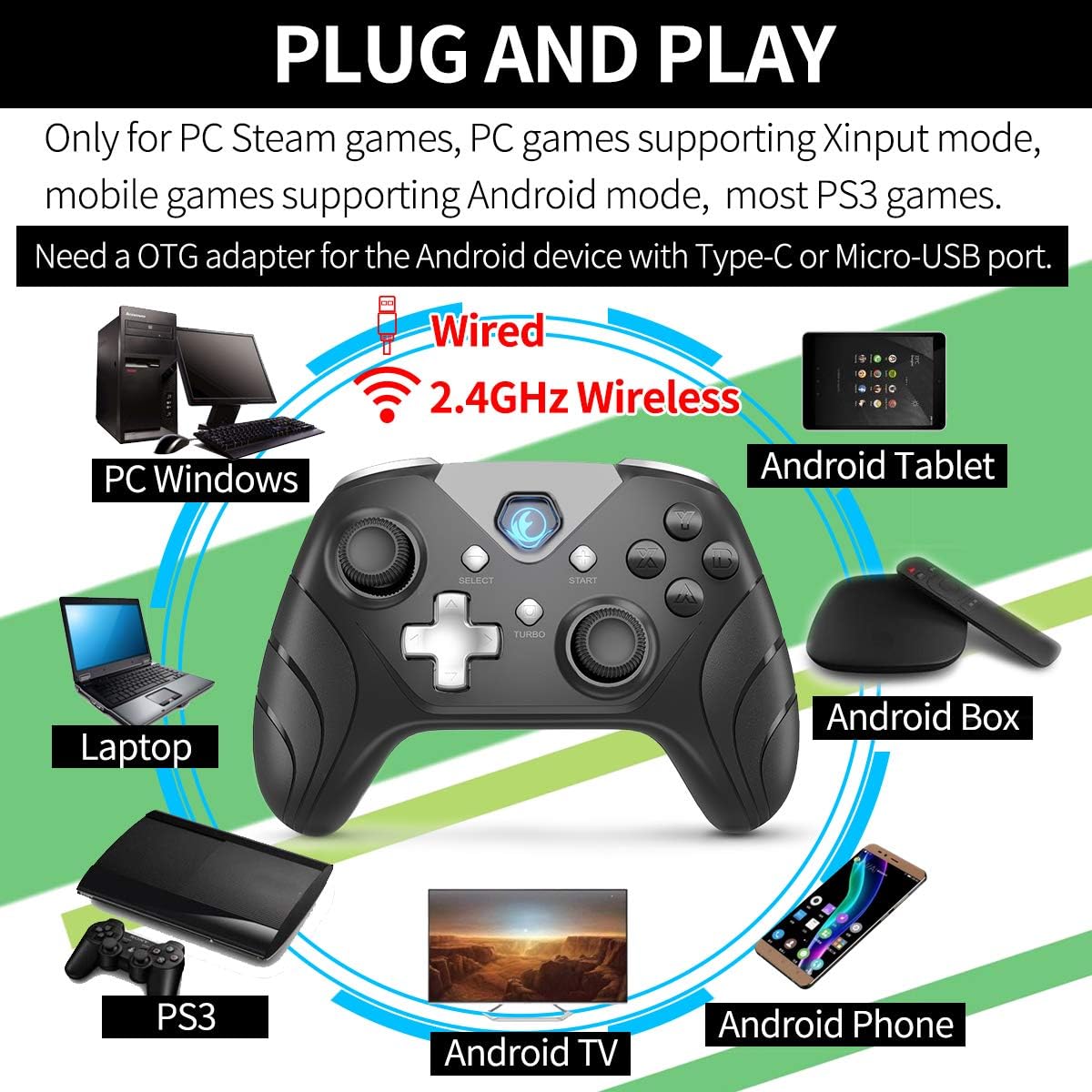
그림 5: 연결성view. This image illustrates the controller's compatibility with various devices (PC, Laptop, Android Tablet, Android Box, Android TV, Android Phone, PS3) via both wired and 2.4GHz wireless connections. It also notes the requirement for an OTG adapter for Android devices.

Figure 6: Android Device Connection. This image shows the IFYOO X208 controller connected wirelessly to an Android phone via an OTG adapter, demonstrating gameplay.

Figure 7: PC Connection. This image depicts the IFYOO X208 controller being used with a laptop for PC gaming.
4.2.2 유선 연결
- Connect the Micro-USB end of the charging cable to the controller.
- Connect the USB-A end of the charging cable to an available USB port on your PC or PS3 console.
- The controller will automatically be recognized as a wired device.
The wired connection also charges the controller's internal battery.
5. 사용 설명서
5.1 다중 모드 기능
The controller supports multiple modes for different platforms:
- X입력 모드: Primarily for PC games that support Xinput. This mode often enables dual vibration feedback.
- Dinput Mode: For older PC games or specific applications that require DirectInput.
- 안드로이드 모드: For compatible Android mobile games.
- PS3 모드: 플레이스테이션 3 콘솔용.
The controller typically switches modes automatically based on the connected device. Some games may require manual button mapping or third-party software for optimal performance.
5.2 JD-SWITCH Function
The JD-SWITCH function allows you to swap the input functionality between the D-pad and the Left Analog Stick. This can be useful for games where one input method is preferred for movement or specific actions.
- To activate/deactivate JD-SWITCH, press and hold the "TURBO" 버튼을 누른 후 다음을 누르세요. "SELECT" 단추.
- The indicator light may change to confirm the switch.
5.3 터보 기능
The TURBO function enables rapid, continuous input for a selected button, reducing the need for repeated presses. This can be beneficial in games requiring fast button mashing.
- Press and hold the button you wish to assign TURBO functionality to (e.g., A, B, X, Y).
- While holding that button, press the "TURBO" 버튼을 한 번 누릅니다.
- Release both buttons. The assigned button will now activate continuously when held down.
- To clear the TURBO function for a specific button, repeat the process: hold the button, then press the "TURBO" 단추.

Figure 8: Practical Functions. This image visually explains the JD-SWITCH function (swapping D-pad and Left Stick) and the TURBO function (creating continuous button presses).
5.4 이중 진동 피드백
The controller features dual vibration motors for enhanced gaming immersion. This function is primarily available in PC games that support Xinput mode and may need to be enabled within the game's settings.
6. 중요 사항 및 문제 해결
- 드라이버 설치: For Windows 10 or above, DirectX 9.0c or higher may be required. If the controller is not recognized in Windows, try installing the latest version of the Microsoft Xbox 360 Controller gamepad driver. Windows XP systems specifically require driver installation.
- 안드로이드 OTG: Ensure your Android device supports OTG (On-The-Go) functionality for wireless connection via the USB dongle. An OTG adapter or cable is necessary for devices with Type-C or Micro-USB ports.
- 게임 설정: Some games may require manual configuration of buttons or the use of third-party software to function correctly with the controller.
- 진동 피드백: Dual vibration feedback is only active in PC games that support Xinput mode and where the feature is enabled in the game's settings.
6.1 일반적인 문제 및 해결 방법
- 컨트롤러가 연결되지 않음:
- 2.4GHz USB 동글이 작동하는 USB 포트에 제대로 삽입되었는지 확인하십시오.
- 컨트롤러의 전원이 켜져 있는지 확인하십시오.
- For wired connection, ensure the USB cable is fully connected to both the controller and the device.
- 다른 USB 포트를 사용해보십시오.
- Buttons Not Responding / Incorrect Input:
- Check game settings for controller configuration.
- Ensure the correct mode (Xinput/Dinput/Android/PS3) is active for your platform.
- If on PC, ensure necessary drivers are installed (e.g., Xbox 360 Controller driver for Windows).
- 진동 피드백 없음:
- Confirm the game supports Xinput mode.
- 게임 설정에서 진동이 활성화되어 있는지 확인하세요.
7. 사양
| 제품 치수 | 160 x 113 x 63mm |
| 제품 무게 | 205±10g |
| 충전 인터페이스 | 마이크로 USB |
| 연결 방법 | 2.4GHz Wireless and Wired |
| 충전 시간 | 2-3시간 |
| 무선 거리 | 약 7미터 |
| 배터리 용량 | 600mAh 리튬 폴리머 |
| 배터리 지속 시간 | 10시간 이상 |
8. 유지관리
- 청소: 부드럽고 마른 천을 사용하여 컨트롤러를 청소하세요. 강한 화학 물질이나 연마재는 사용하지 마세요.
- 저장: 컨트롤러는 직사광선과 극한의 온도를 피해 서늘하고 건조한 곳에 보관하세요.
- 배터리 관리 : 배터리 수명을 연장하려면 컨트롤러를 자주 완전히 방전시키지 마십시오. 계속 사용하지 않더라도 정기적으로 충전하십시오.
- 낙하 방지: 컨트롤러를 떨어뜨리거나 충격을 가하지 마십시오. 내부 구성 요소가 손상될 수 있습니다.
9. 보증 및 지원
IFYOO offers a warranty for the X208 Gaming Controller. You may return or request a refund for any reason, or exchange/replace the product for any quality issue within 3 months of purchase.
For any questions, concerns, or support needs, please contact IFYOO customer service. Refer to the included Warranty Card for specific contact details and warranty terms.


