소개
Thank you for choosing the Spigen Tough Armor case for your Samsung Galaxy Note 20 Ultra 5G. This case is engineered to provide extreme protection through a combination of durable materials and advanced design, ensuring your device is safeguarded against drops, scratches, and daily wear. This manual will guide you through the proper installation, usage, and care of your new case.

Image: The Spigen Tough Armor case, showcasing its design alongside the Samsung Galaxy Note 20 Ultra 5G and its S-Pen.
패키지 내용
- 1 x Spigen Tough Armor Case (Cover)
호환성
This Spigen Tough Armor case is specifically designed for the 삼성 갤럭시 노트 20 울트라 5G. It is not compatible with the standard Samsung Galaxy Note 20. Please verify your device model before installation.

Image: A visual guide illustrating the compatibility of the case exclusively with the Samsung Galaxy Note 20 Ultra 5G, distinguishing it from the standard Note 20.
설정 및 설치
기기를 준비하세요: Ensure your Samsung Galaxy Note 20 Ultra 5G is clean and free of dust or debris. It is recommended to wipe your phone with a soft, dry cloth.
개별 사건 구성 요소(해당되는 경우): The Tough Armor case features a dual-layer design. Gently separate the soft TPU inner layer from the hard polycarbonate outer shell if they are assembled.
내부 레이어 설치: Carefully place your Samsung Galaxy Note 20 Ultra 5G into the flexible TPU inner layer, ensuring all edges and corners are properly seated.
Install Outer Shell: Align the TPU-encased phone with the hard polycarbonate outer shell. Snap the outer shell securely around the TPU layer, ensuring all clips engage properly. You should hear a subtle click as it locks into place.
적합성 확인: Check that the case fits snugly around your device, with no gaps or loose areas. Ensure all ports, buttons, and camera cutouts are perfectly aligned.
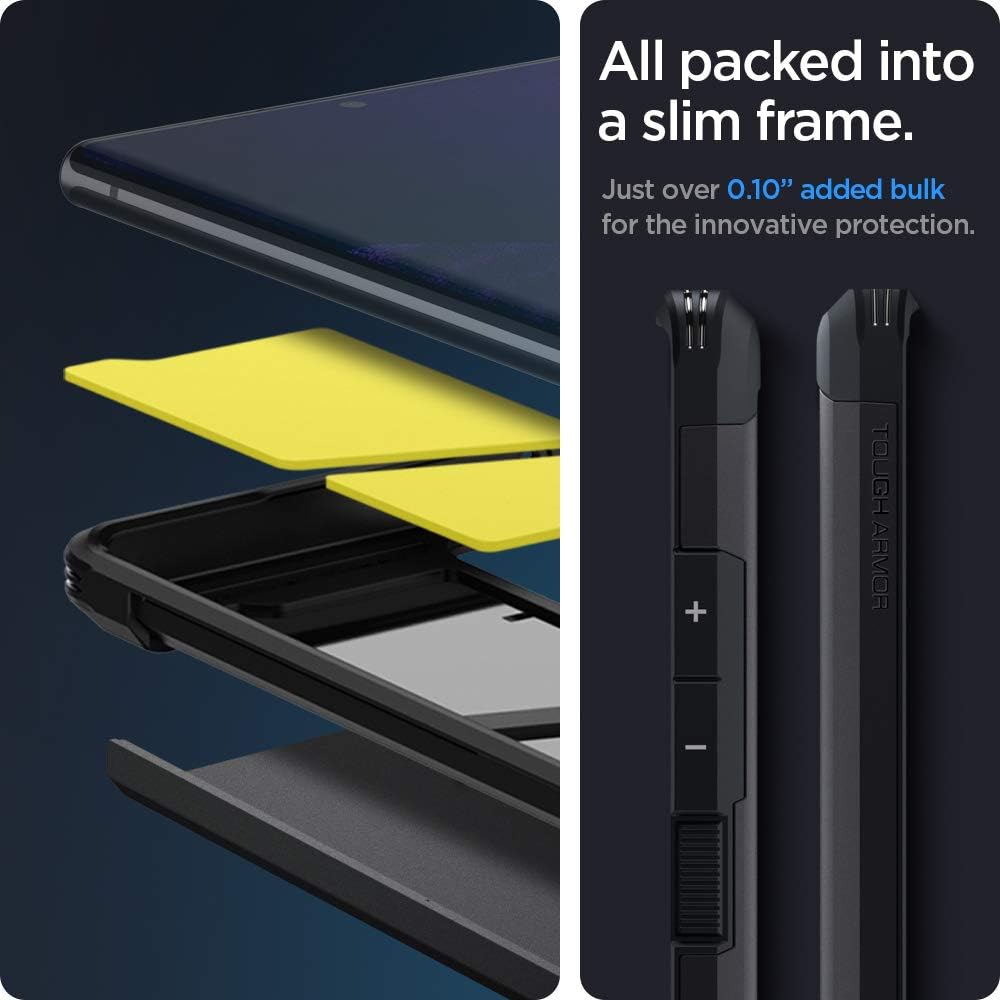
이미지: 폭발된 view demonstrating the multi-layer construction of the Spigen Tough Armor case, highlighting its slim profile and precise button design.
작동 기능
Dual-Layer Protection
The Spigen Tough Armor case combines a soft Thermoplastic Polyurethane (TPU) inner layer with a rigid Polycarbonate outer shell. This dual-layer design provides superior shock absorption and impact resistance, protecting your device from drops and scratches. The internal Impact Foam further dissipates shocks for enhanced internal protection.

Image: A visual representation of the Extreme Impact Foam within the case, illustrating how it dissipates shock to protect the device internally.
Air Cushion Technology
Integrated Air Cushion Technology in all four corners of the case absorbs and mitigates impacts, providing military-grade certified protection (MIL-STD 810G-516.6). This technology ensures maximum shock dispersion upon impact.

Image: A graphic detailing the Air Cushion Technology in the case's corners, along with an indication of its 48-inch, 26-time drop test certification.
내장형 킥스탠드
The reinforced kickstand allows for convenient hands-free viewing of content in landscape orientation. To use, simply pull out the kickstand from the back of the case until it locks into position. Push it back in to retract.
무선 충전 호환성
The Spigen Tough Armor case is designed to be compatible with wireless charging and PowerShare features, allowing you to charge your device without removing the case.

Image: The Spigen Tough Armor case demonstrating its integrated kickstand for hands-free viewing and its compatibility with wireless charging.
Tactile Buttons and Raised Bezels
The case features precise cutouts for all ports and tactile buttons for a responsive feel. Raised lips around the screen and camera provide additional protection against direct surface contact.
유지 보수 및 관리
청소: 케이스를 청소하려면 기기에서 케이스를 분리하세요. 부드러운 천을 사용하세요.amp cloth with mild soap and water to gently wipe the surface. Avoid harsh chemicals or abrasive cleaners, as these can damage the case material.
건조: Allow the case to air dry completely before re-installing your device. Do not use heat sources to dry the case.
저장: 사용하지 않을 때는 케이스를 직사광선과 극한 온도 변화를 피해 서늘하고 건조한 곳에 보관하여 재질 손상을 방지하십시오.
정기 검사: Periodically inspect the case for any signs of wear or damage. While highly durable, extreme impacts can cause unseen stress. Replace the case if significant damage is observed to ensure continued protection.
문제 해결
| 문제 | 가능한 원인 | 해결책 |
|---|---|---|
| 케이스가 제대로 맞지 않습니다. | 휴대폰 모델이 잘못되었거나 설치가 잘못되었습니다. | Ensure your device is a Samsung Galaxy Note 20 Ultra 5G. Re-install the case following the "Setup and Installation" steps carefully. |
| 버튼이 뻑뻑하거나 반응이 없습니다. | Case not fully seated or debris under buttons. | Remove the case, clean around the phone's buttons and the case's button covers, then re-install ensuring a snug fit. |
| 무선 충전이 작동하지 않습니다. | Misalignment on charging pad or incompatible charger. | Ensure the phone is centered on the wireless charging pad. Try a different wireless charger to rule out charger issues. |
| Kickstand feels loose or doesn't stay open. | 일반적인 마모 또는 가벼운 이물질. | Clean any debris around the kickstand hinge. If it remains loose after extended use, it may be due to normal wear and tear. |
명세서
- 모델 번호: ACS01396
- 호환되는 전화 모델: 삼성 갤럭시 노트 20 울트라 5G
- 색상: 검은색
- 재료: Impact Foam, Polycarbonate, Thermoplastic Polyurethane (TPU)
- 제품 크기: 3 x 0.4 x 6 인치
- 품목 무게: 2.11 온스
- 제조업체: 슈피겐
- 원산지: 한국, 대한민국
- Protection Standard: Certified [MIL-STD 810G-516.6]
보증 및 지원
Spigen products are designed for durability and performance. For information regarding warranty coverage, product registration, or technical support, please visit the official Spigen web사이트를 방문하거나 고객 서비스에 직접 문의하세요.
스피겐 공식 Web대지: www.spigen.com
For further assistance, please refer to the contact information provided on the Spigen web대지.


