소개
구매해주셔서 감사합니다asing the Mesqool Projection Alarm Clock. This manual provides comprehensive instructions for setting up, operating, and maintaining your new alarm clock. Please read this manual carefully before use to ensure proper function and to maximize your experience with the product.
주요 특징
- 180도 조절 가능한 프로젝터: Projects ultra-clear time onto a wall or ceiling with a 1.6-9.8ft (0.5-3m) optimum projection distance. Features a focus ring for clarity adjustment and a projection flip function.
- Dual Alarms with Snooze: Set two independent alarms with a large, easy-to-press snooze button for an extra 9 minutes of sleep.
- 조정 가능한 알람 볼륨: Alarm volume (Level 1-5) can be adjusted from 76dB to 106dB, with a progressive increase to gently wake you.
- 7.5'' Large LED Display: Super-clear time display visible across the room, with 5 levels of brightness dimmer to protect your eyes.
- USB 충전 포트 : Built-in 5V/1.0A USB output interface for convenient charging of mobile devices.
- 배터리 백업 : Requires 2 AAA batteries (not included) to retain time and alarm settings during power outages, ensuring alarms still trigger.
- 12/24H Time Format & DST: Easily switch between 12-hour and 24-hour time formats and activate Daylight Saving Time (DST) with a dedicated button.
- Easy-to-Set: Simple and intuitive buttons for straightforward setup and operation.
패키지 내용
- Mesqool Projection Alarm Clock Unit
- 5V/2A 전원 어댑터
- 사용자 설명서
제품 끝view
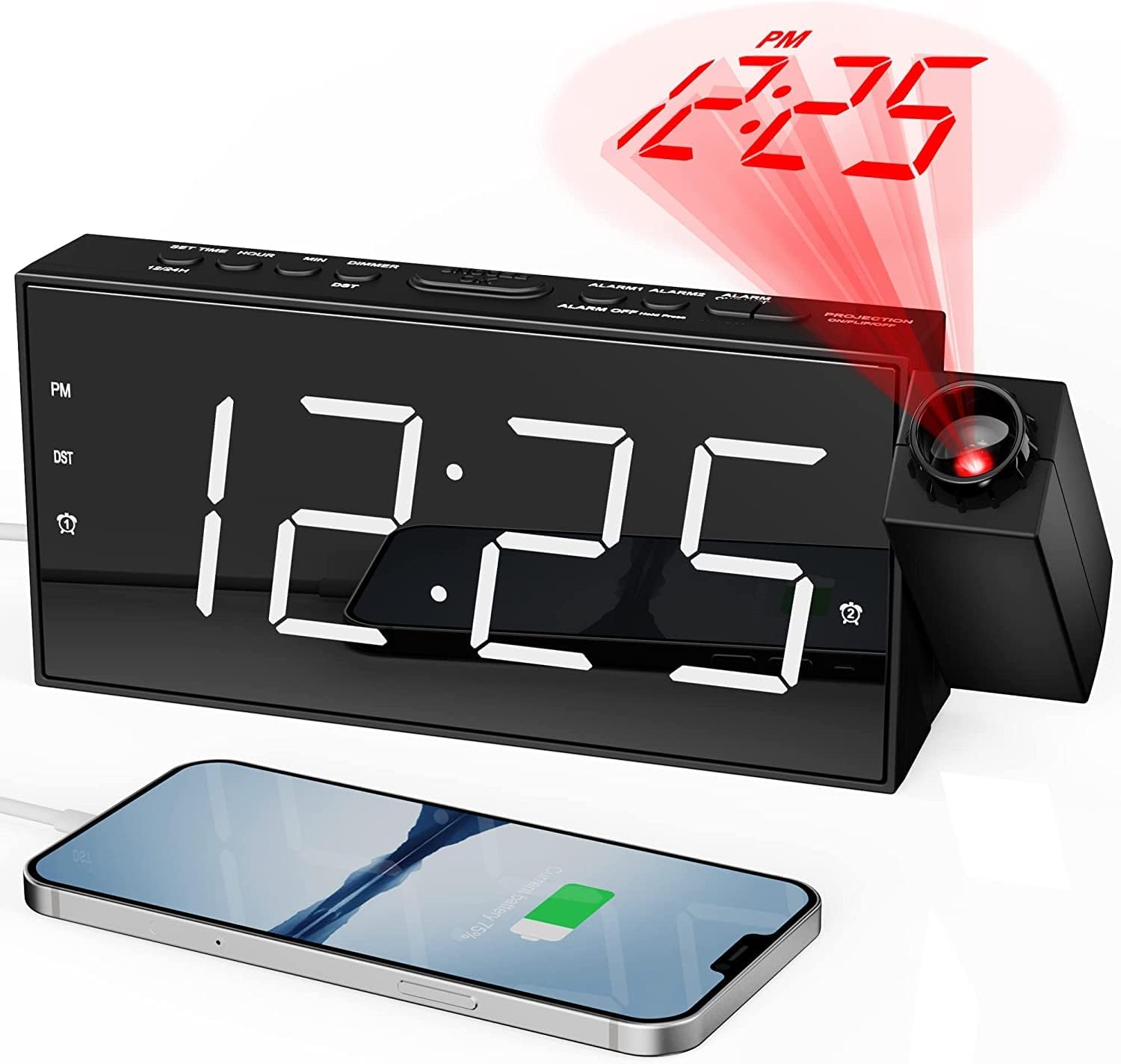
앞쪽 view of the Mesqool Projection Alarm Clock, showing the large LED display, the rotatable projector, and a phone connected to the USB charging port.
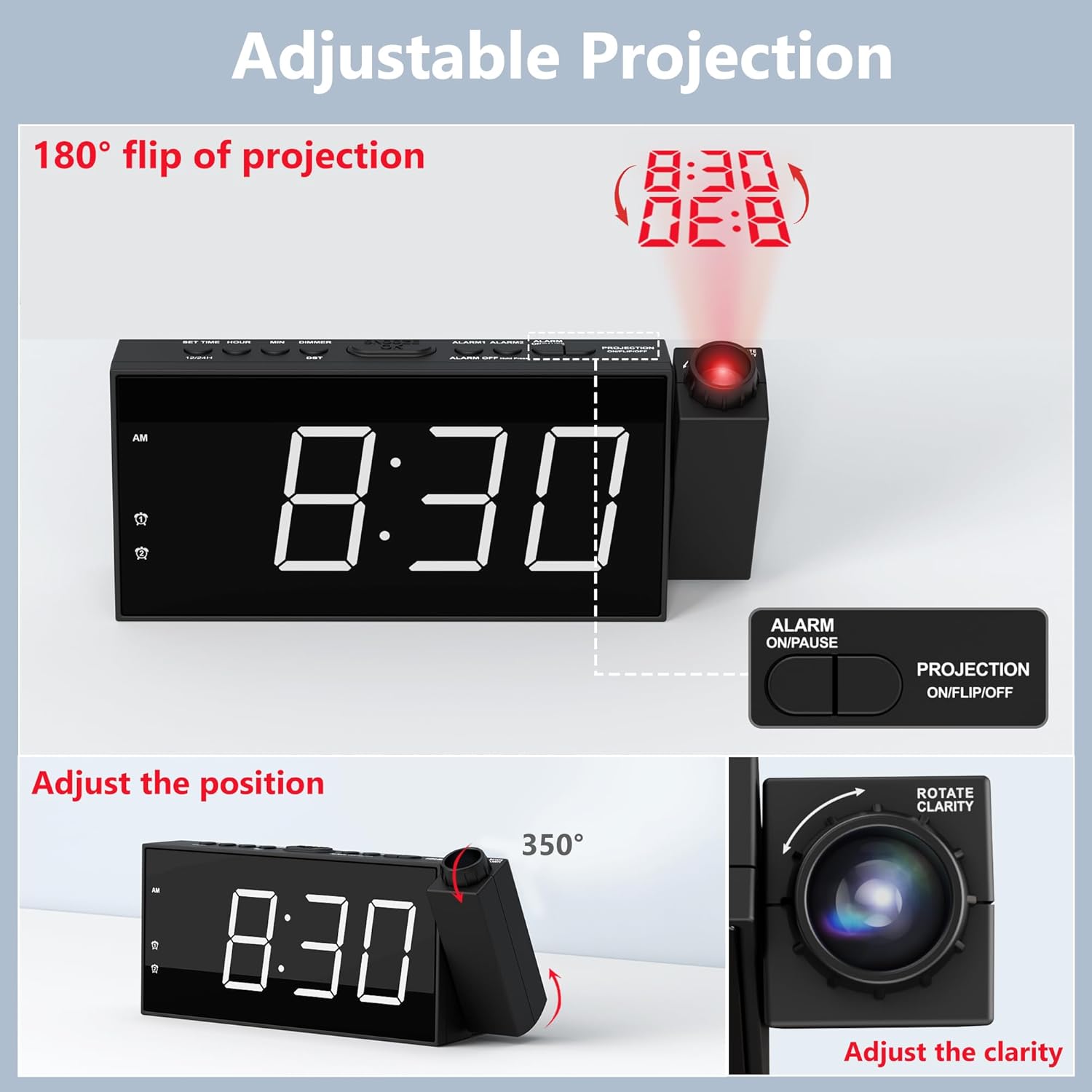
상세한 view of the adjustable projection feature, illustrating the 180° rotation, projection flip, and the focus ring for clarity adjustment.

Illustration of the 7.5-inch LED display with its 5-level brightness dimmer and options for 12-hour, 24-hour, and DST time formats.

Depiction of the dual alarm functionality, the convenient snooze button, and the 5 adjustable alarm volume levels (76dB-106dB).

뒤쪽 view of the clock highlighting the battery backup compartment and the USB charging port for external devices.

A visual guide demonstrating the four steps to operate and adjust the projection feature, including rotation, flipping, focusing, and brightness adjustment.
설정
1. 전원 연결
Connect the provided 5V/2A power adapter to the DC IN port on the back of the alarm clock and plug the adapter into a standard electrical outlet (100-240V). The clock display will light up.
2. 배터리 백업 설치
Open the battery compartment on the back of the clock. Insert 2 AAA batteries (not included) according to the polarity markings (+/-). These batteries serve as a backup to retain time and alarm settings during a power outage. The clock requires AC power for full functionality, including the display and projection.
3. 초기 시간 설정
- Press and hold the "SET TIME" button located on the top of the clock. The hour digits will begin to flash.
- "+" 또는 "-" 버튼을 사용하여 시간을 조정하세요.
- Press "SET TIME" again to confirm the hour and move to minute setting. The minute digits will flash.
- "+" 또는 "-" 버튼을 사용하여 분을 조정하세요.
- Press "SET TIME" one more time to save the time setting and exit.
4. 12/24H Time Format
To switch between 12-hour and 24-hour time formats, long press the "12/24H" button on the top of the clock. In 12-hour format, "AM" or "PM" indicators will be displayed.
5. 일광 절약 시간제(DST)
To activate or deactivate the Daylight Saving Time (DST) function, simply press the "DST" button on the top of the clock. The time will adjust by one hour forward or backward accordingly.
작동 지침
1. 알람 설정 (알람 1 및 알람 2)
- Press and hold the "ALARM 1" or "ALARM 2" button (depending on which alarm you want to set). The hour digits for that alarm will flash.
- "+" 또는 "-" 버튼을 사용하여 알람 시간을 조정하세요.
- Press the respective alarm button again to confirm the hour and move to minute setting. The minute digits will flash.
- "+" 또는 "-" 버튼을 사용하여 알람 시간을 분 단위로 조정하세요.
- Press the alarm button one more time to save the alarm setting. The alarm icon will appear on the display, indicating the alarm is active.
- To turn an alarm ON or OFF, short press the corresponding "ALARM 1" or "ALARM 2" button. The alarm icon will appear or disappear.
2. 알람 소리 조절
When an alarm is sounding, or during alarm setup, use the "V+" or "V-" buttons on the side of the clock to adjust the alarm volume from Level 1 (76dB) to Level 5 (106dB). The alarm sound will progressively increase in volume when it triggers.
3. 스누즈 기능 사용하기
When the alarm sounds, press the large "SNOOZE/OK" button on the top of the clock to temporarily silence the alarm for 9 minutes. The alarm will sound again after 9 minutes. To turn off the alarm completely, press any other button (e.g., ALARM ON/PAUSE) or let it ring for its full duration.
4. 프로젝션 기능
- Activating/Deactivating Projection: Press the "PROJECTION ON/FLIP/OFF" button on the top of the clock to turn the projection ON or OFF.
- 투사 각도 조정: Manually rotate the projector lens unit up to 180° to direct the time display onto your desired surface (wall or ceiling).
- Flipping Projection: If the projected time appears upside down, short press the "PROJECTION ON/FLIP/OFF" button to flip the orientation of the projected image.
- Adjusting Projection Clarity (Focus): Rotate the focus ring around the projector lens to achieve a clear and sharp projected image.
- Adjusting Projection Brightness: Press the "PROJECTION DIMMER" button repeatedly to cycle through 5 levels of projection brightness.
5. 디스플레이 밝기
Press the "DIMMER" button repeatedly to cycle through 5 levels of LED display brightness, allowing you to adjust it to your comfort level, especially at night.
6. USB 충전 포트
The USB charging port (5V/1.0A output) on the back of the clock can be used to charge your mobile devices, such as smartphones and tablets. Simply connect your device's USB charging cable to this port.
유지
청소
To clean the clock, gently wipe the surface with a soft, dry cloth. Do not use abrasive cleaners, waxes, or solvents as they may damage the finish. Keep the projector lens clean for optimal clarity.
배터리 교체
정전 중에 시계가 시간이나 알람 설정을 잃어버리는 경우tage, it may be time to replace the AAA backup batteries. Ensure the clock is connected to AC power before replacing batteries to avoid losing current settings.
문제 해결
| 문제 | 가능한 원인 | 해결책 |
|---|---|---|
| Clock display is off / No power. | 전원 어댑터가 연결되지 않았거나 결함이 있습니다. | 전원 어댑터가 시계와 작동하는 콘센트에 제대로 꽂혀 있는지 확인하십시오. 다른 기기를 사용하여 콘센트가 제대로 작동하는지 확인하십시오. |
| 알람이 울리지 않습니다. | 알람이 활성화되지 않았거나 잘못 설정되었습니다. | Verify that the alarm is set and activated (alarm icon visible). Check the alarm time. Ensure volume is not set to minimum. |
| Projected time is blurry or unclear. | 프로젝션 초점을 조정해야 합니다. | Rotate the focus ring around the projector lens until the image is clear. Ensure projection distance is within 1.6-9.8ft. |
| 예상 시간이 거꾸로 되어 있습니다. | Projection orientation needs flipping. | Short press the "PROJECTION ON/FLIP/OFF" button to flip the projected image. |
| 정전 시 시계가 시간이 맞지 않습니다tage. | 백업 배터리가 방전되었거나 설치되어 있지 않습니다. | AAA 배터리 2개를 새로 장착하거나 기존 배터리를 교체하십시오. |
| USB 충전 포트가 작동하지 않습니다. | 기기가 호환되지 않거나 케이블에 문제가 있습니다. | Ensure the clock is powered by AC. Try a different USB cable or device. |
명세서
| 상표 | 메스쿨 |
| 모델 번호 | CR1001F |
| 디스플레이 유형 | 디지털 LED |
| 전원 | 유선 전기 (AC 100-240V) |
| 배터리 백업 | AAA 배터리 2개 (포함되지 않음) |
| USB 출력 | 5V/1.0A |
| 투사 거리 | 1.6 - 9.8 피트 (0.5 - 3 미터) |
| 알람 볼륨 범위 | 76dB - 106dB (5 levels) |
| 제품 치수 | 폭 7.99인치 x 높이 3.58인치 |
| 품목 무게 | 8.5 온스 |
| 재료 | 아크릴로니트릴 부타디엔 스티렌(플라스틱) |
보증 및 지원
보증 정보
Mesqool provides an 18-month warranty for this product. This warranty covers manufacturing defects and issues arising from normal use. Please retain your proof of purchase for warranty claims.
고객 지원
For any questions, concerns, or technical assistance regarding your Mesqool Projection Alarm Clock, please contact our customer support team. You can find our support email address in this User Manual or on the product packaging. We are committed to providing prompt and helpful assistance.


