1. 서론
This manual provides detailed instructions for the installation, operation, and maintenance of your JVC KD-TD71BT CD Receiver. The KD-TD71BT is a versatile car audio system featuring CD playback, AM/FM tuner, built-in Bluetooth for hands-free calling and audio streaming, front USB and AUX inputs, and integrated Amazon Alexa functionality. It also includes advanced audio processing technologies like a 13-band equalizer, K2 Technology, Time Alignment, Space Enhancement, and Sound Lift for an optimized listening experience. Please read this manual thoroughly before using the product to ensure correct operation and to prevent damage.
2. 안전 정보
- 운전 안전: 항상 안전하게 장비를 작동하십시오. 운전에 방해가 되는 조작은 절대 하지 마십시오.
- 볼륨 조절: 긴급 차량 소리 등 외부 소리가 여전히 들릴 수 있는 수준으로 볼륨을 유지하세요.
- 전원 공급 장치: 본 장치는 12V DC 네거티브 접지 전기 시스템용으로 설계되었습니다.
- 설치: Ensure proper installation to prevent fire, electric shock, or other injuries. Consult a qualified technician if unsure.
- 습기를 피하세요: 화재나 감전을 방지하기 위해 장치를 비나 습기에 노출시키지 마십시오.
- 통풍: 과열을 방지하기 위해 장치 주변에 적절한 환기를 확보하세요.
3. 패키지 내용
패키지에 모든 품목이 들어 있는지 확인하세요.
- JVC KD-TD71BT CD Receiver Unit
- Wired Microphone (for Bluetooth hands-free calling)
- 배선 마구
- 장착 하드웨어
- 사용 설명서(본 문서)
4. 설정 및 설치
Proper installation is crucial for optimal performance and safety. If you are unsure about any part of the installation process, it is recommended to consult a professional car audio installer.
4.1. 설치 전
- Disconnect the negative terminal of the car battery to prevent short circuits.
- Ensure you have all necessary tools and mounting accessories.
- Review your vehicle's wiring diagram.
4.2. 배선 연결
Connect the wiring harness provided with the unit to your vehicle's wiring. Pay close attention to the color codes and functions of each wire.
- 노란색 : 12V(배터리)
- 빨간색: 12V 스위치 (점화/액세서리)
- 검은색: 지면
- 파란색/흰색: 원격 켜기(용 amp(리파이어/파워 안테나)
- 스피커 전선: 해당 차량 스피커에 연결하십시오(예: 흰색/흰색-검정색은 전면 좌측, 회색/회색-검정색은 전면 우측, 녹색/녹색-검정색은 후면 좌측, 보라색/보라색-검정색은 후면 우측).
- 마이크 입력: Connect the supplied wired microphone to the dedicated input jack for Bluetooth hands-free calling.

영상: 뒤쪽 view of the JVC KD-TD71BT CD Receiver. This image displays the various connection ports, including the main wiring harness connector on the left, RCA pre-outs for external amplifiers, and the antenna input on the right. The heat sink is also visible in the center.
4.3. 유닛 장착
Secure the unit into the dashboard opening using the provided mounting sleeve and brackets. Ensure the unit is firmly seated and does not obstruct any vehicle controls.
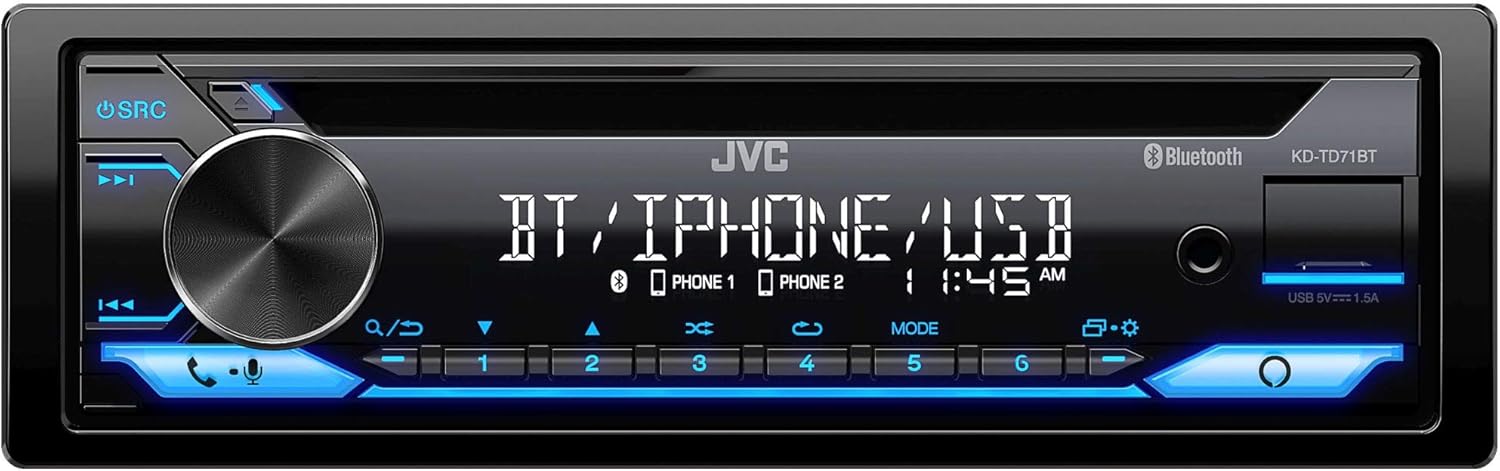
영상: 앞쪽 view of the JVC KD-TD71BT CD Receiver. This image shows the main display, the large rotary volume knob, source button, track controls, and the CD slot. The front USB and AUX inputs are also visible on the right side of the faceplate.
5. 사용 설명서
5.1. 기본 동작
- 전원 켜기/끄기: 를 누르세요 에스알씨 버튼을 눌러 장치를 켭니다. 버튼을 길게 누릅니다. 에스알씨 버튼을 눌러 끕니다.
- 볼륨 조절: 큰 회전식 노브를 돌려 볼륨을 조절하세요.
- 소스 선택: 를 누르세요 에스알씨 버튼을 반복해서 누르면 사용 가능한 소스(CD, 튜너, 블루투스 오디오, USB, AUX)를 순환하며 선택할 수 있습니다.
- 메뉴/설정: 를 누르세요 메뉴 button (often integrated with the volume knob press) to access system settings.
5.2. 블루투스 기능
The KD-TD71BT features Bluetooth for hands-free calling and wireless audio streaming.
- 장치 페어링:
- 모바일 기기의 블루투스를 켜세요.
- Select "KD-TD71BT" from the list of available devices.
- Confirm the pairing on both devices if prompted. The unit supports Bluetooth Automatic Pairing.
- 핸즈프리 통화:
- 통화 수신/종료: 버튼을 누르세요 부르다 button (often a dedicated button or part of the volume knob function).
- 전화 걸기: 기기의 조작 버튼이나 전화를 이용하여 전화를 걸 수 있습니다.
- 오디오 스트리밍 : Select Bluetooth Audio as the source. Play music from your paired device. The unit supports Streaming DJ, allowing up to 5 Bluetooth devices to be connected simultaneously for music streaming.
- 2-Phones Full-Time Connection: The unit can maintain a full-time connection with two Bluetooth-enabled phones simultaneously, allowing for seamless switching between devices for calls or music.
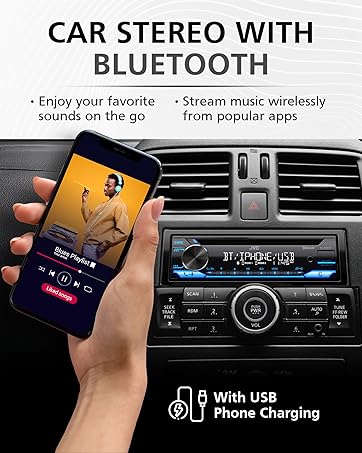
영상: A hand holding a smartphone displaying a music playlist, positioned next to a car stereo. The car stereo's display shows "BT / IPHONE / USB", indicating its Bluetooth and USB capabilities. This illustrates the unit's ability to connect with smartphones for audio playback.
5.3. USB and AUX Inputs
- USB 재생 : Connect a USB storage device to the front USB port. The unit supports MP3, WMA, WAV, AAC, and FLAC audio file playback. Use the track controls to navigate. The USB port also provides 1.5A charging for compatible devices.
- 보조 입력: Connect an external audio player to the front 3.5mm AUX input using a stereo mini-jack cable. Select AUX as the source.
5.4. CD 재생
- CD를 디스크 슬롯에 넣으십시오. 기기가 자동으로 CD 소스로 전환되어 재생을 시작합니다.
- 사용하세요 트랙 업/다운 트랙을 건너뛸 수 있는 버튼.
- 를 누르세요 일시정지/재생 버튼을 눌러 재생을 일시 중지하거나 다시 시작합니다.
5.5. AM/FM 튜너
- Select Tuner as the source.
- 사용하세요 구하다 라디오 방송국을 찾는 버튼입니다.
- 누르고 있으세요 구하다 자동 방송국 검색을 위해.
- Store favorite stations using the preset buttons (1-6).
5.6. Amazon Alexa 통합
The KD-TD71BT features built-in Amazon Alexa.
- 활성화: Connect your smartphone via Bluetooth and ensure the JVC Remote App is installed and configured with your Amazon Alexa account.
- 음성 명령: Press the dedicated Alexa button (or activate via the JVC Remote App) and speak your commands, such as "Alexa, play music," "Alexa, get directions," or "Alexa, check the weather."
6. 오디오 설정
Customize your listening experience using the advanced audio settings. Access these settings through the unit's menu.
- 13밴드 그래픽 EQ: Adjust specific frequency bands to tailor the sound to your preference. Eleven preset EQ settings are also available.
- 시간 정렬: Adjust the delay of individual speaker outputs to ensure sound from all speakers reaches the listener at the same time, creating a more focused soundstage.
- Space Enhancement: Digitally expands the sound field to create a larger, more immersive listening environment.
- Sound Lift: Virtually adjusts the height of the sound image, making it appear as if the sound is coming from the dashboard rather than the floor.
- K2 기술: JVC's proprietary technology that reproduces the original master sound by expanding the bit rate and frequency range.
7. 유지관리
- 장치 청소: Use a soft, dry cloth to wipe the faceplate. For stubborn dirt, damp천에 물을 적셔주세요. 연마성 세척제나 용제를 사용하지 마십시오.
- CD 플레이어 관리: Use only standard, round CDs. Avoid using irregularly shaped discs or discs with labels that may peel off. Keep the disc tray clean.
- 퓨즈 교체: 기기가 켜지지 않으면 기기 뒷면에 있는 퓨즈를 확인하십시오. 동일한 규격의 퓨즈로 교체하십시오. amp분노 등급.
8. 문제 해결
If you encounter issues with your KD-TD71BT, refer to the following common problems and solutions.
| 문제 | 가능한 원인 | 해결책 |
|---|---|---|
| 전원이 없습니다 | 퓨즈가 끊어짐; 배선이 잘못됨; 차량 배터리 문제. | Check and replace fuse; verify wiring connections; check car battery. |
| 소리가 나지 않습니다 | 볼륨이 너무 작습니다. 음소거가 활성화되었습니다. 스피커 배선 문제입니다. 잘못된 소스가 선택되었습니다. | 볼륨을 높이세요. 음소거를 해제하세요. 스피커 연결을 확인하세요. 올바른 소스를 선택하세요. |
| 블루투스가 연결되지 않습니다 | Bluetooth off on phone/unit; device not paired; interference. | Ensure Bluetooth is on; re-pair device; move closer to unit; restart phone/unit. |
| CD가 건너뛰거나 재생되지 않음 | Dirty or scratched disc; unit vibration; foreign object in slot. | Clean disc; ensure stable mounting; check for obstructions. |
| 라디오 수신 불량 | 안테나가 연결되지 않았거나, 안테나가 손상되었거나, 신호가 약한 지역입니다. | Check antenna connection; replace antenna if damaged; try a different location. |
9. 사양
Key technical specifications for the JVC KD-TD71BT CD Receiver:
- 모델 번호: KD-TD71BT (also referred to as KD-T710BT in some documentation)
- 전원 공급 장치: 12V DC(음극 접지)
- 연결성: Bluetooth, Front USB, Front AUX (3.5mm Jack)
- USB 충전: 1.5A
- 오디오 출력 모드: 스테레오 재생
- 서라운드 사운드 채널 구성: 2
- 이퀄라이저 : 13-Band Graphic EQ with 11 Presets
- 지원되는 오디오 형식(USB/CD): MP3, WMA, WAV, AAC, FLAC
- 특별 기능: Amazon Alexa Compatible, K2 Technology, Time Alignment, Space Enhancement, Sound Lift, Streaming DJ, 2-Phones Full-Time Connection, Steering Wheel Remote Ready
- 제품 크기: 약 10 x 9 x 4cm(25.4 x 22.86 x 10.16인치)
- 품목 무게: 3.19파운드(1.45kg)
- 제조업체: 제이비씨(JVC)
10. 보증 정보
JVC products are manufactured to high-quality standards. For specific warranty terms and conditions, please refer to the warranty card included with your product or visit the official JVC website. Warranty coverage typically includes defects in materials and workmanship for a specified period from the date of purchase. Keep your proof of purchase for warranty claims.
11. 고객 지원
If you require further assistance or have questions not covered in this manual, please contact JVC customer support.
- JVC 공식 Web대지: www.jvc.com (제품 정보, FAQ 및 지원 연락처는 다음을 참조하세요.)
- 온라인 리소스: Check the support section of the JVC website for updated manuals, firmware, and troubleshooting guides.


