1. 서론
The Oral-B iO Series 9n Electric Toothbrush represents a significant advancement in oral care technology. It combines Oral-B's unique round brush head with revolutionary iO magnetic technology and gentle micro-vibrations to deliver a professional clean feeling and healthier gums within one week. This toothbrush features 3D teeth tracking with Artificial Intelligence (AI) to monitor brushing across all surfaces of your teeth, guiding you for the most comprehensive cleaning possible. An interactive color display provides essential information, including brushing modes and brush head replacement reminders. This manual provides detailed instructions for the safe and effective use of your Oral-B iO Series 9n toothbrush.
2. 안전 정보
본 제품을 사용하기 전에 모든 지침을 꼼꼼히 읽어 주십시오. 나중에 참조할 수 있도록 이 설명서를 보관하십시오.
- 경고: 3세 미만 어린이의 손이 닿지 않는 곳에 보관하세요.
- Replace the toothbrush head every 3 months, or sooner if the bristles are splayed or worn, to maintain optimal oral hygiene and cleaning performance.
- Do not use this product if it appears damaged. Contact Oral-B customer service for assistance.
- 잇몸 질환이 심하거나 구강 수술을 받은 경우에는 사용 전에 치과 의사와 상담하십시오.
3. 제품 구성품
Your Oral-B iO Series 9n Electric Toothbrush typically includes the following components:
- Oral-B iO Series 9n Handle
- iO Ultimate Clean Brush Head
- 자기 충전기
- 여행용 케이스
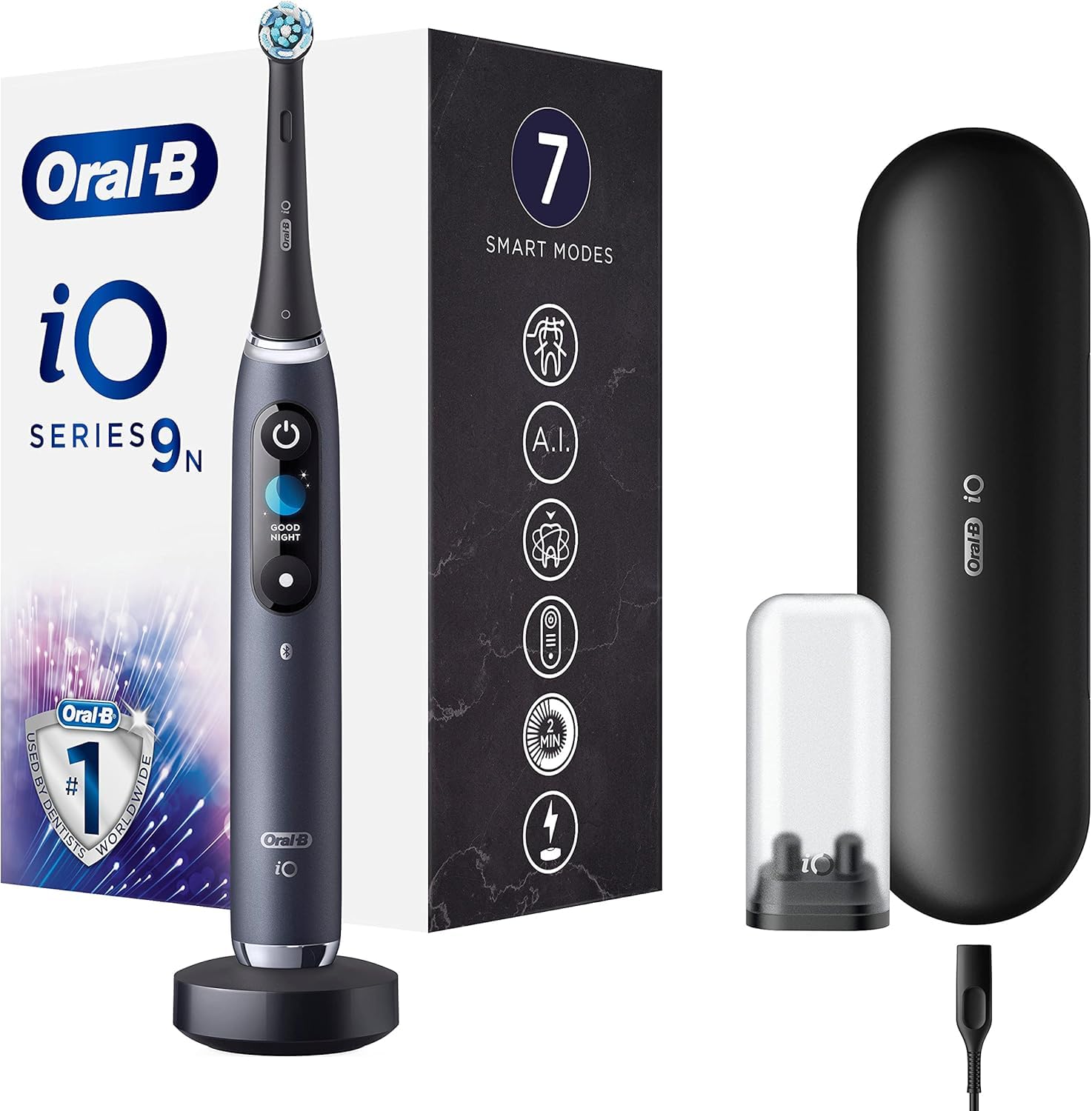
그림 1: Oral-B iO Series 9n Electric Toothbrush with its magnetic charger and travel case. The toothbrush handle is black with an illuminated display, and the travel case is also black.
4. 설정 및 첫 사용
- 초기 청구 : Before first use, fully recharge the toothbrush. Place the handle on the magnetic charger. The interactive display will show the charging progress. A full charge can take several hours.
- 브러시 헤드 부착: Firmly push an Oral-B iO brush head onto the handle. You will hear a click when it is securely attached.
- 전원 켜기: Press the power button to turn on the toothbrush. The display will greet you.
- 앱 연결(선택 사항): For enhanced features and real-time brushing guidance, download the Oral-B app on your smartphone. Follow the in-app instructions to pair your toothbrush via Bluetooth.

그림 2: The Oral-B iO Series 9n toothbrush handle placed on its compact magnetic charging base. The base is black and the toothbrush handle is dark gray/black.
5. 사용 설명서
5.1 양치질
- 칫솔모를 물에 적신 후 소량의 치약을 묻히세요.
- Place the brush head against your teeth at a 45-degree angle to the gumline.
- 칫솔질을 시작하려면 전원 버튼을 누르세요.
- Move the brush head gently from tooth to tooth, allowing the brush to do the work. Do not scrub.
- Brush each quadrant of your mouth (upper right, upper left, lower right, lower left) for 30 seconds, for a total of two minutes. The toothbrush will provide feedback to guide you.
- The interactive display will show a smiley face for a job well done.
5.2 스마트 압력 센서
The iO Series 9n features an intelligent pressure sensor that provides real-time feedback:
- 빨간불: You are brushing too hard. Reduce pressure.
- 백색광: You are brushing with too little pressure. Apply slightly more pressure.
- 녹색불: You are brushing with optimal pressure. Maintain this pressure for effective cleaning.

그림 3: 클로즈업 view of the Oral-B iO Series 9n handle, illustrating the pressure sensor light. The left image shows a red light indicating too much pressure, while the right image shows a green light indicating optimal pressure.
5.3가지 양치 모드
Your iO Series 9n toothbrush offers 7 intelligent modes to customize your brushing experience. Use the mode button on the handle to cycle through the available modes:
- 매일 청소: 일상적인 청소용.
- 민감한: 민감한 부위를 부드럽지만 철저하게 세척합니다.
- 잇몸 관리: 잇몸을 위한 부드러운 마사지.
- 집중 세척: 더욱 철저한 청소를 위해.
- 매우 민감함: Extra gentle cleaning.
- 호분: For polishing and stain removal.
- Tongue Cleaner: For tongue cleaning.
5.4 AI Brushing Recognition and App Integration
When connected to the Oral-B app, the toothbrush uses AI to track your brushing in 3D, identifying areas you've brushed and areas you might have missed. This provides personalized guidance to ensure complete coverage.

그림 4: A user holding the Oral-B iO Series 9n electric toothbrush alongside a smartphone displaying the Oral-B app interface, which provides real-time brushing feedback and a 'Brush Score'.
6. 유지관리
6.1 칫솔 세척
- 매번 사용 후, 손잡이를 켠 채로 흐르는 물에 브러시 헤드를 깨끗이 헹구세요.
- 브러시 헤드를 분리하고 손잡이와 브러시 헤드를 각각 흐르는 물에 씻으십시오.
- 부드러운 천으로 손잡이 부분을 닦아 말리세요.
- Ensure the charger is unplugged before cleaning. Clean the charger with a damp 천만.
6.2 브러시 헤드 교체
For optimal performance and hygiene, replace your Oral-B iO brush head every three months, or sooner if the indicator bristles fade or the brush head appears worn. The interactive display will also provide a reminder.
7. 문제 해결
If you encounter issues with your Oral-B iO Series 9n toothbrush, refer to the following common problems and solutions:
| 문제 | 가능한 원인 | 해결책 |
|---|---|---|
| 칫솔이 켜지지 않습니다. | 배터리가 부족하거나 충전되지 않았습니다. | Place the toothbrush on the charger for several hours to ensure a full charge. |
| 칫솔질 힘이 약해졌습니다. | 배터리가 부족합니다. | 칫솔을 충전하세요. |
| 압력 센서가 항상 빨간색입니다. | 너무 많은 압력을 가함. | 칫솔질할 때 가하는 압력을 줄이세요. |
| 앱이 연결되지 않습니다. | Bluetooth off, app not open, or pairing issue. | Ensure Bluetooth is enabled on your phone, the app is open, and try re-pairing the device. |
If the problem persists, please refer to the Oral-B official web추가 지원이 필요하면 사이트를 방문하거나 고객 지원팀에 문의하세요.
8. 사양
| 특징 | 세부 사항 |
|---|---|
| 모델 번호 | 80336681 |
| 치수(길이 x 너비 x 높이) | 17.8 x 10 x 25.3cm |
| 무게 | 63.3그램 |
| 전원 | 충전식 전기 케이블 |
| 배터리 유형 | 1 리튬이온(포함) |
| 특별 기능 | Pressure Sensor, Customizable Modes, AI Tracking |
| 브러시 헤드 유형 | 둥근 |
| 연령대 | 성인 |
| 색상 | 검은색 |
9. 보증 및 지원
자세한 보증 정보 및 고객 지원은 오랄비 공식 웹사이트를 참조하십시오. website or the warranty card included with your product. You can also find contact information for customer service on the Oral-B packaging.


