1. 제품 오버view
The Billboard BB425 Gaming Headset is designed for an immersive audio experience across various gaming platforms. It features a boom microphone for clear communication, enhanced bass for rich sound, and convenient in-line controls for volume adjustment and instant muting. The headset is lightweight and adjustable, ensuring a comfortable fit during extended use, and comes with a durable fabric cord.
- 붐 마이크: 선명한 음성 통신을 위해.
- 향상된 베이스: 풍부한 오디오 경험을 제공합니다.
- 인라인 제어: Easily adjust volume and mute the microphone.
- 조절 가능한 디자인: Lightweight and comfortable for prolonged gaming sessions.
- Durable Fabric Cord: 오래 사용할 수 있도록 설계되었습니다.
2. 설정 지침
Follow these steps to connect your Billboard BB425 Gaming Headset to your device.
- 커넥터 식별: The headset features a single 3.5mm TRRS jack for combined audio and microphone functionality. An included Y-splitter cable separates this into two 3.5mm TRS jacks: one for audio output (typically green) and one for microphone input (typically pink).
- For Devices with a Single 3.5mm Port (e.g., most laptops, gaming controllers, smartphones):
- Plug the headset's single 3.5mm TRRS jack directly into your device's combined audio/microphone port.
- For Devices with Separate Audio and Microphone Ports (e.g., most desktop PCs):
- Connect the headset's single 3.5mm TRRS jack into the female end of the Y-splitter cable.
- Plug the audio output jack (often green) of the Y-splitter into your device's audio output port.
- Plug the microphone input jack (often pink) of the Y-splitter into your device's microphone input port.
- 핏 조절: Place the headset over your ears and adjust the headband for a comfortable and secure fit. Position the boom microphone near your mouth for optimal voice pickup.
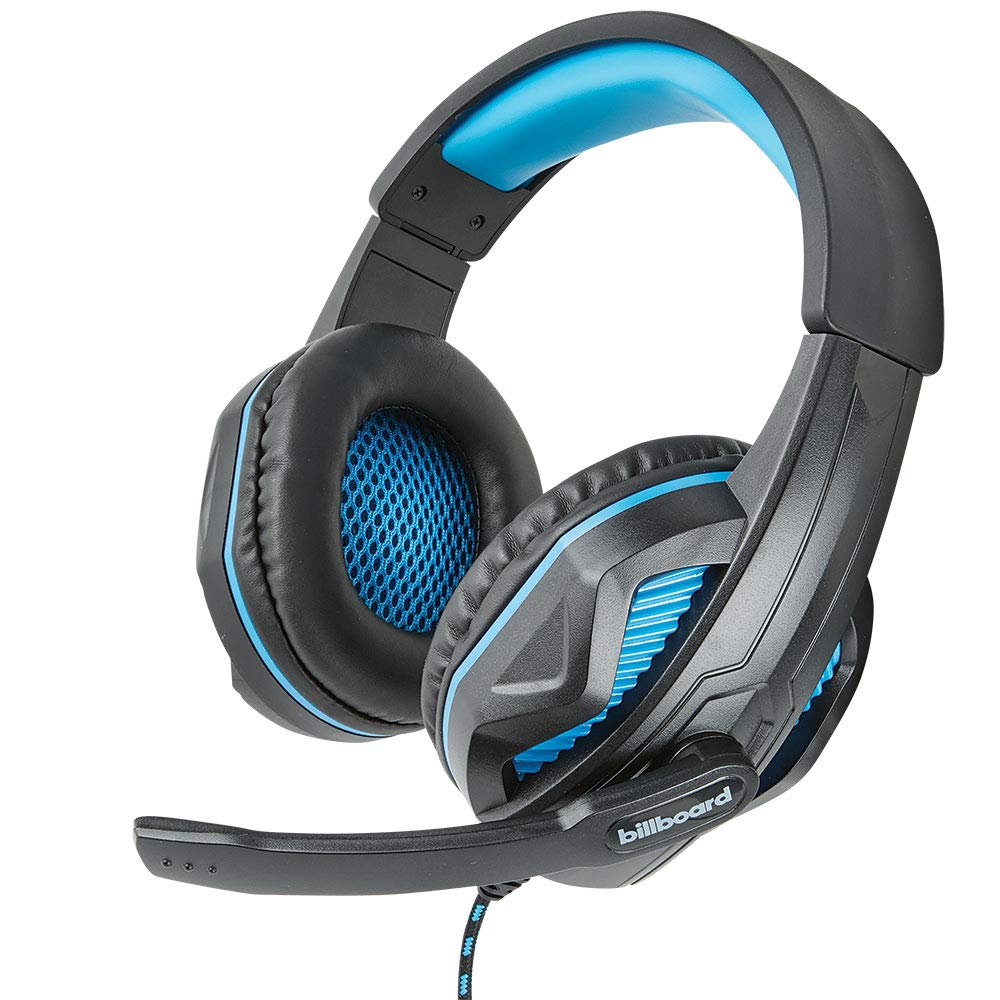
Image: The Billboard BB425 Gaming Headset's braided cable, in-line control unit, and the included Y-splitter cable with two 3.5mm TRS jacks for separate audio and microphone connections.
3. 사용 설명서
The in-line control unit provides easy access to essential audio functions.
- 볼륨 조절: Use the scroll wheel on the in-line control unit to adjust the audio volume. Scroll up to increase volume and down to decrease it.
- 마이크 음소거: The in-line control unit features a switch to mute or unmute the microphone. Slide the switch to the "OFF" position to mute your microphone, and to the "ON" position to enable it.
- Boom Microphone Adjustment: The flexible boom microphone can be positioned closer or further from your mouth to optimize voice clarity.
4. 유지관리 및 관리
적절한 관리를 하면 헤드셋의 수명을 연장할 수 있습니다.
- 청소: 부드럽고 마른 천으로 헤드셋을 닦으세요. 이어 쿠션의 경우, 약간amp cloth with mild soap can be used, but ensure they are completely dry before use. Do not use harsh chemicals or abrasive cleaners.
- 저장: 헤드셋은 깨끗하고 건조한 곳에 보관하고, 극한 온도와 직사광선을 피하십시오. 케이블이 꼬이지 않도록 주의하십시오.
- 손질: 헤드셋을 분리할 때 케이블을 잡아당기지 마십시오. 항상 플러그를 단단히 잡으십시오. 헤드셋을 떨어뜨리거나 강한 충격을 가하지 마십시오.
5. 문제 해결
If you encounter issues with your Billboard BB425 Gaming Headset, refer to the following common solutions.
- 소리가 나지 않거나 볼륨이 낮음:
- Ensure the headset's 3.5mm jack(s) are fully inserted into the correct port(s) on your device.
- 본체에 내장된 볼륨 조절 휠을 확인하고 소리가 잘 들리는 수준으로 조절하세요.
- Verify your device's audio output settings. Ensure the headset is selected as the default playback device.
- 다른 기기로 헤드셋을 테스트하여 기기 자체에 특정 문제가 있는지 확인하세요.
- 마이크가 작동하지 않음:
- Ensure the microphone mute switch on the in-line control unit is in the "ON" position.
- If using the Y-splitter, ensure the microphone jack (typically pink) is correctly plugged into your device's microphone input port.
- Check your device's microphone input settings. Ensure the headset microphone is selected as the default recording device and that its input volume is not muted or set too low.
- 다른 애플리케이션이나 장치로 마이크를 테스트해 보세요.
- Static or Distorted Audio:
- 모든 연결부가 단단히 고정되어 있고 먼지나 이물질이 없는지 확인하십시오.
- Try connecting the headset to a different audio port or device to check if the issue persists.
- 케이블을 강한 전자파 간섭원 근처에 두지 마십시오.
6. 사양
| 특징 | 세부 사항 |
|---|---|
| 모델명 | BB425 |
| 상표 | 광고 게시판 |
| 연결 기술 | 열광한 |
| 헤드폰 잭 | 3.5 mm 잭 |
| 귀 위치 | 귀 위 |
| 폼 팩터 | 귀에 |
| 호환 장치 | Gaming Consoles, Desktops, Laptops, Telephones |
| 특별 기능 | Enhanced bass |
| 제어 유형 | In-line control (Volume, Mute) |
| 케이블 기능 | Retractable, Durable Fabric Cord |
| 재료 | 플라스틱 |
| 색상 | 검은색 |
| 제품 치수 | 25.15 x 22.86 x 8.89cm |
| 품목 무게 | 386g |
| 필요한 배터리 | 아니요 |
7. 보증 정보
This product is covered by a manufacturer's warranty. For specific details regarding warranty coverage, duration, and terms, please refer to the warranty card included with your product or visit the official Billboard web사이트. 보증 청구에 대비해 구매 증빙 자료로 구매 영수증을 보관하세요.
8. 고객 지원
If you require further assistance or have questions not addressed in this manual, please contact Billboard customer support. Contact information can typically be found on the product packaging or the official Billboard web대지.
제조업체: ESI 케이스 및 액세서리


