1. 서론
The KAIWEETS HT106D Socket Tester is designed to quickly and accurately detect common wiring faults in standard electrical sockets and RCD (Residual Current Device) protected circuits. It features a clear LED display for voltage measurement and intuitive LED indicators for wiring status. This manual provides essential information for the safe and effective use of your device.
2. 안전 정보
본 제품을 사용하기 전에 모든 안전 경고 및 지침을 주의 깊게 읽으십시오. 지침을 따르지 않을 경우 감전, 화재 또는 심각한 부상이 발생할 수 있습니다.
- This device is rated CAT II 300V. Do not use it for measurements exceeding this rating.
- Do not use the tester if it appears damaged or is not functioning correctly.
- Do not use the tester in wet conditions or with wet hands.
- Always ensure the socket is de-energized before performing any wiring work. This tester is for verification only.
- The RCD test function may trip the circuit breaker. Ensure all sensitive equipment is saved or turned off before performing an RCD test.
- Important Note for 3x230V installations without neutral (common in Belgium): This tester may not function correctly or provide accurate readings in 3x230V installations without a neutral wire. It is primarily designed for systems with a neutral connection.
- 어린이의 손이 닿지 않는 곳에 보관하세요.
3. 제품 오버view
The KAIWEETS HT106D Socket Tester is a compact and robust device designed for ease of use. It features a digital display for voltage and a series of LED indicators to show wiring status.

그림 1: 앞쪽 view of the KAIWEETS HT106D Socket Tester, showing the digital voltage display, LED indicators, and RCD test button.
3.1개의 구성요소
- 플러그 핀: For insertion into the electrical socket.
- LED 표시등: Red LEDs that illuminate in various patterns to indicate wiring status.
- 디지털 디스플레이: 측정된 볼륨을 보여줍니다tage.
- RCD Test Button: Initiates the RCD trip test.
- Wiring Status Chart: Printed on the device for quick reference.
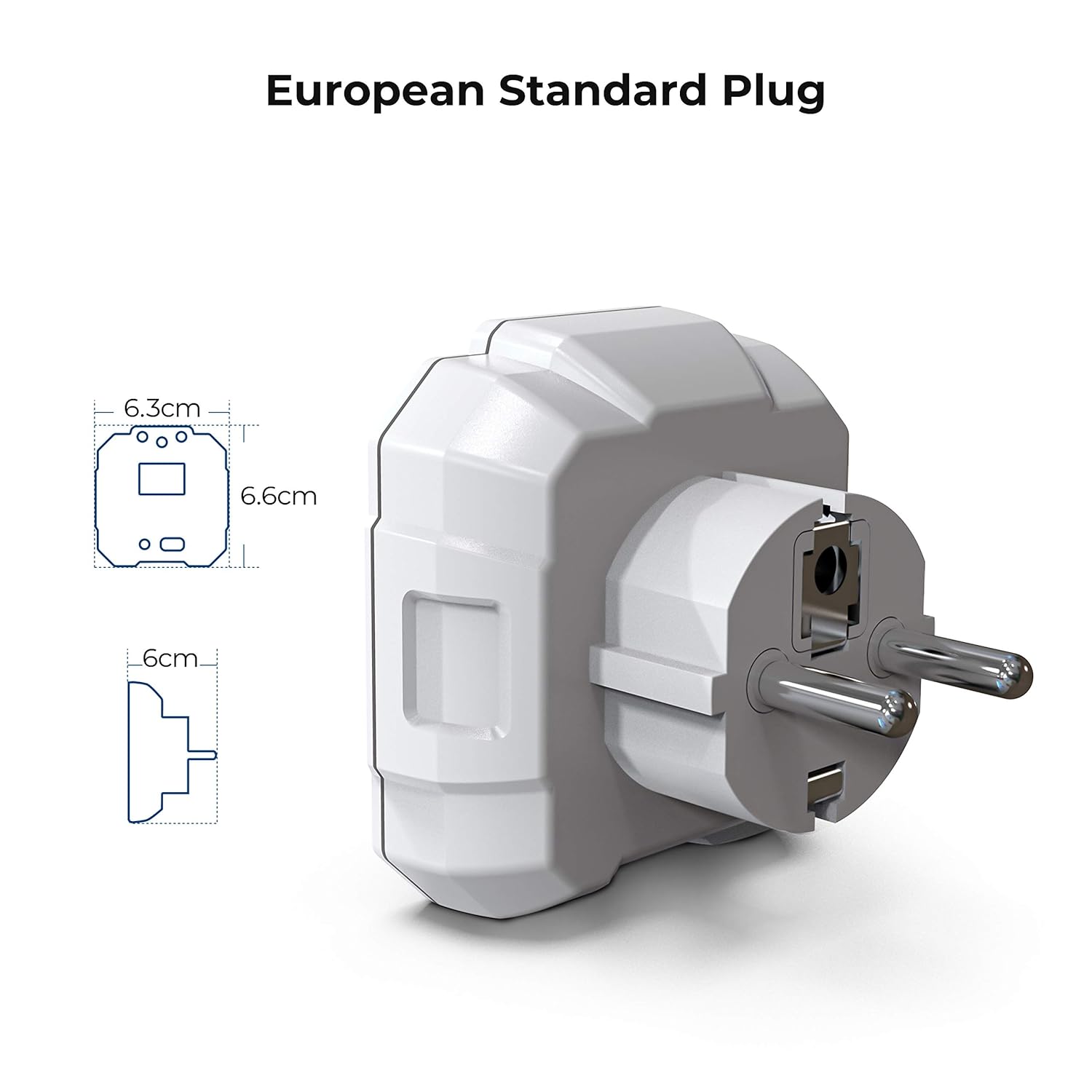
그림 2: Diagram illustrating the dimensions of the KAIWEETS HT106D European standard plug.
4. 설정
The KAIWEETS HT106D Socket Tester comes with 2 AAA batteries included and pre-installed. No initial setup is required beyond ensuring the batteries are correctly seated if the device does not power on.
4.1 배터리 설치/교체
If battery replacement is needed, carefully open the battery compartment, insert 2 AAA batteries observing polarity, and close the compartment securely.

그림 3: 뒤쪽 view of the KAIWEETS HT106D Socket Tester, showing the battery compartment location.
5. 사용 설명서
The HT106D is designed for simple plug-and-play operation. Once plugged into a live socket, it automatically performs a wiring check and displays the voltage.
5.1 기본 배선 테스트
- Insert the KAIWEETS HT106D Socket Tester into the socket you wish to test.
- Observe the LED indicators on the front panel. The pattern of illuminated red LEDs will correspond to a specific wiring condition.
- Refer to the wiring status chart printed on the device or in Section 5.4 of this manual to interpret the results.

그림 4: Visual representation of the 7 circuit conditions detected by the HT106D, with corresponding LED patterns.
5.2권tage 측정
Upon insertion into a live socket, the digital display on the HT106D will automatically show the measured voltage of the socket. This provides an immediate reading of the electrical supply.

그림 5: 클로즈업 view of the digital display showing the measured voltage.
5.3 RCD Test
The RCD test function verifies the operation of Residual Current Devices (RCDs) by simulating an earth fault condition. This test should only be performed on RCD-protected circuits.
- Plug the HT106D into an RCD-protected socket.
- Ensure the wiring status indicates 'Correct' before proceeding.
- 를 누르세요 RCD 테스트 버튼 (located at the bottom of the device).
- If the RCD is functioning correctly, it should trip, cutting power to the circuit. The tester's lights will go out.
- If the RCD does not trip, it indicates a potential fault with the RCD device, and further investigation by a qualified electrician is recommended.
- To restore power, reset the RCD at your consumer unit.
Caution: Performing an RCD test will temporarily cut power to the circuit. Save any unsaved work on computers or other electronic devices before initiating the test.

그림 6: The KAIWEETS HT106D plugged into a socket, ready for or performing an RCD test.
5.4 LED 표시등 이해
The HT106D uses a combination of three red LEDs to indicate the wiring status. Refer to the table below for interpretation:
| LED 패턴 | 배선상태 | 설명 |
|---|---|---|
| ● ● ● (All three LEDs ON) | 옳은 | The wiring is correct. |
| ● ○ ○ (Left LED ON) | 오픈 그라운드 | The earth wire is not connected. |
| ○ ● ○ (Middle LED ON) | 오픈 뉴트럴 | The neutral wire is not connected. |
| ○ ○ ● (Right LED ON) | 오픈 라이브 | The live wire is not connected. |
| ● ● ○ (Left & Middle LEDs ON) | 라이브/접지 역방향 | The live and earth wires are reversed. |
| ○ ● ● (Middle & Right LEDs ON) | 라이브/중립 리버스 | The live and neutral wires are reversed. |
| ● ○ ● (Left & Right LEDs ON) | 라이브/접지 반전, 접지 누락 | The live and earth wires are reversed, and the earth connection is missing. |
메모: '●' indicates an illuminated LED, '○' indicates an unlit LED.
6. 사양
| 특징 | 사양 |
|---|---|
| 모델 | HT106D |
| 운영 볼륨tag및 범위 | 48V - 250V 교류 |
| 주파수 범위 | 50Hz - 60Hz |
| RCD Test Current | >30mA |
| 안전 등급 | CAT II 300V, CE |
| 전원 | AAA 배터리 2개(포함) |
| 치수 | 약 7.9×7.5×7.5 cm |
| 무게 | 약 80그램 |
| 플러그 유형 | European Standard 2-pin |
| 색상 | 하얀색 |
7. 유지관리
- 청소: 부드럽고 마른 천으로 기기를 닦으세요. 연마성 세제나 용제를 사용하지 마세요.
- 저장: 테스터는 직사광선과 극한 온도 변화를 피해 서늘하고 건조한 곳에 보관하십시오. 장기간 보관할 경우 누액을 방지하기 위해 배터리를 제거하십시오.
- 점검: 기기에 균열과 같은 손상 징후가 있는지 주기적으로 점검하십시오.asin핀이 휘었거나 손상되었을 수 있습니다. 손상된 경우 사용하지 마십시오.
8. 문제 해결
- 기기의 전원이 켜지지 않습니다: 배터리가 올바르게 장착되었고 충전량이 충분한지 확인하세요. 필요한 경우 배터리를 교체하세요.
- No LED indication or voltag전자 디스플레이: Ensure the socket is live and functioning. Test with a known working socket. If still no indication, the device may be faulty.
- RCD test does not trip the circuit: Ensure the socket is RCD-protected. If it is, and the RCD does not trip, the RCD itself may be faulty and requires inspection by a qualified electrician.
- 부정확한 볼륨tag전자책 읽기: Ensure the tester is fully inserted into the socket. If the reading is consistently off, compare with another calibrated voltag전자 미터.
9. 보증 및 지원
KAIWEETS offers a 36-month service and technical support for the HT106D Socket Tester. If you encounter any issues or require assistance, please contact KAIWEETS customer support through their official web제품을 구매한 사이트 또는 소매업체.
For technical support or warranty claims, please have your model number (HT106D) and proof of purchase ready.


