1. 서론
This manual provides detailed instructions for the setup, operation, maintenance, and troubleshooting of your iProda T1045A 10.1 inch Android Tablet. Please read this manual thoroughly before using your device to ensure proper functionality and to maximize your user experience.
The iProda T1045A is a 10.1-inch tablet featuring an HD IPS display with 1280x800 resolution, powered by a 64-bit Quad-core processor running Android 9 Pie. It includes 3GB RAM, 64GB internal storage expandable up to 128GB via TF card, dual-band Wi-Fi, HDMI output, and a 5000mAh battery for extended use.
2. 제품 오버view
2.1 패키지 내용
패키지를 열면 모든 품목이 들어 있는지 확인하세요.
- iProda T1045A 10.1 inch Android Tablet
- USB 케이블
- 전원 어댑터
- 사용 설명서 (본 문서)

Image: Contents of the iProda T1045A tablet package.
2.2 장치 레이아웃
태블릿의 물리적 구성 요소와 포트에 대해 알아보세요.
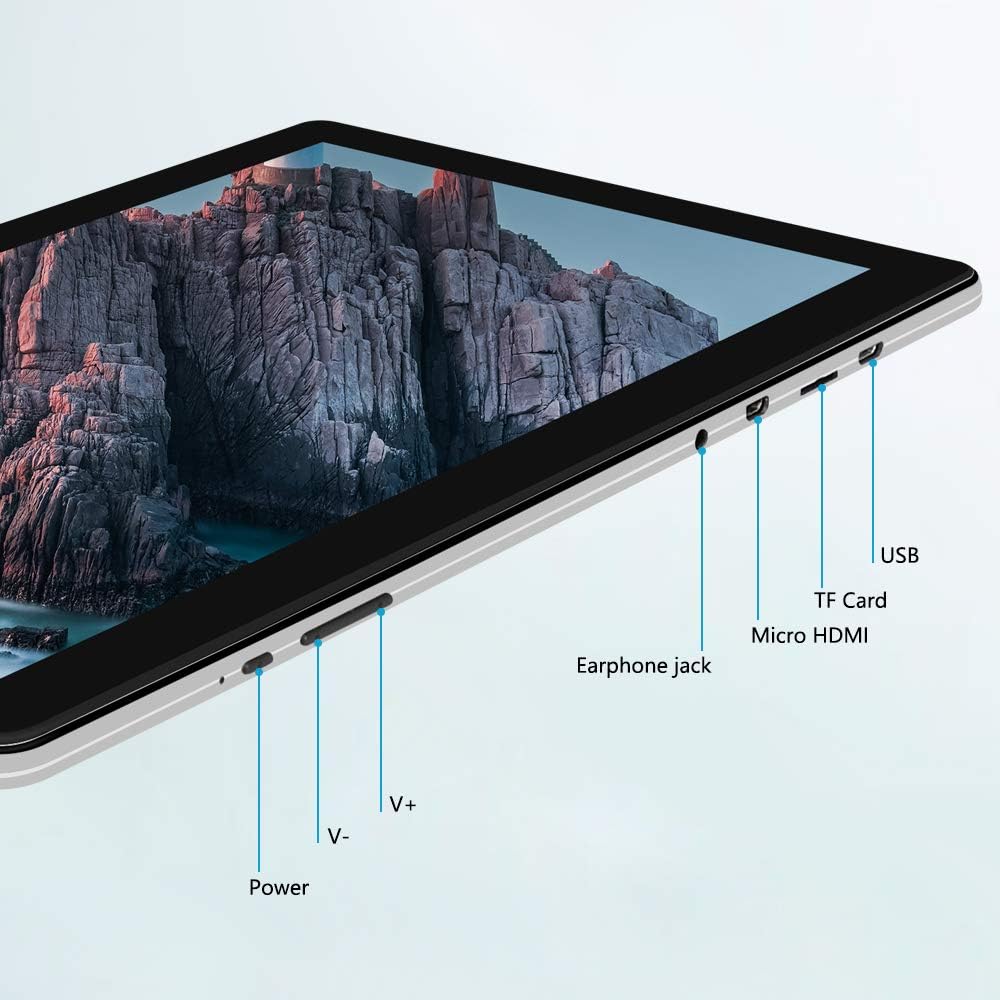
이미지: 측면 view of the iProda T1045A tablet highlighting port locations.
- 전원 버튼: 길게 눌러 태블릿의 전원을 켜거나 끄거나 다시 시작할 수 있습니다. 짧게 눌러 화면을 켜거나 끕니다.
- Volume Buttons (V+, V-): 오디오 볼륨을 조절합니다.
- 이어폰 잭: 3.5mm 헤드폰을 연결합니다.
- TF 카드 슬롯 : Insert a microSD card for expandable storage (up to 128GB).
- 마이크로 HDMI 포트: Connect to an external display using a Micro HDMI to HDMI cable.
- USB 포트: Connect to a computer for data transfer or for charging the device.
3. 설정
3.1 초기 충전
Before first use, fully charge the tablet. Connect the provided USB cable to the tablet's USB port and the power adapter, then plug the adapter into a wall outlet. The charging indicator will typically illuminate. A full charge may take several hours.
3.2 전원 켜기/끄기
- 전원을 켜려면: 화면이 켜질 때까지 전원 버튼을 길게 누릅니다.
- 전원을 끄려면: 화면에 전원 메뉴가 나타날 때까지 전원 버튼을 길게 누르세요. "전원 끄기"를 선택하고 확인하세요.
- 재시작하기 위해: 전원 메뉴에서 "다시 시작"을 선택합니다.
- 화면 켜기/끄기: Briefly press the Power button to turn the screen off (sleep mode) or wake it up.
3.3 초기 설정 마법사
The first time you power on the tablet, you will be guided through an initial setup process. Follow the on-screen prompts to:
- 원하는 언어를 선택하세요.
- Wi-Fi 네트워크에 연결합니다.
- Google 계정을 설정하세요(선택 사항이지만 앱 다운로드를 위해 권장합니다).
- 날짜 및 시간 설정을 구성합니다.
3.4 Inserting a TF Card (MicroSD)
태블릿의 저장 공간을 확장하려면:
- 태블릿 측면에서 TF 카드 슬롯을 찾으세요.
- Carefully insert a microSD card (up to 128GB) into the slot with the gold contacts facing down until it clicks into place.
- 제거하려면 카드가 튀어나올 때까지 안쪽으로 살살 밀어주세요.
4. 사용 설명서
4.1 기본 탐색
The iProda T1045A uses a touch-sensitive screen for navigation:
- 수도꼭지: 항목을 선택하거나 애플리케이션을 엽니다.
- 길게 누르기 : 상황에 맞는 메뉴에 접근하거나 아이콘을 이동합니다.
- 강타: 목록을 스크롤하거나 홈 화면 간에 전환합니다.
- 꼬집기: 이미지 확대/축소 및 web 페이지.
4.2 Wi-Fi 연결
무선 네트워크에 연결하려면:
- 이동하다 설정 > 네트워크 및 인터넷 > 와이파이.
- Wi-Fi 전환 On.
- 목록에서 원하는 네트워크를 선택하세요.
- 메시지가 표시되면 비밀번호를 입력한 다음 탭하세요. 연결하다.
The tablet supports both 2.4G and 5G dual-band Wi-Fi for faster and more stable connections.
4.3 블루투스 페어링
Bluetooth 장치(예: 헤드폰, 스피커)와 페어링하려면:
- 이동하다 설정 > 연결된 장치 > 블루투스.
- 블루투스 전환 On.
- Bluetooth 장치가 페어링 모드인지 확인하세요.
- 사용 가능한 기기 목록에서 기기를 선택하고 화면의 안내에 따라 페어링을 완료하세요.
4.4 카메라 사용
이 태블릿은 2만 화소 전면 카메라와 5만 화소 후면 카메라를 탑재하고 있습니다.
- 열기 카메라 application from the app drawer.
- 전면 카메라와 후면 카메라를 전환하려면 카메라 아이콘을 탭하세요.
- 셔터 버튼을 눌러 사진을 촬영하거나 동영상 녹화를 시작/정지하세요.

Image: Tablet in use, showcasing its camera capabilities.
4.5 Connecting to an External Display (HDMI)
To display your tablet's screen on a larger monitor or TV:
- Connect one end of a Micro HDMI cable to the tablet's Micro HDMI port.
- Connect the other end of the cable to an HDMI input on your external display.
- Select the correct HDMI input source on your external display.
- The tablet's screen content should now be mirrored on the external display.
4.6 앱 관리
The tablet runs Android 9 Pie and supports applications from the Google Play Store.
- 앱 설치: 열기 플레이 스토어 앱을 실행하고 원하는 애플리케이션을 검색한 다음 탭하세요. 설치하다.
- 앱 제거: Tap and hold an app icon on the home screen or in the app drawer, then drag it to "Uninstall" or select "App info" and choose "Uninstall". Alternatively, go to 설정 > 앱 및 알림, 앱을 선택하고 탭하세요 제거.
5. 유지관리
5.1 장치 청소
태블릿을 청소하려면:
- 청소하기 전에 태블릿 전원을 끄세요.
- 부드럽고 보푸라기가 없는 천을 사용하여 약간 damp물이나 화면 세정제를 묻혀 화면과 본체를 닦으세요.
- 강한 화학 물질, 연마성 세제 또는 과도한 습기를 사용하지 마세요.
5.2 소프트웨어 업데이트
Periodically check for software updates to ensure optimal performance and security:
- 이동하다 설정 > 체계 > 고급의 > 시스템 업데이트.
- 화면의 지시에 따라 사용 가능한 업데이트를 다운로드하고 설치하십시오. 업데이트 중에는 태블릿이 충분히 충전되어 있거나 전원에 연결되어 있는지 확인하십시오.
5.3 스토리지 관리
To manage internal storage and the TF card:
- 이동하다 설정 > 저장.
- 여기서 당신은 할 수 있습니다 view storage usage, free up space, and manage files on both internal storage and the inserted TF card.
6. 문제 해결
This section addresses common issues you might encounter with your iProda T1045A tablet.
6.1 장치 전원이 켜지지 않음
- Ensure the tablet is sufficiently charged. Connect it to the power adapter and allow it to charge for at least 30 minutes before attempting to power on again.
- 강제로 재시작하려면 전원 버튼을 10~15초 동안 길게 눌러 보세요.
6.2 Wi-Fi 연결 문제
- Wi-Fi가 활성화되어 있는지 확인하십시오. 설정.
- 올바른 Wi-Fi 비밀번호를 입력했는지 확인하세요.
- Wi-Fi 라우터와 태블릿을 다시 시작하세요.
- Try connecting to a different Wi-Fi network to determine if the issue is with the tablet or the network.
6.3 느린 성능
- 불필요한 백그라운드 애플리케이션을 닫습니다.
- Clear cached data for apps in 설정 > 앱 및 알림 > [앱 이름] > 저장소 및 캐시 > 캐시 지우기.
- Ensure sufficient free storage space. Uninstall unused apps or move large files to a TF card.
- 태블릿을 다시 시작하십시오.
6.4 배터리가 빠르게 소모됨
- 화면 밝기를 낮추세요.
- 사용하지 않을 때는 Wi-Fi, 블루투스, GPS를 비활성화하세요.
- 전력을 많이 소모하는 백그라운드 앱을 종료하세요.
- 배터리 사용량을 확인하세요 설정 > 배터리 전력 소모가 많은 앱을 식별합니다.
- Ensure the tablet is not allowed to run below 15% charge frequently, as this can impact battery longevity.
6.5 공장 초기화
문제가 지속적으로 발생하는 경우, 공장 초기화를 통해 해결할 수 있습니다. 경고: 이렇게 하면 태블릿의 모든 데이터가 삭제됩니다. 진행하기 전에 중요한 데이터를 백업하십시오.
- 이동하다 설정 > 체계 > 고급의 > 옵션 재설정.
- 선택하다 모든 데이터 삭제(공장 초기화).
- 결정을 확인하고 화면의 지시를 따르세요.
7. 사양
Below are the technical specifications for the iProda T1045A tablet:
| 모델명 | T1045A |
| 운영 체제 | 안드로이드 9 파이 |
| 디스플레이 크기 | 10.1 인치 |
| 디스플레이 해상도 | 1280 x 800 픽셀(HD IPS) |
| 프로세서 | MediaTek Quad-core 1.5Ghz |
| 숫양 | 3GB (XNUMX기가바이트) |
| 내부 저장소 | 64GB SSD |
| 확장 가능한 스토리지 | Up to 128 GB via TF Card (MicroSD) |
| 그래픽 코프로세서 | ARM Mali-T720 MP2 |
| 후방 카메라 | 5 MP |
| 전면 카메라 | 2 MP |
| 배터리 용량 | 5000mAh 리튬 폴리머 |
| 평균 배터리 수명 | 최대 8시간 |
| 무선 연결 | Dual-Band Wi-Fi (802.11a/b/g/n), Bluetooth 4.0 |
| 포트 | 1x USB 2.0, 1x Micro HDMI, 3.5mm Earphone Jack, TF Card Slot |
| 치수 | 34.5 x 19.7 x 5.5cm |
| 무게 | 550g |

Image: Key performance specifications of the tablet.

Image: Tablet portability and battery details.
8. 보증 및 지원
8.1 제품 보증
The iProda T1045A tablet comes with a 12개월 보증 구매일로부터 적용됩니다. 본 보증은 정상적인 사용 조건에서 발생하는 제조상의 결함 및 오작동에 한해 적용됩니다. 단, 오용, 사고, 무단 수리 또는 정상적인 마모로 인한 손상은 보증 대상에서 제외됩니다.
8.2 고객 지원
If you encounter any issues not covered in the troubleshooting section or require further assistance, please contact iProda customer support. Refer to your purchase documentation or the iProda official web연락처 정보 사이트.
When contacting support, please have your tablet's model number (T1045A) and purchase details readily available.


