1. 소개 및 이상view
The ESX INFOTAINMENT VN1015-MA-DAB-4G is an advanced Android-based naviceiver designed for vehicle integration, offering a comprehensive multimedia and navigation experience. This unit features a 10.1-inch anti-glare multi-angle touchscreen, Android operating system, 4G/LTE connectivity, DAB+ digital radio, and Google Maps navigation. It supports Bluetooth hands-free calling and audio streaming, USB and MicroSD media playback, and includes inputs for rearview cameras and auxiliary devices.
주요 특징은 다음과 같습니다.
- 10.1-inch high-resolution, anti-glare multi-angle touchscreen.
- Android Operating System for versatile app usage.
- Integrated 4G/LTE dongle for mobile internet (requires optional SIM card).
- DAB+ digital radio reception with station logos and AM/FM radio with RDS.
- Google Maps navigation (online and offline capabilities).
- Bluetooth hands-free system with audio streaming.
- Multiple connectivity options: 2x USB ports, 1x MicroSD slot, 1x camera input, 2x video outputs, 1x AUX/video input, 1x AUX/audio input.
- Support for steering wheel controls (optional adapter may be required).
2. 설정 및 설치
Proper installation is crucial for the optimal performance of your ESX VN1015-MA-DAB-4G naviceiver. It is highly recommended that installation be performed by a qualified professional to ensure correct wiring and vehicle compatibility.
2.1. 구성 요소 식별
Familiarize yourself with the various ports and connections on the rear of the unit before installation.
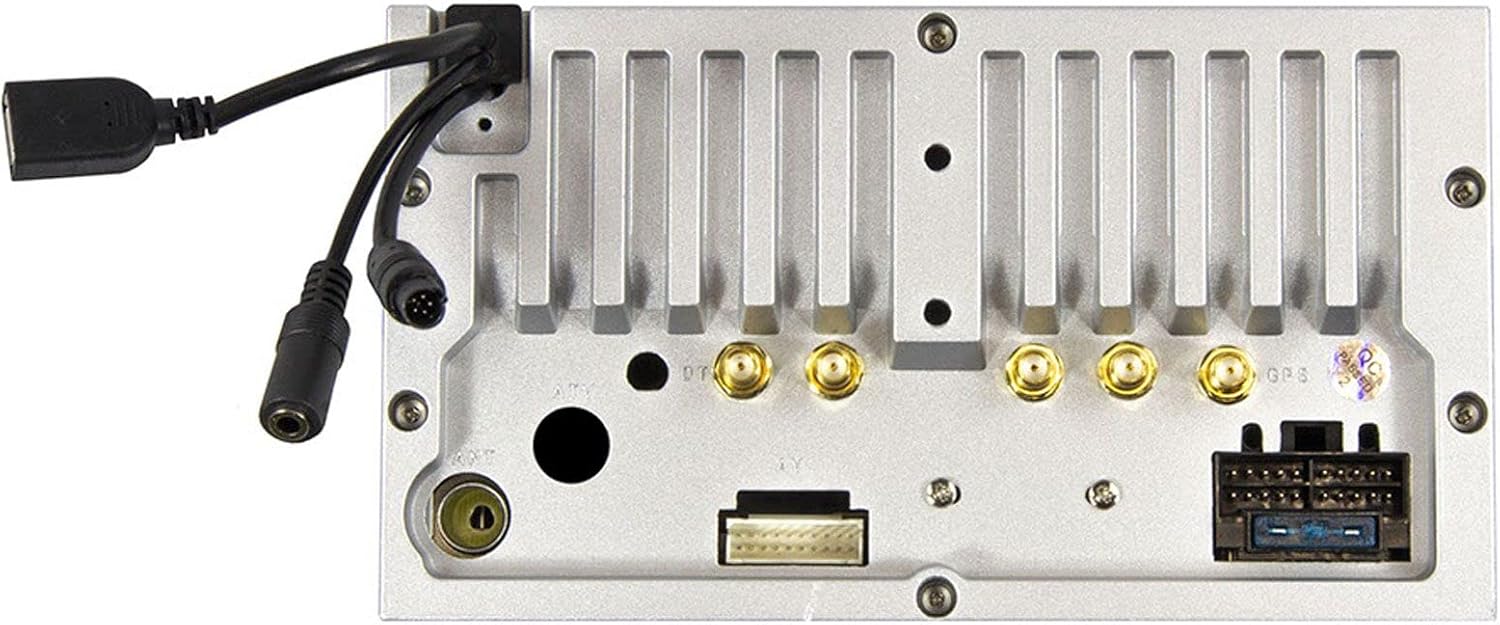
그림 2.1: 뒤쪽 view of the ESX VN1015-MA-DAB-4G unit, illustrating the power harness, antenna inputs, USB ports, and auxiliary connections.
2.2. 배선 연결
- 전원 공급 장치: Connect the main power harness to your vehicle's electrical system, ensuring correct positive, negative, and accessory (ACC) connections.
- 스피커 출력: Connect your vehicle's speakers to the corresponding outputs on the naviceiver.
- 안테나 연결: Connect the FM/AM antenna. For DAB+ digital radio, connect the included DAB+ antenna to the designated port.
- GPS 안테나 : GPS 안테나를 연결하고 시야가 확보된 곳에 설치하십시오. view 최적의 신호 수신을 위해 하늘을 살펴보세요.
- USB 포트: Connect external USB devices for media playback or smartphone connectivity.
- 마이크로폰: Connect the external microphone (VNA-MIC-AND, optional) for improved hands-free call quality.
- 뒤쪽view 카메라: 후면 연결view camera to the dedicated camera input. Ensure the reverse trigger wire is correctly connected for automatic display switching.
- 비디오 출력: Utilize the two video outputs for connecting external monitors.
- AUX 입력: Connect external audio/video sources to the AUX/video and AUX/audio inputs.
- 4G/LTE Dongle: If using mobile internet via 4G/LTE, insert a compatible SIM card into the optional 4G/LTE dongle and connect it to a USB port.
- 스티어링 휠 제어: If your vehicle supports steering wheel controls, an optional adapter may be required to integrate this functionality.
2.3. 초기 파워업
After all connections are secure, turn on your vehicle's ignition. The naviceiver should power on. Follow any on-screen prompts for initial setup, such as language selection and time zone.
3. 사용 설명서
This section details the primary functions and operations of your ESX VN1015-MA-DAB-4G naviceiver.
3.1. 기본 컨트롤 및 인터페이스
The unit features a responsive touchscreen and physical buttons for common functions.

그림 3.1: The main screen showing the radio interface with frequency display and control buttons.
- 전원 버튼: Press and hold to turn the unit on/off. A short press may mute audio or put the unit into standby.
- 볼륨 조절: 오디오 출력 레벨을 조정합니다.
- 홈 버튼: Android 홈 화면으로 돌아갑니다.
- 뒤로가기 버튼: Navigates back one step in menus or applications.
- 카메라 버튼: Direct access to the camera input display (e.g., rearview 카메라).
3.2. 안드로이드 운영체제
The naviceiver runs on an Android operating system, allowing access to various applications and customization options.
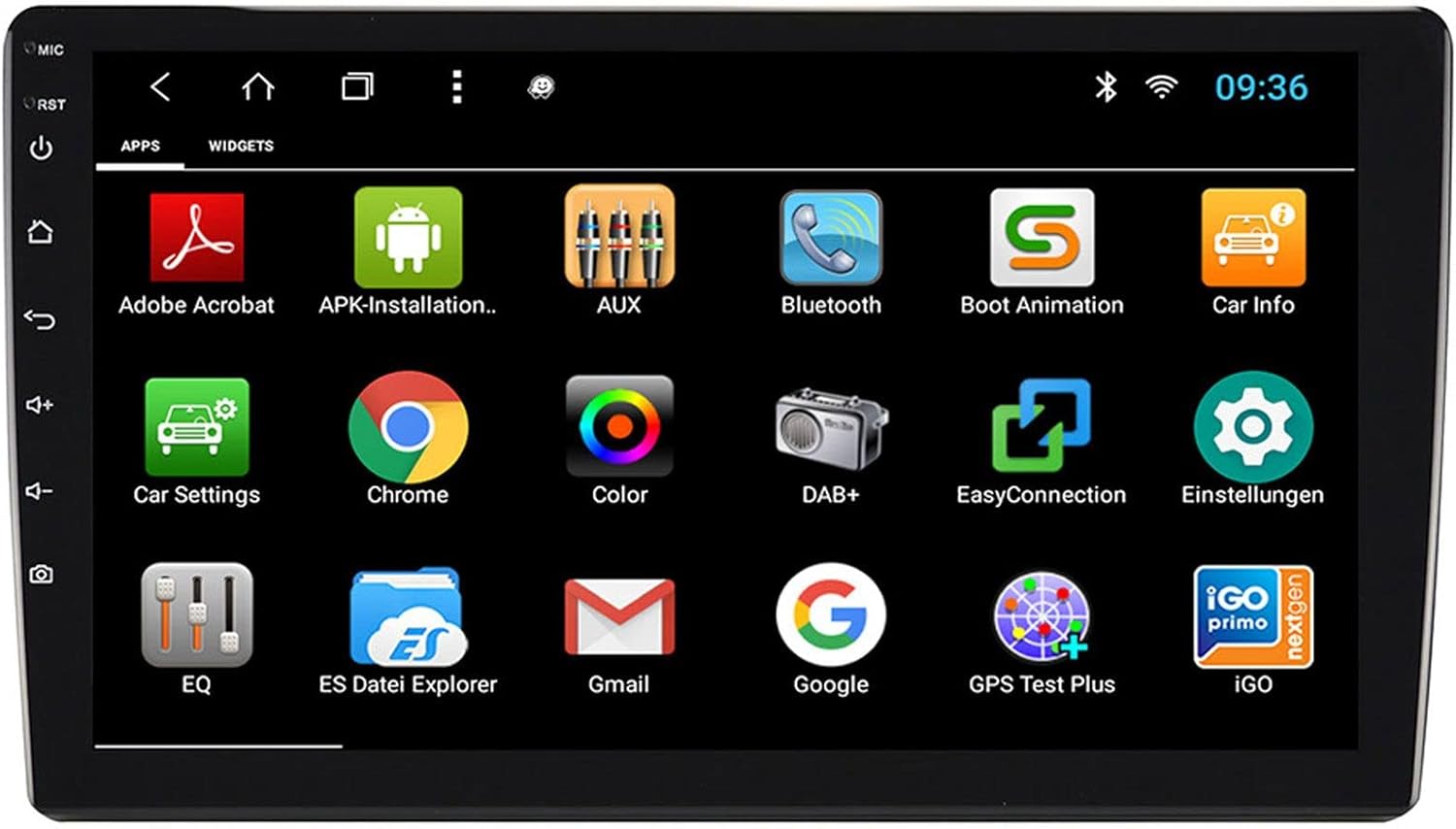
그림 3.2: The applications screen, displaying various pre-installed and user-installed Android apps.
- 앱 실행기: Access all installed applications from the app drawer.
- 위젯 : Customize your home screen with widgets for quick access to information or functions.
- 설정: Adjust system settings, network connections, display, audio, and more.
- 인터넷 연결: Connect to the internet via a WiFi hotspot (from a compatible smartphone) or by inserting a SIM card into the 4G/LTE dongle.
3.3. Radio Functions (AM/FM/DAB+)
The unit supports both analog and digital radio broadcasts.
- 밴드 선택: Switch between AM, FM, and DAB+ bands.
- 튜닝 : Manually tune or use the auto-scan function to find available stations.
- 사전 설정 : 자주 이용하는 채널을 저장해 두면 빠르게 접속할 수 있습니다.
- RDS (FM): Radio Data System displays station information (e.g., station name, song title).
- DAB+ 기능: Enjoy higher quality digital audio and view station logos where available.
3.4. 블루투스 연결
Pair your smartphone for hands-free communication and audio streaming.
- 편성: Enable Bluetooth on your smartphone and search for the naviceiver. Select the unit and confirm the pairing code.
- 핸즈프리 통화: Make and receive calls directly from the naviceiver screen.
- 오디오 스트리밍 : Play music from your smartphone wirelessly through the naviceiver.
3.5. Navigation (Google Maps)
Utilize Google Maps for turn-by-turn navigation.

그림 3.3: The navigation interface showing a map with a selected destination.
- 온라인 탐색: Requires an active internet connection (WiFi hotspot or 4G/LTE).
- 오프라인 지도: Download maps for specific regions to use navigation without an internet connection.
- 목적지 항목: Enter addresses or points of interest using the touchscreen keyboard.
3.6. 미디어 재생
오디오 및 비디오 재생 file다양한 출처에서.
- USB: Connect USB drives containing media files.
- 마이크로SD: Insert a MicroSD card into the dedicated slot for media or navigation data.
- 지원되는 형식: The unit supports a wide range of audio and video formats. Refer to the system settings for a complete list.
3.7. 카메라 입력
The naviceiver automatically displays the rearview camera feed when the vehicle is in reverse, or manually via the camera button.

그림 3.4: 뒤쪽view camera display with dynamic parking guidelines.
- 자동 활성화 : When connected correctly, the rearview camera image appears automatically when shifting into reverse.
- 주차 지침: Adjustable parking lines assist with maneuvering.
4. 유지관리
Regular maintenance ensures the longevity and optimal performance of your naviceiver.
- 화면 청소: 부드럽고 보풀이 없는 천을 사용하여 터치스크린을 부드럽게 닦으세요. 잘 지워지지 않는 얼룩은 가볍게 닦아주세요.amp천에 물이나 화면에 안전한 세척제를 묻혀 닦아주세요. 강한 화학 물질이나 연마재는 사용하지 마세요.
- 소프트웨어 업데이트: 시스템 설정 또는 제조업체 웹사이트를 통해 주기적으로 소프트웨어 업데이트가 있는지 확인하십시오. web사이트입니다. 업데이트를 통해 성능이 향상되고, 기능이 추가되며, 버그가 수정될 수 있습니다.
- 일반 관리 : 제품을 극한 온도, 장시간 직사광선 또는 과도한 습기에 노출시키지 마십시오. 모든 연결부가 단단히 고정되어 있는지 확인하십시오.
5. 문제 해결
This section addresses common issues you might encounter with your ESX VN1015-MA-DAB-4G naviceiver.
| 문제 | 가능한 원인 | 해결책 |
|---|---|---|
| 장치의 전원이 켜지지 않습니다. | 전원 공급 안 됨; 퓨즈 단선; 배선 오류. | Check vehicle's fuse box and the unit's power connections. Ensure ACC wire is receiving power. |
| 소리가 나지 않습니다. | Volume too low; Mute activated; Incorrect speaker wiring; Audio source issue. | Increase volume. Check if mute is active. Verify speaker connections. Try a different audio source. |
| GPS signal loss or inaccurate navigation. | GPS antenna obstructed or disconnected; Outdated maps. | GPS 안테나가 깨끗한지 확인하십시오. view 하늘에서 온 것처럼 안전하게 연결되어 있습니다. 필요한 경우 지도를 업데이트하세요. |
| 블루투스 연결 문제. | Device not in pairing mode; Interference; Unit not discoverable. | Ensure both devices are in pairing mode. Restart both devices. Check Bluetooth settings on the naviceiver. |
| 터치스크린이 응답하지 않습니다. | System freeze; Software error. | Perform a soft reset (refer to the unit's specific reset procedure, often a small reset button). If persistent, a factory reset might be needed (data loss may occur). |
| DAB+ radio not receiving stations. | DAB+ antenna not connected or faulty; Poor signal area. | Check DAB+ antenna connection. Ensure the antenna is correctly installed. Try rescanning for stations in a different location. |
If you encounter issues not listed here or if the suggested solutions do not resolve the problem, please contact ESX customer support or your authorized dealer.
6. 사양
Below are the technical specifications for the ESX VN1015-MA-DAB-4G Naviceiver:
| 특징 | 세부 사항 |
|---|---|
| 상표 | ESX |
| 모델 | VN1015-MA-DAB-4G |
| 화면 크기 | 10.1인치(25.6cm) |
| 디스플레이 유형 | High-resolution, anti-glare multi-angle touchscreen |
| 운영 체제 | 기계적 인조 인간 |
| 숫양 | 4GB (XNUMX기가바이트) |
| 플래시 메모리 | 64GB (XNUMX기가바이트) |
| 연결성 | Bluetooth, USB, 4G/LTE (via dongle), WiFi (via hotspot) |
| 라디오 튜너 | AM/FM with RDS, DAB+ Digital Radio |
| 항해 | Google Maps (online/offline) |
| 입력 | 1x Camera Input, 1x AUX/Video Input, 1x AUX/Audio Input, 2x USB Ports, 1x MicroSD Slot |
| 출력 | 2x Video Outputs, Pre-amplified outputs (Front/Rear/Subwoofer) |
| 제어 방법 | 터치스크린 |
| 호환 장치 | 스마트폰 |
7. 보증 및 지원
Your ESX VN1015-MA-DAB-4G naviceiver comes with a Certificate of Authenticity. For specific warranty terms and conditions, please refer to the documentation provided with your purchase or contact your authorized ESX dealer.
For technical support, troubleshooting assistance beyond this manual, or inquiries regarding parts and service, please contact your point of purchase or visit the official ESX web고객 서비스 연락처 정보를 제공하는 사이트입니다.


