1. 서론
Thank you for choosing the Xiaomi Mi 55-inch 4K UHD Smart Android TV. This manual provides essential information for the safe and efficient use of your television. Please read it thoroughly before operating the device and retain it for future reference.

이미지 1.1: 앞면 view of the Xiaomi Mi 55-inch 4K UHD Smart Android TV.
2. 안전 정보
안전한 작동을 보장하고 손상을 방지하려면 다음 예방 조치를 준수하세요.
- TV를 비나 습기에 노출시키지 마세요.
- 환기구를 막지 마십시오.
- 전원 플러그의 접지가 제대로 되어 있는지 확인하세요.
- 불안정한 표면에 TV를 두지 마십시오.
- 텔레비전을 직사광선, 열원 및 화기로부터 멀리 두십시오.
- 번개가 칠 때나 장기간 사용하지 않을 때는 TV의 플러그를 뽑아 두세요.
- 모든 서비스는 자격을 갖춘 서비스 담당자에게 의뢰하세요.
3. 패키지 내용
패키지에 모든 품목이 들어 있는지 확인하세요.
- 1 × Xiaomi Mi 55-inch TV
- 1 × Remote control with voice control
- 1 × Remote control batteries
- 1 × 전원 케이블
- 1 × 사용자 설명서 (본 문서)
- 1 × Support legs
- 4 × Screws for support legs
4. 설정
4.1. 물리적 설치
Your TV can be installed on a stand or wall-mounted. The TV is VESA mounting standard compatible.
4.1.1. 스탠드 설치
- 화면 손상을 방지하려면 부드럽고 평평한 표면에 TV를 뒤집어서 조심스럽게 놓으세요.
- Attach the support legs to the designated slots at the bottom of the TV using the provided screws. Ensure they are securely fastened.
- TV를 안정적이고 평평한 표면에 놓으세요.
4.1.2. 벽면 장착 (선택 사항)
If you choose to wall-mount your TV, use a VESA-compatible wall mount kit (sold separately) and follow the instructions provided with the wall mount. Ensure the wall can support the weight of the TV.
4.2. 주변기기 연결하기
외부 기기를 TV의 포트에 연결하세요.
- HDMI : Connect Blu-ray players, game consoles, or set-top boxes to the HDMI ports (3 available). HDMI ARC is supported for audio return channel functionality.
- USB: Connect USB storage devices for media playback (2 available).
- LAN : 유선 인터넷 연결의 경우 이더넷 케이블을 LAN 포트에 연결하세요.
- 디지털 오디오 출력(광): Connect to an external audio system for high-quality digital sound.
4.3. 초기 전원 켜기
- 전원 케이블을 TV에 연결한 다음 전원 콘센트에 연결하세요.
- 리모컨이나 TV의 전원 버튼을 누르세요.
- 화면의 지시에 따라 언어 선택, 네트워크 연결(Wi-Fi 또는 이더넷), Google 계정 로그인 등 초기 설정을 완료하세요.
5. 사용 설명서
5.1. 원격 제어
The included remote control allows you to navigate the TV's features. It supports voice control for convenient interaction with Google Assistant.
- 전원 버튼: TV를 켜거나 끕니다.
- 탐색 패드(위/아래/왼쪽/오른쪽/확인): 메뉴를 탐색하고 옵션을 선택합니다.
- 볼륨 버튼: 사운드 레벨을 조정합니다.
- 채널 버튼: TV 채널을 변경합니다.
- Google 어시스턴트 버튼: 음성 제어를 활성화합니다.
- 홈 버튼: Android TV 홈 화면으로 돌아갑니다.
- 뒤로가기 버튼: 이전 화면으로 돌아갑니다.
- 앱 버튼: Dedicated buttons for popular apps like Netflix and YouTube.
5.2. 스마트 TV 기능(Android TV)
Your TV runs on Android TV (version 9), providing access to a wide range of smart features:
- 구글 어시스턴트: 음성 명령을 사용하여 콘텐츠를 검색하고, 스마트 홈 기기를 제어하고, 정보를 얻으세요.
- 구글 플레이 스토어: Download and install various apps, games, and streaming services.
- 내장 Chromecast: 스마트폰, 태블릿, 컴퓨터에서 TV로 직접 콘텐츠를 전송하세요.
- 사전 설치된 앱: Access Netflix, YouTube, and a web 브라우저에서 직접.
- SmartThings 앱 지원: Integrate with other compatible smart home devices.
5.3. 화면 및 사운드 설정
화면 및 사운드 설정을 조정하여 최적화하세요. view경험:
- 사진 모드: Select from various presets (e.g., Standard, Vivid, Movie, Game) or customize brightness, contrast, color, and sharpness.
- HDR: The TV supports HDR for enhanced contrast and color with compatible content.
- 사운드 모드: Standard, Music, Movie와 같은 사전 설정 중에서 선택하거나 이퀄라이저 설정을 사용자 지정할 수 있습니다.
- DTS/Dolby Audio: The TV supports DTS and Dolby audio technologies for immersive sound.
6. 유지관리
6.1. 청소
텔레비전을 청소하려면:
- 청소하기 전에는 항상 TV의 플러그를 뽑아 두세요.
- 부드럽고 마른 천으로 화면과 캐비닛을 닦으세요.
- 완고한 자국의 경우 가볍게 damp천에 물이나 특수 화면 세척제를 묻혀 닦으세요. 화면에 세척제를 직접 뿌리지 마세요.
- 연마성 세척제나 용제를 사용하지 마십시오.
6.2. 소프트웨어 업데이트
Periodically check for software updates to ensure your TV has the latest features and performance improvements. Updates can usually be found in the TV's settings menu under 'About' or 'System Update'.
7. 문제 해결
문제가 발생하면 다음의 일반적인 문제와 해결 방법을 참조하세요.
| 문제 | 가능한 해결책 |
|---|---|
| 전원이 없습니다 | 전원 케이블이 제대로 연결되어 있는지, 콘센트가 정상적으로 작동하는지 확인하십시오. 다른 콘센트에 꽂아 보십시오. |
| 화면은 나오지 않지만 소리는 나옵니다 | 올바른 입력 소스가 선택되었는지 확인하세요. 외부 장치와의 케이블 연결을 확인하세요. |
| 소리는 나지 않지만 화면은 나옵니다 | Check volume level and mute settings. Verify audio cable connections. If using external audio, ensure it's powered on and correctly configured. |
| 리모컨이 작동하지 않습니다 | 배터리를 교체하세요. 리모컨과 TV 사이에 장애물이 없는지 확인하세요. 블루투스 리모컨인 경우 다시 페어링하세요. |
| Wi-Fi에 연결할 수 없습니다 | Check if the Wi-Fi router is on and working. Re-enter the Wi-Fi password. Try restarting the TV and router. |
| 앱이 느리거나 충돌합니다 | 사용하지 않는 앱을 종료하세요. 앱 캐시를 삭제하세요. TV를 재시작하세요. 인터넷 속도가 충분한지 확인하세요. |
문제가 지속되면 고객 지원에 문의하십시오.
8. 사양
| 특징 | 세부 사항 |
|---|---|
| 모델 번호 | L55M5-5ASP |
| 화면 크기 | 55인치 |
| 디스플레이 기술 | 주도의 |
| 해결 | 3840 x 2160(4K UHD) |
| 새로 고침 빈도 | 60Hz |
| View잉 각도 | 178도 |
| 비디오 기능 | HDR 지원 |
| 운영 체제 | 안드로이드 TV (안드로이드 9) |
| 숫양 | 2GB |
| 저장 용량 | 8GB |
| 오디오 출력 | 2 x 10W 스피커 |
| 오디오 기술 | DTS/Dolby Audio |
| 스마트 기능 | Google Assistant, Google Play, Web Browser, SmartThings app support, YouTube, Netflix (subscription not included), Chromecast built-in, DVB-T2 + DVB-C tuner |
| 연결성 | 3 x HDMI (with ARC), 2 x USB, 1 x LAN (Ethernet 100Mbps), 1 x Digital Optical Audio Out, Built-in Wi-Fi (2.4G/5G), Bluetooth 4.2 |
| 종횡비 | 16시 9분 |
| 장착 표준 | VESA 호환 |
| 제품 치수(W x D x H) | 124.2 x 24.5 x 78cm (스탠드 포함) |
| 제품 무게 | 13kg |
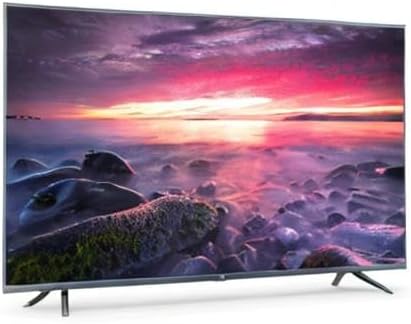
Image 8.1: Energy efficiency label for the Xiaomi Mi 55-inch TV.
9. 보증 및 지원
보증 정보는 제품과 함께 제공된 보증 카드를 참조하거나 공식 Xiaomi 웹사이트를 방문하세요. web해당 지역의 사이트를 방문하세요. 구매 증빙 자료로 구매 영수증을 보관하세요.
For technical support, troubleshooting assistance beyond this manual, or service inquiries, please contact Xiaomi customer service through their official channels.