소개
The myGEKOgear Orbit 960 is a 4K UHD dash camera designed to record your journeys with high clarity. Featuring a Sony STARVIS sensor for enhanced low-light performance, built-in Wi-Fi for mobile app connectivity, and GPS logging for location and speed data, this device provides comprehensive recording capabilities. It also includes advanced driver assistance systems (ADAS) such as Forward Collision Warning System (FCWS) and Lane Departure Warning System (LDWS) to promote safer driving habits.
상자 안에 무엇이 들어있나요?
- 돌진 카메라
- 12 Volt Power Cable
- 접착식 마운트
- 석션 컵 마운트
- 16 GB Micro SD Card & Card Reader
- 사용자 설명서
- 보증 카드
제품 끝view

그림 1: 전면 View 대시캠의

그림 2: 후면 View with Screen and Controls
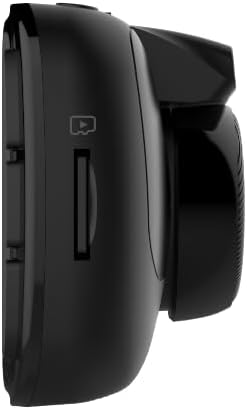
그림 3: 측면 View with MicroSD Card Slot

그림 4: 상단 View 포트가 있는
설정
1. 대시캠 장착
일반적으로 뒷부분 뒤쪽의 앞 유리에 적합한 위치를 선택하십시오.view 거울을 사용하여 방해받지 않고 볼 수 있도록 합니다. view 도로 표면입니다. 마운트를 부착하기 전에 해당 부위를 깨끗하게 청소하십시오.
- 흡입 컵 마운트: Attach the suction cup to the cleaned windshield and press firmly while engaging the locking mechanism to secure it.
- 접착 마운트: Peel off the protective film from the adhesive pad and firmly press the mount onto the cleaned windshield for at least 30 seconds. Allow 24 hours for the adhesive to fully cure before attaching the dash cam.
Once the mount is secure, slide the dash cam onto the mount until it clicks into place.

그림 5: 차량에 장착된 대시캠
2. MicroSD 카드 삽입
Insert the provided 16GB MicroSD card (or your own, up to 512GB) into the MicroSD card slot on the side of the dash cam until it clicks. Ensure the card is inserted correctly to avoid damage.
3. 장치 전원 공급
Connect the 12 Volt Power Cable to the dash cam's USB port and plug the other end into your vehicle's cigarette lighter socket. The dash cam will automatically power on and begin recording when your vehicle starts.
4. 초기 전원 켜기 및 기본 설정
Upon first power-on, the dash cam may prompt you to set the date and time. Use the control buttons on the side of the device to navigate the menu and adjust settings. It is recommended to format the MicroSD card through the dash cam's settings menu before first use.
5. Mobile App Connection (Wi-Fi)
Download the GEKO DVR app from your smartphone's app store. Enable Wi-Fi on your dash cam via the settings menu. On your smartphone, connect to the dash cam's Wi-Fi network (SSID typically starts with 'Orbit_960-'). The default password is '12345678'. Once connected, you can view 라이브 푸tage, adjust settings, and transfer recordings directly to your phone.
작동 지침
1. 녹음 모드
- 루프 녹음: The dash cam continuously records video in segments (e.g., 1, 3, or 5 minutes). When the MicroSD card is full, the oldest files는 새 녹음으로 덮어쓰여집니다.
- 비상 녹화(G-센서): In the event of a sudden impact or collision, the built-in G-Sensor automatically detects the event and locks the current video segment, preventing it from being overwritten.
2. 모바일 앱 사용
The GEKO DVR app allows for convenient control and management of your dash cam. After connecting via Wi-Fi, you can:
- View 라이브 비디오 피드.
- Access and download recorded videos and photos.
- Adjust various settings, including resolution, loop recording duration, and driver assistance features.
3. Driver Assist Features
The Orbit 960 includes several driver assistance features to enhance safety:
- 전방 충돌 경고 시스템(FCWS): 차량에 너무 빠른 속도로 접근할 경우 경고음을 울려줍니다.
- 차선 이탈 경고 시스템(LDWS): 차량이 방향지시등 없이 차선을 이탈할 경우 알려줍니다.
- 전조등 점검 안내: Prompts you to turn on your headlights in low-light conditions.
- 운전자 피로 경보: Provides alerts to prevent drowsy driving during long trips.
These features can be enabled or disabled through the dash cam's settings menu or the mobile app.
4. GPS 로깅
The built-in GPS module records your vehicle's speed and location data, which is embedded in the video files. 이 정보는 다음과 같습니다. viewed during playback using compatible software or the mobile app, providing crucial context for recorded events.
5. 주차 모드
When enabled, parking mode allows the dash cam to monitor your vehicle while parked. If an impact is detected (via the G-Sensor), the dash cam will automatically record a short video segment. For continuous parking surveillance, the dash cam requires a constant power supply (e.g., hardwired installation).
주요 특징
- 4K UHD Video & Sony STARVIS Sensor: Records videos at 3840 x 2160p at 30 fps, offering high clarity even in low-light conditions.
- 140° 광각 렌즈: 광범위한 영역을 포착합니다 view 도로의 사각지대를 최소화합니다.
- 2.7인치 LCD 디스플레이: Provides a clear interface for view잉 라이브 푸tage and navigating settings.
- Wi-Fi 사용: 사용자가 다음을 수행할 수 있습니다. view and transfer footage to a smartphone via the GEKO DVR app.
- GPS 로깅: Records accurate speed and location information, vital for incident analysis.
- G-센서: Automatically detects impacts and locks video file덮어쓰기를 방지하기 위한 것입니다.
- 동작 감지: Initiates recording when motion is detected in front of the vehicle, useful for parking surveillance.
- Driver Assist Features: Includes Speed Limit Alert, Lane Departure Warning System (LDWS), and Front Collision Warning System (FCWS) to promote safer driving.
- MicroSD 카드 지원: Supports up to 512GB, with a 16GB card included for immediate use.
비디오 1: 끝view of myGEKOgear Orbit 960 4K Dash Cam features, including Wi-Fi and GPS logging.
명세서
| 특징 | 세부 사항 |
|---|---|
| 제품 치수 | 7 x 5 x 3 인치 |
| 품목 무게 | 3.5 온스 |
| 품목 모델 번호 | GO96016G |
| 배터리 | 1개의 리튬 이온 배터리 필요(포함) |
| 연결 기술 | 와이파이 |
| GPS | GPS Built-In; Location Capture |
| 특별 기능 | 4K Resolution, Auto Incident Recording, Built-in GPS logging, Night Vision, WiFi - Instant File 입장 |
| 색상 | 검은색 |
| 제조업체 | myGEKO기어 |
| 모델명 | 궤도 960 |
| 비디오 캡처 해상도 | 2160p |
| 장착 유형 | Camera Mount (Suction Cup, Adhesive) |
| 분야의 View | 140도 |
유지
- SD 카드 포맷: Regularly format your MicroSD card (at least once a month) to ensure optimal performance and prevent data corruption. This can typically be done through the dash cam's settings menu or the mobile app.
- 청소: Keep the dash cam lens and screen clean using a soft, dry cloth. Avoid abrasive materials or harsh chemicals.
- 펌웨어 업데이트: Check the myGEKOgear website or the GEKO DVR app periodically for available firmware updates. Keeping your device updated ensures access to the latest features and performance improvements.
문제 해결
- 대시캠 전원이 켜지지 않음: Ensure the power cable is securely connected to both the dash cam and the vehicle's 12V socket. Check if the vehicle's 12V socket is receiving power.
- SD 카드 오류: Format the MicroSD card. If the issue persists, try a different, high-quality MicroSD card (Class 10 or higher recommended).
- Wi-Fi 연결 문제: Ensure Wi-Fi is enabled on the dash cam and your smartphone is connected to the correct dash cam network. Verify the Wi-Fi password.
- App Not Connecting/Functioning: Ensure location permissions are granted to the app on your smartphone. Restart both the dash cam and the app. Check for app updates.
- 낮은 비디오 품질: Ensure the lens is clean and free from obstructions. Check the resolution settings in the dash cam or app.
For further assistance, refer to the detailed user manual included in the box or contact myGEKOgear customer support.
보증 및 지원
The myGEKOgear Orbit 960 Dash Cam comes with a manufacturer's warranty. Please refer to the Warranty Card included in your product packaging for specific terms and conditions. For technical support, product inquiries, or warranty claims, please visit the official myGEKOgear web해당 웹사이트를 방문하거나 고객 서비스 부서에 문의하십시오. 보증 서비스를 받으려면 구매 영수증을 구매 증빙 자료로 보관하십시오.


