1. 서론
The Amcrest ASH21-B is a 1080P WiFi Pan/Tilt Indoor Security Camera designed for comprehensive indoor surveillance. It offers live streaming, remote pan, tilt, and digital zoom capabilities, human detection with smart tracking, two-way audio, night vision, and flexible storage options. This manual provides detailed instructions for setting up, operating, and maintaining your camera.

Figure 1: Amcrest ASH21-B 1080P WiFi Pan/Tilt Indoor Camera.
2. 상자 안에 무엇이 들어있나요?
- Amcrest ASH21-B 1080P WiFi Pan/Tilt Indoor Camera
- 전원 어댑터(유선형)
- 장착 나사 및 브래킷
- 빠른 설치 안내서
- 보증 정보
3. 설정
3.1 카메라 전원 켜기
Connect the provided power adapter to the camera's power port and plug it into a standard electrical outlet. The camera will power on and initiate its startup sequence.

그림 2: 후면 view of the camera showing power port, Ethernet port, and microSD card slot.
3.2 앱 다운로드 및 설치
Download the Amcrest Smart Home app from the Apple App Store or Google Play Store. Follow the on-screen instructions to create an account or log in.

Figure 3: Amcrest SmartHome app interface for mobile devices.
3.3 Wi-Fi에 연결하기
- Open the Amcrest Smart Home app and tap the '+' icon to add a new device.
- Select your camera model (ASH21-B).
- 카메라 하단에 있는 QR 코드를 스캔하세요.
- Follow the app's prompts to connect the camera to your 2.4GHz Wi-Fi network. Note: This camera is only compatible with 2.4GHz networks and does not work with 5GHz networks.
- Set a strong password for your device.
3.4 카메라 장착
The camera can be placed on a flat surface or mounted to a wall or ceiling. Use the provided mounting screws and bracket for secure installation. If mounting on the ceiling, ensure to adjust the image orientation in the app settings.

Figure 4: Amcrest ASH21-B camera dimensions and features.
4. 사용 설명서
4.1 팬, 틸트 및 디지털 줌
From the Amcrest Smart Home app, you can remotely control the camera's pan (355°) and tilt (80°) movements to adjust the viewing angle. The camera also supports digital zoom for closer inspection of details.
4.2 양방향 대화
The camera features a built-in microphone and speaker, enabling two-way audio communication. Use the 'Talk' and 'Listen' functions in the app to communicate with individuals near the camera.

Figure 5: Camera with microphone and speaker locations.
4.3 인체 감지 및 스마트 추적
The ASH21-B utilizes a hardware-based AI chipset for human detection, reducing false alerts. When enabled, the Smart Tracking feature allows the camera to automatically record and follow moving objects, specifically humans.

Figure 6: Smart Tracking in action, showing camera movement.

Figure 7: Human Detection feature with on-screen notification.
4.4 아기 모니터 소리 알람 모드
Transform your camera into an adjustable VOX monitor. This mode allows you to view and receive notifications based on adjustable sound thresholds, such as a baby crying or a dog barking. This feature can be enabled directly from the live-view 앱의 화면입니다.
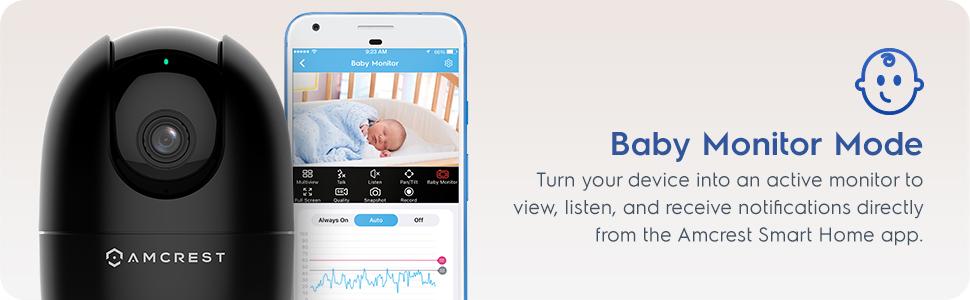
Figure 8: Baby Monitor Mode interface in the Amcrest Smart Home app.
4.5 야간 투시경
The camera provides night vision capability up to 33 feet in absolute darkness, ensuring clear monitoring even in low-light conditions.
4.6 저장 옵션
Recordings can be stored locally on a Class 10 MicroSD card (up to 256GB) or remotely on the Amcrest Smart Home Cloud (1-Year Free Cloud Storage plan included). The camera is also compatible with Amcrest NVRs and third-party software through SDK integration.
5. 유지관리
5.1 청소
To clean the camera lens and body, use a soft, dry cloth. Avoid using harsh chemicals or abrasive cleaners that could damage the device.
5.2 펌웨어 업데이트
Regularly check for and install firmware updates through the Amcrest Smart Home app to ensure optimal performance, security, and access to the latest features.
6. 문제 해결
- 연결 문제: Ensure your camera is connected to a 2.4GHz Wi-Fi network. Verify your Wi-Fi password and router settings.
- 낮은 비디오 품질: 인터넷 연결 속도를 확인하세요. 카메라 렌즈가 깨끗하고 장애물이 없는지 확인하세요. 필요한 경우 앱에서 비디오 화질 설정을 조정하세요.
- 나이트 비전이 작동하지 않음: Confirm that the camera is in a dark environment for night vision to activate. Check app settings for night vision mode.
- 허위 모션 경고: Adjust the sensitivity of motion detection in the app settings. Utilize human detection filtering to reduce alerts from non-human movements.
- Two-Way Audio Feedback: If experiencing feedback during two-way talk, ensure your mobile device is not too close to the camera or reduce the volume.
7. 사양
| 특징 | 사양 |
|---|---|
| 모델 번호 | ASH21-B |
| 비디오 해상도 | 1080P (1920x1080) at 30fps |
| 연결성 | 2.4GHz Wi-Fi, 이더넷 |
| 팬/틸트 범위 | 팬 355 °, 틸트 80 ° |
| View잉 각도 | 93° |
| 나이트 비전 범위 | 최대 33피트 |
| 저장 | MicroSD (up to 256GB), Amcrest Smart Home Cloud, Amcrest NVR |
| 오디오 | 양방향 오디오(내장 마이크 및 스피커) |
| 치수 | 4.17 x 3.04 x 3.04 인치 |
| 무게 | 8.5 온스 |
| 전원 | 유선 전기 (5V DC, 5W) |
| 실내/실외 사용 | 실내에서만 사용 가능 |
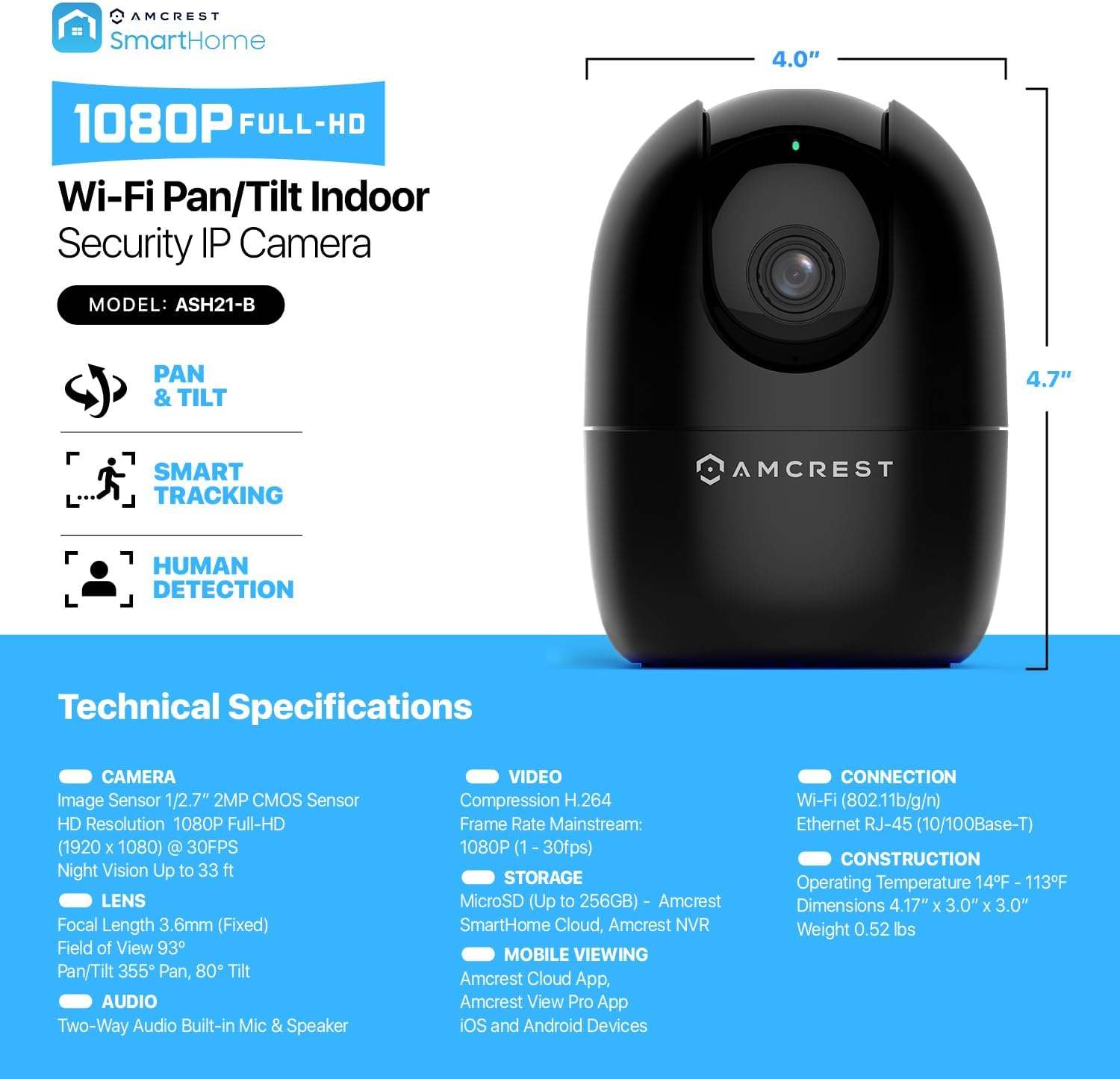
Figure 9: Detailed technical specifications of the Amcrest ASH21-B.
8. 공식 제품 영상
Video 1: Amcrest - Simple. Reliable. Secure. This video highlights the ease of use and reliability of Amcrest security products.
9. 보증 및 지원
The Amcrest ASH21-B camera includes a 1-Year Free SmartHome Cloud Subscription and a 1-Year US Warranty with Lifetime Support provided directly from Amcrest. For technical assistance or warranty claims, please visit the official Amcrest web사이트를 방문하거나 고객 지원팀에 문의하세요.


