1. 서론
The KLIM Light v2 is a high-performance wireless gaming keyboard designed for an optimal typing and gaming experience. Featuring a Spanish ES layout, vibrant RGB backlighting, and a long-lasting rechargeable battery, this keyboard offers instant connectivity and enhanced durability. This manual provides detailed instructions for setting up, operating, maintaining, and troubleshooting your KLIM Light v2 keyboard.
2. 설정
2.1 패키지 내용
- KLIM Light v2 Wireless Gaming Keyboard
- USB 수신기
- USB 충전 케이블
2.2 키보드 연결
- Locate the USB receiver, typically stored in a compartment on the keyboard.
- Plug the USB receiver into an available USB port on your computer, console (PS4/PS5, Xbox), or other compatible device.
- The keyboard will automatically connect. No additional drivers are required for installation.

The KLIM Light v2 Wireless Gaming Keyboard, featuring a Spanish ES layout, is shown with its compact USB receiver, ready for instant plug-and-play connectivity.
2.3 키보드 충전
The KLIM Light v2 keyboard features a built-in rechargeable Lithium Ion battery. To charge:
- Connect the supplied USB charging cable to the keyboard's charging port.
- USB 케이블의 다른 쪽 끝을 전원이 공급되는 USB 포트(예: 컴퓨터, USB 벽면 어댑터)에 꽂으세요.
- The charging indicator light will illuminate. Once fully charged, the light will turn off or change color.
- The keyboard can be used while charging. A full charge typically takes 4-6 hours.

This image illustrates the keyboard's power management features, including adjustable backlighting brightness, an automatic stand-by mode after 120 seconds of inactivity, and its extended battery capacity.
3. 사용 설명서
3.1 백라이트 제어
The KLIM Light v2 features stunning rainbow RGB backlighting. You can adjust the lighting to suit your preference:
- 밝기 조정: Use the dedicated keys (often Fn + arrow keys or specific lighting keys) to cycle through different brightness levels or turn the backlighting off completely.
- 조명 모드: Switch between static and breathing modes using the designated function keys.
- 메모: The colors of the rainbow backlighting are fixed and not customizable.

The keyboard's vibrant rainbow RGB backlighting is displayed, emphasizing its quiet membrane keys and soft-touch typing experience, ideal for use in low-light environments.
3.2 주요 기능
- Membrane Keys: The keyboard utilizes membrane keys with a short travel distance, providing a responsive and quiet typing experience.
- 멀티미디어 키: Access various multimedia functions (e.g., volume control, play/pause) using the Fn key in combination with the corresponding function keys (F1-F12).
- 로우 프로file 설계: 로우 프로file keys contribute to comfortable and efficient typing.
3.3 절전 모드
To conserve battery life, the keyboard features an automatic stand-by mode. After approximately 120 seconds of inactivity, the keyboard will enter a low-power state. Press any key to wake it up instantly.
4. 유지관리
4.1 배터리 관리
- Regularly charge the keyboard to maintain optimal battery performance.
- 배터리를 자주 완전히 방전시키지 마세요. 배터리의 전체 수명이 줄어들 수 있습니다.
- If the keyboard is not used for an extended period, charge it periodically to prevent deep discharge.
4.2 청소
To clean your KLIM Light v2 keyboard:
- Disconnect the keyboard from its power source and turn it off.
- 부드럽고 털이 없는 천을 살짝 사용하세요.amp물 또는 순한 세척액으로 세척하십시오.
- 키캡과 표면을 부드럽게 닦아주세요. 과도한 습기는 피해주세요.
- The keyboard has an IP03 water resistance rating, offering protection against light splashes, but it is not fully waterproof and should not be submerged.

오버view of the KLIM Light v2's key features, including its wireless connectivity, RGB lighting, anti-ghosting technology, 2ms response time, compact design, IP03 water resistance, and long-lasting battery.
5. 문제 해결
5.1 연결 문제
- 키보드가 응답하지 않습니다: USB 수신기가 정상적으로 작동하는 USB 포트에 제대로 꽂혀 있는지 확인하세요. 다른 USB 포트에 연결해 보세요.
- 간헐적 연결: Ensure the keyboard is within the operating range (up to 10 feet) of the USB receiver and there are no significant obstructions.
- 지연 또는 딜레이: Ensure the keyboard is sufficiently charged. Low battery can affect wireless performance.
5.2 충전 문제
- 키보드가 충전되지 않음: Verify the USB charging cable is properly connected to both the keyboard and a powered USB source. Try a different USB cable or port.
- 배터리가 충전되지 않음: If the battery life significantly decreases or the keyboard fails to hold a charge after repeated attempts, contact KLIM customer support.
5.3 키가 반응하지 않음
- 키보드가 완전히 충전되었는지 확인하세요.
- If specific keys are unresponsive, try cleaning around the keycap to remove any debris.
- 문제가 지속되면 추가 지원을 위해 고객 지원팀에 문의하세요.
5.4 일반 지원
For any issues not covered in this section, please refer to the KLIM customer support resources mentioned in the Warranty and Support section.
6. 사양
| 특징 | 사양 |
|---|---|
| 제품 치수 | 17.13 x 5.47 x 1.14 인치 |
| 품목 무게 | 1.19파운드 |
| 제조업체 | 클림 |
| 품목 모델 번호 | k69es |
| 배터리 | 1개의 리튬 이온 배터리 필요(포함) |
| 상표 | 클림 |
| 호환 장치 | Laptop, Mac, PC, PS4/PS5, Xbox |
| 연결 기술 | 무선 전화 |
| 키보드 설명 | Spanish ES Layout |
| 제품의 권장 용도 | 책상 |
| 특징 | Travel, Water-resistant (IP03) |
| 색상 | 검은색 |
| 키보드 백라이트 색상 지원 | RGB (Rainbow) |
| 포함된 구성 요소 | USB 케이블 |
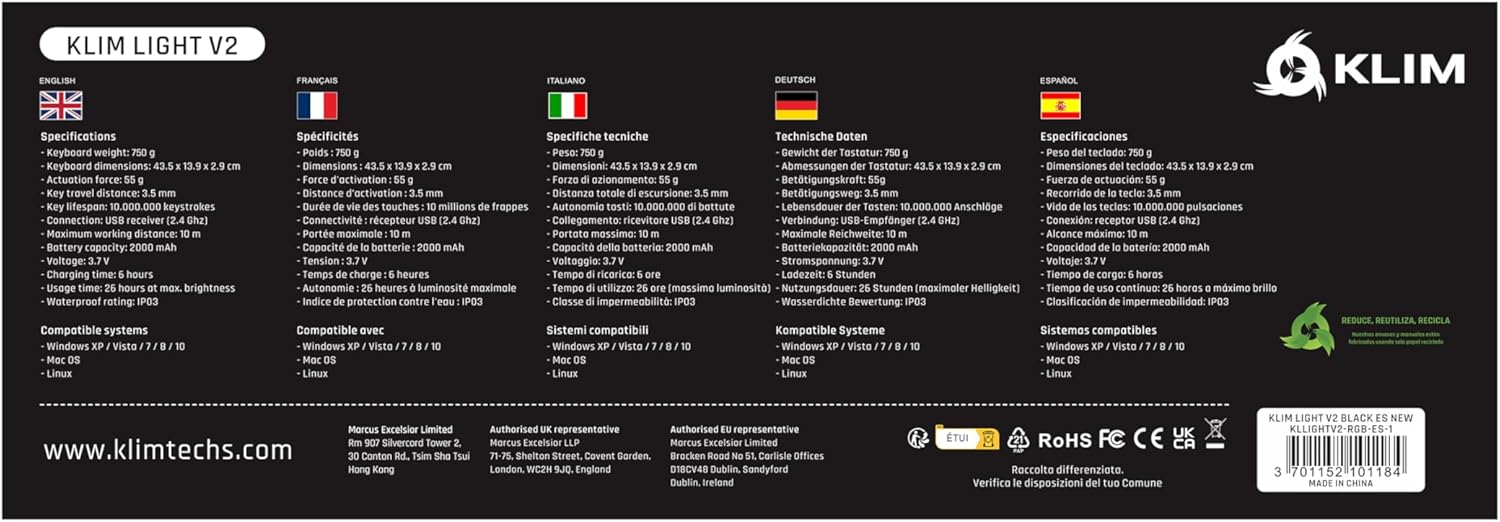
A comprehensive table detailing the technical specifications of the KLIM Light v2 keyboard, presented in multiple languages, covering aspects such as weight, dimensions, battery type, and system compatibility.
7. 보증 및 고객 지원
KLIM stands behind the quality of its products. The KLIM Light v2 Wireless Gaming Keyboard comes with an unbeatable 5년 보증.
If you encounter any issues or have questions regarding your product, KLIM provides 24시간 연중무휴 고객 지원. Please visit the official KLIM website or contact their support team directly for assistance.

KLIM's commitment to quality and customer satisfaction is underscored by its 5-year product protection, ensuring long-term reliability for your keyboard.


