1. 서론
Thank you for choosing the ATUMTEK ATMS034 Dual Monitor Arm. This product is designed to enhance your workspace ergonomics and free up valuable desk space by securely mounting two computer monitors. This manual provides detailed instructions for proper installation, operation, and maintenance to ensure safe and efficient use of your monitor arm.
The ATMS034 is compatible with most LCD monitors ranging from 13 to 27 inches, supporting VESA mounting patterns of 75x75mm and 100x100mm, with a weight capacity of up to 17.6 lbs (8 kg) per arm.
2. 안전 정보
- 설치 및 사용 전에 모든 지침을 주의 깊게 읽으십시오.
- 책상 표면이 모니터 암과 두 모니터의 총 무게를 견딜 수 있을 만큼 튼튼한지 확인하십시오.
- 팔당 최대 하중 8kg(17.6lbs)을 초과하지 마십시오.
- Ensure all screws are securely tightened during installation to prevent accidental detachment.
- 어린이와 애완동물이 설치 장소에 접근하지 못하도록 하세요.
- If you encounter any difficulties during installation, consult a qualified professional.
3. 패키지 내용
설치를 시작하기 전에 모든 구성 요소가 있는지 확인하세요.
- Monitor Arm Assembly (Main Pole, Horizontal Arm with VESA plates)
- C-Clamp 베이스
- 그로밋 베이스 구성 요소
- VESA Screws (M4x12, M4x30, M5x12, M5x30)
- 와셔 및 스페이서
- 육각 렌치 (다양한 크기)
- 케이블 클립
- 사용 설명서
4. 설정 및 설치
The ATUMTEK ATMS034 offers two mounting options: C-Clamp and Grommet. Choose the method best suited for your desk.
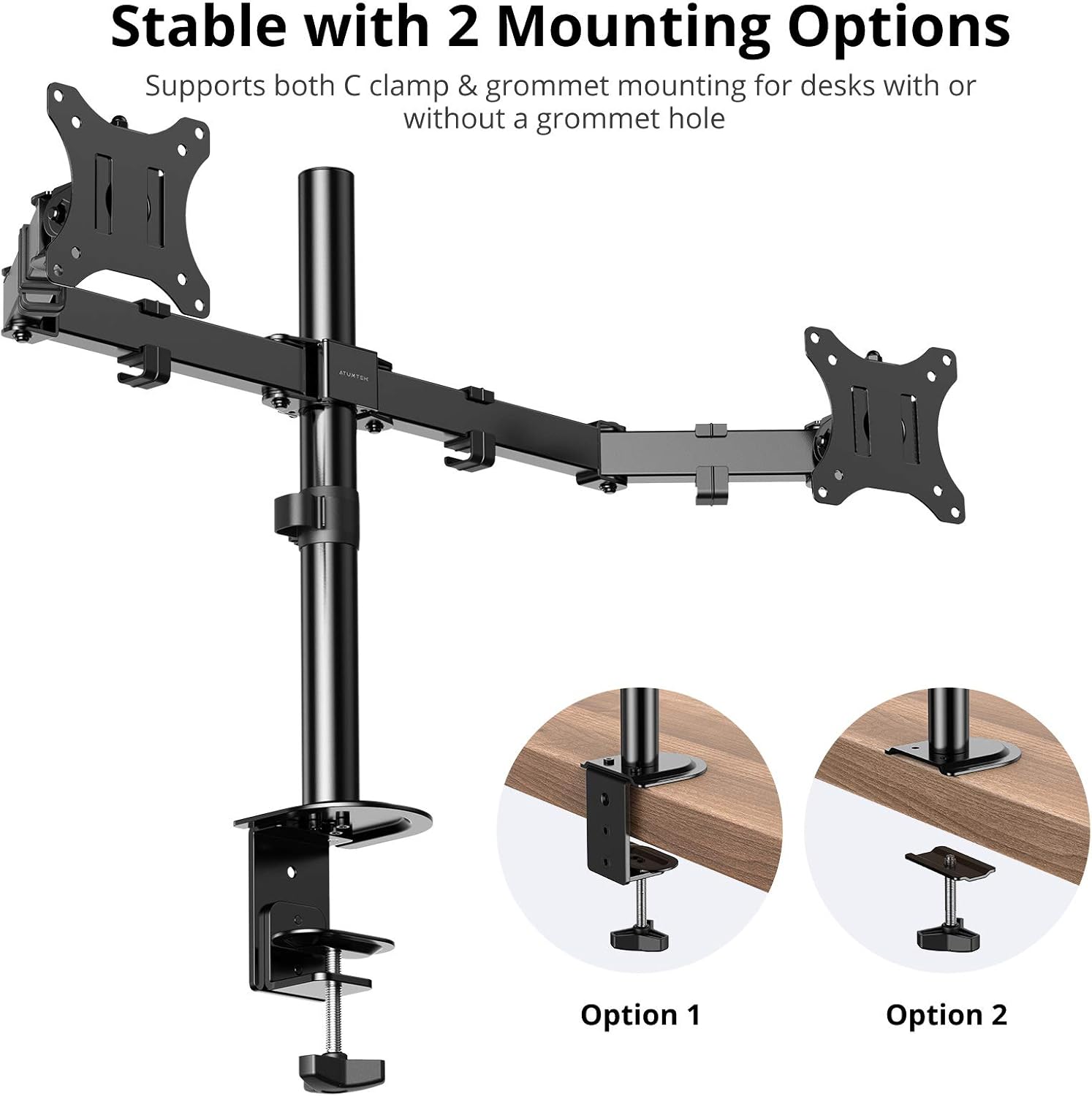
Image: The ATUMTEK ATMS034 Dual Monitor Arm illustrating both C-clamp and grommet mounting methods for desk attachment.
4.1. C-Clamp 설치
- C-cl을 부착하세요amp 기둥의 밑부분에서 바닥까지.
- Position the main pole assembly at the desired location on your desk.
- C-cl을 조입니다amp screw until the mount is securely fastened to the desk. Ensure the desk thickness does not exceed 2.4 inches (6 cm).
- Slide the horizontal arm onto the main pole and secure it at the desired height using the provided hex key.
4.2. 그로밋 설치
- 책상에 케이블 구멍이 있다면 케이블 덮개를 제거하세요.
- Assemble the grommet base components according to the diagram in the included quick start guide.
- Insert the main pole through the grommet hole and secure the base from underneath the desk using the provided plate and screw.
- Slide the horizontal arm onto the main pole and secure it at the desired height using the provided hex key.
4.3. 모니터 연결
- Carefully attach the VESA plates to the back of your monitors using the appropriate VESA screws (75x75mm or 100x100mm). Use washers and spacers if necessary to ensure a secure fit without overtightening.
- Slide the monitors (with VESA plates attached) onto the ends of the horizontal arms. Ensure they click into place or are secured with the locking mechanism.
- Adjust the tension of the arm joints using the hex keys to support the weight of your monitors. This will prevent sagging or unwanted movement.
5. 운영 및 조정
The ATUMTEK ATMS034 offers extensive adjustability for optimal view편안함을.

Image: The ATUMTEK ATMS034 Dual Monitor Arm demonstrating its full range of motion, including tilt, swivel, and 360-degree rotation.
5.1. Tilt, Swivel, and Rotation
- 경사: Monitors can be tilted from -35° to +90° to reduce glare and find the perfect vertical angle.
- 받침: Each monitor arm can swivel from -90° to +90°, allowing you to share your screen or adjust viewing angles horizontally.
- 회전: Monitors can be rotated a full 360°, enabling quick switching between landscape and portrait orientations.

Image: Two monitors mounted on the ATUMTEK ATMS034, one in portrait mode (90° rotation) and the other in landscape mode (180° rotation), illustrating ergonomic view유연성.
5.2. 높이 조절
The horizontal arm can be adjusted vertically along the main pole to achieve the desired monitor height. Loosen the securing screw on the main pole, slide the arm to the new position, and retighten the screw firmly.
6. 케이블 관리
The ATMS034 features integrated cable clips along the arms and main pole to keep your workspace tidy and organized.

Image: A monitor mounted on the ATUMTEK ATMS034, demonstrating how cables are neatly routed through the integrated cable clips on the arm, contributing to a clean desk setup.
Route your monitor power and video cables through these clips to prevent clutter and ensure a clean aesthetic. The clips are detachable for easy cable insertion and removal.
7. 사양
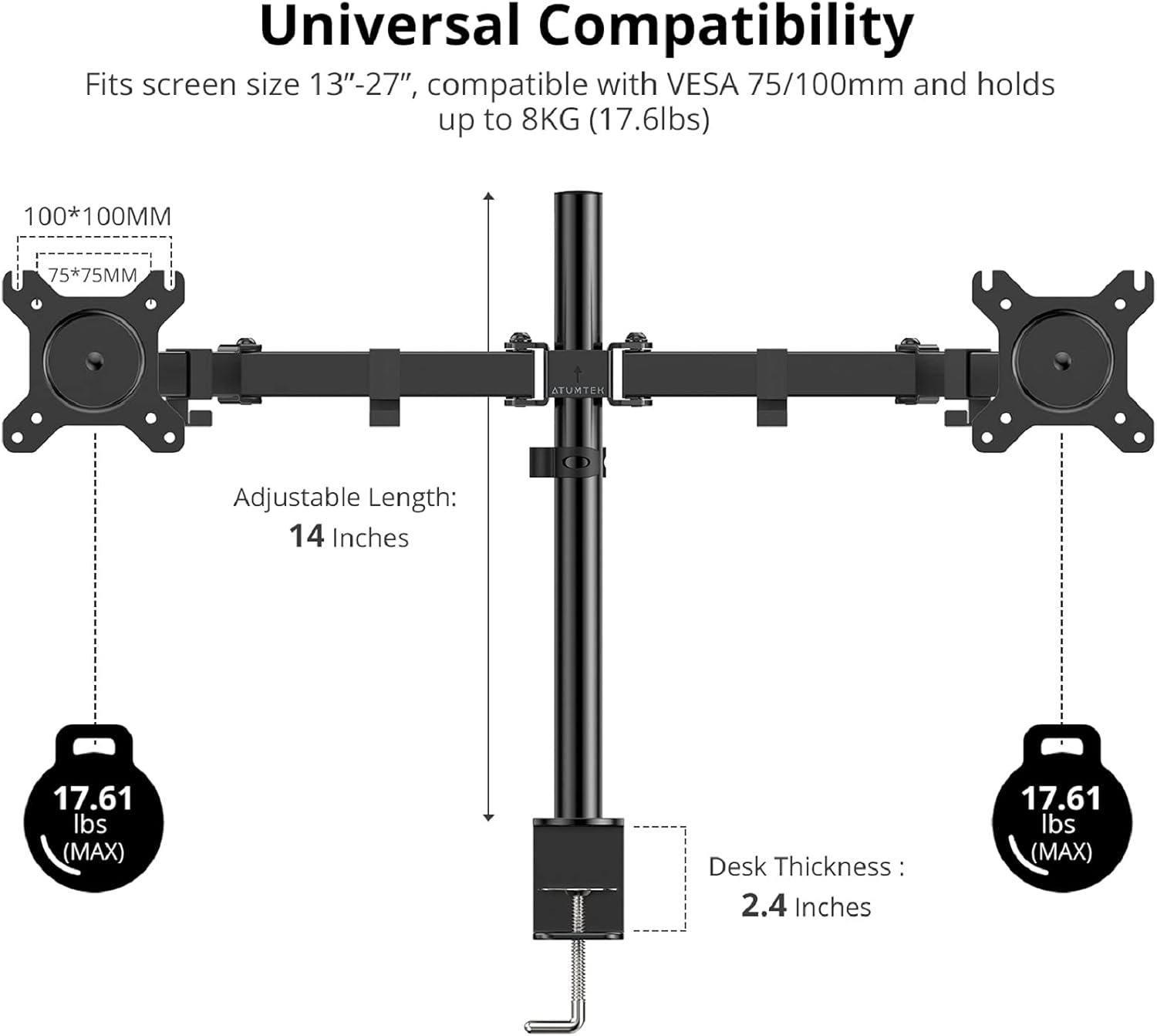
Image: A diagram illustrating the universal compatibility of the ATUMTEK ATMS034 Dual Monitor Arm, showing supported screen sizes (13-27 inches), VESA patterns (75x75mm, 100x100mm), weight capacity (17.6 lbs per arm), adjustable length (14 inches), and maximum desk thickness (2.4 inches).
| 특징 | 사양 |
|---|---|
| 모델 | ATMS034 |
| 호환 모니터 크기 | 13" - 27" (33-69 cm) |
| 팔당 하중 용량 | 최대 17.6kg(8파운드) |
| VESA 호환성 | 75x75mm, 100x100mm |
| 기울기 범위 | -35° ~ +90° |
| 스위블 범위 | -90° ~ +90° |
| 회전 범위 | 360° |
| 높이 조절 범위 | 14 inches (along main pole) |
| 최대 책상 두께 | 2.4인치(6cm) |
| 장착 옵션 | C-Clamp 또는 그로밋 |
| 재료 | 금속 |
| 제품 치수 | 54 x 23 x 8cm (포장) |
| 품목 무게 | 3.27kg |
8. 문제 해결
- 모니터가 처지거나 제자리에 고정되지 않습니다. Ensure the tension screws on the arm joints are tightened sufficiently for the weight of your monitors. Use the provided hex keys to adjust.
- 산이 불안정하다고 느껴집니다: Double-check that the C-clamp or grommet base is securely tightened to the desk. Ensure the desk surface is flat and sturdy.
- Difficulty attaching VESA plate: Verify that you are using the correct VESA screw size (M4 or M5) and length for your monitor. Use spacers if the monitor's back is uneven.
- Arm does not move smoothly: Check for any obstructions. If the arm feels too stiff or too loose, adjust the tension screws on the joints.
9. 관리 및 유지 보수
- 모든 나사와 연결부를 정기적으로 점검하여 단단히 고정되어 있는지 확인하세요.
- 모니터 암을 부드러운 천으로 닦으세요.amp 천으로 닦으세요. 연마성 세제나 용제는 사용하지 마세요.
- Do not apply excessive force when adjusting the arms; use the tension adjustments as needed.
10. 보증 및 고객 지원
ATUMTEK stands behind the quality of its products. The ATMS034 Dual Monitor Arm comes with a 10 Years Product Quality Guarantee. If you encounter any issues or have questions regarding your product, please do not hesitate to contact our friendly customer service team. We are committed to providing excellent support and ensuring your satisfaction.
For assistance, please refer to the contact information provided on the ATUMTEK official web사이트 또는 구매 문서.


