1. 서론
Welcome to the user manual for your Nokia 216 Dual SIM mobile phone. This guide provides essential information to help you set up, operate, and maintain your device. The Nokia 216 (RM-1187) is a classic feature phone designed for reliable communication, featuring dual SIM capability, a 2.4-inch display, and a VGA camera.
Please read this manual carefully to ensure proper use and to get the most out of your phone.
2. 패키지 내용
제품 패키지에 모든 품목이 들어 있는지 확인하세요.
- Nokia 216 Dual SIM Mobile Phone (RM-1187)
- 배터리
- 전원 어댑터
- USB 케이블
3. 디바이스 오버view
Familiarize yourself with the key components of your Nokia 216 phone.
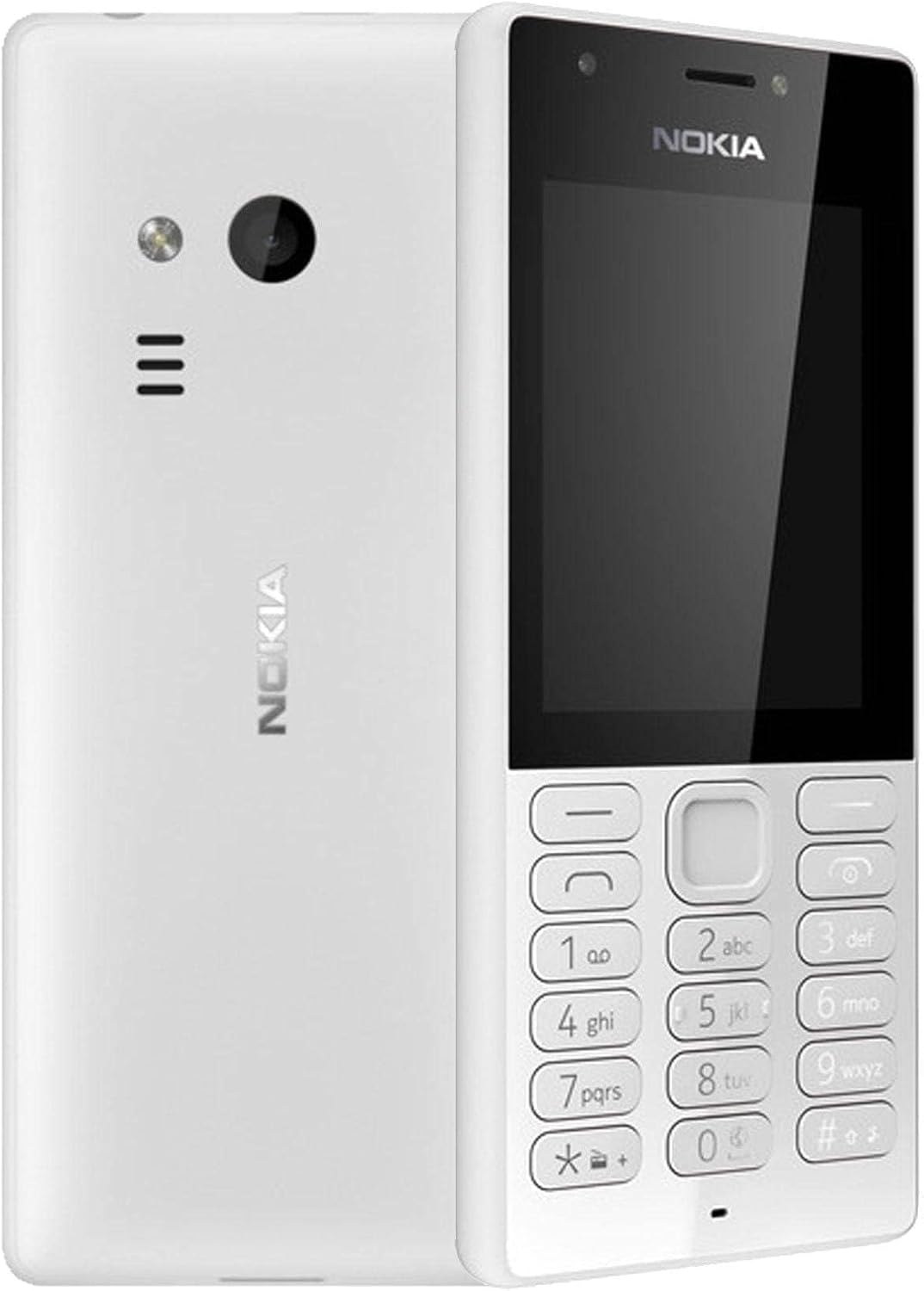
그림 3.1: 앞면과 뒷면 view of the Nokia 216 Dual SIM mobile phone. The front shows the display, earpiece, and numeric keypad. The back features the rear camera, LED flash, and loudspeaker grille.

그림 3.2: 앞쪽 view of the Nokia 216 Dual SIM mobile phone. This image highlights the 2.4-inch display, the navigation keys, and the alphanumeric keypad for dialing and text input.

그림 3.3: 뒤쪽에 view of the Nokia 216 Dual SIM mobile phone. This view shows the rear VGA camera lens, the LED flash, and the Nokia branding.
주요 구성 요소:
- 표시하다: 2.4-inch QVGA screen.
- 키패드 : Alphanumeric keypad for dialing and text entry, with navigation keys.
- 후방 카메라: VGA camera with LED flash.
- 라우드 스피커 : For audio playback and hands-free calls.
- 마이크로폰: 통화 및 녹음 중 음성 입력을 위해 사용됩니다.
- 3.5mm 오디오 잭: 헤드폰이나 외부 스피커용.
- 충전 포트: 충전 및 데이터 전송용 마이크로 USB 포트.
4. 설정
4.1. SIM 카드 삽입
- Turn off the phone and disconnect any charger.
- Carefully remove the back cover by prying it open from the notch.
- 배터리가 들어 있으면 들어 올립니다.
- Insert the SIM card(s) into the designated slot(s) with the gold contacts facing down. For dual SIM models, ensure both SIMs are correctly seated.
- If applicable, insert a microSD card into its slot for additional storage.
- 배터리를 교체하세요.
- 뒷면 덮개를 제자리에 맞춰 딸깍 소리가 날 때까지 세게 눌러주세요.
4.2. 배터리 충전
- 전원 어댑터를 벽면 콘센트에 연결합니다.
- Plug the micro-USB end of the cable into the phone's charging port.
- 화면의 배터리 표시등은 충전 상태를 보여줍니다.
- 충전이 완료되면 충전기를 휴대폰에서 분리한 다음 벽면 콘센트에서도 분리하십시오.
5. 사용 설명서
5.1. 전원 켜기/끄기
- 전원을 켜려면: 휴대전화가 진동하고 노키아 로고가 나타날 때까지 전원 버튼(일반적으로 빨간색 '통화 종료' 버튼)을 길게 누르세요.
- 전원을 끄려면: 화면에 '전원 끄기' 옵션이 나타날 때까지 전원 버튼을 길게 누른 다음 해당 옵션을 선택하세요.
5.2. 전화 걸기
- 홈 화면에서 숫자 키패드를 사용하여 전화번호를 입력하세요.
- 통화를 시작하려면 초록색 '통화' 버튼을 누르세요.
- 통화를 종료하려면 빨간색 '통화 종료' 버튼을 누르세요.
5.3. 문자 메시지(SMS) 보내기
- 이동하다 메뉴 > 메시지 > 메시지 작성.
- 키패드를 사용하여 메시지를 입력합니다.
- 수신자의 전화번호를 입력하거나 연락처에서 선택하세요.
- 선택하다 보내다.
5.4. 카메라 사용
- 이동하다 메뉴 > 카메라.
- 화면을 이용해 구도를 잡으세요.
- 사진을 찍으려면 가운데 내비게이션 키를 누르세요.
6. 유지관리 및 관리
To ensure the longevity and optimal performance of your Nokia 216, follow these care guidelines:
- Keep the device dry: Moisture can damage electronic circuits.
- Use original accessories: Only use batteries, chargers, and accessories approved by Nokia.
- 부드럽게 청소하세요: Use a soft, clean, dry cloth to clean the surface of the device.
- 극한의 온도를 피하세요: Do not expose your device to very high or low temperatures.
- 조심해서 다루세요: 장치를 떨어뜨리거나 강한 충격을 가하지 마십시오.
7. 문제 해결
If you encounter issues with your Nokia 216, try these common troubleshooting steps:
| 문제 | 해결책 |
|---|---|
| 전화가 켜지지 않습니다 | 배터리가 충전되어 있는지 확인하십시오. 충전기를 연결하고 다시 시도하십시오. 배터리가 제대로 삽입되었는지 확인하십시오. |
| 네트워크 신호 없음 | Check if the SIM card is correctly inserted. Move to an area with better network coverage. Restart the phone. |
| 배터리가 충전되지 않음 | Ensure the charger is properly connected to both the phone and the power outlet. Try a different power outlet or charger. Check for any damage to the charging port. |
| 전화를 걸거나 받을 수 없습니다 | Check network signal. Ensure your SIM card is active and has sufficient credit/plan. Verify that call barring is not enabled. |
8. 사양
| 특징 | 세부 사항 |
|---|---|
| 상표 | 노키아 |
| 모델명 | RM-1187 |
| 운영 체제 | Symbian 9.1 (Series 30) |
| 화면 크기 | 2.4인치 |
| 화면 해상도 | 240 x 320 픽셀 |
| 새로 고침 빈도 | 90Hz |
| 설치된 RAM 크기 | 256메가바이트 |
| 메모리 저장 용량 | 3.9 GB (Internal, likely for system/apps, expandable via microSD) |
| CPU 모델 | A10 |
| 셀룰러 기술 | 2G |
| 무선 통신 기술 | 셀룰러 |
| 연결 기술 | USB, 블루투스, Wi-Fi |
| GPS | A-GPS |
| Primary Device User Interface | Buttons, Numeric Keypad, Microphone |
| 기타 카메라 기능 | Rear Camera (VGA) |
| 오디오 잭 | 3.5mm (XNUMXmm) |
| 폼 팩터 | 권위 있는 |
| 색상 | 회색 |
| 통화 시간 | 최대 18시간 |
| 품목 무게 | 339그램 |
| 패키지 크기 | 13.4 x 12.6 x 3.6cm |
| 상자 안에 무엇이 들어있나요? | 전원 어댑터, USB 케이블 |
9. 보증 및 지원
보증 관련 정보는 제품 패키지에 포함된 보증 카드를 참조하거나 노키아 공식 웹사이트를 방문하십시오. website. If you require further assistance or technical support, please contact Nokia customer service through their official channels.
보증 청구를 위해 구매 증빙서류로 구매 영수증을 보관하세요.


