1. 이상view
The Belkin BoostCharge USB-C to USB-C Fast Charging Cable is designed for efficient power delivery and data transfer between compatible USB-C devices. This 6.6ft (2M) cable supports fast charging up to 60W and data transfer speeds up to 480 Mbps, ensuring reliable performance for a wide range of electronics.
2. 제품 특징
- 보편적 인 호환성 : Connects with a broad range of USB-C devices, including iPhone 17/16 Series, Samsung Galaxy S25/S24, Google Pixel 9, Nintendo Switch 2, iPad Pro, MacBook Pro, and more. Supports Apple Carplay and Android Auto.
- 빠른 충전: Delivers up to 60W Power Delivery, enabling fast charging of compatible USB-C smartphones from 0-50% in approximately 35 minutes when paired with an 18W or higher USB-C PD charger (not included).
- 뛰어난 내구성: Engineered with a durable braided material, tested to withstand over 8,000 bends and 10,000 plugs, offering enhanced longevity compared to standard cables.
- 데이터 전송: Supports data transfer speeds up to 480 Mbps (USB 2.0 standard) for syncing music, photos, and other data.
- USB-IF 인증: Ensures adherence to strict electrical, mechanical, and environmental standards for a safe and reliable user experience.
Image: Illustration of 60W fast charging capability.
Image: USB-IF certification for 60W power delivery.
Image: Durability testing results for bends and plugs.
3. 패키지 내용
패키지에는 다음이 포함됩니다.
- 1 x Belkin USB-C to USB-C Cable (2M/6.6ft)
4. 설정
To set up your Belkin BoostCharge USB-C to USB-C cable:
- Ensure your charging adapter and device are compatible with USB-C and support the desired power delivery (e.g., 60W for fast charging).
- Connect one end of the Belkin USB-C cable to the USB-C port on your power adapter.
- Connect the other end of the Belkin USB-C cable to the USB-C port on your device (e.g., smartphone, tablet, laptop).
- 전원 어댑터를 벽면 콘센트에 꽂으세요.

Image: A Belkin USB-C to USB-C cable connected to a device.
5. 사용 설명서
5.1 장치 충전
Once connected as described in the Setup section, your device should begin charging automatically. The cable supports fast charging for devices that are compatible with USB Power Delivery (PD) and are paired with an appropriate power adapter.
5.2 데이터 전송
To transfer data between two USB-C compatible devices (e.g., a smartphone and a laptop):
- Connect one end of the Belkin USB-C cable to the USB-C port on the source device.
- Connect the other end of the Belkin USB-C cable to the USB-C port on the destination device.
- Follow the on-screen prompts on your devices to initiate data transfer. The cable supports USB 2.0 data transfer speeds up to 480 Mbps.
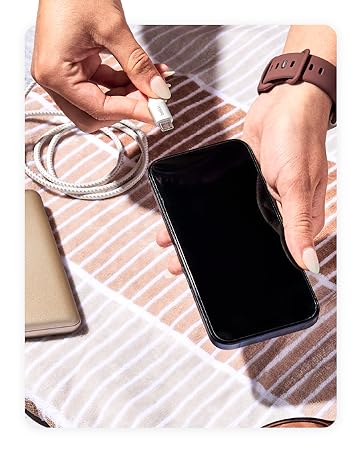
Image: Wide compatibility with various USB-C devices.
6. 유지관리
To ensure the longevity and optimal performance of your Belkin BoostCharge USB-C to USB-C cable:
- 저장: 케이블은 직사광선과 극한 온도 변화를 피해 서늘하고 건조한 곳에 보관하십시오. 내부 손상을 방지하기 위해 케이블을 너무 세게 감거나 급격한 각도로 구부리지 마십시오.
- 청소: 부드럽고 마른 천을 사용하여 케이블과 커넥터를 부드럽게 닦으세요. 액체 세척제나 연마재를 사용하지 마세요.
- 손질: 케이블을 연결하거나 분리할 때는 케이블 자체를 잡아당기지 말고 항상 커넥터 헤드를 잡으십시오.
- 점검: 케이블에 마모, 닳음 또는 커넥터 손상 흔적이 있는지 주기적으로 점검하십시오. 손상이 발견되면 사용을 중단하십시오.
7. 문제 해결
7.1 기기가 충전되지 않음
- 연결 확인: 케이블의 양쪽 끝이 기기와 전원 어댑터에 제대로 연결되어 있는지 확인하십시오.
- 전원: Verify that the power adapter is plugged into a working wall outlet. Try a different outlet if necessary.
- 어댑터 호환성: Confirm that your power adapter provides sufficient wattage for your device and supports USB Power Delivery (PD) for fast charging.
- 케이블 상태: Inspect the cable for any visible damage. A damaged cable may not function correctly.
- 장치 문제: Test the cable with another compatible device or try a different cable with your device to isolate the problem.
7.2 충전 속도가 느림
- 전원 어댑터: Ensure you are using an 18W or higher USB-C PD charger for optimal fast charging speeds.
- 장치 지원: Confirm that your device supports fast charging via USB-C PD.
- 백그라운드 앱: 기기의 백그라운드에서 실행 중인 전력 소모가 큰 애플리케이션을 모두 닫으세요.
- 케이블 길이: While this cable is 2M, longer cables can sometimes result in slightly slower charging. Ensure the cable is not excessively long for your needs.
7.3 데이터 전송 문제
- 연결: Re-seat both ends of the cable to ensure a stable connection.
- 기기 설정: Check your device's settings to ensure data transfer is enabled (e.g., USB preferences on Android devices).
- 드라이버 문제: Ensure necessary drivers are installed on your computer for the connected device.
8. 사양
| 특징 | 설명 |
|---|---|
| 모델명 | BoostCharge USB-C to USB-C Cable |
| 모델 번호 | CAB003bt2M |
| 케이블 길이 | 2M(6.6피트) |
| 커넥터 유형 | USB 타입 C (수-수) |
| 전력 공급 | 최대 60W |
| 데이터 전송 속도 | 최대 480Mbps(USB 2.0) |
| 내구성 | Tested to 8,000+ bends, 10,000+ plugs |
| 인증 | USB-IF 인증 |
| 색상 | 검은색 |
| 재료 | Durable braided material |
| 제품 치수 | 1 x 4 x 5.21 인치 |
| 품목 무게 | 0.07킬로그램(2.39온스) |
Image: Internal engineering for safety and performance.
9. 보증 및 지원
벨킨은 제공합니다 2년 보장 for this BoostCharge USB-C to USB-C cable. For technical support, warranty claims, or further assistance, please visit the official Belkin support web사이트를 방문하거나 고객 서비스에 문의하세요.

Image: Belkin 2-Year Coverage and quality assurance.
10. 공식 제품 영상
Video: Belkin Brand Overview. 이 영상은 일반적인 내용을 제공합니다.view of the Belkin brand and its commitment to quality and innovation.


