1. 서론
The ANCEL FX1000 is a professional vehicle diagnostic tool designed to read and clear trouble codes, view live data, and perform various special functions for a single-car manufacturer. It supports full OBD service modes and is compatible with vehicles manufactured from 1996 onwards. This manual provides detailed instructions for setting up and operating your device.
2. 제품 특징
- Full OBDII Service Modes: Supports 8 OBDII service modes for comprehensive diagnostics.
- Multi-System Diagnostics: Capable of diagnosing all major vehicle systems including Engine, Transmission, SRS (Supplemental Restraint System), SAS (Steering Angle Sensor), TPMS (Tire Pressure Monitoring System), ABS (Anti-lock Braking System), and more.
- 특수 기능: Includes advanced functions such as DPF (Diesel Particulate Filter) Regeneration, Battery Replacement, ABS Bleeding, Oil Service Reset, EPB (Electronic Parking Brake) Reset, and Throttle Position Adaption.
- 다국어 지원: Supports 7 languages: English, French, Spanish, German, Russian, Polish, and Portuguese.
- Manufacturer-Specific Tool: Designed for a single-car manufacturer, allowing in-depth diagnostics for a specific brand's vehicle series.
- 평생 무료 온라인 업데이트: 기기에 항상 최신 소프트웨어와 차량 지원 기능이 적용되도록 보장합니다.
3. 패키지 내용
Your ANCEL FX1000 package should include the following items:
- ANCEL FX1000 Diagnostic Tool
- OBDII 연결 케이블
- Micro USB Cable (for PC connection and updates)
- 가이드 다운로드
- 하드 쉘 휴대용 케이스
4. 장치 레이아웃
Familiarize yourself with the buttons and ports on your ANCEL FX1000 device for optimal operation.

Image: ANCEL FX1000 device showing LCD display, Return button, Scroll Left/Right/Up/Down buttons, Fn button, and Ok button. Dimensions are also indicated.
- LCD 디스플레이: Shows diagnostic information and menu options.
- 반환 버튼: 이전 화면이나 메뉴로 돌아갑니다.
- Scroll Buttons (Up/Down/Left/Right): 메뉴를 탐색하고 옵션을 선택하는 데 사용됩니다.
- Fn 버튼: Function button, may have context-specific uses.
- 확인 버튼: 선택 사항을 확인하거나 하위 메뉴로 들어갑니다.
- OBDII 커넥터: 기기를 차량의 OBDII 포트에 연결합니다.
- USB 포트: For connecting to a computer for software updates.
5. 설정 및 연결
Follow these steps to connect your ANCEL FX1000 to your vehicle:
- 차량의 OBDII 포트를 찾으십시오. 일반적으로 운전석 쪽 대시보드 아래에 있습니다.
- Ensure the vehicle's ignition is ON, but the engine is NOT running. For push-button start vehicles, press the start button until all dashboard lights illuminate without starting the engine.
- Plug the OBDII connector from the ANCEL FX1000 into your vehicle's OBDII port. The device will power on automatically.
- Once powered on, the device is ready for use.
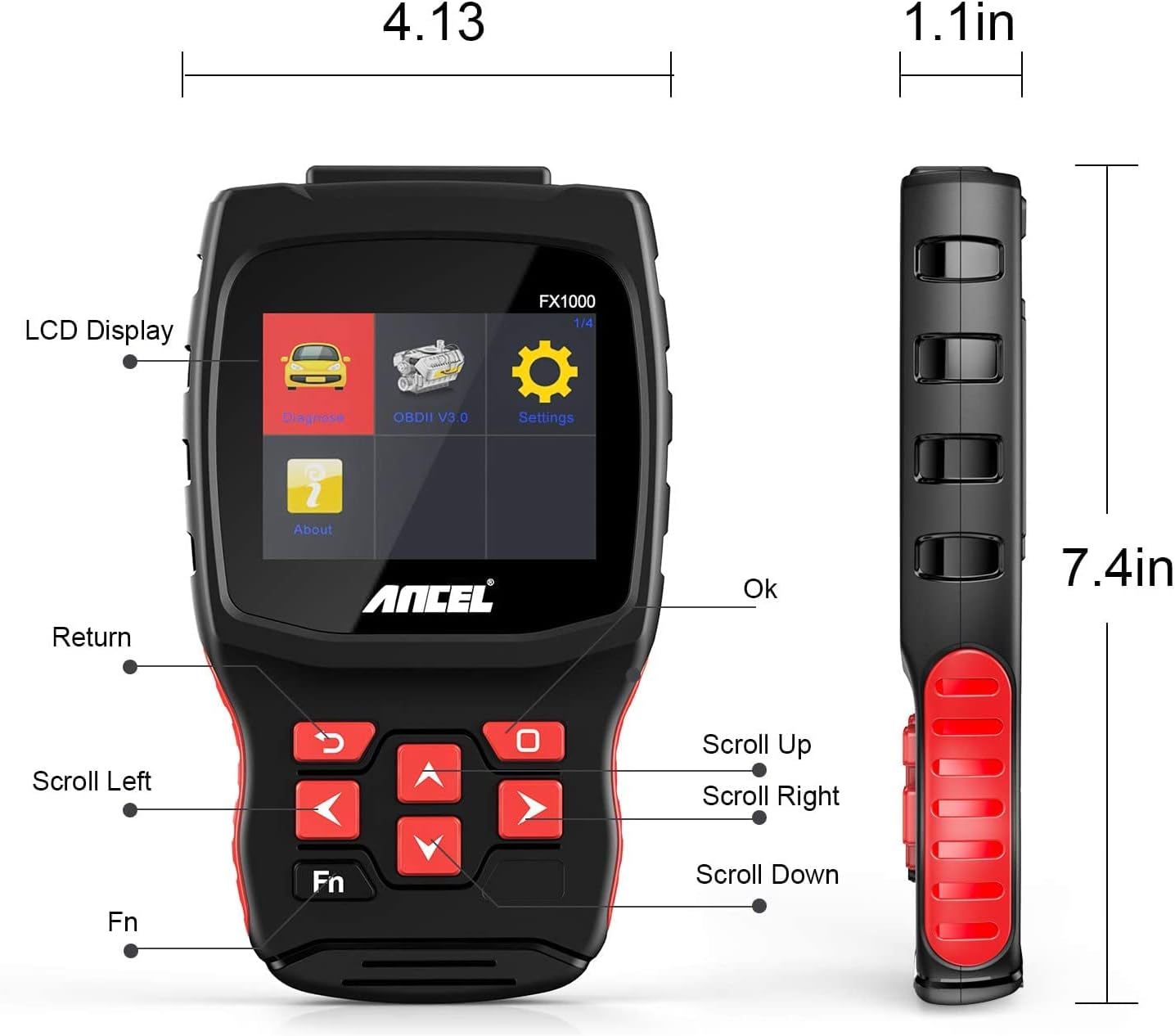
Image: A hand holding the ANCEL FX1000 connected to a vehicle's OBDII port, with the car's dashboard visible.
6. 탐색 및 설정
The ANCEL FX1000 features a user-friendly interface. Use the arrow buttons to navigate and the OK button to select.
- 진단: Access vehicle-specific diagnostic functions.
- OBDII V3.0: Access general OBDII functions for all compatible vehicles.
- 설정: 기기 설정을 구성하세요.
- 에 대한: View device information such as serial number, firmware version, and software version.
설정 메뉴 옵션:
- 언어: 표시 언어를 변경합니다.
- 단위: 온도를 읽을 때 섭씨와 화씨를 전환해 보세요.
- 삑 하는 소리: 청각적 피드백을 활성화 또는 비활성화합니다.
- 기록: View recorded diagnostic data.
- 버튼 테스트: Test the functionality of the device buttons.
- LCD Test: Test the LCD display.
7. 시스템 진단
The ANCEL FX1000 allows you to perform in-depth diagnostics on various vehicle systems. After selecting 'Diagnose' and your vehicle's manufacturer (e.g., Toyota), you can choose specific systems.
Image: Visual representation of systems diagnosed by FX1000, including Engine, ABS, TPMS, Transmission, Oil Service, Airbag, Battery, Audio, and Headlight Activate.
진단 기능:
- Read Trouble Code: Retrieves current, pending, and history Diagnostic Trouble Codes (DTCs).
- Clear Trouble Code: Erases DTCs from the vehicle's computer.
- 데이터 스트림 읽기: 차량 센서에서 수집된 실시간 데이터 매개변수를 표시합니다.
- 활성 테스트: Allows bidirectional control to test specific components.
- 특수 기능 : Accesses advanced maintenance and service functions.
8. 특수 기능
The ANCEL FX1000 offers several special functions for vehicle maintenance:

Image: Visual representation of special functions including Oil Service Reset, ABS Bleeding, TPMS Reset, and EPB Reset.
- 오일 서비스 재설정: 오일 교환 후 오일 서비스 표시등을 재설정합니다.
- ABS 출혈: ABS(잠금 방지 제동 시스템)의 공기 빼기 작업을 수행합니다.
- EPB 재설정: Resets the Electronic Parking Brake system.
- 스로틀 위치 적응: 스로틀 위치 센서를 조정합니다.
- DPF 재생: 디젤 미립자 필터(DPF)의 재생 과정을 시작합니다.
- 배터리 교체: 새로운 배터리 교체를 등록합니다.
9. OBDII Functions (General)
The 'OBDII V3.0' menu provides general diagnostic functions compatible with all OBDII-compliant vehicles (1996 and newer).
- Read Current Trouble Code: Displays active DTCs.
- Clear Trouble Code: Erases all stored DTCs.
- Read Current Data: View 실시간 센서 데이터.
- Read Pending Trouble Code: Displays DTCs that have not yet fully matured.
- 정지 화면 데이터 읽기: Shows a snapshot of vehicle conditions when a DTC was set.
- Readiness Tests: 배출 관련 모니터의 상태를 확인합니다.
Readiness Test:
The Readiness Test is crucial for emissions inspections. It indicates whether various emission control systems have completed their self-tests. Look for 'Complete' or 'Supported' status for all monitors. If a monitor shows 'Not Complete' or 'Not Supported', it may indicate an issue or that the drive cycle has not been completed.
10. Clearing Trouble Codes
To clear trouble codes, navigate to the 'Clear Trouble Code' option within the relevant diagnostic menu. The device will prompt you to confirm. After clearing, it is recommended to cycle the vehicle's ignition off and on to ensure all related warning lights are reset.
Note: The ANCEL FX1000 can only read and clear SRS error codes; it does NOT support SRS reset functions.
11. 소프트웨어 업데이트
To ensure your ANCEL FX1000 has the latest vehicle coverage and features, regular software updates are recommended. The device offers lifetime free online updates.
- Connect the device to your computer using the provided Micro USB cable.
- Follow the instructions in the 'Download Guide' included in your package to install the update software on your computer.
- Register your device using the serial number and your email address.
- Select the specific car manufacturer software you need for your device.
- Perform the update as prompted by the software.

Image: ANCEL FX1000 connected via USB cable to a laptop, illustrating the update process.
12. 문제 해결
If you encounter issues while using your ANCEL FX1000, refer to the following common scenarios:
-
관련 문서 - FX1000

ANCEL VD500 사용 설명서: OBD2 진단 도구 가이드
ANCEL VD500 OBD2 진단 스캐너의 종합 사용 설명서입니다. 자동차 진단 도구의 안전 주의사항, 기능, 작동법, 사양 및 보증 정보를 알아보세요.
ANCEL VOD700 사용 설명서 - 볼보 멀티 시스템 스캐너
ANCEL VOD700 멀티 시스템 스캐너에 대한 포괄적인 사용 설명서로, 진단, 특수 기능, 도구 설정 및 업데이트를 포함하여 볼보 차량에 대한 자세한 지침을 제공합니다.
ANCEL DS160, DS100, DS200 사용자 설명서 - 자동차 진단 도구
ANCEL DS160, DS100, DS200 자동차 진단 도구 사용 설명서입니다. 이 OBD2 스캐너의 기능, 매개변수, 사용법, 작동 방식, FAQ 및 보증 정보를 다룹니다.
ANCEL BD300 OBD2 스캐너 사용 설명서
ANCEL BD300 OBD2 스캐너의 종합 사용자 설명서입니다. ANCEL 앱 다운로드, 블루투스 연결, 차량 진단, 소프트웨어 업데이트, EPB, CBS, ABS 및 에어백 리셋과 같은 특수 기능 사용 방법을 알아보세요. BMW를 비롯한 다양한 차량의 전체 시스템 진단을 지원합니다.
ANCEL FD500 사용 설명서: 자동차 진단에 대한 포괄적인 가이드
포드, 링컨, 머큐리 차량용으로 설계된 회색의 종합 멀티 시스템 OBD2 스캐너 ANCEL FD500을 만나보세요. 이 사용 설명서에는 엔진, ABS, SRS, 변속기, 4륜 구동 시스템, EPB, 오일 리셋, 배터리 등록 등 기능, 안전 예방 조치 및 진단 기능에 대한 자세한 설명이 포함되어 있습니다.
ANCEL BD300 사용 설명서 및 빠른 시작 가이드
ANCEL BD300 블루투스 OBD2 진단 도구의 종합적인 사용 설명서로, BMW/Mini 차량용 설정, 작동 및 기능을 다룹니다. 앱 연결, 시스템 진단 및 서비스 재설정에 대한 지침이 포함되어 있습니다.