1. 서론
Thank you for choosing the ToLuLu 1080P HD Webcam. This manual provides detailed instructions for the proper setup, operation, and maintenance of your webcam. Designed for professional-quality video calls, recording, conferencing, and gaming, this webcam delivers crisp images and clear video at 30 frames per second. It features automatic light correction, HDR technology, and a built-in noise-reduction microphone to ensure optimal performance in various lighting conditions.
2. 상자 안에 무엇이 들어있나요?
- ToLuLu 1080P HD Web캠
- 사용자 설명서
- 프라이버시 커버
- 삼각대 스탠드
3. 제품 오버view
The ToLuLu 1080P HD Webcam is equipped with a full HD glass lens and an integrated digital stereo microphone. It features a flexible clip for mounting on various displays and a standard tripod thread for the included tripod stand. A privacy cover is also provided for enhanced security.

Image 3.1: ToLuLu 1080P Webcam with included privacy cover and tripod.

이미지 3.2: Webcam with privacy cover and tripod stand. The privacy cover can be closed when the web캠을 사용하지 않습니다.
4. 설정 지침
- 장착 Web캠:
그만큼 webcam features an adjustable universal clip. You can place it securely on top of your laptop screen, desktop monitor, or any flat surface. For alternative placement, attach the webcam to the included tripod stand using the standard tripod thread at the bottom of the clip. - 컴퓨터에 연결하기:
USB 케이블을 연결하세요 webcam to an available USB port on your computer (laptop, desktop, Mac, PC). The webcam is designed for plug-and-play functionality, meaning no additional drivers are typically required for most operating systems. - 초기 인식:
컴퓨터가 자동으로 감지하여 설치해야 합니다. webcam. A notification may appear indicating that the device is ready for use. - 소프트웨어 구성 :
Open your preferred video conferencing or streaming application (e.g., Zoom, Skype, OBS, YouTube, Facetime). Navigate to the video and audio settings within the application and select the "ToLuLu Webcam" as your video input device and its integrated microphone as your audio input device.

이미지 4.1: 연결하기 webcam via USB for plug-and-play setup.
5. 사용 설명서
- 비디오 품질: The 1080P Full HD glass lens delivers clear video at 30 frames per second. The webcam features automatic light correction and HDR technology, which adjusts color and brightness for natural lighting, even in dim or poorly backlit environments.
- 오디오 품질 : The built-in digital stereo microphone includes automatic noise reduction, ensuring your voice is captured clearly from up to 10 feet away.
- 와이드스크린 View: The fixed-focus lens provides a 110-degree wide-angle view, suitable for individual use or group video conferencing.
- 프라이버시 커버: Use the included privacy cover to physically block the camera lens when not in use. This protects your privacy and prevents unauthorized access to your video feed.

Image 5.1: Comparison illustrating the clarity of the 1080P Full HD web캠.

이미지 5.2: webcam's 110-degree wide-angle view, suitable for multiple participants.
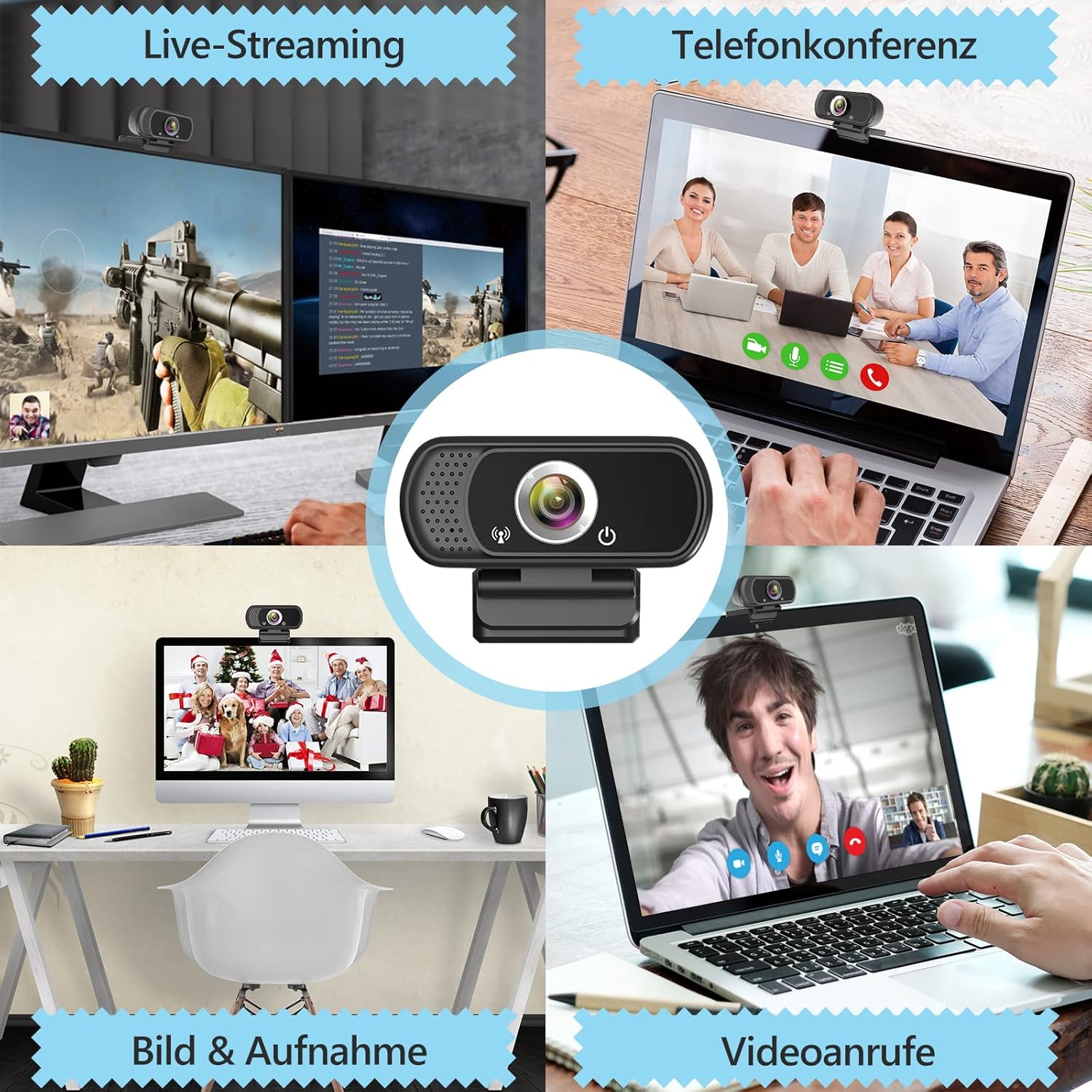
이미지 5.3: Examp~의 webcam use in live streaming, teleconferencing, and video calls.
6. 호환성
The ToLuLu 1080P HD Webcam offers broad compatibility with various operating systems and applications:
- 운영 체제: Windows 2000, XP, 7, 8, 10 and above; macOS 10.6 and above; Chrome OS 29.0.1547 or above; Android V5.0 or above; Smart TV.
- 하드웨어 플랫폼: Mac, PC, Laptops, Desktops, Smart TVs.
- 호환 응용 프로그램: Skype, OBS, YouTube, Facebook, Twitch, Facetime, Zoom, Xbox One, Hangouts, and more.

이미지 6.1: webcam is compatible with multiple operating systems and popular communication platforms.
7. 유지관리
- 렌즈 청소: 안경 렌즈 전용으로 제작된 부드럽고 보풀 없는 천을 사용하여 부드럽게 닦아주세요. webcam lens. Avoid abrasive materials or harsh chemicals, which can scratch or damage the lens.
- 일반 청소: 몸을 닦으세요 web부드러운 캠, damp cloth. Ensure no moisture enters the device.
- 저장: 사용하지 않을 때는 보관 web깨끗하고 건조한 곳에 보관하세요. 프라이버시 커버를 사용하여 렌즈를 먼지와 긁힘으로부터 보호하세요.
- 케이블 관리: 내부 손상을 방지하려면 USB 케이블을 과도하게 구부리거나 비틀지 마세요.
8. 문제 해결
| 문제 | 가능한 원인 | 해결책 |
|---|---|---|
| Webcam not detected / No image | USB connection issue, driver conflict, or incorrect software selection. |
|
| 이미지 품질이 좋지 않음 (흐릿하고, 어둡고, 노이즈가 심함) | Insufficient lighting, dirty lens, or software settings. |
|
| Microphone not working / Poor audio quality | Microphone not selected, system audio settings, or environmental noise. |
|
| Intermittent connection issues | Loose USB connection, USB port power issues, or system resource conflicts. |
|
9. 사양
| 특징 | 세부 사항 |
|---|---|
| 비디오 캡처 해상도 | 1080p Full HD (1920 x 1080) at 30fps |
| 렌즈 유형 | Full HD Glass Lens, Fixed Focus |
| 분야 View | 110 Degrees Widescreen |
| 마이크로폰 | Built-in Digital Stereo Microphone with Automatic Noise Reduction |
| 빛 보정 | Automatic Light Correction, HDR Technology |
| 연결성 | USB Plug & Play (1.8m / 6 feet USB cable) |
| 설치 | Adjustable Universal Clip, Tripod Ready |
| 운영 체제 | Windows 2000/XP/7/8/10+, macOS, Chrome OS, Android, Smart TV |
| 치수(길이x너비x높이) | 3.8 x 3.1 x 2.5 인치 |
| 품목 무게 | 6.3 온스 |
10. 보증 및 지원
ToLuLu is committed to providing quality products and customer satisfaction.
- 반품 정책: This product is eligible for return within 30 days for an exchange or refund, subject to the retailer's return policy.
- 기술 지원: ToLuLu offers lifetime professional technical team support for this product.
For further assistance or inquiries, please refer to the contact information provided with your purchase or visit the official ToLuLu support channels.


