1. 제품 오버view
The Milly Mally Optimus is a versatile 3-in-1 children's vehicle designed to adapt as your child grows. It can be configured as a tricycle without pedals, a classic balance bike, or a tricycle with pedals. Its stable three-wheel construction provides security and aids in developing motor skills, leg muscles, and overall coordination.
주요 특징:
- Comfortable contoured saddle
- 조절 가능한 좌석 높이
- Foam tires for smooth riding
- 튼튼한 강철 프레임
- Front wheel pedals that can be fixed to the steering column handle
- Adjustable handlebar tilt
- Steering limiter for enhanced safety
- Foldable rear fork for easy conversion
- Suitable for children aged 12 months and older
- Complies with European safety standards
2. 안전 정보
조립 및 사용 전에 모든 지침을 읽고 이해하십시오. 이 지침을 따르지 않을 경우 심각한 부상을 입을 수 있습니다.
- 성인의 감독이 필요합니다: Always supervise children when using the Optimus bicycle.
- 보호 장비: Ensure the child wears a helmet and other protective gear (knee pads, elbow pads) at all times.
- 중량 제한: Do not exceed the maximum recommended weight for the product.
- 안전한 주행 환경: Use on flat, even surfaces away from traffic, stairs, hills, and swimming pools.
- 정기 점검: Before each use, check that all bolts, nuts, and fasteners are securely tightened. Ensure tires are in good condition.
- 수정 없음: 어떠한 방식으로든 제품을 개조하지 마십시오. 필요한 경우 정품 교체 부품만 사용하십시오.
- 연령 적합성: This product is designed for children 12 months and older. Ensure the child's feet can comfortably reach the ground when seated.
3. Assembly and Configuration
The Milly Mally Optimus requires some assembly and can be easily reconfigured between its three modes.
초기 조립:
The product is delivered partially assembled. Follow the included graphical instructions for initial setup of the handlebar, seat, and front wheel assembly. Ensure all components click into place and are securely fastened.
Converting to Tricycle (without pedals):
- Ensure the rear wheels are in the wide, tricycle position.
- If pedals are attached, remove them from the front wheel and store them securely.
- Adjust the seat height so the child can comfortably reach the ground with their feet.

Figure 1: Optimus configured as a tricycle without pedals. The rear wheels are spread wide for stability, and the front wheel does not have pedals attached.
Converting to Balance Bike:
- Locate the folding mechanism for the rear fork.
- Fold the rear wheels inward so they are close together, forming a single rear wheel. This creates the balance bike configuration.
- Ensure the folding mechanism is securely locked in place.
- Adjust the seat height to allow the child to push off the ground with their feet.

Figure 2: Optimus configured as a balance bike. The rear wheels are folded together to create a single wheel, promoting balance development.
Converting to Tricycle (with pedals):
- Ensure the rear wheels are in the wide, tricycle position.
- Attach the pedals to the designated slots on the front wheel. Ensure they are securely fastened.
- The pedals can also be fixed to the steering column handle when not in use, preventing them from interfering with the child's legs in other modes.
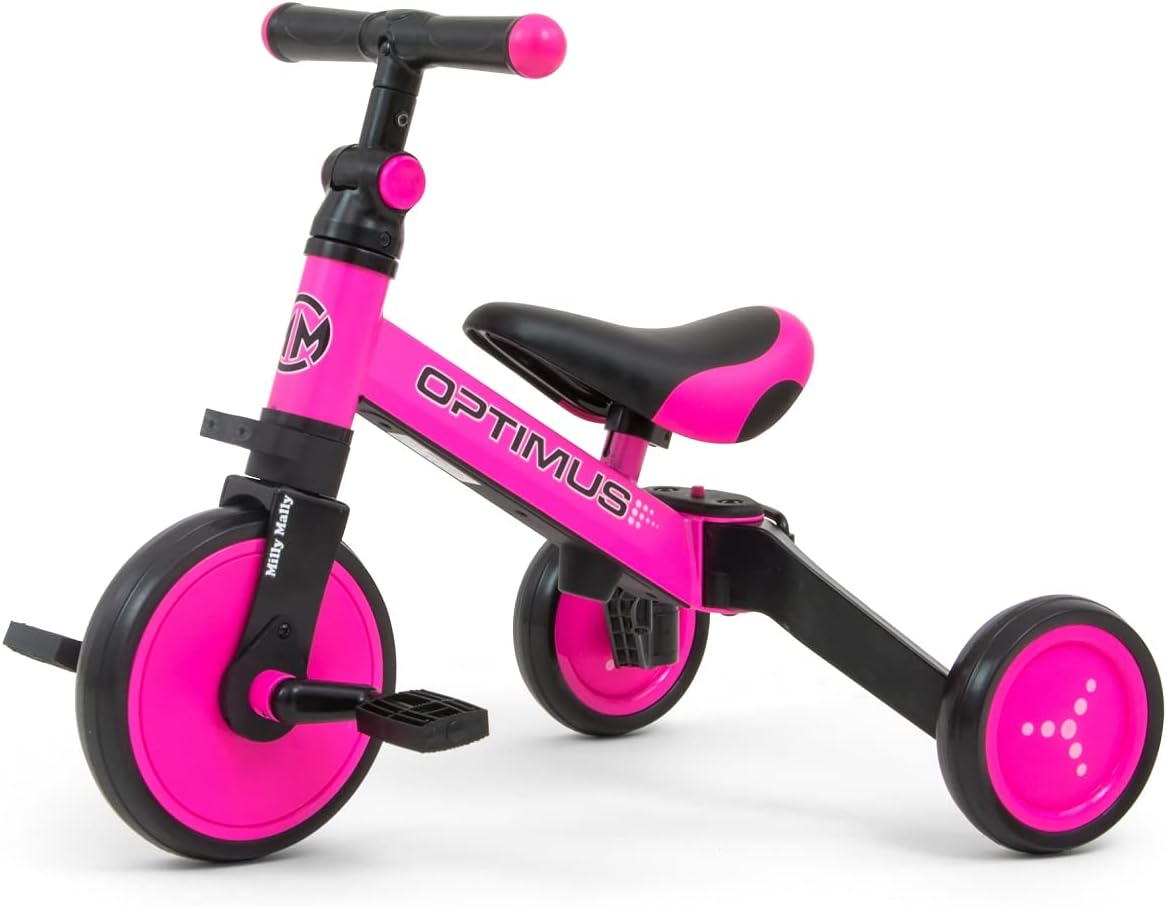
Figure 3: Optimus configured as a tricycle with pedals. Pedals are attached to the front wheel for traditional tricycle riding.
Adjusting Seat Height and Handlebar:
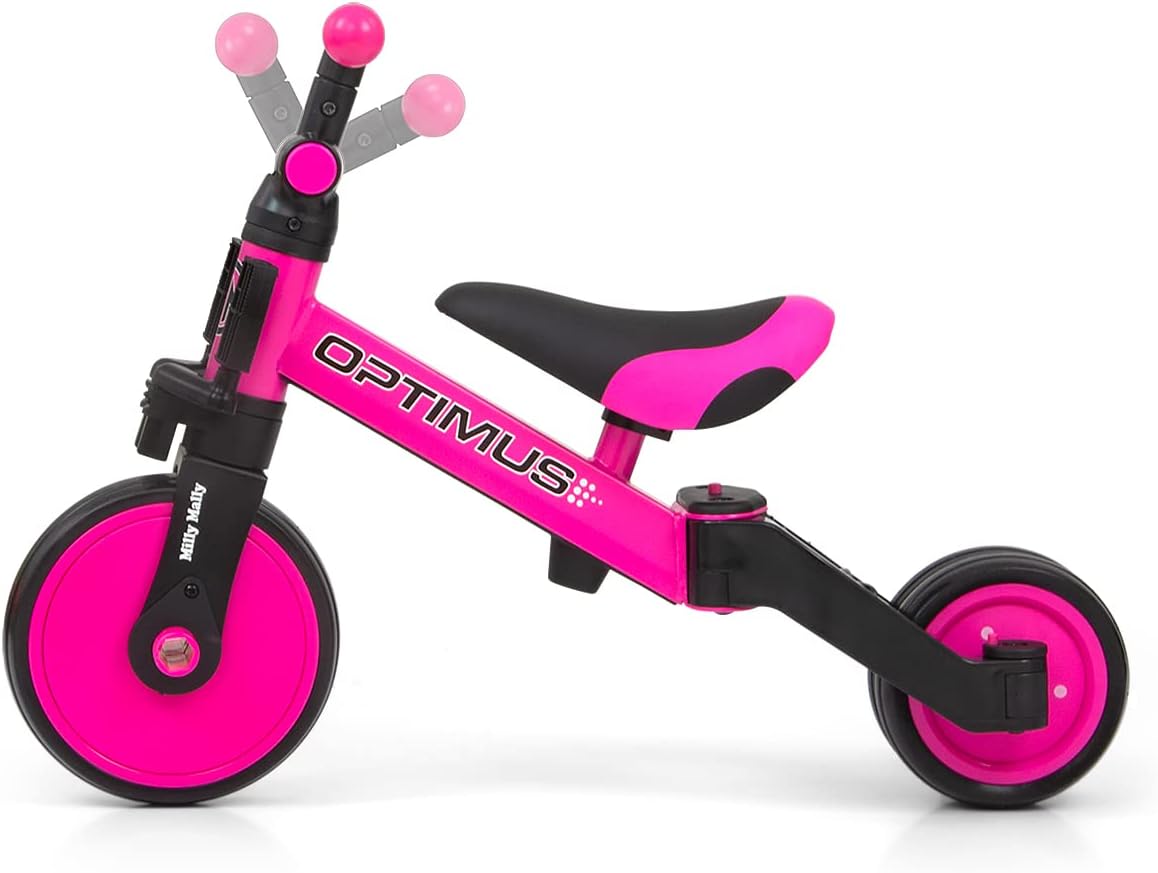
Figure 4: The seat can be adjusted up or down to suit the child's height, ensuring proper leg extension and comfort.

Figure 5: The handlebar tilt can be adjusted for optimal ergonomic positioning for the child.
To adjust the seat height, loosen the quick-release lever or bolt under the seat, slide the seat to the desired height, and securely tighten. For handlebar adjustments, refer to the specific mechanism on the steering column, typically involving a clamp or bolt to adjust tilt.
4. 사용 설명서
The Milly Mally Optimus is designed to support different stag아이의 발달 과정.
Mode 1: Tricycle without Pedals (Push Bike)
This mode is ideal for very young children (12 months and older) who are just starting to explore mobility. The child sits on the seat and pushes off the ground with their feet to move forward. This helps develop balance and coordination before introducing pedals.
Mode 2: Balance Bike
Once the child has mastered pushing and gliding, convert the Optimus to a balance bike. In this mode, the child continues to push off the ground, but with the narrower rear wheel configuration, they learn to balance on two wheels. This is a crucial step before riding a traditional bicycle.
Mode 3: Tricycle with Pedals
When the child is ready to pedal, attach the pedals to the front wheel. This mode allows the child to practice pedaling and steering simultaneously, providing a stable platform with three wheels.
5. 유지관리
Regular maintenance ensures the longevity and safe operation of your Milly Mally Optimus bicycle.
- 청소: 자전거를 정기적으로 청소하세요.amp 천과 순한 비누를 사용하세요. 강한 화학 물질이나 연마성 세제는 사용하지 마세요.
- 매끄럽게 하기: Periodically check and lubricate moving parts such as wheel axles if they become stiff.
- 패스너: Regularly inspect all screws, bolts, and nuts to ensure they are tight. Tighten any loose fasteners immediately.
- 타이어: The foam tires require minimal maintenance. Check for any damage or excessive wear.
- 저장: Store the bicycle in a dry place, away from direct sunlight and extreme temperatures, to prevent material degradation. The compact design allows for easy transport and storage.
6. 문제 해결
If you encounter any issues with your Milly Mally Optimus, refer to the following common solutions:
- 조향에 어려움: Check if the handlebar is securely tightened and if the steering limiter is not overly restrictive for the child's skill level.
- 흔들리는 바퀴: Ensure all wheel axles are properly secured. If the rear wheels are wobbly in balance bike mode, check the folding mechanism lock.
- Pedals Not Engaging: If using the pedal tricycle mode, ensure the pedals are correctly attached to the front wheel and are not loose.
- Child Cannot Reach Ground: Adjust the seat height. The seat should be low enough for the child to place their feet flat on the ground.
- 불안정한 승차감: Verify that the product is correctly assembled according to the chosen mode (tricycle or balance bike) and that all locking mechanisms are engaged.
문제가 지속되면 고객 지원에 문의하여 도움을 받으십시오.
7. 사양
| 특징 | 세부 사항 |
|---|---|
| 제품 크기(L x W x H) | 58 x 45 x 47.5cm |
| 품목 무게 | 3.1 킬로그램 |
| 추천연령 | 12개월 이상 |
| 모델 번호 | 5901761125085 |
| 주요소재 | Plastic, Steel frame |
| 색상 | 분홍색 |
| 조립이 필요합니다 | 예 |
| 필요한 배터리 | 아니요 |
| 교육적 가치 | Develops motor skills, leg muscles, and general coordination |

Figure 6: Diagram showing the dimensions of the Milly Mally Optimus in various configurations.
8. 보증 및 지원
This product is covered by a standard return policy, typically 30 days from the date of purchase. For specific warranty details or to report any defects, please refer to your purchase documentation or contact the retailer directly.
For technical support, missing parts, or further assistance, please contact Milly Mally customer service through their official website or the contact information provided with your purchase. Please have your model number (Optimus 5901761125085) and proof of purchase ready.


