1. 제품 오버view
The Fender Mustang GTX100 is a versatile 100-watt guitar amplifier designed for a wide range of musical styles. It features a 12-inch Celestion speaker, advanced digital modeling, and a comprehensive suite of effects. The amplifier includes 200 onboard presets and offers modular signal path flexibility, allowing users to customize their sound. Integrated Bluetooth enables audio streaming for play-along sessions and connectivity with the Fender TONE 3.0 app for deep editing and preset management. WiFi capabilities ensure the amplifier stays updated with the latest features. The included 7-button footswitch provides convenient control over bank selection, effects, and a 60-second looper, making it suitable for live performance.
2. 패키지 내용
- 펜더 머스탱 GTX100 기타 Amp리퍼
- 7버튼 풋스위치
- 전원 케이블
- USB 케이블
3. 안전 정보
항상 amplifier is connected to a grounded power outlet. Do not expose the unit to moisture or extreme temperatures. Disconnect the power cable before cleaning or servicing. Refer to local electrical codes for proper installation and usage. Keep ventilation openings clear to prevent overheating.
4. 설정
4.1 포장 풀기 및 배치
조심스럽게 amplifier and footswitch from their packaging. Place the amp앰프는 안정적이고 평평한 표면에 놓고, 제품 주변에 충분한 환기가 이루어지도록 하십시오. 열원 근처나 직사광선이 비치는 곳에 두지 마십시오.
4.2 연결하기 Amp리퍼
- 전원 연결: 동봉된 전원 케이블을 연결하세요. amplifier's power input on the rear panel and then to a grounded electrical outlet.
- 기타 입력: 기타를 입력 jack on the top panel of the amp리퍼.
- 풋스위치 연결: Connect the 7-button footswitch to the dedicated 풋스위치 후면 패널에 입력 단자가 있습니다.
- 선택적 연결:
- 헤드폰: 조용한 연습을 위해 헤드폰을 연결하세요. 헤드폰 output on the top panel.
- 보조 입력: 외부 오디오 장치(예: 스마트폰, MP3 플레이어)를 연결하세요. 보조 input on the top panel for play-along.
- USB: 연결하다 amp증폭기를 통해 컴퓨터로 USB port on the rear panel for recording or software updates.
- XLR Line Outputs: For connecting to a PA system or recording interface, use the STEREO XLR LINE OUT 후면 패널에 잭이 있습니다.
- 효과 루프: External effects pedals can be connected via the FX 전송 그리고 외환 반환 후면 패널에 잭이 있습니다.

Figure 1: Fender Mustang GTX100 Amplifier with 7-Button Footswitch. The amplifier is black with a silver Fender logo, and the footswitch is connected via a cable.
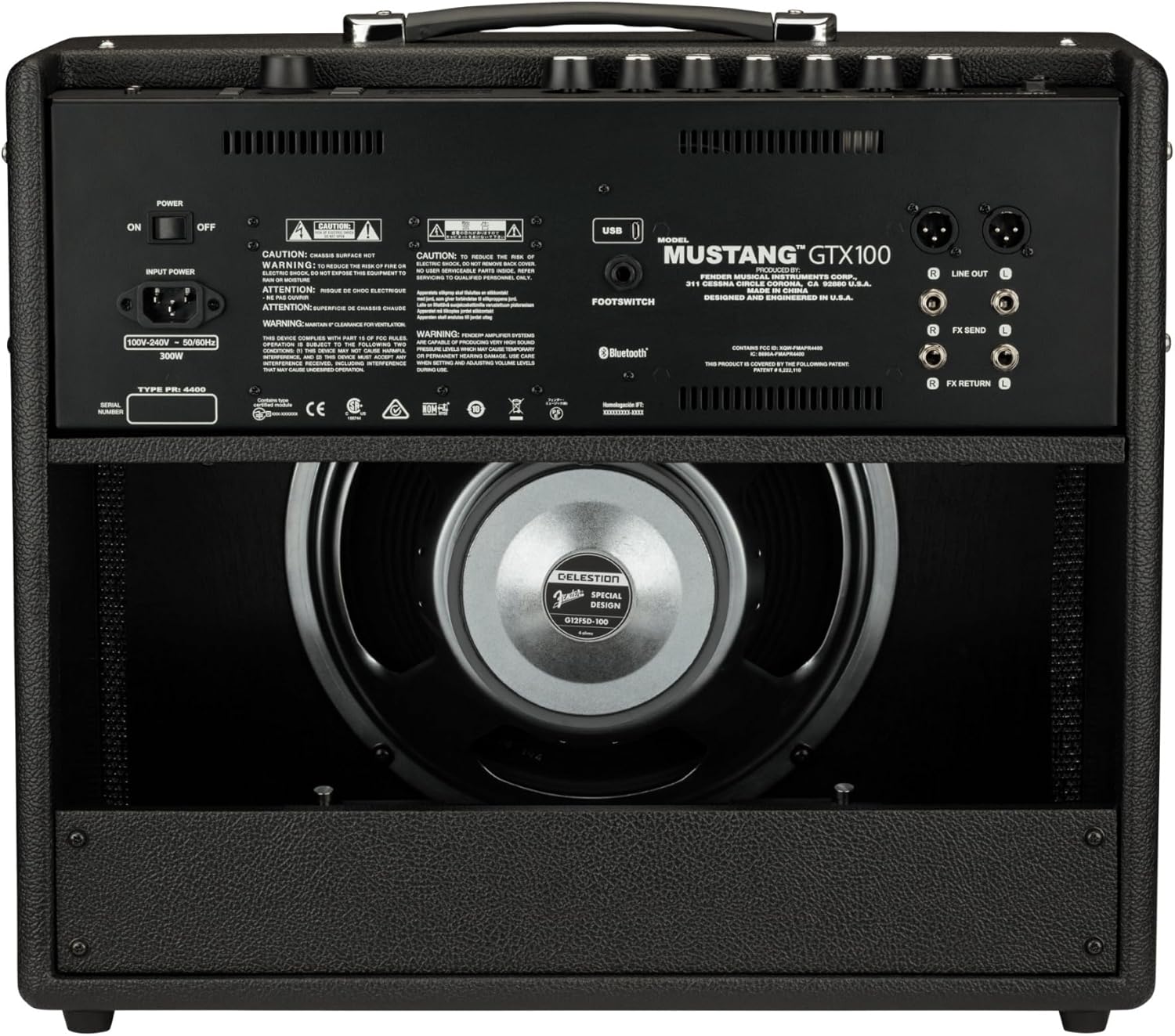
Figure 2: Rear panel connections of the Fender Mustang GTX100 Amp리퍼. 이것 view highlights the power input, footswitch jack, stereo XLR line outputs, and effects loop (FX Send/Return).

Figure 3: Top panel controls of the Fender Mustang GTX100 Amplifier. This image displays the input, aux, headphone jacks, gain, volume, tone controls (treble, middle, bass), master volume, and the digital display with navigation buttons.
5. 사용 설명서
5.1 전원 켜기/끄기
전원을 켜려면 amp증폭기, 뒤집으세요 힘 switch located on the top panel to the 'ON' position. The display will illuminate. To power off, flip the switch back to 'OFF'.
5.2 프리셋 및 효과 탐색
The Mustang GTX100 features 200 onboard presets, offering a wide array of guitar tones. Use the large rotary encoder knob on the top panel to scroll through and select presets. The crisp full-color display will show the selected preset number and name. You can also use the Fender TONE 3.0 app (available for iOS and Android) via Bluetooth for deep editing, preset browsing from the Fender Tone community, and preset backup/restore.
Video 1: A demonstration of the Fender Mustang LT40S amplifier's preset navigation and sound capabilities. While this video features the LT40S, the core functionality of preset selection and sound variety is similar to the GTX100.
5.3 Using the 7-Button Footswitch
The included 7-button footswitch allows for hands-free control during performance. It provides individual bank up and down functions, easy effects selection, and unlocks the amplifier's integrated 60-second looper. Refer to the footswitch's dedicated manual for detailed operation.
5.4 블루투스 오디오 스트리밍
Connect your Bluetooth-enabled device to the amplifier to stream audio. This feature is ideal for playing along with your favorite tracks or backing music.
5.5 WiFi Connectivity for Updates
그만큼 amplifier's WiFi capabilities allow you to connect to your home network for product updates. This ensures your amplifier always has the latest firmware and features.
5.6 Stereo XLR Line Outputs and Effects Loop
Utilize the stereo XLR line outputs to connect the amplifier directly to a PA system, recording interface, or other outboard gear. The stereo effects loop allows for integration of external effects pedals into your signal chain.
5.7 USB 연결
The USB port can be used for direct recording to a computer or for managing presets and firmware updates via the Fender TONE 3.0 desktop application.
6. 유지관리
6.1 청소
겉면을 닦아주세요 amplifier with a soft, dry cloth. Do not use abrasive cleaners or solvents. Ensure no liquids enter the ventilation openings or control panel.
6.2 보관
사용하지 않을 때는 보관 amplifier in a cool, dry place away from direct sunlight and extreme temperatures. If transporting, use appropriate protective covers or cases.
7. 문제 해결
- 전원 없음: 전원 케이블이 양쪽에 단단히 연결되어 있는지 확인하십시오. amplifier and a working electrical outlet. Check the power switch position.
- 소리 없음: Verify that your guitar is properly plugged into the INPUT jack. Check the volume and master volume knobs. Ensure any connected headphones or external devices are functioning correctly.
- 왜곡된 소리: Adjust the gain and volume settings. Check your guitar's output and any external pedals for proper levels.
- 풋스위치가 반응하지 않습니다: Ensure the footswitch cable is securely connected to the dedicated input on the rear panel.
- 블루투스/와이파이 연결 문제: 확인하십시오 amplifier's Bluetooth/WiFi is enabled. Check your device's settings and ensure it's within range. For WiFi, verify network credentials.
8. 사양
| 특징 | 사양 |
|---|---|
| 모델 번호 | 2310700000 |
| 출력 와트tage | 100 와트 |
| 스피커 | 12-inch Celestion |
| 품목 무게 | 28.5파운드 |
| 제품 크기(L x W x H) | 27.4 x 22.6 x 13.2 인치 |
| 사전 설정 | 200 Onboard |
| 자벌레 | 60-second integrated |
| 연결성 | Bluetooth, WiFi, USB, Stereo XLR Line Out, Effects Loop |
9. 보증 및 지원
9.1 제한 보증
Fender warrants this amplifier to be free from defects in materials and workmanship for two (2) years from the original date of purchase. This warranty is applicable to the original purchaser only and is non-transferable.
9.2 고객 지원
For technical assistance, warranty claims, or further information, please visit the official Fender support web사이트를 방문하거나 고객 서비스 부서에 문의하세요. 보증 확인을 위해 구매 증빙 자료를 보관하세요.


