1. 서론
구매해주셔서 감사합니다asing the TWS i17 Dual Earbuds. This manual provides essential information for setting up, operating, and maintaining your new wireless earbuds. Please read this manual thoroughly before use to ensure optimal performance and longevity of your device.
2. 안전 정보
To prevent damage to your earbuds or injury to yourself or others, please observe the following precautions:
- 이어버드나 충전 케이스를 극한의 온도, 습도 또는 액체에 노출시키지 마세요.
- 기기를 떨어뜨리거나 충격을 주거나 분해하지 마십시오.
- Do not use abrasive cleaners or solvents. Clean with a soft, dry cloth.
- 청력 손상을 예방하려면 적당한 볼륨으로 들으세요.
- 어린이의 손이 닿지 않는 곳에 보관하세요.
- 본 제품은 방수 기능이 없습니다. 물이나 과도한 습기에 노출되지 않도록 하십시오.
3. 패키지 내용
패키지에 모든 품목이 들어 있는지 확인하세요.
- TWS i17 Dual Earbuds (Left and Right)
- 충전 케이스
- USB 충전 케이블
- 사용자 설명서

Image: The TWS i17 Dual Earbuds, with one earbud partially removed from its charging case, showcasin세련된 검은색 디자인.
4. 설정
4.1 이어버드와 케이스 충전
처음 사용하기 전에 이어버드와 충전 케이스를 완전히 충전하세요.
- 두 이어버드를 충전 케이스에 넣으세요. 이어버드가 제대로 장착되었는지 확인하세요.
- Connect the USB charging cable to the charging port on the bottom of the case and the other end to a USB power source (e.g., computer, wall adapter).
- The indicator light on the case will show charging status. It will turn off or change color when fully charged.
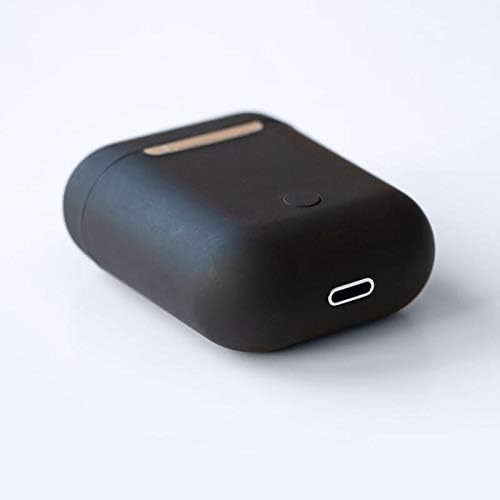
이미지: 클로즈업 view of the bottom of the TWS i17 charging case, highlighting the USB charging port and a small button.
4.2 기기와 페어링
The i17 earbuds use Bluetooth for wireless connection.
- 이어버드가 충전되어 있는지 확인하세요.
- 충전 케이스를 여세요. 이어버드가 자동으로 페어링 모드로 진입합니다(표시등이 깜빡입니다).
- On your mobile phone or Bluetooth-enabled device, go to Bluetooth settings and turn Bluetooth on.
- 검색 available devices. Select "i17" from the list.
- Once connected, the indicator lights on the earbuds will stop flashing. You are now ready to use your earbuds.

Image: The TWS i17 Dual Earbuds resting inside their open charging case, ready for pairing or use.
5. 사용 설명서
5.1 전원 켜기/끄기
- 전원 켜기: 충전 케이스에서 이어버드를 꺼내세요. 자동으로 전원이 켜지고 마지막으로 페어링된 기기와 연결됩니다.
- 전원 끄기 : 이어버드를 충전 케이스에 다시 넣으세요. 자동으로 전원이 꺼지고 충전이 시작됩니다.
5.2 음악 재생
- 재생/일시 중지: 한쪽 이어폰을 한 번 탭하세요.
- 다음 트랙: 오른쪽 이어버드를 두 번 탭합니다.
- 이전 트랙 : 왼쪽 이어버드를 두 번 탭합니다.
5.3 통화 관리
- 전화 받기/종료: 한쪽 이어폰을 한 번 탭하세요.
- 전화 거부: 양쪽 이어버드를 2초 동안 길게 누릅니다.
5.4 음성 어시스턴트
- 음성 지원(Siri/Google Assistant) 활성화: 양쪽 이어버드를 세 번 탭합니다.
6. 유지관리
Proper maintenance ensures the longevity of your earbuds:
- 청소: Use a soft, dry, lint-free cloth to clean the earbuds and charging case. Do not use liquids or sprays.
- 저장: 사용하지 않을 때는 이어버드를 충전 케이스에 넣어 보호하고 충전 상태를 유지하세요. 서늘하고 건조한 곳에 보관하세요.
- 배터리 관리 : 배터리 수명을 연장하려면 이어버드를 자주 완전히 방전시키지 마세요. 정기적으로 충전하십시오.

Image: The TWS i17 Dual Earbuds securely stored within their closed charging case, ready for transport or charging.
7. 문제 해결
| 문제 | 가능한 원인 | 해결책 |
|---|---|---|
| 이어폰이 페어링되지 않음 | Low battery; Out of range; Not in pairing mode; Bluetooth off on device. | Charge earbuds; Move closer to device; Ensure case is open for pairing; Turn on Bluetooth on device. |
| 하나의 이어폰만 작동 | One earbud not charged; Earbuds not properly synced. | Ensure both earbuds are charged; Place both earbuds back in case, close, then reopen to re-sync. |
| 소리가 나지 않습니다 | Volume too low; Not connected; Media paused. | Increase volume on device; Reconnect earbuds; Check media playback status. |
| 충전 케이스가 충전되지 않음 | Faulty cable/adapter; Loose connection. | Try a different USB cable or power adapter; Ensure cable is securely plugged in. |
8. 사양
| 특징 | 세부 사항 |
|---|---|
| 모델 번호 | 아이17 |
| 상표 | 트위스 |
| 연결 기술 | 무선(블루투스) |
| 헤드폰 폼 팩터 | 인이어 |
| 마이크 포함 | 예 |
| 소음 제거 | 아니요 |
| 호환 가능 | 모바일 폰 |
| 색상 | 검은색 |
| 재료 | 플라스틱 |
| 케이블 기능 | 케이블 없음 |
| 방수 레벨 | 방수가 되지 않음 |
| 배송 치수 | 12.6 x 8.8 x 3.6cm |
| 무게 | 96그램 |
| 첫 번째 가능한 날짜 | 15년 2020월 XNUMX일 |
9. 보증 및 지원
For warranty information and customer support, please refer to the contact details provided on the product packaging or the official TWS web사이트. 보증 청구를 위해 구매 증빙 자료를 보관하세요.
For further assistance, please contact TWS customer service.


