1. 서론
구매해주셔서 감사합니다asing the GLIDiC Sound Air TW-5000s True Wireless Earbuds. This manual provides essential information for the safe and effective use of your device. Please read it thoroughly before use and retain it for future reference.
2. 안전 정보
- 이어버드나 충전 케이스를 극한의 온도, 직사광선 또는 높은 습도에 노출시키지 마세요.
- Avoid dropping, impacting, or disassembling the device. This may cause damage and void the warranty.
- Keep the device away from water and liquids. While sweatproof, immersion can cause damage.
- 제공된 충전 케이블이나 인증된 동등 제품만 사용하세요.
- 높은 볼륨으로 장시간 청취하면 청력 손상을 유발할 수 있습니다. 볼륨을 안전한 수준으로 조절하십시오.
- 이어폰을 사용할 때는, 특히 교통량이 많은 곳이나 위험한 환경에서는 주변 환경에 주의하십시오.
3. 패키지 내용
패키지에 모든 품목이 들어 있는지 확인하세요.
- GLIDiC Sound Air TW-5000s 완전 무선 이어버드 (좌우 세트)
- 충전 케이스
- USB 충전 케이블 (A형 USB - 마이크로 USB)
- 다양한 크기의 이어팁(S, M, L)
- 사용 설명서(본 문서)
4. 제품 오버view
Familiarize yourself with the components of your GLIDiC Sound Air TW-5000s earbuds and charging case.

Figure 4.1: GLIDiC Sound Air TW-5000s Earbuds and Charging Case. The image displays the black charging case with the GLIDiC logo on top, positioned next to the two black earbuds.
이어버드 구성품
- 다기능 버튼: Located on the outer surface of each earbud, used for playback control, call management, and voice assistant activation.
- LED 표시등: Provides status information (pairing, charging, power).
- 마이크로폰: For voice calls and voice assistant commands.
- 충전 연락처: Located on the underside of each earbud, for charging within the case.
- 이어팁: Silicone tip for in-ear comfort and sound isolation.
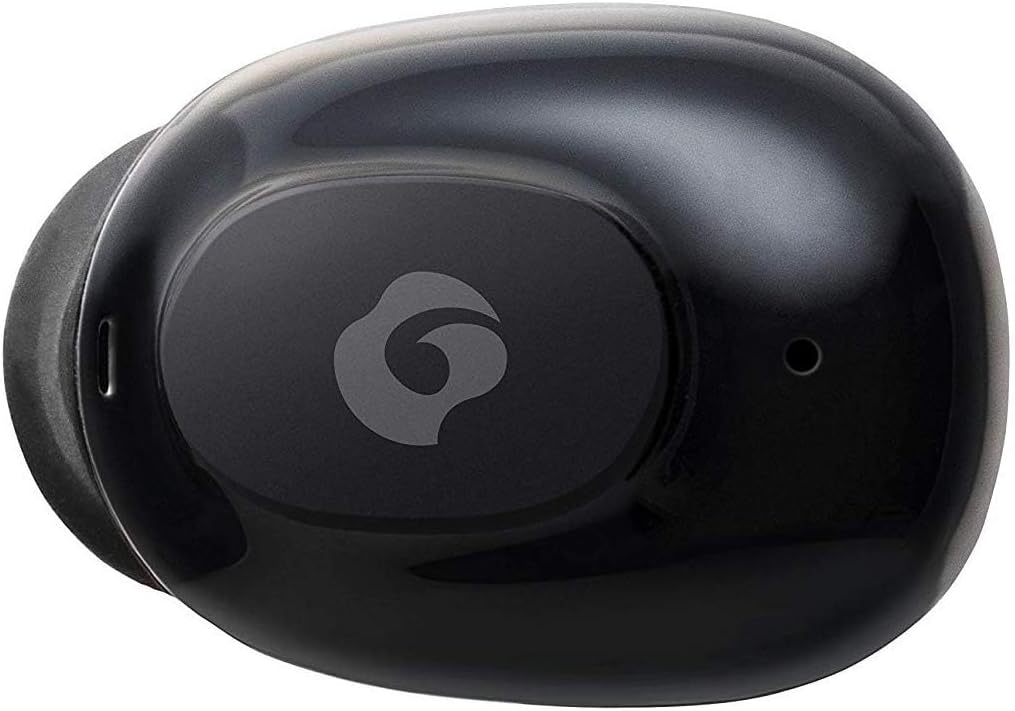
그림 4.2: 클로즈업 view of a single GLIDiC earbud, highlighting the multifunction button with the GLIDiC logo and the microphone opening.
충전 케이스 구성 요소
- 충전 포트: Internal contacts for earbuds, external port for case charging.
- 케이스 LED 표시기: 케이스의 충전 상태를 보여줍니다.
- 뚜껑: Protects earbuds and secures them during charging.
5. 설정
5.1 초기 충전
- Place both earbuds into the charging case. Ensure they are correctly seated, and the LED indicators on the earbuds illuminate.
- USB 충전 케이블을 케이스의 충전 포트에 연결하고 다른 한쪽 끝을 USB 전원(예: 컴퓨터, 벽면 어댑터)에 꽂으세요.
- The case LED indicator will show charging status. Allow approximately 2 hours for a full charge of both earbuds and the case.
- Once fully charged, disconnect the charging cable. The earbuds offer up to 60 days of standby time when stored in the fully charged case.
5.2 블루투스 기기와 페어링
- 이어버드가 충전되어 있는지 확인하세요.
- 충전 케이스를 여세요. 이어버드가 자동으로 페어링 모드로 전환되고 LED 표시등이 깜빡입니다.
- Bluetooth가 활성화된 기기(스마트폰, 태블릿 등)에서 Bluetooth 설정으로 이동합니다.
- 검색 available devices. Select "GLIDiC TW-5000s" from the list.
- Once connected, the earbud LED indicators will stop flashing and may show a solid light or turn off, depending on the model. A voice prompt may also confirm the connection.
- 페어링에 실패하면 이어버드를 케이스에 다시 넣고 뚜껑을 닫은 후 몇 초간 기다렸다가 단계를 반복하십시오.
6. 사용 설명서
6.1 전원 켜기/끄기
- 전원 켜기: Open the charging case, or press and hold the multifunction button on each earbud for approximately 3 seconds.
- 전원 끄기 : Place the earbuds back into the charging case and close the lid, or press and hold the multifunction button on each earbud for approximately 5 seconds.
6.2 음악 재생
- 재생/일시 중지: 한쪽 이어버드의 다기능 버튼을 한 번 누르세요.
- 다음 트랙: 오른쪽 이어버드의 다기능 버튼을 두 번 누르세요.
- 이전 트랙 : 왼쪽 이어버드의 다기능 버튼을 두 번 누르세요.
- 볼륨 업: Triple-press the multifunction button on the right earbud.
- 볼륨 작게 : Triple-press the multifunction button on the left earbud.
6.3 통화 관리
- 전화 받기/종료: 한쪽 이어버드의 다기능 버튼을 한 번 누르세요.
- 전화 거부: Press and hold the multifunction button on either earbud for approximately 2 seconds.
6.4 음성 어시스턴트
- Voice Assistant 활성화 : Press and hold the multifunction button on either earbud for approximately 2 seconds (when not on a call).
6.5 Multi-Communication Mode
The GLIDiC Sound Air TW-5000s features a multi-communication mode that allows select ambient sounds to be heard without compromising audio quality. This enhances user awareness and safety.
- Activate/Deactivate Multi-Communication Mode: Consult the specific instructions provided with your device, as activation methods can vary. Typically, this involves a specific press sequence on the multifunction button or an option within a companion app if available.
7. 유지관리
7.1 청소
- 부드럽고 마른 보푸라기 없는 천으로 이어버드와 충전 케이스를 닦으세요.
- 연마성 세척제, 알코올, 화학 용제는 사용하지 마세요.
- 이어팁을 조심스럽게 제거하고 필요한 경우 순한 비누와 물로 세척하세요. 다시 부착하기 전에 완전히 말랐는지 확인하세요.
- 마른 면봉을 사용하여 이어버드와 케이스의 충전 접점을 조심스럽게 닦으세요.
7.2 보관
- 사용하지 않을 때는 이어버드를 충전 케이스에 보관하여 보호하고 충전 상태를 유지하세요.
- 기기를 서늘하고 건조한 곳에 보관하고, 직사광선과 극한의 온도를 피하세요.
8. 문제 해결
If you encounter issues with your GLIDiC Sound Air TW-5000s, refer to the following common problems and solutions:
| 문제 | 가능한 해결책 |
|---|---|
| 이어폰의 전원이 켜지지 않습니다. | Ensure earbuds are charged. Place them in the charging case and connect the case to a power source. |
| 이어폰이 기기와 페어링되지 않습니다. |
|
| 한쪽 이어버드에서만 소리가 납니다. |
|
| 충전 케이스가 충전되지 않습니다. |
|
| 음질이 좋지 않거나 소리가 끊깁니다. |
|
9. 사양
| 특징 | 세부 사항 |
|---|---|
| 모델명 | TW-5000s |
| 연결 기술 | 무선(블루투스) |
| 블루투스 범위 | 10 미터 |
| 주파수 범위 | 20Hz - 20,000Hz |
| Battery Life (Carrying Case Standby) | 최대 60일 |
| 방수 레벨 | 방수(땀 방지) |
| 제어 유형 | 미디어 제어, 터치, 음성 |
| 특별 기능 | Microphone Included, Noise Cancellation, Multi-communication mode |
| 재료 | Plastic, TPE, and Silicone |
| 크기 (이어버드) | 0.98 x 0.67 x 0.91 인치(대략) |
| 품목 무게 | 9.6온스(총 포장 무게) |
| 한국어: | 811559030024 |
10. 보증 및 지원
GLIDiC products are designed for reliability and performance. For specific warranty details, please refer to the warranty card included with your purchase or visit the official GLIDiC website. If you require technical support or have questions not covered in this manual, please contact GLIDiC customer service through their official channels.
보증 청구를 위해 구매 증명서를 보관하십시오.


