소개
This manual provides instructions for the proper use and care of your Memorex 128GB USB 2.0 Flash Drive. Please read this manual thoroughly before using the device to ensure optimal performance and longevity.
제품 끝view
The Memorex 128GB USB 2.0 Flash Drive is a portable storage device designed for easy data transfer and backup. It features a compact design with a protective swivel cap.

그림 1: 앞쪽 view of the Memorex 128GB USB 2.0 Flash Drive. The drive features a red body and a silver swivel cap that protects the USB connector.
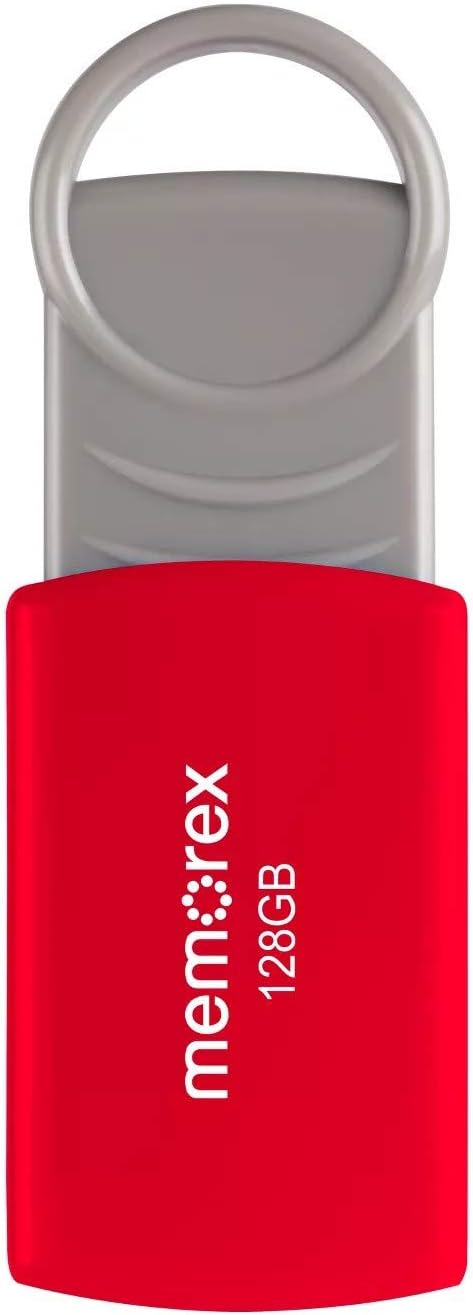
그림 2: The Memorex 128GB USB 2.0 Flash Drive shown in its retail packaging, highlighting its capacity and USB 2.0 interface.
설정
- 장치 포장 풀기: Carefully remove the flash drive from its packaging.
- USB 포트를 확인하세요: 컴퓨터(PC 또는 Mac)에서 사용 가능한 USB Type-A 포트를 찾으세요.
- Connect the Flash Drive: Remove the protective cap or swivel the cover to expose the USB connector. Insert the flash drive firmly into the USB port.
- 자동 인식: Your operating system should automatically detect and install the necessary drivers. A notification may appear indicating that the device is ready for use. The flash drive will typically appear as a removable disk drive in your computer's file explorer (e.g., "This PC" on Windows, "Finder" on Mac).
작동 지침
전송 중 Files
- 드라이브에 액세스하세요: 컴퓨터의 file explorer (e.g., "File Explorer" on Windows, "Finder" on Mac) and navigate to the Memorex flash drive.
- 복사 Files:
- To the Flash Drive: 드래그 앤 드롭 files or folders from your computer's hard drive into the flash drive's window. Alternatively, right-click on the desired files/folders, select "Copy," then open the flash drive's window, right-click, and select "Paste."
- From the Flash Drive: 드래그 앤 드롭 files or folders from the flash drive's window to a location on your computer's hard drive. Alternatively, right-click on the desired files/folders on the flash drive, select "Copy," then open the destination folder on your computer, right-click, and select "Paste."
Safely Removing the Flash Drive
To prevent data corruption, always safely remove the flash drive before physically disconnecting it from your computer.
- 윈도우:
- Click the "Safely Remove Hardware and Eject Media" icon in the system tray (usually near the clock).
- Select the Memorex flash drive from the list.
- Wait for the "Safe to Remove Hardware" message before unplugging.
- 스코틀랜드 사람:
- Drag the flash drive icon from your desktop or Finder sidebar to the Trash icon. The Trash icon will change to an Eject icon.
- Alternatively, right-click (or Control-click) the flash drive icon on your desktop or in Finder and select "Eject."
- Once the icon disappears or the eject option is no longer available, you can safely unplug the drive.
유지
- 신체 관리: Keep the flash drive clean and dry. Avoid exposing it to extreme temperatures, direct sunlight, or strong magnetic fields. Use the swivel cap to protect the USB connector when not in use.
- 데이터 백업: While flash drives are convenient, it is recommended to regularly back up important data to another storage medium (e.g., computer hard drive, cloud storage) to prevent data loss.
- Avoid Sudden Removal: Always follow the safe removal procedures to prevent data corruption and damage to the drive.
문제 해결
- 드라이브가 인식되지 않음:
- Try plugging the flash drive into a different USB port on your computer.
- 컴퓨터를 재시작하고 다시 시도하세요.
- USB 커넥터가 포트에 완전히 삽입되었는지 확인하십시오.
- Check your computer's Device Manager (Windows) or System Information (Mac) to see if the device is listed, even if it doesn't appear as a drive letter.
- 느린 전송 속도:
- Ensure you are using a USB 2.0 port for optimal USB 2.0 speeds. While compatible with USB 3.0/3.1 ports, the drive will operate at its native USB 2.0 speed.
- 많은 작은 것을 전송합니다 file소량의 데이터를 전송하는 것보다 소량의 데이터를 전송하는 것이 더 느릴 수 있습니다. files.
- 시스템 리소스를 사용하고 있을 수 있는 다른 애플리케이션을 종료하세요.
- 쓸 수 없습니다 Files to Drive:
- 드라이브 용량이 가득 찼는지 확인하고 불필요한 파일을 삭제하세요. file공간을 확보합니다.
- Ensure the drive is not write-protected (though this model typically does not have a physical write-protect switch).
- 그만큼 file system (e.g., FAT32) might have limitations on individual file sizes (e.g., 4GB limit for FAT32). If you need to store larger files, consider reformatting the drive to NTFS (Windows) or exFAT (Windows/Mac compatible) if compatible with your intended use. 참고: 다시 포맷하면 드라이브의 모든 데이터가 지워집니다.
명세서
| 상표 | 메모렉스 |
| 모델명 | 32020012821 |
| 메모리 저장 용량 | 128GB (XNUMX기가바이트) |
| 하드웨어 인터페이스 | USB 2.0 |
| 연결 기술 | USB |
| 색상 | 빨간색 |
| 하드웨어 플랫폼 | 맥, PC |
| 품목 무게 | 1.58 온스 |
| 패키지 크기 | 5 x 4 x 0.2 인치 |
| 한국어: | 751492617930 |
보증 및 지원
For warranty information and technical support, please refer to the documentation included with your purchase or visit the official Memorex web사이트. 보증 청구를 위해 구매 증빙 자료를 보관하세요.
For further assistance, you may contact Memorex customer support through their official channels.


