1. 제품 오버view
The Lindy Single Display Short Bracket with Pole and Desk Clamp, Model 40656, provides a robust solution for mounting a single monitor to a standard office desk or table. This mount allows for easy adjustment of the display, including tilt, pivot, and rotation, to achieve an optimal viewing angle. It is compatible with most monitors adhering to VESA standards of 75 x 75mm or 100 x 100mm.
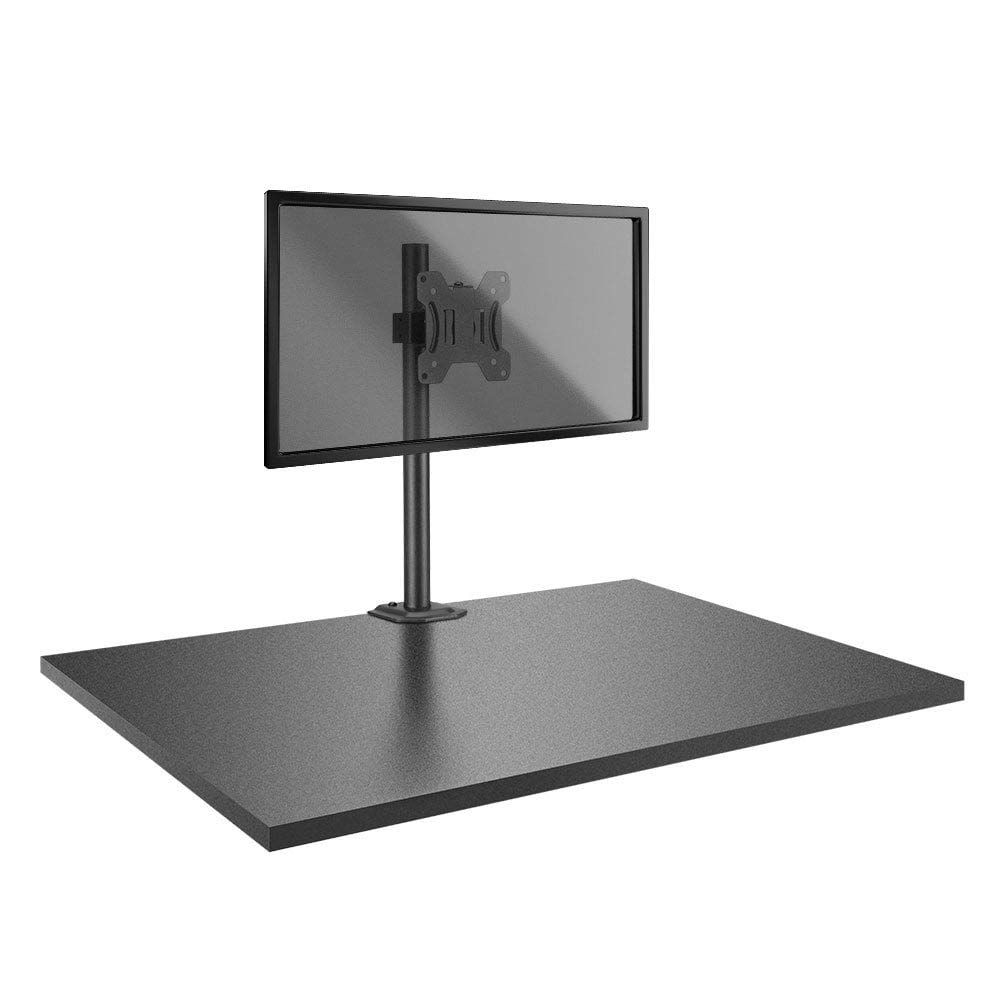
Image: The Lindy Single Display Short Bracket with Pole and Desk Clamp, Model 40656, shown installed on a desk with a monitor (monitor not included).
주요 특징:
- Mounts a single monitor to a standard office desk.
- Allows tilt, pivot, or rotate for simple maneuverability.
- Conforms to VESA standards (75 x 75mm and 100 x 100mm).
- Constructed with a robust, lightweight metal pole and an aluminum powder-coated bracket.
2. 안전 정보
Please read and understand all instructions before attempting installation. Failure to follow these instructions may result in property damage, injury, or product malfunction.
- Ensure the desk surface is stable and can safely support the combined weight of the mount and your monitor.
- Do not exceed the maximum weight capacity of the mount. Refer to the 'Specifications' section for details.
- Ensure all screws are securely tightened to prevent accidental detachment of the monitor.
- Keep children and pets away from the installation area during assembly.
- Avoid placing the mount in areas with excessive vibration, direct sunlight, or high humidity.
- 제공된 하드웨어 또는 제조업체에서 승인한 교체품만 사용하십시오.
3. 패키지 내용
설치를 시작하기 전에 모든 구성 요소가 있는지 확인하세요.
- Pole with integrated desk clamp
- Short VESA bracket
4. 설정 지침
Follow these steps to properly install your Lindy Single Display Short Bracket:
1단계: 책상 선반 부착amp 책상으로
- 책상 배치 clamp base on the edge of your desk, ensuring it is stable and flush.
- cl을 조여주세요amp screw firmly until the mount is securely fastened to the desk. Do not overtighten.

이미지: 측면 view of the pole with the desk clamp, illustrating how it attaches to a desk surface.
Step 2: Assemble Pole and Bracket
- Slide the short VESA bracket onto the pole.
- Position the bracket at your desired height and secure it using the integrated locking mechanism or screws.

Image: The pole and desk clamp assembly with the short VESA bracket positioned on the pole.
Step 3: Attach VESA Bracket to Monitor
- 모니터에 흠집이 생기지 않도록 부드럽고 깨끗한 표면에 모니터 화면이 아래로 향하게 조심스럽게 놓으십시오.
- Align the VESA mounting holes on the back of your monitor with the holes on the short bracket.
- Secure the bracket to the monitor using the appropriate screws (typically M4 or M5, not included with mount). Ensure they are tightened firmly but do not overtighten.

이미지: 클로즈업 view of the VESA mounting plate, showing the screw holes for monitor attachment.
Step 4: Mount Monitor to Pole
- With assistance, carefully lift the monitor (with the attached bracket) and slide the bracket onto the pole.
- Ensure the bracket is securely seated on the pole and tighten any locking screws on the bracket to prevent vertical movement.
5. 사용 설명서
Once installed, the Lindy Single Display Short Bracket allows for flexible monitor positioning:
- 기울기 조정: Loosen the tilt knob on the VESA bracket, adjust the monitor to your desired vertical angle (up to 12 degrees), and then re-tighten the knob to secure the position.
- 피벗 조정: The monitor can be rotated 360 degrees around the VESA plate, allowing for easy switching between landscape and portrait orientations.
- 회전 조정: The entire monitor assembly can be rotated around the pole for horizontal view각도 조정.
6. 유지관리
To ensure the longevity and safe operation of your monitor mount:
- Regularly check all screws and connections to ensure they remain tight. Re-tighten as necessary.
- Clean the mount with a soft, dry cloth. Avoid using abrasive cleaners, solvents, or chemical sprays.
- Inspect the mount periodically for any signs of wear, damage, or corrosion. If damage is found, discontinue use and contact support.
7. 문제 해결
모니터 거치대에 문제가 발생하면 다음의 일반적인 문제 및 해결 방법을 참조하십시오.
- Monitor is wobbly:
- 책상이 깨끗한지 확인하세요amp 책상에 단단히 고정되어 있습니다.
- Check all screws connecting the VESA bracket to the pole and the monitor.
- Monitor does not stay in desired position (e.g., tilts down):
- Tighten the tilt adjustment knob on the VESA bracket.
- Difficulty rotating or pivoting the monitor:
- Ensure no cables are obstructing the movement of the monitor or bracket.
- Check for any overtightened screws that might restrict motion.
8. 사양
| 특징 | 세부 사항 |
|---|---|
| 상표 | 린디 |
| 모델 번호 | 40656 |
| 품목 무게 | 4.4파운드 |
| 제품 치수 | 4.17 x 4.33 x 20.08 인치 |
| 재료 | 알루미늄, 금속 |
| 장착 유형 | 탁상 마운트 |
| 이동 유형 | Rotate, Tilt |
| 호환 장치 | Monitors (Television) |
| 최대 기울기 각도 | 12도 |
| VESA 호환성 | 75x75mm, 100x100mm |
9. 보증 및 지원
보증 정보:
This Lindy product is covered by a 2년 보증 구매일로부터. 보증 청구를 위해 구매 증빙을 보관하세요.
고객 지원:
For technical assistance, troubleshooting, or to make a warranty claim, please contact Lindy customer support. Visit the official Lindy website for up-to-date contact information and support resources.


