소개
The Hyperkin Armor3 NuWave Controller is designed to provide accurate and fluid motion control for your Nintendo Wii U and Wii consoles. Featuring built-in Nu+ technology, this controller enhances your gaming experience by offering a wider range of motion in compatible titles. This manual provides essential information on setting up, operating, maintaining, and troubleshooting your NuWave Controller.
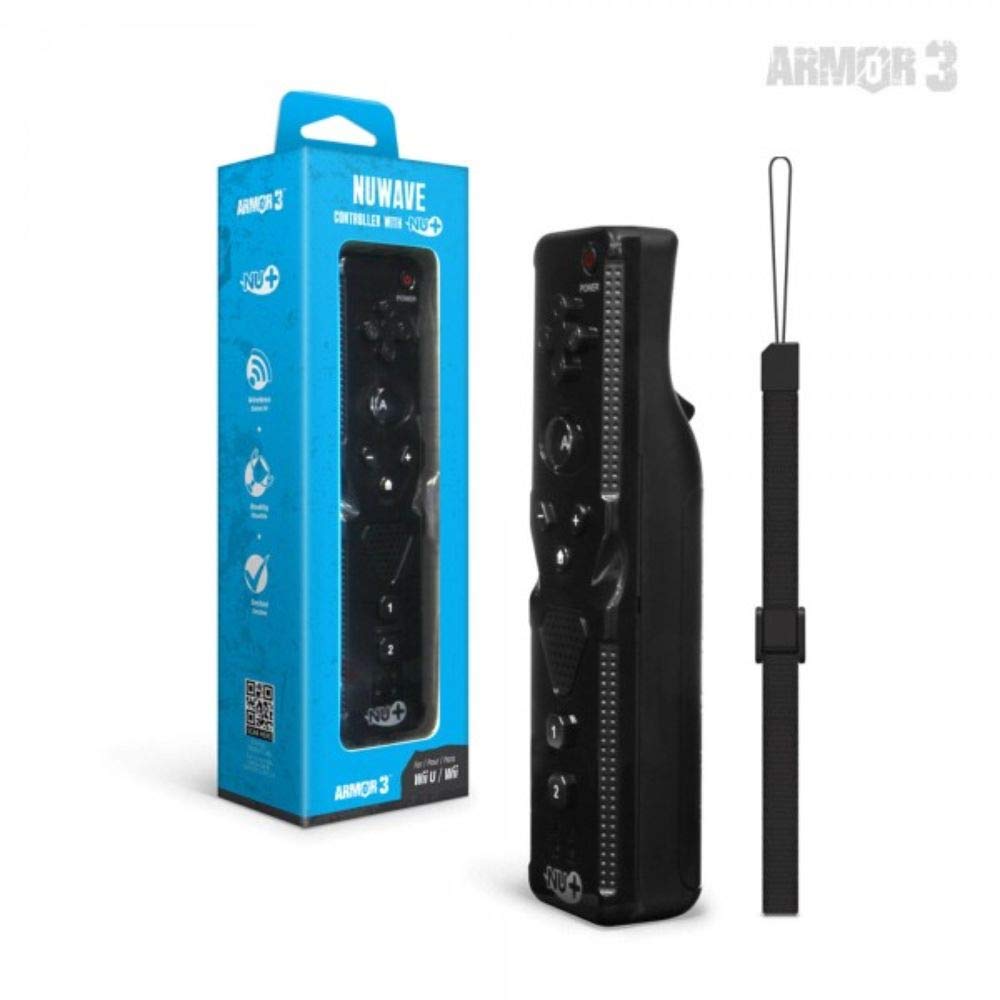
그림 1: Hyperkin Armor3 NuWave Controller and its packaging. The controller is black with a wrist strap, and the packaging highlights its Nu+ technology and compatibility with Wii U and Wii.
제품 끝view
The Armor3 NuWave Controller is a motion-sensing controller compatible with both Wii U and Wii systems. It integrates advanced Nu+ technology for enhanced motion detection and precision in supported games.
주요 특징:
- 호환성: Fully compatible with Nintendo Wii U and Nintendo Wii consoles.
- Nu+ Technology: Built-in technology for a wider range of motion and improved accuracy in compatible titles.
- 인체공학적 디자인: Designed for comfortable grip and extended gameplay sessions.
- 전원: 2 AA 배터리 (포함되지 않음)가 필요합니다.
설정
1. 배터리 설치
- 컨트롤러 뒷면에서 배터리 구획을 찾으세요.
- 배터리 덮개를 아래로 밀어서 엽니다.
- 칸 내부에 표시된 대로 올바른 극성(+/-)을 확인하여 AA 배터리 2개(2)를 삽입합니다.
- 배터리 덮개를 위로 밀어서 딸깍 소리가 날 때까지 제자리에 고정합니다.
2. Connecting to Your Console
To connect the NuWave Controller to your Wii U or Wii console, follow these steps:
- 콘솔 전원이 켜져 있는지 확인하십시오.
- On your Wii U or Wii console, press the SYNC button (usually located near the SD card slot or battery compartment).
- On the NuWave Controller, open the battery cover and locate the small red SYNC button inside the battery compartment.
- Press and release the SYNC button on the controller.
- The player indicator lights on the bottom of the controller will flash. Once a single light remains lit, the controller is successfully connected.
- If connection fails, repeat steps 2-5. Ensure the controller is within range of the console.
작동 지침
기본 컨트롤:
- 방향 패드(D-패드): Used for menu navigation and character movement.
- 단추: Primary action button, often used for selection or interaction.
- B 버튼(트리거): Located on the underside, typically used for grabbing or firing.
- 1 & 2 Buttons: Auxiliary action buttons, functions vary by game.
- 홈 버튼: Returns to the console's Home Menu.
- 플러스(+) 및 마이너스(-) 버튼: Often used for zooming, adjusting settings, or specific in-game actions.
- 전원 버튼: 컨트롤러를 켜거나 끕니다.
Motion Sensing with Nu+ Technology:
The built-in Nu+ technology provides enhanced motion tracking. For games that support it, you will experience more precise and responsive movements. Hold the controller firmly and ensure clear line of sight to the sensor bar for optimal performance.
- 구경 측정: Some games may require initial calibration. Follow on-screen prompts.
- 손목 끈: Always use the included wrist strap to prevent accidental drops during active gameplay.
유지
청소:
- 컨트롤러를 부드럽고 마른 천으로 닦으세요.
- 완고한 먼지에는 약간 damp천에 물을 묻혀 닦으세요. 강한 화학 물질이나 연마성 세제는 사용하지 마세요.
- 컨트롤러의 구멍에 액체가 들어가지 않도록 하십시오.
저장:
- 컨트롤러는 직사광선과 극한의 온도를 피해 서늘하고 건조한 곳에 보관하세요.
- 장기간 보관할 경우 누액을 방지하기 위해 배터리를 제거하십시오.
배터리 관리 :
- Always use new, high-quality AA batteries.
- 오래된 건전지와 새 건전지, 다른 종류의 건전지를 혼용하지 마세요.
- 사용한 배터리는 현지 규정에 따라 책임감 있게 폐기하십시오.
문제 해결
| 문제 | 가능한 원인 | 해결책 |
|---|---|---|
| 컨트롤러가 켜지지 않습니다. | 배터리가 방전되었거나 잘못 삽입되었습니다. | 배터리를 새 AA 배터리로 교체하고 극성이 올바른지 확인하세요. |
| Controller does not sync with console. | Incorrect syncing procedure; out of range; console interference. | Ensure console is on. Repeat syncing steps (press SYNC on console, then on controller). Move closer to console. Check for other wireless device interference. |
| 버튼이 반응하지 않거나 반응 속도가 느립니다. | Low battery; connection issue; physical obstruction. | Replace batteries. Re-sync the controller. Ensure buttons are not stuck. |
| Motion control is inaccurate. | Sensor bar obstruction; improper calibration; environmental factors. | Ensure clear line of sight to the sensor bar. Re-calibrate in-game if prompted. Avoid strong light sources directly facing the sensor bar. |
명세서
- 모델: M07399-bk
- 상표: 하이퍼킨
- 호환성: Nintendo Wii U, Nintendo Wii
- 전원: AA 배터리 2개(포함되지 않음)
- 치수: 2.8 x 1.8 x 8 인치(대략)
- 무게: 3.88온스 (배터리 제외, 대략적인 무게)
- 기술: Built-in Nu+ motion technology
- 색상: 검은색
보증 및 지원
For specific warranty information and terms, please refer to the documentation included with your purchase or visit the official Hyperkin website. Hyperkin provides customer support for their products.
온라인 지원: Visit the official Hyperkin webFAQ, 문제 해결 가이드 및 연락처 정보를 제공하는 사이트입니다. www.hyperkin.com
연락하다: Refer to the Hyperkin website for the most current customer service contact methods (phone, email, etc.).


