1. 서론
This manual provides detailed instructions for the YuanLey YS082G-P 10-Port PoE Switch. This unmanaged network switch is designed for various applications, offering 8 Power over Ethernet (PoE+) ports and 2 Gigabit uplink ports for efficient network connectivity and power delivery.

이미지 1.1: 앞면 view of the YuanLey YS082G-P 10-Port PoE Switch.
2. 주요 특징
- 포트 구성: Features 8 PoE ports (10/100Mbps) and 2 Gigabit uplink Ethernet ports (1000Mbps) for high-bandwidth connections.
- PoE+(Power over Ethernet): Supports IEEE 802.3af/at standards with a maximum total power budget of 120W, delivering up to 30W per port.
- 플러그 앤 플레이: Unmanaged switch design allows for automatic device detection and requires no configuration for easy setup.
- 기능을 확장하십시오: Enables single PoE ports to support transmission distances up to 250m at 10Mbps when activated.
- VLAN 지원: Ports 1-8 support VLAN isolation to reduce network congestion and enhance security.
- 내구성 있는 디자인: Constructed with a metal case for bilateral heat dissipation, fanless operation for quiet performance, and 4KV lightning protection.
- 폭넓은 작동 온도: Designed to operate reliably in environments ranging from -10°C to +55°C.
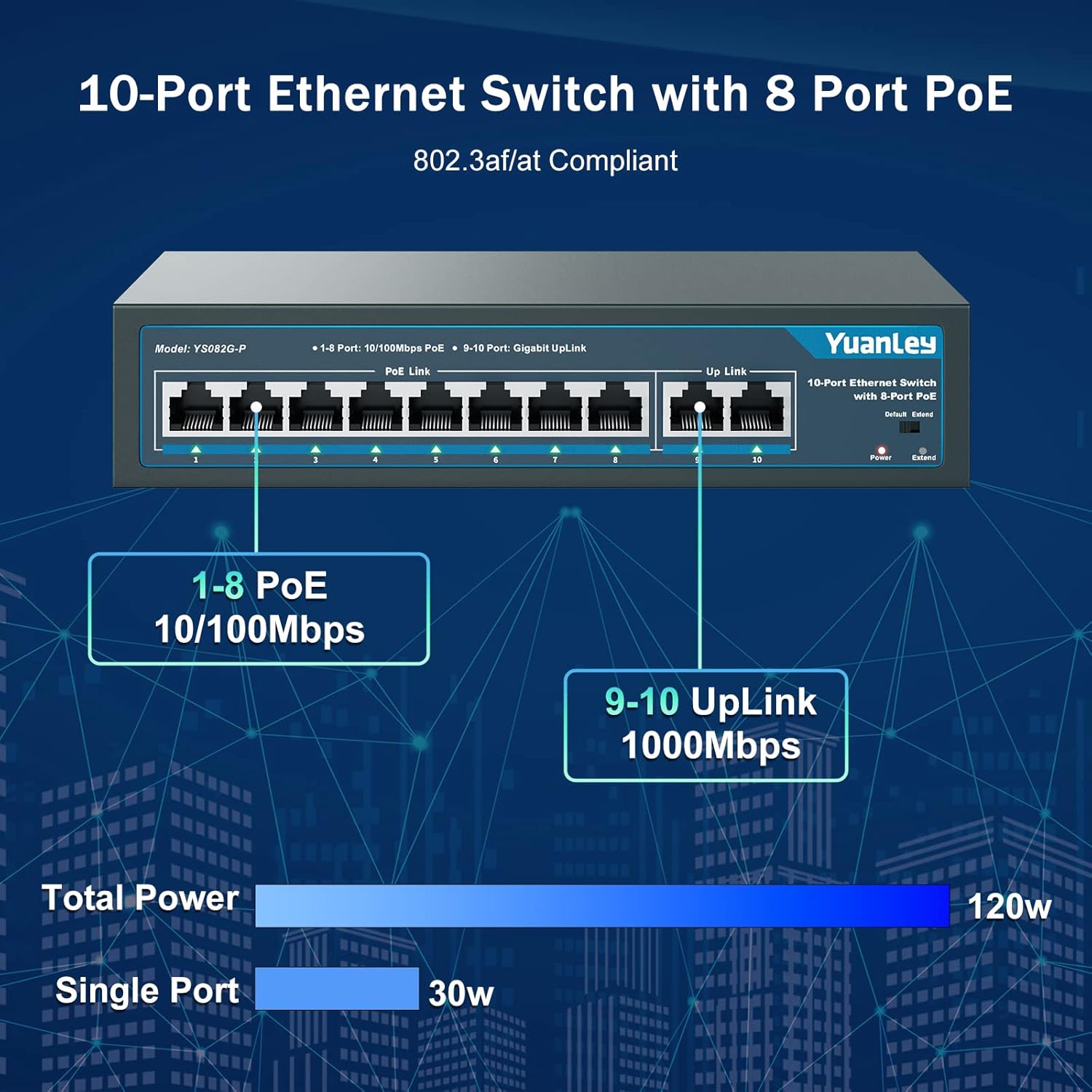
Image 2.1: Port configuration showing 8 PoE ports (10/100Mbps) and 2 Gigabit uplink ports (1000Mbps).

Image 2.2: Diagram illustrating the One Key VLAN function, isolating ports 1-8 while allowing communication with uplink ports.

Image 2.3: Comparison of Extend Mode (250m, 10Mbps) and Default Mode (100m, 100Mbps) for PoE transmission.
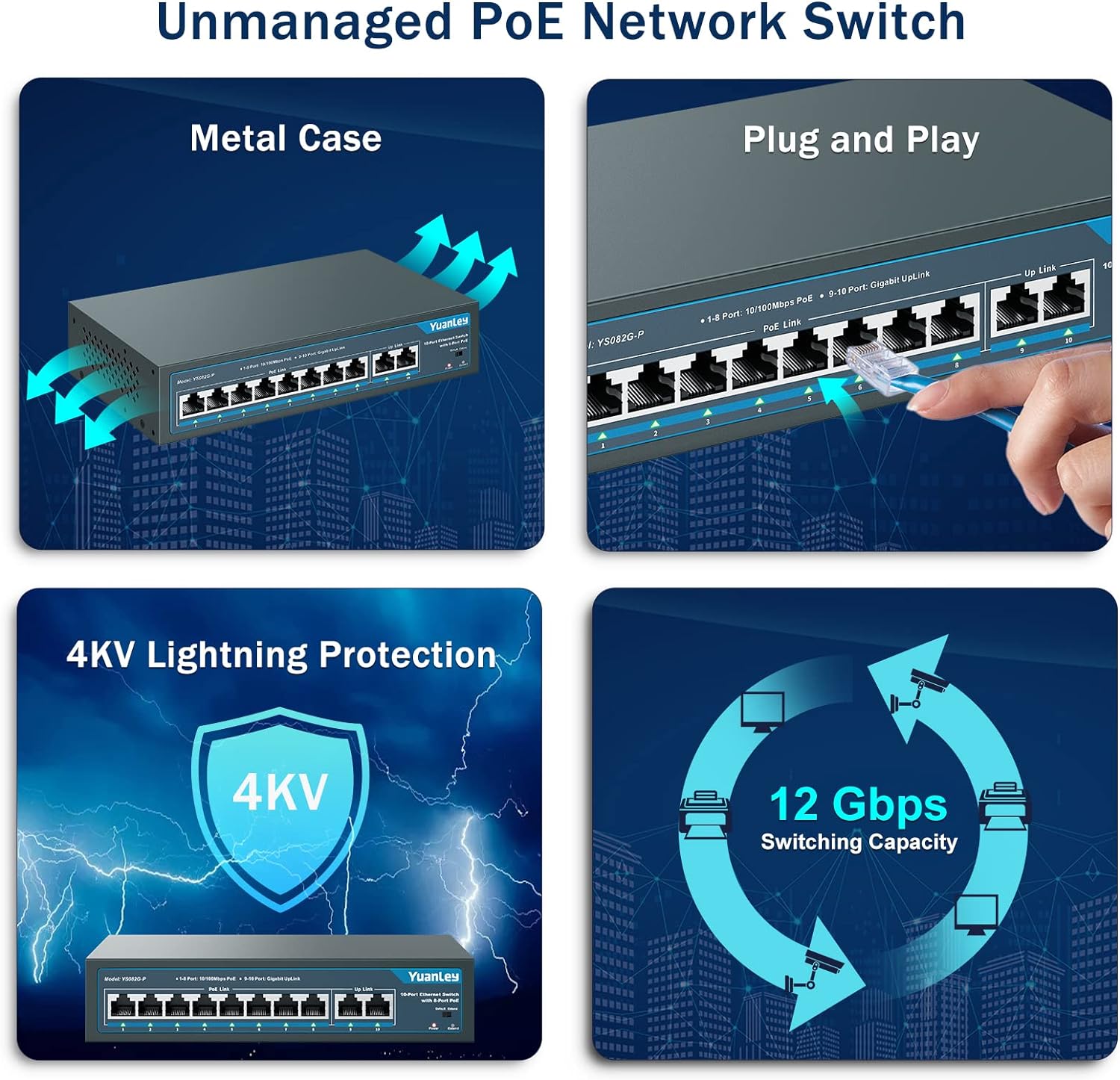
이미지 2.4: 이상view of the switch's unmanaged features including metal case, plug and play, 4KV lightning protection, and 12 Gbps switching capacity.

Image 2.5: Illustration of the switch's fanless design and wide operating temperature range (-10°C to +55°C).
3. 패키지 내용
패키지에 모든 품목이 들어 있는지 확인하세요.
- YuanLey YS082G-P 10-Port PoE Switch
- 전원 코드
- Mounting Brackets (for rackmount or wall mount)
- 장착용 나사
- 빠른 시작 가이드
4. 설정 지침
The YuanLey YS082G-P is a plug-and-play unmanaged switch, requiring minimal setup.
- 전원 연결: Plug the provided power cord into the AC IN port on the back of the switch and then into a standard electrical outlet. The Power LED on the front panel should illuminate.
- 업링크 연결: Connect your router or main network device to one of the two Gigabit uplink ports (ports 9 or 10) using a standard Ethernet cable.
- PoE 장치 연결: Connect your PoE-compatible devices (e.g., IP cameras, wireless access points, IP phones) to any of the 8 PoE ports (ports 1-8) using Ethernet cables. The switch will automatically detect and power these devices.
- 장착(선택 사항): Use the included mounting brackets and screws to install the switch in a 19-inch rack or mount it on a wall.
비디오 4.1: 간략한 설명view of the YuanLey 10 Port PoE Switch, demonstrating its physical appearance and basic connectivity.

Image 4.2: Visual guide for the simple plug-and-play setup process: Connect to Power, Connect Devices, and Enjoy.
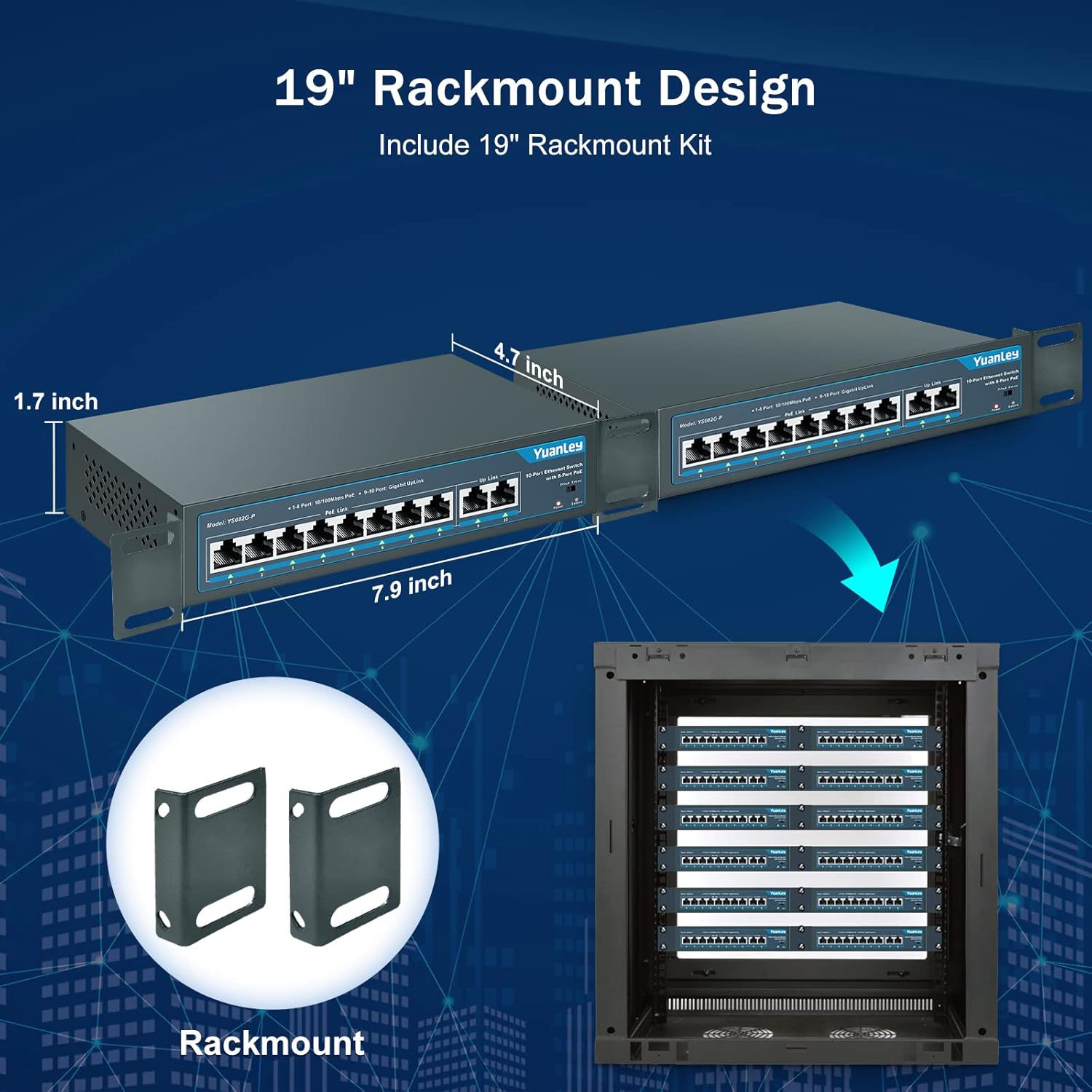
Image 4.3: Illustration of the rackmount design and included brackets for installation.
5. 작동 모드
The switch features a mode switch on the front panel to select between Default and Extend modes.
- 기본 모드: In this mode, all ports operate at their standard speeds (10/100Mbps for PoE ports, 1000Mbps for uplink ports) with a maximum transmission distance of 100 meters.
- 확장 모드: When the switch is set to Extend mode, PoE ports 1-8 can transmit data and power up to 250 meters, but the speed for these ports will be reduced to 10Mbps. This mode is ideal for long-distance deployments of devices like IP cameras where higher bandwidth is not critical.
- VLAN 기능: The switch supports VLAN isolation on ports 1-8. When enabled, these ports are isolated from each other but can still communicate with the uplink ports (9-10). This helps in segmenting the network, reducing broadcast storms, and improving overall network security and performance.
Image 5.1: The physical switch for selecting between Default and Extend modes.

Image 5.2: Diagram illustrating the functionality of One Key VLAN and the Extend mode for longer PoE distances.
6. 유지관리
To ensure optimal performance and longevity of your YuanLey PoE Switch:
- Keep the device in a well-ventilated area to prevent overheating. The fanless design relies on natural convection.
- 케이블 손상 여부를 정기적으로 점검하고 연결이 안전한지 확인하십시오.
- Clean the exterior of the switch with a soft, dry cloth. Avoid using liquid cleaners or aerosols.
- 전원 공급 장치가 안정적이고 지정된 전압 범위 내에 있는지 확인하십시오.tage 범위(AC 100-240V).
7. 문제 해결
| 문제 | 가능한 원인 | 해결책 |
|---|---|---|
| 전원 LED 표시가 없습니다. | No power supply or faulty power cord. | Check power cord connection and power outlet. Ensure the power source is active. |
| PoE device not receiving power or data. | Incorrect cable, non-PoE device, or device exceeding power budget. | Verify the device is PoE-compatible (IEEE 802.3af/at). Check Ethernet cable for damage. Ensure total power consumption does not exceed 120W and individual port consumption does not exceed 30W. |
| Slow network speed on PoE ports. | 확장 모드가 활성화되었습니다. | If high speed is required for short distances (under 100m), switch the mode to Default. Extend mode reduces speed to 10Mbps for longer distances. |
| Network congestion or security concerns. | No network segmentation. | Enable VLAN isolation for ports 1-8 to segment traffic and improve security. |
8. 사양
| 특징 | 세부 사항 |
|---|---|
| 모델 | YS082G-P |
| 포트 | 8 x 10/100Mbps PoE+ Ports, 2 x 1000Mbps Gigabit Uplink Ports |
| PoE 표준 | IEEE 802.3af / at |
| 총 PoE 전력 예산 | 120와트 |
| 포트당 최대 전력 | 30와트 |
| 데이터 전송 속도 | 1000 Megabits Per Second (Uplink), 100 Megabits Per Second (PoE Ports) |
| 스위칭 용량 | 12Gbps |
| Extend Function | Up to 250m transmission distance at 10Mbps on PoE ports 1-8 |
| VLAN 지원 | Ports 1-8 isolation, communication with uplink ports |
| 인터페이스 유형 | RJ45 |
| 전원 입력 | AC 100-240V, 50/60Hz (Built-in Power Supply) |
| 케이스 소재 | 금속 |
| 냉각 | 팬리스 |
| 작동 온도 | -10°C ~ +55°C |
| 제품 치수 | 7.9인치 길이 x 4.7인치 너비 x 1.7인치 높이 |
| 품목 무게 | 0.96킬로그램(2.11파운드) |
| 번개 보호 | 4KV |
9. 보증 및 지원
For any questions, technical assistance, or warranty inquiries, please contact YuanLey official support. Refer to the product packaging or the official YuanLey web최신 연락처 정보는 사이트에서 확인하세요.


