1. 서론
This manual provides detailed instructions for the proper use, setup, operation, and maintenance of your Cressi Donatello Dive Computer. The Donatello is a versatile dive computer designed for recreational diving, offering four distinct operating modes: Air, Nitrox, Gauge, and Apnea. Please read this manual thoroughly before using the device to ensure safe and effective operation.
2. 안전 정보
Diving involves inherent risks. The Cressi Donatello Dive Computer is a tool to assist in dive planning and execution, but it does not replace proper dive training, experience, or judgment. Always dive within the limits of your training and certification. Failure to follow these safety guidelines can result in serious injury or death.
- Never exceed your certified depth limits.
- Always perform a safety stop.
- Do not dive alone.
- Regularly check your equipment before each dive.
- Understand and follow all decompression limits indicated by the computer.
- Do not attempt to open the computer case underwater.
- Ensure the battery is properly installed and has sufficient charge before diving.
3. 제품 오버view
The Cressi Donatello is a robust and user-friendly dive computer featuring a large, high-contrast display and a single multi-function button for intuitive navigation. Its ergonomic design ensures comfort on the wrist.
3.1 주요 특징
- Large, high-contrast display for clear readability underwater.
- Single multi-function button for simplified menu navigation.
- Four operating modes: Air, Nitrox, Gauge, and Apnea.
- Cressi RGBM algorithm for comprehensive dive data processing.
- User-replaceable battery (CR2430).
- Logbook function storing up to 50 dives per category.
- Durable case and two-tone TPU rubber wristband with stainless steel buckle.
3.2개의 구성요소

그림 1: 전면 view of the Cressi Donatello Dive Computer, displaying current depth, no-decompression limit, and dive time.
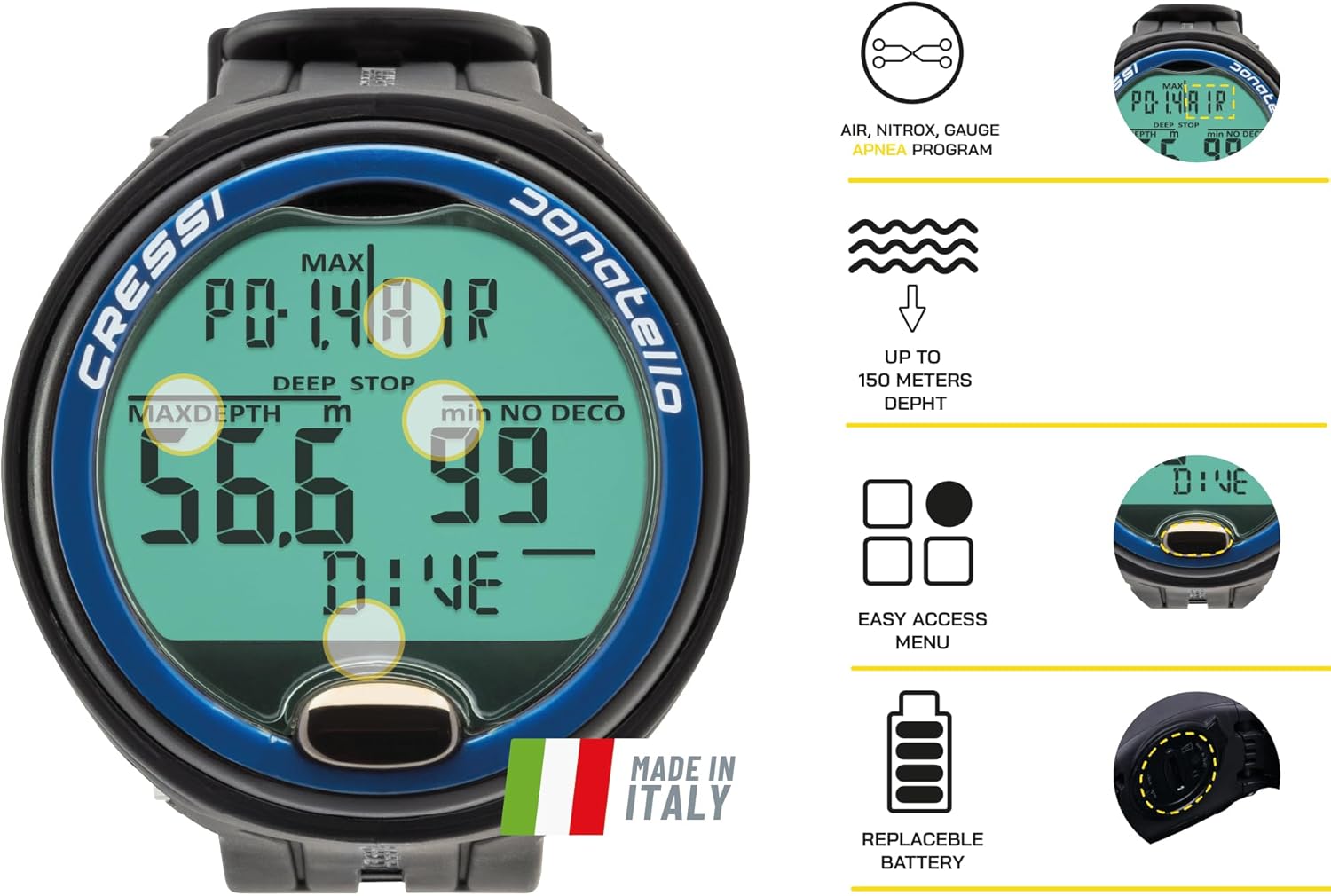
그림 2: 이상view of key features including Air, Nitrox, Gauge, Apnea programs, depth rating up to 150 meters, easy access menu, and replaceable battery.

그림 3: 상세 view highlighting the heavy-duty case, single steel button, high-contrast display with extra-large numbers, and graphic indicator for CNS oxygen toxicity.
4. 설정
4.1 초기 활성화
The Donatello Dive Computer typically comes pre-installed with a battery. Upon first use, the device should activate automatically. If not, press and hold the single button for a few seconds to power it on.
4.2 기본 설정 구성
Upon initial activation or after a battery change, you may need to configure basic settings such as units of measurement (metric/imperial), time, and date. Use the single button to navigate through the menu options and confirm selections. Refer to the 'Operating Modes' section for general button navigation.
4.3 배터리 설치/교체
The Cressi Donatello features a user-replaceable CR2430 battery. To replace the battery:
- Ensure the computer is dry and clean.
- 장치 뒷면에서 배터리 덮개를 찾으세요.
- Using a coin or appropriate tool, carefully unscrew the battery cover counter-clockwise until it can be removed.
- 기존 CR2430 배터리를 제거하세요.
- 새 CR2430 배터리를 양극(+)이 위를 향하게 하여 삽입하세요.
- Inspect the O-ring seal for any dirt, damage, or signs of wear. Replace if necessary.
- Carefully place the battery cover back on, ensuring the O-ring is correctly seated.
- Screw the cover clockwise until it is finger-tight. Do not overtighten.
- After replacement, check for proper sealing and functionality.

Figure 4: Illustration of the user-replaceable battery compartment on the back of the dive computer, alongside descriptions of the Air/Nitrox, Free (Apnea), and Gauge programs.
5. 작동 모드
The Cressi Donatello offers four distinct operating modes, each tailored for specific diving activities. The single button is used for navigation and selection.
5.1 General Button Navigation
- 짧은 보도: Scrolls through information or menu options.
- 길게 누르기 : Enters a menu, confirms a selection, or switches modes (depending on context).
5.2 Air Mode
This mode is for diving with standard compressed air. It calculates no-decompression limits, ascent rates, and safety stops based on the Cressi RGBM algorithm. Key information displayed includes current depth, maximum depth, no-decompression time, dive time, and temperature.
5.3 Nitrox Mode
For diving with enriched air nitrox mixtures. Before diving in Nitrox mode, you must set the oxygen percentage (FO2) and partial pressure of oxygen (PO2) limit according to your dive plan. The computer will then calculate decompression limits accordingly, also displaying CNS oxygen toxicity levels.
5.4 게이지 모드
This mode functions as a bottom timer, providing current depth, maximum depth, average depth, and dive time in minutes and seconds. It does not provide decompression information, making it suitable for technical diving where divers manage their own decompression. Always use a separate, reliable timing device in this mode.
5.5 Apnea Mode (Free Diving)
Designed for freediving, this mode displays real-time depth, maximum depth, dive time, and surface interval. It tracks consecutive dives and surface recovery times, which are crucial for freediving safety.
6. 유지관리
6.1 청소 및 보관
- After each dive, rinse the computer thoroughly with fresh water to remove salt, sand, and chlorine.
- Allow the computer to air dry completely before storage.
- Store the computer in a cool, dry place, away from direct sunlight and extreme temperatures.
- Avoid contact with solvents, chemicals, or sharp objects that could damage the display or casing.
6.2 배터리 관리
Regularly check the battery indicator. Replace the battery as soon as the low battery warning appears. Always use a new, high-quality CR2430 battery. Ensure the O-ring is clean and properly seated during battery replacement to maintain water integrity.
7. 문제 해결
If you encounter issues with your Cressi Donatello Dive Computer, refer to the following common problems and solutions:
| 문제 | 가능한 원인 | 해결책 |
|---|---|---|
| Computer does not turn on. | 배터리가 방전되었거나 제대로 설치되지 않았습니다. | Replace battery (CR2430) and ensure correct polarity. |
| 디스플레이가 어둡거나 읽을 수 없습니다. | 배터리 부족 또는 극한 온도. | Replace battery. Ensure operating within specified temperature range. |
| 깊이 측정값이 부정확합니다. | 센서가 막히거나 오작동합니다. | Rinse thoroughly with fresh water. If problem persists, contact Cressi support. |
| 물이 침투함. | Improperly sealed battery compartment or damaged O-ring. | Immediately rinse with fresh water and dry. Do not use. Contact Cressi support for inspection/repair. |
For issues not listed here or if troubleshooting steps do not resolve the problem, please contact Cressi customer support.
8. 사양
| 특징 | 세부 사항 |
|---|---|
| 모델 번호 | KS860022 |
| 색상 | 검정/파란색 |
| 크기 | 원 사이즈 |
| 표시 형식 | 4.7 인치 |
| 제품 크기(L x W x H) | 12.7 x 11.94 x 12.95cm(5 x 4.7 x 5.1인치) |
| 무게 | 181.44g(0.4파운드) |
| 재료 유형 | 기타(내구성 복합재) |
| 포함된 구성 요소 | 1 다이브 컴퓨터 |
| 배터리 유형 | 1 x CR2430 (포함) |
| 한국어: | 810026124884 |
| 스포츠 | 다이빙 |
9. 보증 및 지원
The Cressi Donatello Dive Computer is covered by a manufacturer's warranty. For specific warranty terms and conditions, please refer to the documentation included with your purchase or visit the official Cressi website. For technical support, service, or warranty claims, please contact Cressi customer service through their official channels.
Availability of spare parts in the EU is guaranteed for 2 years from the date of first availability.


