소개
구매해주셔서 감사합니다asing the Caliber Alarm Clock with QI Charging Station. This device combines a digital alarm clock with a convenient wireless charging pad and a USB charging port, designed to simplify your bedside setup. It also features an adjustable night light and a large LED display for clear visibility.
This manual provides detailed instructions on how to set up, operate, maintain, and troubleshoot your new alarm clock. Please read it thoroughly before use to ensure optimal performance and longevity of the product.
설정
짐 풀기: 알람시계를 포장에서 조심스럽게 꺼내십시오. 알람시계 본체와 전원 어댑터를 포함한 모든 구성품이 있는지 확인하십시오.
전원 연결: Connect the provided power adapter to the DC input port on the back of the alarm clock. Plug the other end of the adapter into a standard wall outlet. The display will illuminate.
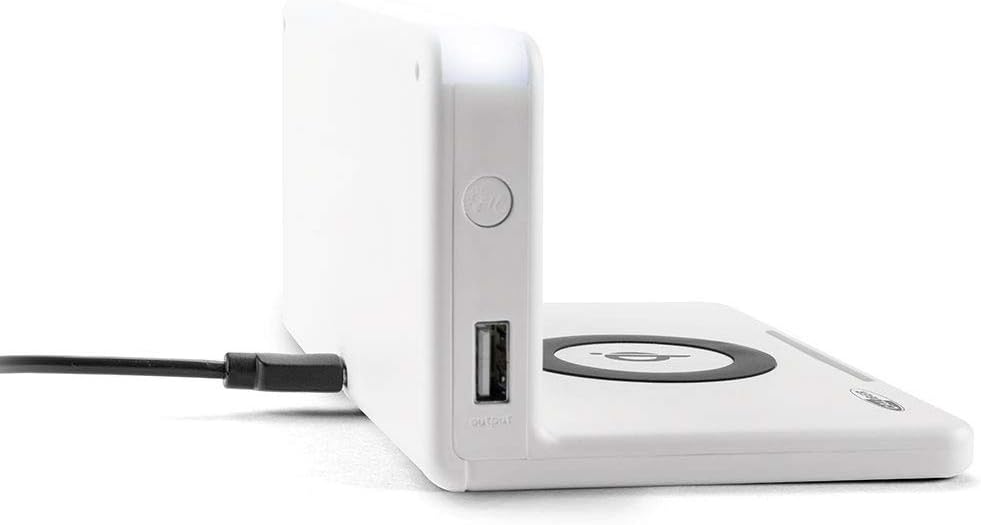
이미지: 측면 view of the alarm clock, illustrating the power input port (left) and the USB output port (right).
배터리 설치(백업): The unit includes 1 Lithium Ion battery for backup. This battery maintains time settings during power outages. No user installation is typically required for this pre-installed battery.
초기 시간 설정: Upon first power-up, the clock may display a default time or require manual setting. Refer to the "Operating" section for detailed instructions on setting the time.
작동 지침
시간 및 날짜 설정
- 를 누르고 계세요 시간 설정 button (location may vary, typically on the back or top) until the hour digits flash.
- 사용하세요 + or - 버튼으로 시간을 조정합니다.
- 누르다 시간 설정 다시 분 단위로 이동한 다음 조정합니다. + or -.
- Repeat for year, month, and day if applicable.
- 누르다 시간 설정 마지막으로 확인하고 종료하세요.
알람 설정
- 를 누르고 계세요 알람 설정 button (or similar) until the alarm hour digits flash.
- 알람 시간과 분을 설정하려면 다음을 사용하세요. + or - 버튼.
- 누르다 알람 설정 확인합니다.
- 알람을 활성화/비활성화하려면 다음을 누르세요. 알람 ON / OFF 버튼을 누르면 디스플레이에 알람 아이콘이 나타나거나 사라집니다.
- 알람이 울리면 버튼을 누르세요. 선잠 button for a temporary pause, or any other button to turn it off for the day.
Using the QI Wireless Charging Station
The alarm clock features a built-in QI wireless charging pad for compatible devices.
- 알람시계 전원이 켜져 있는지 확인하십시오.
- Place your QI-compatible smartphone or device directly onto the charging pad, centering it over the QI 로고.
- A charging indicator (e.g., an LED light or on-screen icon) will illuminate to confirm charging has begun. If charging does not start, reposition your device.

Image: A smartphone placed on the QI charging pad of the alarm clock, showing the charging interface on the phone screen.

Image: The alarm clock with a phone positioned on its wireless charging surface, indicating active charging.
USB 충전 포트 사용
A USB output port is available on the side of the unit for charging non-QI compatible devices or for faster wired charging.
- Connect your device's USB charging cable to the USB output port on the alarm clock.
- 케이블의 다른 쪽 끝을 기기에 연결하세요. 충전이 자동으로 시작됩니다.
Adjusting Display Brightness and Night Light
- The alarm clock features adjustable display brightness. Look for a 주차 or 명도 button, typically on the back or top. Press it repeatedly to cycle through brightness levels.
- To activate or adjust the night light, locate the dedicated 야간 조명 button. Press it to turn the light on/off or cycle through different brightness settings if available.
유지
- 청소: Disconnect the power adapter before cleaning. Use a soft, dry cloth to wipe the surface of the alarm clock. Do not use abrasive cleaners, waxes, or solvents as they may damage the finish.
- 저장: 장기간 보관할 경우 전원을 끄고 서늘하고 건조한 곳에 보관하세요.
- 손질: Avoid dropping the unit or subjecting it to strong impacts. Keep it away from water and high humidity.
문제 해결
| 문제 | 가능한 원인 | 해결책 |
|---|---|---|
| 시계 표시가 비어 있습니다. | 전원이 연결되지 않았습니다. | 전원 어댑터가 장치에 단단히 꽂혀 있고 벽면 콘센트에 잘 연결되어 있는지 확인하세요. |
| QI 충전이 작동하지 않습니다. | Device not QI-compatible; device not properly aligned; foreign objects on pad; phone case too thick. | Verify device compatibility. Reposition device on the center of the pad. Remove any foreign objects. Remove thick phone cases. |
| 알람이 울리지 않습니다. | 알람이 활성화되지 않았습니다. 볼륨이 너무 낮습니다. 알람 시간이 잘못되었습니다. | Ensure the alarm icon is displayed. Check alarm volume settings. Verify the alarm time is set correctly. |
| 시간이 정확하지 않습니다. | 시간이 잘못 설정되었거나 정전이 발생했습니다. | Reset the time manually. If power was interrupted, the backup battery should maintain time, but a manual check is recommended. |
명세서
| 특징 | 세부 사항 |
|---|---|
| 상표 | 구경 |
| 모델 번호 | HCG018QI/W |
| 색상 | 하얀색 |
| 디스플레이 유형 | 디지털 |
| 특징 | Night light, QI charging station, USB charging port |
| 전원 | 코드식 전기 |
| 제품 치수 | 7.09 x 4.25 x 3.86 인치 |
| 품목 무게 | 7.9온스(225그램) |
| 배터리 | 1 Lithium Ion battery (included, for backup) |
| GTIN | 08714505047157 |
보증 및 지원
This Caliber product is designed for reliability and performance. For information regarding warranty coverage, please refer to the warranty card included with your purchase or visit the official Caliber web대지.
Should you encounter any issues not covered in the troubleshooting section, or require further assistance, please contact Caliber customer support. Contact details can typically be found on the product packaging or the manufacturer's official web대지.


