1. 서론
This manual provides essential information for the safe and efficient operation of your EPEVER MPPT 30A Solar Charge Controller (Model 3210AN). This advanced Maximum Power Point Tracking (MPPT) controller is designed to optimize power harvesting from your solar panels and efficiently charge 12V or 24V battery systems, including lead-acid (Sealed, AGM, Gel, Flooded) and lithium batteries. It features high conversion efficiency, comprehensive electronic protection, and support for monitoring via APP or PC software.

Figure 1: EPEVER MPPT 30A Solar Charge Controller 3210AN. This image shows the front view of the EPEVER MPPT 30A Solar Charge Controller, highlighting its LCD display and control buttons.
2. 주요 특징
- 고급 MPPT 기술: Efficiency no less than 99.5% with accurate recognition and tracking of multi-peaks maximum power point.
- 높은 변환 효율성: 최대 DC/DC 변환 효율 98%.
- 자동 시스템 볼륨tag전자 신분증: Supports 12V and 24V auto-identifying system voltage.
- 다양한 배터리 호환성: Supports 4 types of battery charging: Lead-acid (Sealed, AGM, Gel, Flooded), User-defined, and Lithium.
- 종합 보호: Includes a power protection chip providing 5VDC/200mA power, over-current, and short-circuit protections.
- Real-time Monitoring & Control: Supports monitoring and setting parameters via APP or PC software.
- 다양한 부하 작업 모드: Offers various load work modes for diverse applications.
- 배터리 온도 보상: Function to ensure the controller’s life and protect against over-charging/discharging.
- Negative Grounded Design: Ensures compatibility with common negative grounded solar systems.

Figure 2: Multiple Protections. This image illustrates the 13 built-in electronic protections of the EPEVER MPPT Solar Charge Controller, ensuring safe and efficient battery charging.
3. 설정
3.1 배선 지침
Follow the wiring diagram carefully. Connect the system in the order of battery, load, and then the PV array. Disconnect in the reverse order (PV array, load, battery).
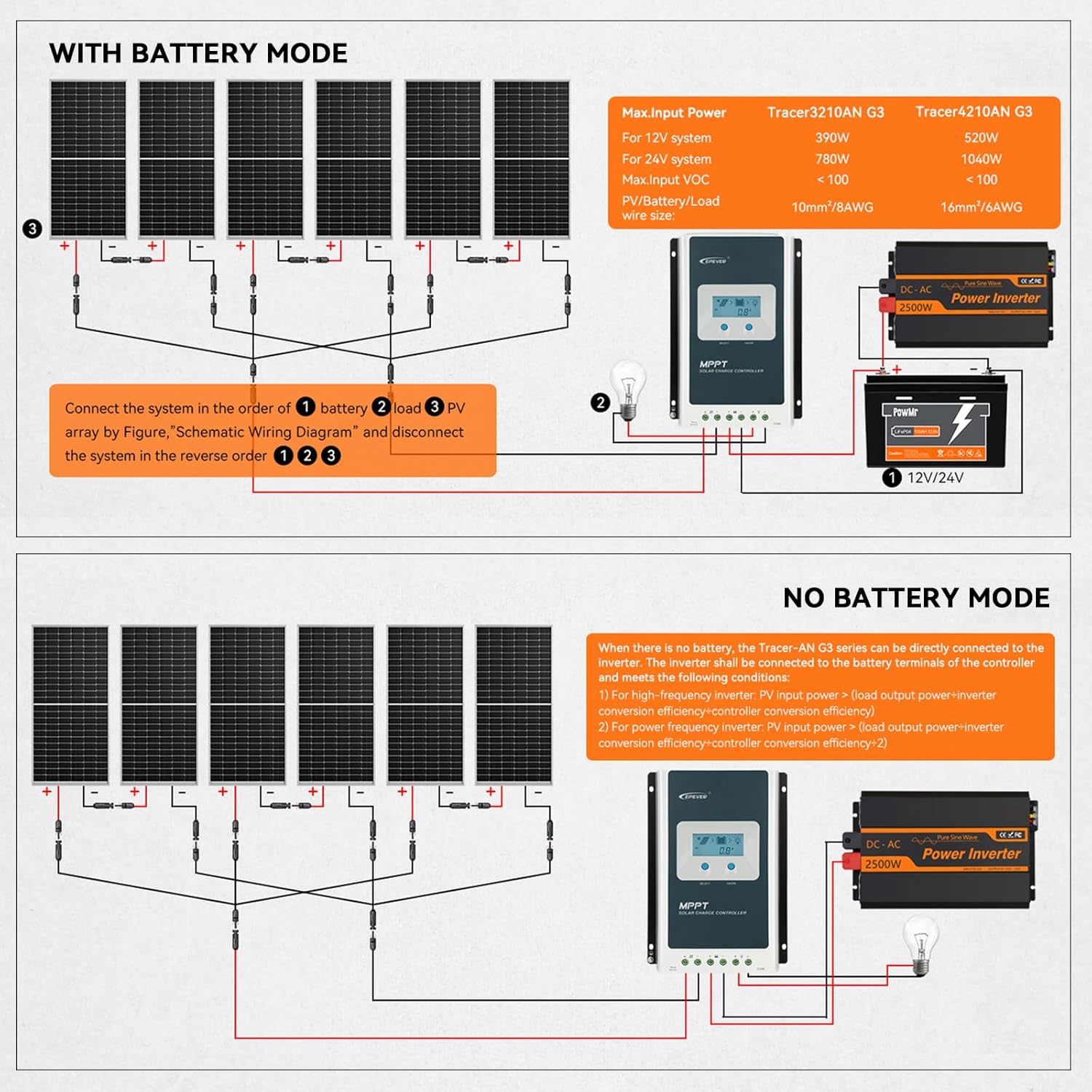
Figure 3: Wiring Diagram. This diagram shows the correct connection sequence for the EPEVER MPPT Solar Charge Controller, including connections for solar panels, battery, and DC load, for both 12V and 24V systems.
3.2 배터리 유형 구성
The controller supports various battery types. Ensure you select the correct battery type for optimal charging and battery longevity. This can be configured via the controller's LCD display or through the mobile app/PC software.

Figure 4: Applicable Battery Types. This image displays a table of supported battery types and their corresponding display codes for the EPEVER MPPT Solar Charge Controller, including Sealed, Gel, Flooded, LiFePO4, and User-Defined options.
3.3 앱 및 PC 소프트웨어 설치
The controller supports monitoring and parameter setting via a mobile application or PC software. This requires an optional communication module (Bluetooth adapter or WiFi adapter) or an RS485 cable for PC connection.
Video 1: EPEVER G3 Version TracerAN MPPT Solar Charge Controller. This video provides an overview of the EPEVER G3 Version TracerAN MPPT Solar Charge Controller, including its features and setup process.
Video 2: Solar Charge Controller Wiring guide. This video demonstrates the wiring process for a solar charge controller, showing how to connect the battery, solar panels, and load.
4. 사용 설명서
4.1 Charging Algorithm
The controller utilizes a smart 3-stage charging algorithm (Bulk Charge, Absorption Charge, Float Charge) to optimize battery performance and extend battery life.

Figure 5: Efficient Charging. This image highlights the 99.5% high tracking efficiency and 98% peak conversion efficiency of the EPEVER MPPT Solar Charge Controller, along with its smart 3-stage charging process (Bulk, Absorption, Float) for 12V/24V Lead-acid and Lithium batteries.
4.2 Load Work Modes
The controller offers multiple load work modes to suit various application needs, including Timer Mode, Manual Mode, Test Mode, Always-On Mode, and Auto-On/Off Mode (Dawn-to-Dusk Mode).

Figure 6: Multiple Load Work Modes. This image illustrates the various load work modes available on the EPEVER MPPT Solar Charge Controller, such as Timer Mode, Manual Mode, Test Mode, Always-On Mode, and Auto-On/Off Mode (Dawn-to-Dusk Mode).
4.3 Monitoring and Control via App
Use the dedicated mobile application (e.g., Solar Guardian) to monitor real-time data, view historical records, and customize charging parameters. The app can be downloaded from the App Store or by scanning the QR code provided in the product documentation.

Figure 7: Monitor and Control via Solar Guardian App. This image shows a smartphone displaying the Solar Guardian app interface, which allows for real-time monitoring and custom charging parameter settings for the EPEVER MPPT Solar Charge Controller. QR codes for iOS and Android app downloads are also visible.
5. 유지관리
Regular maintenance ensures the longevity and optimal performance of your solar charge controller. Inspect all connections for tightness and corrosion periodically. Keep the controller clean and free from dust. Ensure proper ventilation around the unit to prevent overheating. Check battery terminals for any signs of wear or damage.
6. 문제 해결
If the controller is not functioning as expected, check the following:
- 전원/디스플레이 없음: Verify battery connections and ensure the battery voltage는 작동 범위 내에 있습니다.
- 충전 안함: Check PV array connections, ensure solar panels are receiving adequate sunlight, and confirm PV voltage는 컨트롤러의 입력 범위 내에 있습니다.
- 배터리가 완전히 충전되지 않았습니다: Review battery type settings in the controller. Ensure the PV array power is sufficient for the battery bank size.
- 로드가 작동하지 않음: Check load connections, verify load output mode settings, and ensure the battery has sufficient charge.
- 오류 코드: Refer to the detailed user manual for specific error code interpretations and solutions.
7. 사양
| 특징 | 사양 |
|---|---|
| 모델 | 3210AN |
| 시스템 볼륨tage | 12V / 24V 자동 |
| 정격 충전 전류 | 30A |
| 최대 PV 입력 Voltage | 100V (92V at 25℃ environment temperature) |
| Max. PV Rated Charge Power (12V) | 390와트 |
| Max. PV Rated Charge Power (24V) | 780와트 |
| 배터리 유형 | Lead-acid (Sealed, AGM, Gel, Flooded), User, Lithium |
| 디스플레이 유형 | 액정표시장치 |
| 작동 온도 | 섭씨 45도 |
| 제품 치수 | 6.46 x 2.17 x 8.99 인치 |
| 품목 무게 | 3.15파운드 |
| 재료 | 플라스틱 |
| 색상 | 파란색 |
8. 보증
The EPEVER MPPT 30A Solar Charge Controller comes with a manufacturer warranty for 2 years from the date of purchase. Please retain your proof of purchase for warranty claims.
9. 지원
For technical assistance, troubleshooting, or any inquiries regarding your EPEVER MPPT 30A Solar Charge Controller, please refer to the official EPEVER website or contact their customer support. Many users find the mobile app and PC software invaluable for monitoring and adjusting settings, and the manufacturer's technical support is often praised for its responsiveness and helpfulness.
Video 3: EPEVER MPPT Charge Controller. This video provides a general overview of the EPEVER MPPT Charge Controller, showcasing its design and basic functionalities.


