제품 끝view
This manual provides instructions for the Elekpia Replacement Remote Control, designed for use with various MAG IPTV Linux Set-Top Box models. This remote offers a direct replacement solution, requiring no complex programming or pairing.
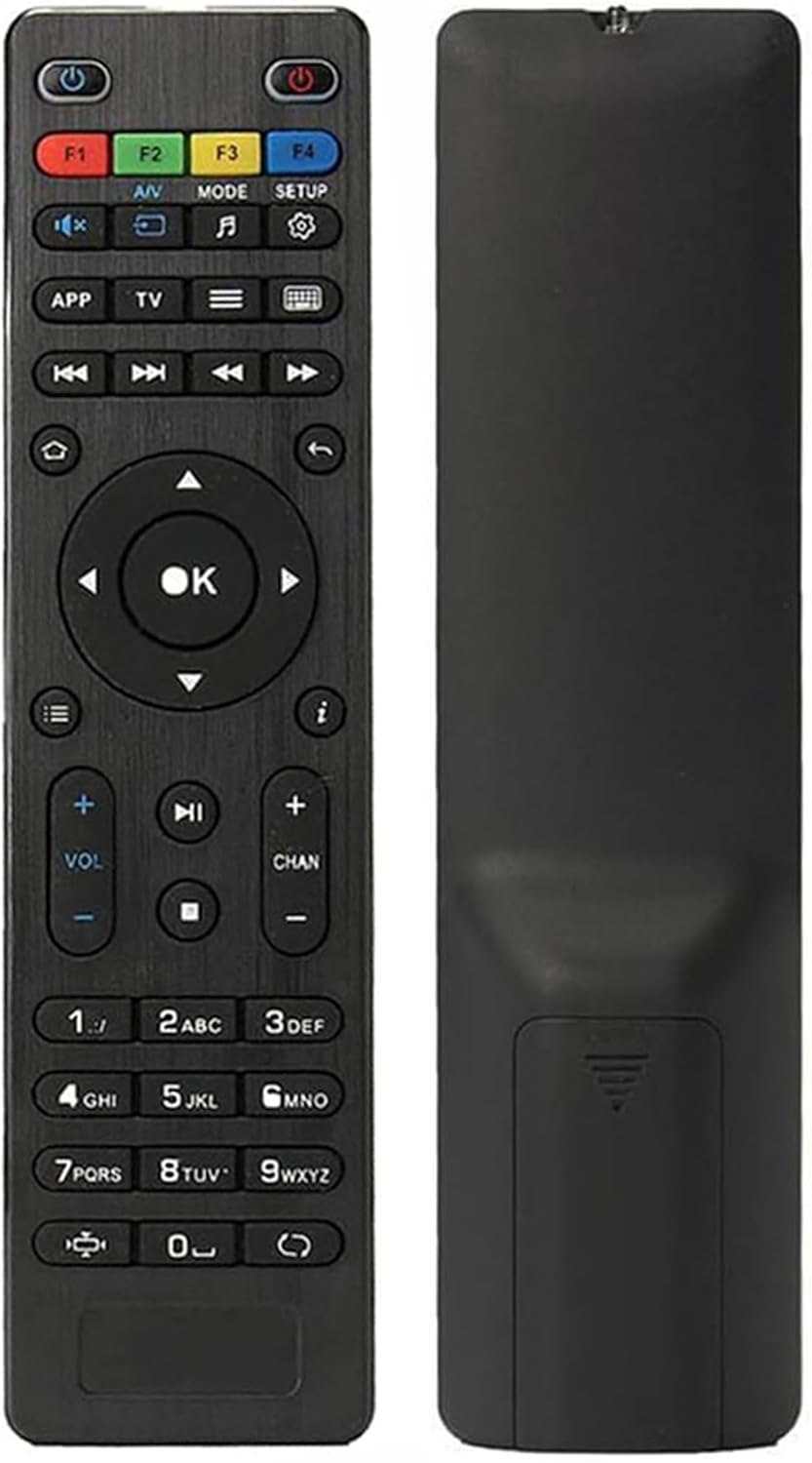
이미지: 앞면과 뒷면 view of the Elekpia replacement remote control. The remote is black with clearly labeled buttons on the front, and a smooth, ergonomic back.
주요 특징:
- Compatible with a wide range of MAG IPTV Linux Set-Top Box models, including MAG250, MAG254, 255, 256, 257, 260, 275, 349, 350, 351, 352, and MAG322W1.
- No programming or pairing required; functions immediately upon battery installation.
- Powered by two AAA batteries (not included).

Image: The remote control is shown alongside a list of compatible MAG models, emphasizing its broad compatibility with various MAG IPTV Linux Set-Top Boxes.
설정
Setting up your new Elekpia remote control is a straightforward process. Follow these steps to begin using your remote.
1. 배터리 설치
- 리모콘 뒷면에서 배터리함을 찾으세요.
- 배터리실 커버를 밀어서 엽니다.
- 2개(2)의 AAA 배터리를 넣고 양극(+)과 음극(-) 단자가 배터리함 내부의 표시기와 올바르게 맞춰지도록 합니다.
- 배터리 덮개를 단단히 닫으세요.
2. 초기 사용
This remote control is designed to work directly with compatible MAG IPTV Linux Set-Top Boxes without the need for programming or pairing. Once batteries are installed, point the remote at your set-top box and begin using it.
작동 지침
Familiarize yourself with the functions of each button on your Elekpia remote control to effectively navigate and control your MAG IPTV Linux Set-Top Box.

Image: A detailed diagram illustrating the layout and function of each button on the remote control, including power, navigation, volume, channel, and media playback controls.
리모컨 버튼 기능| 단추 | 기능 |
|---|
| 전원 버튼 (⏻) | Turns the Media Player On/Off. |
| F1, F2, F3, F4 | Additional functions (may vary by device). |
| 오디오/비디오 | Changes audio mode. |
| 방법 | 설정 메뉴에 접근합니다. |
| 설정 | 설정 메뉴에 접근합니다. |
| 앱 | 컨텍스트 메뉴. |
| TV | Quick TV access. |
| 메뉴 (☰) | TV 가이드. |
| 건반 (⌨) | Virtual keyboard. |
| 탐색 화살표 (위, 아래, 왼쪽, 오른쪽) | 메뉴와 옵션을 탐색합니다. |
| 확인 버튼 | 선택 사항을 확인합니다. |
| 뒤로/돌아가기 (↩) | 이전 화면으로 돌아갑니다. |
| 집 (⌂) | 홈 화면으로 돌아갑니다. |
| 정보 (ⓘ) | 정보를 표시합니다. |
| 볼륨 높이기/낮추기 (VOL + / -) | 볼륨 레벨을 조절합니다. |
| 채널 업/다운 (CHAN + / -) | Switches channels. |
| 무음 (🔇) | 사운드를 켜거나 끕니다. |
| 재생/일시정지 (▶⏸) | 미디어를 재생하거나 일시 정지합니다. |
| 멈추다 (⏹) | Stops media playback. |
| 앞으로/뒤로 건너뛰기 (⏭⏮) | Skips to the next/previous track or chapter. |
| 빠른 재생 (⏩) | 미디어를 통해 빠르게 진행해 봅시다. |
| 숫자 키패드 (0-9) | Direct input for channel numbers or other numerical data. |
| 종횡비 (◧) | 종횡비를 변경합니다. |
| 업데이트 (↻) | Initiates an update (functionality may vary). |
유지
적절한 유지관리는 리모컨의 수명과 최적의 성능을 보장합니다.
1. 배터리 교체
Replace batteries when the remote's responsiveness decreases or it stops functioning. Always use new AAA batteries and dispose of old batteries responsibly according to local regulations.
2. 청소
To clean the remote, gently wipe its surface with a soft, dry cloth. For stubborn dirt, slightly dampen the cloth with water or a mild, non-abrasive cleaner. Avoid using excessive liquid or harsh chemicals, as these can damage the remote's electronics or finish.
3. 보관
When not in use for extended periods, it is recommended to remove the batteries to prevent potential leakage and damage to the remote.
문제 해결
If you encounter issues with your remote control, refer to the following common problems and their solutions.
일반적인 문제 및 솔루션| 문제 | 가능한 원인 | 해결책 |
|---|
| 리모컨이 응답하지 않습니다. | Dead or incorrectly installed batteries. Obstruction between remote and set-top box. Remote out of range. | Replace batteries with new AAA batteries, ensuring correct polarity. Remove any obstructions. Ensure you are within effective range of the set-top box. |
| 버튼이 뻑뻑하거나 누르기 어렵습니다. | Accumulation of dirt or debris under the buttons. Internal mechanism issue. | Gently clean around the buttons with a soft, dry cloth or a cotton swab. If the issue persists, it may indicate internal wear. |
| 원격근무는 간헐적으로 진행됩니다. | Low battery power. Infrared sensor on remote or set-top box is dirty or obstructed. | Replace batteries. Clean the infrared sensor on both the remote and the set-top box. Ensure a clear line of sight. |
| Remote does not control the set-top box. | Incompatible set-top box model. | Verify that your MAG IPTV Linux Set-Top Box model is listed as compatible (MAG250, MAG254, 255, 256, 257, 260, 275, 349, 350, 351, 352, MAG322W1). |
명세서
제품 사양| 특징 | 세부 사항 |
|---|
| 모델 번호 | Elekpia mag 254 remote |
| 호환 장치 | MAG250, MAG254, 255, 256, 257, 260, 275, 349, 350, 351, 352 IPTV Linux Set-Top Box, MAG322W1 |
| 전원 | AAA 배터리 2개(포함되지 않음) |
| 치수(길이 x 너비 x 높이) | 7 x 1.8 x 0.6인치(대략) |
| 품목 무게 | 1.76온스(대략) |
| 색상 | 검은색 |
| 특징 | 인체공학적 디자인 |
보증 및 지원
Information regarding product warranty and customer support is not provided within this instruction manual. For warranty details or technical assistance, please refer to the product packaging or contact the retailer/manufacturer directly.
Manufacturer: Elekpia Factory


