1. 서론
This instruction manual provides detailed information on the installation, operation, and maintenance of your Pioneer DEH-5600 car audio system. Please read this manual thoroughly before using the product to ensure correct usage and to prevent accidents. Keep this manual in a safe place for future reference.
2. 안전 정보
부상이나 제품 손상을 방지하려면 다음 안전 예방 조치를 준수하세요.
- 운전 중 주의를 산만하게 하는 방식으로 시스템을 조작하지 마십시오.
- Ensure proper installation by a qualified technician to prevent electrical shorts or other hazards.
- Do not disassemble or modify the unit. This may result in electric shock, fire, or other malfunctions.
- 외부 소리, 예를 들어 구급차 사이렌 소리가 들릴 정도로 음량을 유지하세요.
- 지정된 액세서리 및 부품만 사용하십시오.
3. 패키지 내용
패키지에 모든 품목이 들어 있는지 확인하세요.
- Main Unit (DEH-5600)
- 배선 마구
- 핸즈프리 마이크
- Installation Screws Set
- Remote Control (with CR2025 Lithium Battery)
- 사용 설명서(본 문서)
- 보증 카드
4. 설정 및 설치
Proper installation is crucial for optimal performance and safety. It is recommended to have this unit installed by a professional.
4.1 배선 연결
Connect the wiring harness according to your vehicle's specifications. Ensure the ground wire is securely connected to a metal part of the vehicle chassis or the battery's negative terminal.
중요한: Connect the vehicle-specific harness to the main unit harness before installation. Ensure all connections are secure to prevent short circuits.
4.2 장치 장착
Install the DEH-5600 into a 1DIN opening in your vehicle's dashboard. Use the provided installation screws to secure the unit.
4.3 Hands-free Microphone Installation
Mount the hands-free microphone in a location that allows clear voice pickup, typically near the driver's sun visor or on the steering column. Route the cable carefully to avoid interference with driving controls.
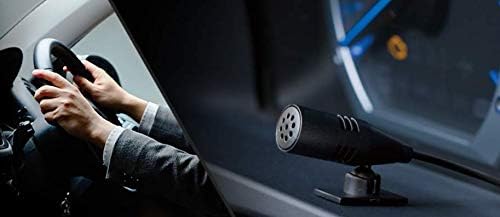
Image: Hands-free microphone for clear communication during calls.
5. 사용 설명서
5.1 기본 작업
- 전원 켜기/끄기: SRC/OFF 버튼을 눌러 장치를 켜거나 끕니다.
- 볼륨 조절: Rotate the rotary knob to adjust the volume.
- 소스 선택: Press the SRC/OFF button repeatedly to cycle through available sources (CD, Bluetooth, USB, iPhone, AUX, Tuner).
5.2 CD 재생
Insert a CD into the disc slot. Playback will start automatically. Use the track skip buttons to navigate between tracks.
5.3 튜너 작동
Select the Tuner source. Use the seek buttons to find radio stations. Press and hold a preset button to store a station.
6. 오디오 설정
The DEH-5600 features a high-performance DSP for precise sound customization.
6.1 Time Alignment
Adjust the time alignment settings to ensure that sound from all speakers reaches the listener at the same time, creating a more focused sound stage. Refer to the on-screen menu for detailed adjustments.
6.2인치 13밴드 그래픽 이퀄라이저
Utilize the 13-band graphic equalizer to fine-tune the audio frequency response. This allows for detailed sound shaping to match your preferences and vehicle acoustics.

Image: The 13-band graphic equalizer interface for detailed sound adjustments.
7. 블루투스 연결
The DEH-5600 supports Bluetooth for hands-free calling and audio streaming.
7.1 블루투스 장치 페어링
- Turn on the Bluetooth function on your smartphone or other device.
- On the DEH-5600, navigate to the Bluetooth settings menu.
- Select "Pairing" or "Add Device".
- 검색 "DEH-5600" on your device and select it.
- 메시지가 표시되면 페어링 코드를 확인하세요.
7.2 핸즈프리 통화
Once paired, you can make and receive calls through the DEH-5600. Use the dedicated call buttons on the unit or remote control. Your voice will be picked up by the external microphone.
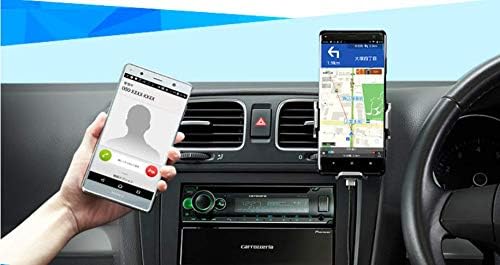
Image: Hands-free calling functionality with a connected smartphone.
7.3 블루투스 오디오 스트리밍
Select the Bluetooth Audio source to stream music from your paired device. Use the unit's controls to play, pause, and skip tracks.
8. USB/iPod/iPhone Playback
Connect your USB device, iPod, or iPhone to the USB Type-A port for direct audio playback and charging.
- Supported formats for USB: WMA, MP3, WAV, AAC, FLAC.
- For iPhone/iPod, use a compatible USB cable. The unit supports iOS control.

Image: Various media playback options including iPhone, Android smartphone, and USB device.
9. 유지관리
To ensure long-lasting performance of your DEH-5600:
- 청소: Wipe the unit's front panel with a soft, dry cloth. Do not use abrasive cleaners or solvents.
- 디스크 관리: CD는 가장자리를 잡고 다루세요. 깨끗하게 유지하고 흠집이 나지 않도록 하세요.
- 펌웨어 업데이트: 파이오니어를 확인하세요 web해당 모델에 대한 사용 가능한 펌웨어 업데이트가 있는지 정기적으로 사이트를 방문하세요.
10. 문제 해결
| 문제 | 가능한 원인 | 해결책 |
|---|---|---|
| 전원이 없습니다 | 잘못된 배선; 퓨즈가 끊어짐 | 전원 연결 상태를 확인하고, 필요한 경우 퓨즈를 교체하십시오. |
| 소리가 나지 않습니다 | 볼륨이 너무 작음; 음소거됨; 스피커 배선 문제 | 볼륨을 높이세요. 음소거를 해제하세요. 스피커 연결을 확인하세요. |
| 블루투스 페어링 실패 | 기기가 페어링 모드가 아닙니다. 간섭이 발생했습니다. | Ensure device Bluetooth is on and in pairing mode; Try pairing again. |
| CD가 건너뛰거나 재생되지 않습니다 | Dirty or scratched disc; Unit vibration | Clean or replace disc; Ensure unit is securely mounted. |
If the problem persists after trying these solutions, contact Pioneer customer support or a qualified service center.
11. 사양
- 모델 이름: DEH-5600
- 상표: 개척자
- 제품 크기: 16.5 x 17.8 x 5cm (깊이 x 너비 x 높이)
- 제품 무게: 1.32kg
- 장착 크기 : 1 DIN
- 연결 기술 : 블루투스, USB
- 컨트롤러 유형 : iOS (호환되는 기기용)
- 특별 기능: DSP, WAZE (via smartphone app)
- 지원되는 미디어: CD, USB (WMA, MP3, WAV, AAC, FLAC), iPhone, iPod, AUX
- Amp정수기: Power MOS FET 50W x 4 channels
- 오디오 처리 : Time Alignment, 13-Band Graphic Equalizer
- 색상: 블랙 / 그린
12. 보증 및 지원
Your Pioneer DEH-5600 comes with a manufacturer's warranty. Please refer to the included warranty card for details regarding coverage period and terms. For technical support, service, or inquiries, please visit the official Pioneer website or contact your local Pioneer customer service center.
온라인 리소스: 파이오니어 카로체리아 공식 Web대지


