1. 서론
This manual provides essential information for the safe and efficient installation, operation, and maintenance of your KIMEX Motorized TV Lift Support, model 018-6044. Please read this manual thoroughly before installation and retain it for future reference.
The KIMEX 018-6044 motorized lift support is designed for 32-48 inch TV screens, supporting VESA patterns from 75x75mm to 400x400mm and a maximum weight of 50 kg. It allows for discreet installation within furniture and includes a remote control. Its adjustable and memorizable height makes it ideal for seamless furniture integration. The design features simple, tool-free installation with anti-detachment screws for maximum security, offering a modern and innovative solution for discreet TV placement.
2. 안전 정보
- 설치하기 전에 모든 구성품이 있는지, 손상되지 않았는지 확인하십시오. 부품이 누락되었거나 결함이 있는 경우 사용하지 마십시오.
- 본 제품은 실내에서만 사용하도록 설계되었습니다.
- 최대 중량 용량 50kg(110파운드)을 초과하지 마십시오.
- Ensure the mounting surface (furniture) can safely support the combined weight of the lift mechanism and the television.
- Keep children and pets away from the lift mechanism during operation to prevent injury.
- Do not attempt to modify the product. Unauthorized modifications may result in injury or product failure.
- 유지관리나 조정을 하기 전에 전원을 분리하세요.
3. 패키지 내용
패키지에 다음 구성 요소가 모두 포함되어 있는지 확인하세요.
- Motorized TV Lift Mechanism
- VESA TV Mounting Brackets
- 원격 제어
- 전원 어댑터
- 장착 하드웨어 키트(나사, 와셔, 스페이서)
- 사용 설명서
4. 설정 및 설치
The KIMEX 018-6044 is designed for recessed installation within furniture. Follow these steps carefully.
4.1. Prepare the Furniture
Ensure the furniture where the lift will be installed has adequate space and structural integrity to support the lift and TV. Refer to the dimensions diagram for precise measurements.

Figure 4.1: Technical drawing with dimensions of the KIMEX motorized TV lift. This diagram shows various measurements including height, width, and depth for proper furniture integration.
4.2. Mount the Lift Mechanism
- Position the lift mechanism inside the furniture. Secure the base of the lift to the furniture using appropriate screws (provided in the hardware kit).
- Ensure the lift is level and stable.
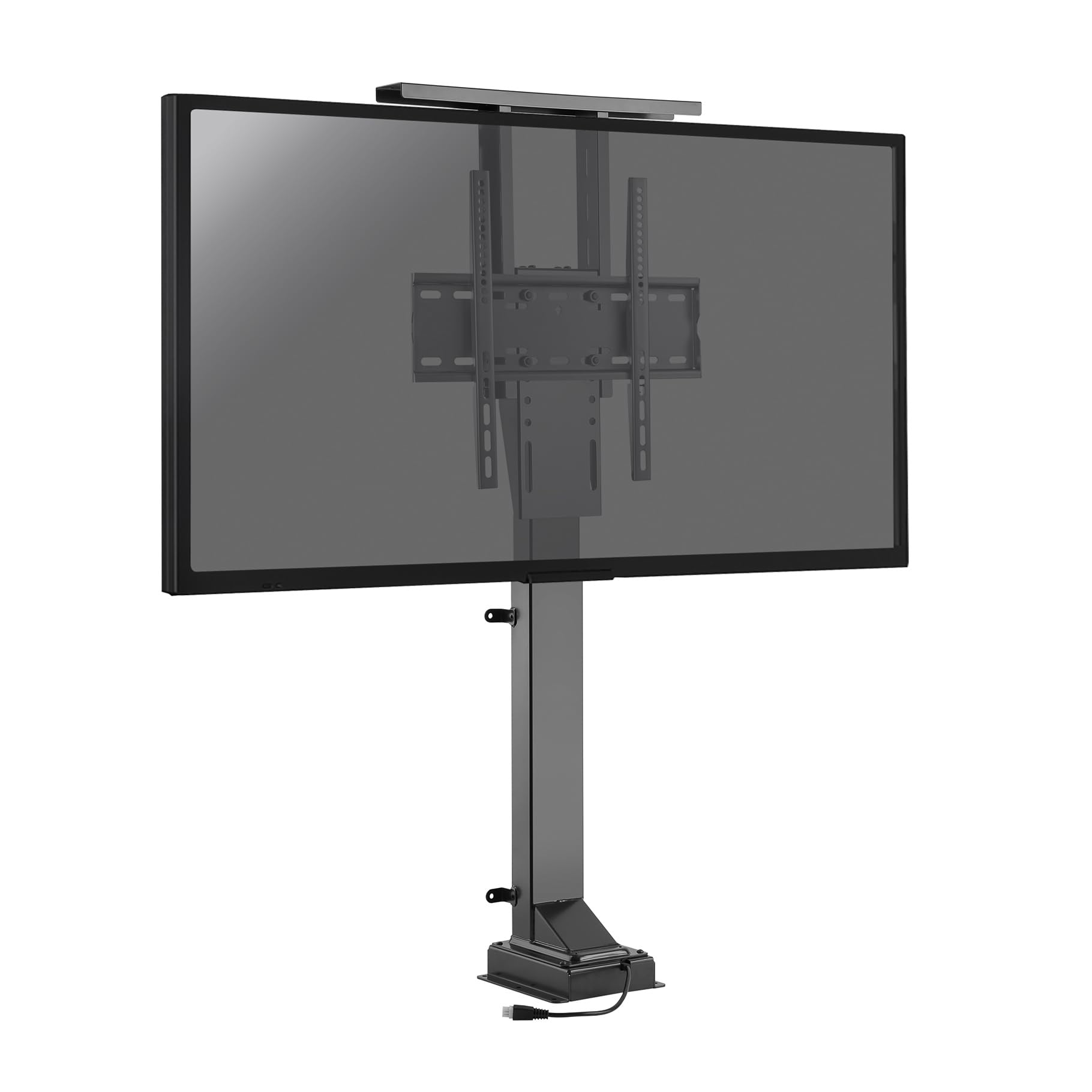
그림 4.2: 전면 view of the KIMEX motorized TV lift mechanism, showing the main structure and VESA mounting plate.

그림 4.3: 측면 view of the KIMEX motorized TV lift mechanism, illustrating its profile and depth.

그림 4.4: 후면 view of the KIMEX motorized TV lift mechanism, showing the back of the column and base.
4.3. Attach TV Mounting Brackets
- Attach the VESA mounting brackets to the back of your television using the appropriate screws and spacers from the hardware kit. Ensure the screws are tightened securely but do not overtighten.
- Verify that the VESA pattern on your TV (75x75mm to 400x400mm) is compatible with the lift.
4.4. Mount the TV to the Lift
- Carefully lift the television and hook the attached VESA brackets onto the lift mechanism's mounting plate.
- Engage the anti-detachment screws or safety locks to secure the TV to the lift. This step is crucial for preventing accidental dislodgement.

Figure 4.5: The motorized TV lift with a television screen attached, viewed from the front, demonstrating the mounted TV.
4.5. 전원 연결
Connect the power adapter to the lift mechanism and then plug it into a suitable power outlet.

그림 4.6: 예ample of the KIMEX motorized TV lift integrated into a bedroom cabinet, with the television extended for view주고받음.
5. 사용 설명서
The motorized TV lift is operated using the included remote control.
5.1. 기본 동작
- 를 누르세요 UP button to raise the television.
- 를 누르세요 아래에 button to lower the television.
- 를 누르세요 멈추다 button to halt movement at any desired position.
5.2. Setting Memory Positions
The lift allows you to save preferred height positions for quick recall.
- Adjust the TV to your desired height using the UP/DOWN buttons.
- 를 누르세요 세트 button once. The lift may beep or flash an indicator.
- Press one of the memory preset buttons (e.g., M1, M2) to save the current position.
- To recall a saved position, simply press the corresponding memory preset button.
6. 유지관리
Regular maintenance ensures the longevity and smooth operation of your TV lift.
- 청소: Wipe the lift mechanism with a soft, dry cloth. Do not use abrasive cleaners or solvents.
- 점검: Periodically check all screws and connections to ensure they are tight. Inspect the power cable for any signs of damage.
- 매끄럽게 하기: The lift mechanism is generally maintenance-free. Do not apply lubricants unless specifically instructed by customer support.
7. 문제 해결
If you encounter issues, refer to the following troubleshooting guide before contacting support.
| 문제 | 가능한 원인 | 해결책 |
|---|---|---|
| 리프트가 움직이지 않습니다 | No power; Remote control battery low/dead; Overload; Obstruction | Check power connection; Replace remote batteries; Reduce TV weight; Remove any obstructions. |
| Lift moves erratically | Loose connections; Motor issue | Check all connections; Contact customer support if problem persists. |
| 리모콘이 응답하지 않음 | Batteries dead; Remote out of range; Interference | Replace batteries; Move closer to the lift; Remove sources of interference. |
8. 사양
| 상표 | 키멕스 |
| 모델 번호 | 018-6044 |
| 색상 | 검은색 |
| 호환 장치 | 텔레비전 |
| 화면 크기 호환성 | 32-48 인치 |
| VESA 호환성 | 최소 75x75mm, 최대 400x400mm |
| 최대 하중 용량 | 50kg |
| 장착 유형 | Floor Mount (Recessed) |
| 이동 유형 | 관절 |
| 재료 | 플라스틱 |
| 예비 부품 가용성 | 3년 |
9. 보증 및 지원
KIMEX products are designed for reliability and performance. This product comes with a guarantee of spare parts availability for 3 years from the date of purchase.
For technical assistance, troubleshooting beyond this manual, or warranty claims, please contact KIMEX customer support through their official website or your retailer. Please have your model number (018-6044) and purchase information ready when contacting support.


