1. 서론
This manual provides essential information for the safe and effective operation of your Behringer C210 Powered Column Loudspeaker. The C210 is a modular column loudspeaker designed for portable PA applications and high-quality music playback. It features an 8-inch subwoofer, four high-frequency drivers, 200 watts of multi-channel Class-D power, Bluetooth audio streaming, an integrated MP3 player, LED lighting, and remote control capabilities.
기기를 작동하기 전에 이 설명서를 자세히 읽고 나중에 참조할 수 있도록 보관하세요.
2. 안전 지침
- 전원: 지정된 용량의 AC 전원 콘센트에만 기기를 연결하십시오.tage. 전원 코드가 손상되거나 꼬이지 않았는지 확인하십시오.
- 통풍: 환기구를 막지 마십시오. 제조업체의 지침에 따라 설치하십시오.
- 물과 습기: Do not expose this apparatus to rain or moisture. Do not place objects filled with liquids on the apparatus.
- 열: 라디에이터, 난방 조절기, 스토브 또는 기타 장치(다음을 포함)와 같은 열원 근처에 설치하지 마십시오. amp열을 생성하는 발전기.
- 청소: 마른 천으로만 닦으십시오.
- 서비스: 이 제품을 직접 수리하려고 하지 마십시오. 모든 수리는 자격을 갖춘 서비스 담당자에게 맡기십시오. 전원 코드나 플러그가 손상된 경우, 액체를 쏟았거나 이물질이 기기 안으로 들어간 경우, 기기가 비나 습기에 노출된 경우, 정상적으로 작동하지 않는 경우 또는 기기를 떨어뜨린 경우 등 기기가 어떤 식으로든 손상된 경우에는 수리가 필요합니다.
- 놓기: Ensure the loudspeaker is placed on a stable, level surface to prevent tipping.
- 청력 보호: Prolonged exposure to high sound pressure levels can cause permanent hearing loss. Use caution when setting volume levels.
3. 패키지 내용
포장을 뜯으신 후 모든 구성품이 있는지, 그리고 양호한 상태인지 확인해 주십시오.
- Behringer C210 Powered Column Loudspeaker Unit (Subwoofer base and column array)
- 전원 케이블
- 원격 제어
- 사용 설명서 (본 문서)
누락되거나 손상된 품목이 있는 경우 즉시 판매점에 문의하십시오.
4. 제품 오버view
The Behringer C210 is a compact yet powerful column loudspeaker system designed for ease of transport and quick setup. It consists of a subwoofer base unit and a column array that houses the high-frequency drivers.
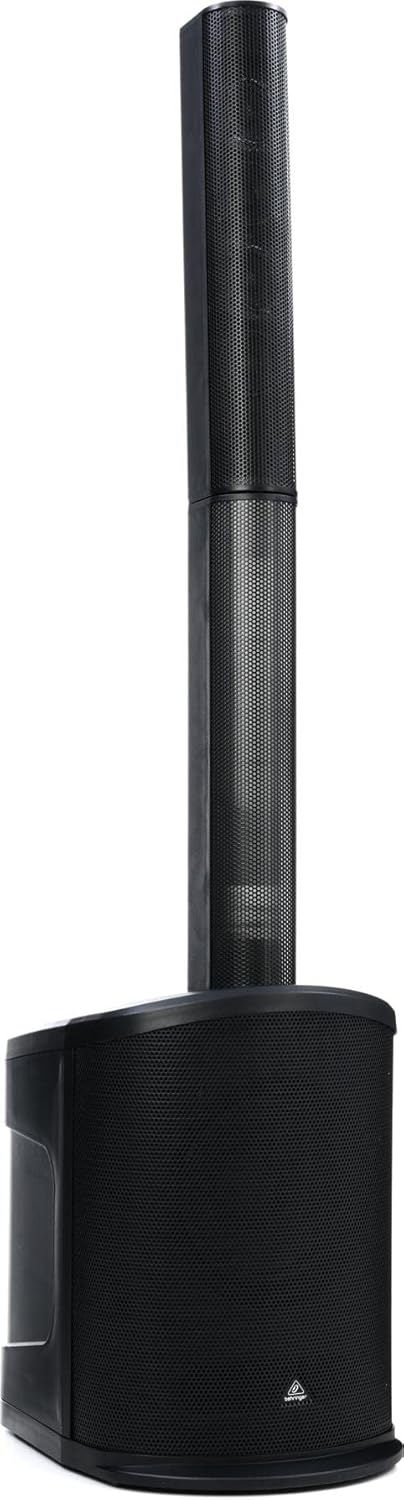
그림 4.1: 전면 view of the C210 loudspeaker, illustrating its modular design with the subwoofer base and the column array.
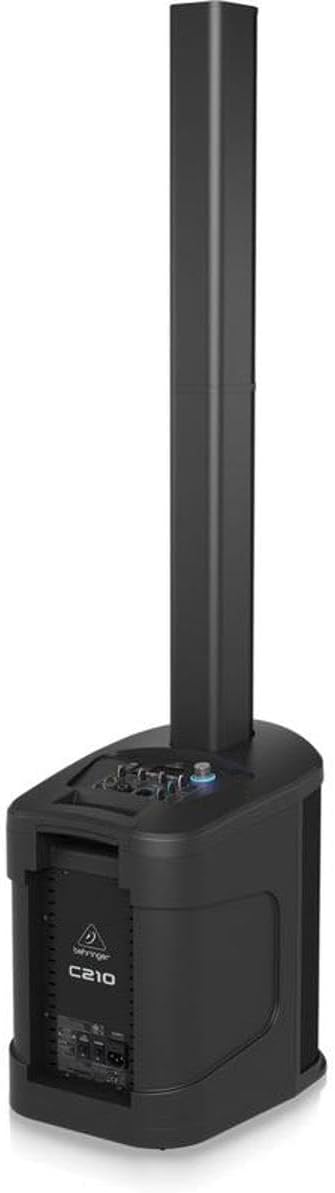
Figure 4.2: Rear/side view of the C210, highlighting the integrated control panel and input/output connections on the subwoofer unit.
주요 구성 요소:
- Subwoofer Base: Houses the 8-inch subwoofer, Class-D amplifier, control panel, and input/output connections.
- 컬럼 배열: Contains four high-frequency drivers for wide sound dispersion. It connects directly to the subwoofer base.
- 제어판: Located on the top of the subwoofer base, providing access to volume, input selection, MP3 player controls, and LED lighting settings.
- 원격 제어: Allows for convenient adjustment of volume, track selection, and LED lighting from a distance.
5. 설정
Follow these steps to set up your C210 loudspeaker:
- 풀다: 포장에서 모든 구성 요소를 조심스럽게 제거합니다.
- 놓기: Choose a stable, level surface for the subwoofer base. Ensure there is adequate space around the unit for ventilation. Avoid placing it directly against walls or in corners if possible, to optimize sound dispersion.
- 컬럼 배열 구성: Align the bottom of the column array with the connector on the top of the subwoofer base. Gently push down until it is securely seated. The connection is designed to be firm and stable.
- 전원 연결: Connect the supplied power cable to the AC inlet on the rear of the subwoofer base. Plug the other end into a suitable grounded electrical outlet.
- 초기 전원 켜기: Before turning on the unit, ensure all volume controls are set to their minimum level. Power on the unit using the main power switch.
6. 운영
6.1. 기본 동작
- 전원 켜기/끄기: Use the power switch located on the rear of the subwoofer base to turn the unit on or off.
- 마스터 볼륨: Adjust the main volume knob on the control panel to control the overall output level of the loudspeaker.
- 입력 선택: Use the input selector buttons or knob on the control panel to switch between different audio sources (e.g., Bluetooth, MP3, Line In).
6.2. 블루투스 오디오 스트리밍
The C210 supports high-quality Bluetooth audio streaming from compatible devices.
- 블루투스 활성화: Select the Bluetooth input mode on the C210's control panel. The unit will enter pairing mode, indicated by a flashing Bluetooth indicator.
- 페어링 장치: On your smartphone, tablet, or other Bluetooth-enabled device, open the Bluetooth settings and search for available devices. Select "Behringer C210" from the list.
- 연결하다: Once paired, the Bluetooth indicator on the C210 will become solid, and you can begin streaming audio from your device.
6.3. MP3 Player Operation
The integrated MP3 player allows playback of audio files from USB sticks and SD/MMC cards.
- 미디어 삽입: Insert a USB stick into the USB port or an SD/MMC card into the card slot on the control panel.
- Select MP3 Input: Switch the input mode to MP3. The unit will automatically detect and begin playing compatible audio files.
- 통제 수단: Use the dedicated MP3 player controls (Play/Pause, Next Track, Previous Track) on the control panel or remote control to manage playback.
6.4. LED 조명
The C210 features integrated LED lighting. Use the dedicated controls on the unit or the remote control to activate and select various lighting modes and effects.
6.5. 원격 제어
동봉된 리모컨을 통해 주요 기능을 편리하게 사용할 수 있습니다.
- 전원 켜기/끄기
- Master Volume Up/Down
- 입력 소스 선택
- MP3 Player Controls (Play/Pause, Skip)
- LED Lighting Mode Selection
7. 유지관리
Proper maintenance ensures the longevity and optimal performance of your C210 loudspeaker.
- 청소: Disconnect the power before cleaning. Use a soft, dry cloth to wipe down the exterior surfaces. Do not use abrasive cleaners, waxes, or solvents.
- 저장: If storing the unit for an extended period, disconnect it from power and store it in a dry, dust-free environment. It is recommended to use the original packaging for protection during storage or transport.
- 통풍: 과열을 방지하기 위해 환기구에 먼지와 이물질이 없는지 정기적으로 점검하십시오.
8. 문제 해결
If you encounter issues with your C210, refer to the following common problems and solutions:
| 문제 | 가능한 원인 | 해결책 |
|---|---|---|
| 전원이 없습니다 | Power cable disconnected; Power outlet faulty; Unit power switch off | 전원 케이블 연결 상태를 확인하십시오. 다른 콘센트에 연결해 보십시오. 전원 스위치가 켜져 있는지 확인하십시오. |
| 사운드 출력이 없습니다 | Volume too low; Incorrect input selected; Audio source issue; Column array not connected properly | Increase master volume; Select correct input; Check audio source device; Re-seat column array |
| 블루투스가 페어링되지 않습니다 | C210 not in pairing mode; Device already paired; Interference | Ensure C210 is in Bluetooth input and flashing; Disconnect from other devices; Move closer to C210 |
| MP3 재생 문제 | 지원되지 않음 file format; Corrupt media; Incorrect input selected | 보장하다 files are MP3; Try different USB/SD card; Select MP3 input |
| 리모컨이 작동하지 않습니다 | Dead batteries; Obstruction; Out of range | Replace batteries; Remove obstructions; Move closer to unit |
이러한 해결 방법을 시도한 후에도 문제가 지속되면 고객 지원팀에 문의하세요.
9. 사양
Technical specifications for the Behringer C210 Powered Column Loudspeaker:
| 특징 | 사양 |
|---|---|
| 모델명 | C210 |
| 스피커 유형 | Subwoofer (with Column Array) |
| 장착 유형 | 독립형 |
| 스피커 Amp화형 | 활동적인 |
| 스피커 최대 출력 전력 | 200 와트 |
| 우퍼 직경 | 8 인치 |
| 트위터 직경 | 2.75인치(x4) |
| 주파수 응답 | 20 Hz - 20 kHz (approximate, based on 2E+4 Hz) |
| 연결 기술 | 블루투스 |
| 무선 통신 기술 | 블루투스 |
| 제어 방법 | 원격 |
| MP3 플레이어가 포함되어 있나요? | 예 |
| 전원 | 코드식 전기 |
| 품목 무게 | 30.6파운드(13.88kg) |
| 제품 크기(L x W x H) | 17.32 x 12.99 x 54.53인치(44 x 33 x 138.5cm) |
| 방수 | 거짓 |
| 제조업체 | 음악 부족 |
| 한국어: | 653341353139 |
10. 보증 및 지원
Your Behringer C210 Powered Column Loudspeaker comes with a limited warranty provided by the manufacturer, Music Tribe. The specific terms and duration of the warranty may vary by region and retailer.
For detailed warranty information, product registration, technical support, or service inquiries, please visit the official Behringer website or contact your authorized Behringer dealer.
자세한 정보와 지원 리소스는 다음에서 찾을 수 있습니다. 아마존에서 베링거 스토어를 만나보세요 or the official Music Tribe web대지.


