1. 서론
The Maxell Bass 13 Wireless Headphones (Model B13-WHPS) are designed to provide a versatile audio experience. These headphones feature 40mm drivers for clear sound, an integrated microphone for communication, and comfortable ear pads for extended listening. They offer both wireless Bluetooth connectivity and a traditional 3.5mm wired option.
2. 상자 안에 무엇이 들어있나요?
- Maxell Bass 13 Wireless Headphones
- USB 충전 케이블
- 3.5mm Audio Cable (if applicable, not explicitly listed but common for hybrid headphones)
- 사용자 설명서
3. 제품 오버view
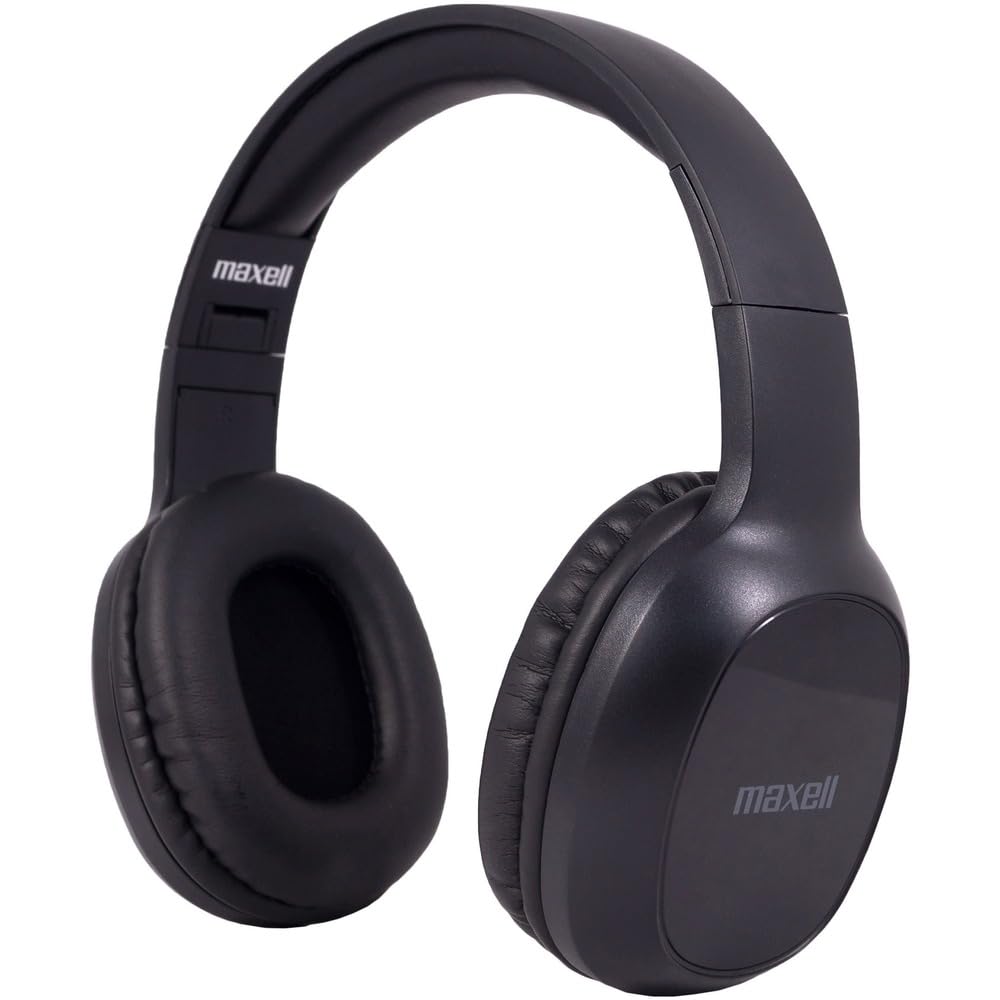
Figure 1: Maxell Bass 13 Wireless Headphones

Figure 2: Earcup Controls (Power, Volume, Play/Pause)
주요 특징:
- 40mm 동적 드라이버: Deliver clear and powerful audio performance.
- 통합 마이크: 핸즈프리 통화가 가능합니다.
- Noise-Isolating Earpads: Provide comfort and help reduce external distractions.
- 블루투스 5.0 연결: 안정적인 무선 연결을 위해.
- 3.5mm 오디오 잭: Allows for wired connection to compatible devices.
- 조정 가능한 머리띠: 다양한 머리 크기에 편안한 착용감을 보장합니다.
- 최대 8시간 배터리 사용 가능: For extended listening and talk time.
4. 설정
4.1 헤드폰 충전

Figure 3: Connecting the USB Charging Cable
- Locate the charging port on the headphone earcup.
- Connect the small end of the provided USB charging cable to the headphone's charging port.
- USB 케이블의 큰 쪽 끝을 USB 전원(예: 컴퓨터 USB 포트, USB 벽면 어댑터)에 연결합니다.
- The LED indicator on the headphones will illuminate to show charging status. It will typically turn off or change color when fully charged.
- A full charge provides up to 8 hours of continuous talk/play time.
4.2 블루투스 페어링
- 헤드폰이 완전히 충전되었는지 확인하세요.
- 헤드폰 이어컵의 전원 버튼을 LED 표시등이 파란색과 빨간색으로 깜빡일 때까지 길게 누르세요. 그러면 페어링 모드에 진입합니다.
- 기기(스마트폰, 태블릿, 컴퓨터)에서 Bluetooth 설정으로 이동하세요.
- 검색 available devices. Select "Maxell Bass 13" from the list.
- 페어링이 완료되면 LED 표시등은 일반적으로 파란색 불빛이 계속 켜져 있거나 파란색 불빛이 천천히 깜빡입니다.
- 암호를 입력하라는 메시지가 나타나면 "0000"을 입력하십시오.
4.3 유선 연결(3.5mm 오디오 잭)

Figure 4: Connecting the 3.5mm Audio Cable
For devices without Bluetooth or when battery is low, you can use the 3.5mm audio cable:
- Plug one end of the 3.5mm audio cable into the audio input jack on the headphone earcup.
- 케이블의 다른 한쪽 끝을 기기의 3.5mm 오디오 출력 잭에 꽂으세요.
- 헤드폰은 패시브 모드로 작동하며 블루투스 기능은 비활성화됩니다.
5. 사용 설명서
5.1 전원 켜기/끄기
- 전원 켜기: LED 표시등이 켜질 때까지 약 3초 동안 전원 버튼을 길게 누릅니다.
- 전원 끄기 : LED 표시등이 꺼질 때까지 약 3~5초 동안 전원 버튼을 길게 누릅니다.
5.2 볼륨 조절
- 볼륨 증가: 볼륨 높이기(+) 버튼을 누르세요.
- 볼륨 감소: 볼륨 낮추기(-) 버튼을 누르세요.
5.3 음악 재생
- 재생/일시 중지: 다기능 버튼(대개 전원 버튼이나 재생/일시 정지 버튼)을 한 번 누릅니다.
- 다음 트랙: Press and hold the Volume Up (+) button (or double-press, refer to specific product button layout).
- 이전 트랙 : Press and hold the Volume Down (-) button (or double-press, refer to specific product button layout).
5.4 통화 관리
- 전화 받기/종료: 다기능 버튼을 한 번 누릅니다.
- 전화 거부: 다기능 버튼을 약 2초간 길게 누릅니다.
- 마지막 번호 재다이얼: 다기능 버튼을 두 번 누릅니다.
6. 유지관리
6.1 청소
- 부드럽고 마른 보푸라기 없는 천으로 헤드폰을 닦으세요.
- 연마성 세척제, 용제 또는 에어로졸 스프레이를 사용하지 마십시오.
- 어떠한 구멍에도 습기가 들어가지 않도록 주의하세요.
6.2 보관

Figure 5: Headphones Folded for Storage
- 헤드폰은 극한의 온도를 피해 시원하고 건조한 곳에 보관하세요.
- When not in use for extended periods, ensure the headphones are fully charged before storage to preserve battery health.
- The headphones feature a foldable design for compact storage and portability.
6.3 배터리 관리
- 배터리를 자주 완전히 방전시키지 마세요.
- Charge the headphones regularly, even if not used often.
- 배터리를 과도한 열이나 직사광선에 노출시키지 마세요.
7. 문제 해결
| 문제 | 가능한 원인 | 해결책 |
|---|---|---|
| 헤드폰 전원이 켜지지 않습니다 | 배터리 부족 | 헤드폰을 완전히 충전하세요. |
| 블루투스로 페어링이 불가능합니다 | 헤드폰이 페어링 모드가 아닙니다. 기기 블루투스가 꺼져 있습니다. 기기와의 거리가 너무 멀습니다. | 헤드폰이 페어링 모드(파란색/빨간색 깜빡임)인지 확인하세요. 기기의 블루투스를 켜세요. 헤드폰을 기기 가까이 가져가세요. |
| 소리가 나지 않습니다 | Volume too low; Incorrect audio source; Headphones not connected | Increase headphone and device volume. Check if headphones are properly paired/connected. Verify audio output settings on your device. |
| 통화 품질이 좋지 않음 | Weak Bluetooth signal; Microphone obstructed | 기기에 더 가까이 다가가세요. 마이크가 가려지지 않도록 하세요. |
8. 사양
| 특징 | 세부 사항 |
|---|---|
| 모델 번호 | B13-WHPS |
| 상표 | 맥셀 |
| 연결 기술 | 블루투스 5.0 |
| 오디오 드라이버 크기 | 40mm (XNUMXmm) |
| 배터리 수명 | Up to 8 Hours (continuous talk/play time) |
| 헤드폰 잭 | 3.5 mm 잭 |
| 소음 제어 기능 | Sound Isolation, Noise Cancelling |
| 임피던스 | 32옴 |
| 감광도 | 100데시벨 |
| 주파수 응답 | 20Hz |
| 귀 위치 | 귀에 |
| 폼 팩터 | 귀 위 |
| 제품 치수 | 7.25 x 3 x 9 인치 |
| 품목 무게 | 8.4 온스 |
| 재료 | Electronic Components, Foam, Plastic, Wire |
| 호환 장치 | Tablets, Laptops, Desktops, Portable Devices with 3.5mm Audio Jack |
9. 공식 제품 영상
Video 1: Maxell Bass 13 Bluetooth Headphones Overview. This video provides a visual demonstration of the headphones' features and design.
10. 보증 및 지원
Maxell products are designed for reliability and performance. For specific warranty information, please refer to the warranty card included with your purchase or visit the official Maxell website. For technical support or customer service inquiries, please contact Maxell customer support through their official channels.