1. 서론
This manual provides detailed instructions for the setup, operation, and maintenance of your Targus M610 AKM610AP Wireless Mouse and Keyboard Combo. This combo offers a reliable 2.4GHz wireless connection, a full-sized keyboard, and a high-definition 1600 DPI optical mouse for efficient and comfortable use.

Figure 1: Targus M610 AKM610AP Wireless Mouse and Keyboard Combo. This image shows the full-sized black wireless keyboard and the matching black wireless mouse.
2. 패키지 내용
패키지에 모든 품목이 들어 있는지 확인하세요.
- Targus Wireless Keyboard
- Targus 무선 마우스
- USB 수신기
- AA 배터리 1개 (마우스용, 포함)

Figure 2: The wireless mouse shown alongside its compact USB receiver. The receiver enables wireless connectivity for both the mouse and keyboard.
3. 설정 지침
Follow these steps to set up your Targus Wireless Mouse and Keyboard Combo:
- 배터리 설치:
- For the mouse: Open the battery compartment cover on the underside of the mouse. Insert the provided AA battery, ensuring correct polarity (+/-). Close the cover.
- For the keyboard: Open the battery compartment cover on the underside of the keyboard. Insert the required batteries (typically AAA, not included for keyboard based on JSON). Ensure correct polarity (+/-). Close the cover.
- USB 수신기를 연결합니다:
Locate an available USB port on your computer. Insert the USB receiver firmly into the USB port. Your computer should automatically detect and install the necessary drivers. This is a plug-and-play device, requiring no additional software installation.

그림 3: 클로즈업 view of the compact USB receiver, which facilitates the wireless connection for both the keyboard and mouse.
- 전원 켜기:
Ensure the power switch on both the mouse and keyboard (if present) is in the "ON" position. The devices should now be ready for use.
4. 사용 설명서
4.1. 키보드 사용
The Targus M610 keyboard features a full-sized layout for comfortable typing.
- 표준 타이핑: 텍스트를 입력하려면 영숫자 키를 사용하세요.
- 기능 키(F1-F12): These keys may have secondary multimedia functions (e.g., volume control, media playback) accessible by pressing the Fn 키를 동시에 누르세요.
- 숫자 키패드: The dedicated numeric keypad on the right provides quick entry for numbers and calculations.
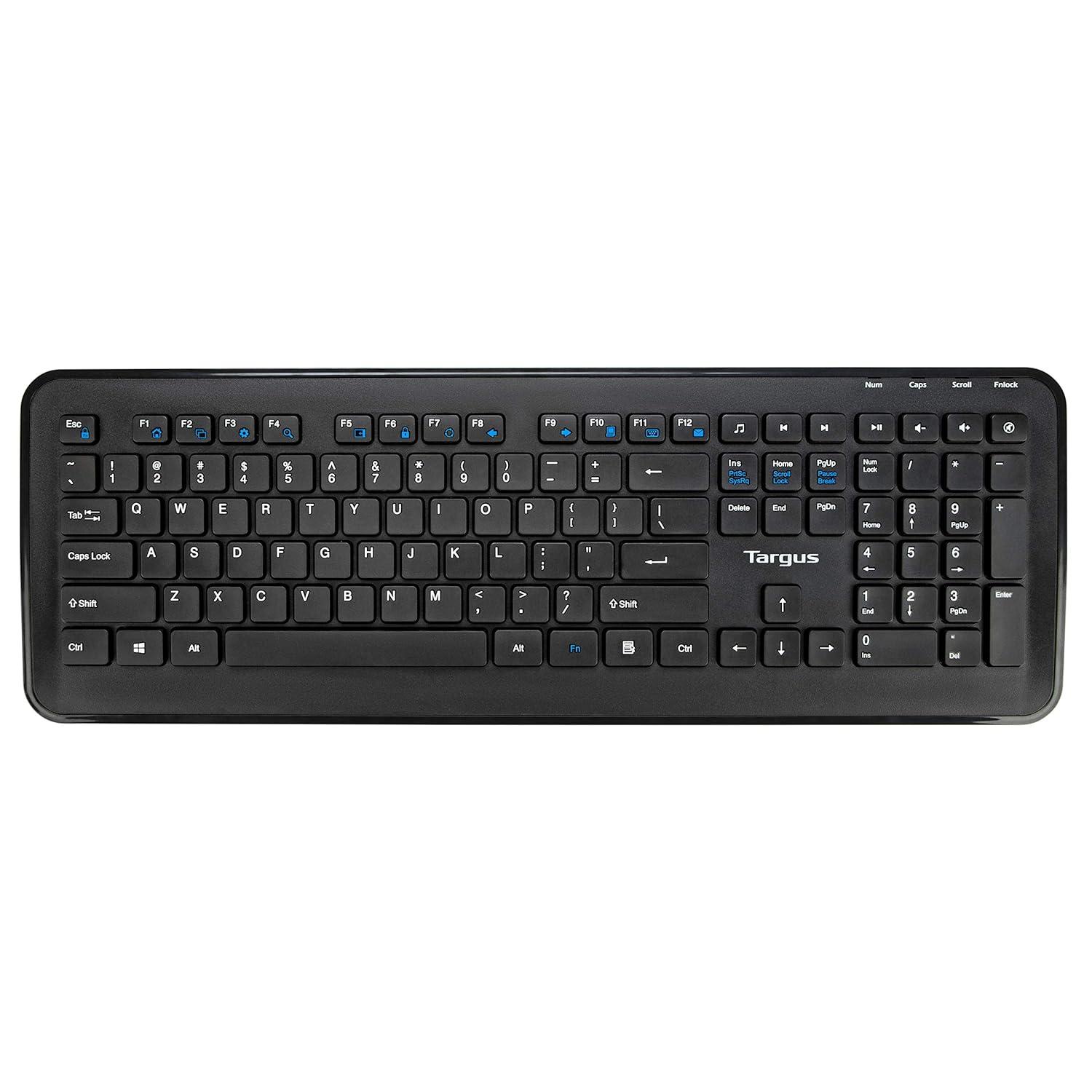
그림 4: 상향식 view of the full-sized Targus wireless keyboard, highlighting its layout and function keys.
4.2. 마우스 사용법
The Targus M610 mouse is equipped with a high-definition 1600 DPI optical sensor for precise tracking.
- 왼쪽 클릭 버튼: 1차 선택 및 활성화.
- 마우스 오른쪽 버튼 클릭: 상황에 맞는 메뉴에 접근합니다.
- 스크롤 휠: 문서를 세로 방향으로 탐색합니다. web 페이지입니다. 마우스 가운데 클릭 버튼으로도 사용할 수 있습니다.
- DPI Sensor: The 1600 DPI optical sensor provides accurate and responsive cursor movement.

그림 5: 상단 view of the Targus wireless mouse, showing the left and right click buttons and the scroll wheel.
5. 유지관리 및 관리
To ensure the longevity and optimal performance of your Targus Wireless Combo, follow these maintenance guidelines:
- 청소: 부드럽고 마른 천으로 키보드와 마우스 표면을 닦으세요. 잘 지워지지 않는 얼룩은 약간 건조한 천으로 닦아내세요.amp천에 물이나 순한 세척액을 묻혀 닦아주세요. 강한 화학 물질이나 연마재는 사용하지 마세요.
- 배터리 교체: Replace batteries when performance degrades or the low battery indicator (if present) illuminates. Always use fresh, high-quality batteries of the specified type (AA for mouse, typically AAA for keyboard).
- 저장: When not in use for extended periods, store the combo in a cool, dry place. Consider removing batteries to prevent leakage.
- 액체를 피하세요: 키보드와 마우스를 액체로부터 멀리 떨어뜨려 내부 부품 손상을 방지하십시오.
6. 문제 해결
If you encounter issues with your Targus Wireless Combo, refer to the following common solutions:
| 문제 | 해결책 |
|---|---|
| 키보드나 마우스가 응답하지 않습니다. |
|
| 연결이 끊기거나 지연 현상이 발생합니다. |
|
| 마우스 커서가 불규칙적으로 움직이거나 부드럽게 움직이지 않습니다. |
|
7. 사양
Detailed technical specifications for the Targus M610 AKM610AP Wireless Mouse and Keyboard Combo:
| 특징 | 세부 사항 |
|---|---|
| 상표 | 타르거스 |
| 모델 번호 | AKM610AP |
| 연결 기술 | 2.4GHz 무선, USB 수신기 |
| 색상 | 검은색 |
| 마우스 센서 | 1600 DPI 광학 센서 |
| 키보드 유형 | Full-sized with Multimedia Keys |
| 호환 장치 | Personal Computer, Laptop, Television, Projector |
| 전원 | 배터리 구동 |
| 필요한 배터리 | 1 AA battery (for mouse, included) |
| 제품 크기 (키보드 포함) | 가로 약 45.5cm, 세로 약 15.7cm |
| 제품 크기 (마우스) | 약 6.6cm(길이) x 3.8cm(너비) x 1.1cm(높이) |
| 품목 무게 | 611 g (total combo weight) |

Figure 6: Diagram illustrating the approximate dimensions of the Targus wireless keyboard, including its width and height, and highlighting the 12 multimedia keys.

Figure 7: Diagram illustrating the approximate dimensions of the Targus wireless mouse (length, width, height) and indicating the high-precision nano receiver.
8. 보증 및 지원
The Targus M610 AKM610AP Wireless Mouse and Keyboard Combo comes with a 3년 보증.
For warranty claims, technical support, or further assistance, please contact Targus customer service through their official web제품을 구매한 사이트 또는 소매점에 문의하십시오. 보증 확인을 위해 구매 증빙 자료를 보관하십시오.
For more information, visit the official Targus web대지: www.targus.com


