1. 서론
This manual provides detailed instructions for the proper use and maintenance of your Zerone AYNEFY0oxm4abc37 USB Endoscope. This device is designed for visual inspection in hard-to-reach areas, offering compatibility with Android smartphones and various computer operating systems. Please read this manual thoroughly before operating the endoscope to ensure optimal performance and longevity.
2. 제품 오버view
2.1 주요 특징
- 컴팩트한 디자인: Features a slim 5.5mm diameter lens for accessing narrow spaces.
- 방수 등급: IP67 waterproof-rated, suitable for moist or underwater inspections.
- 조절 가능한 조명: Equipped with 6 adjustable LED lights to enhance visibility in dark environments.
- 고화질 이미징: 2.0MP CMOS HD camera provides clear and detailed images and videos.
- 내구성 있는 구조: Crafted from high-quality materials for reliability and extended use.
- 폭넓은 호환성: 3-in-1 USB connector supports Android smartphones (with OTG function) and computers (Windows XP/W7/W8/VISTA/W10).
- 확장된 도달 범위: Includes a 5-meter USB cable for flexible inspection tasks.
2.2개의 구성요소

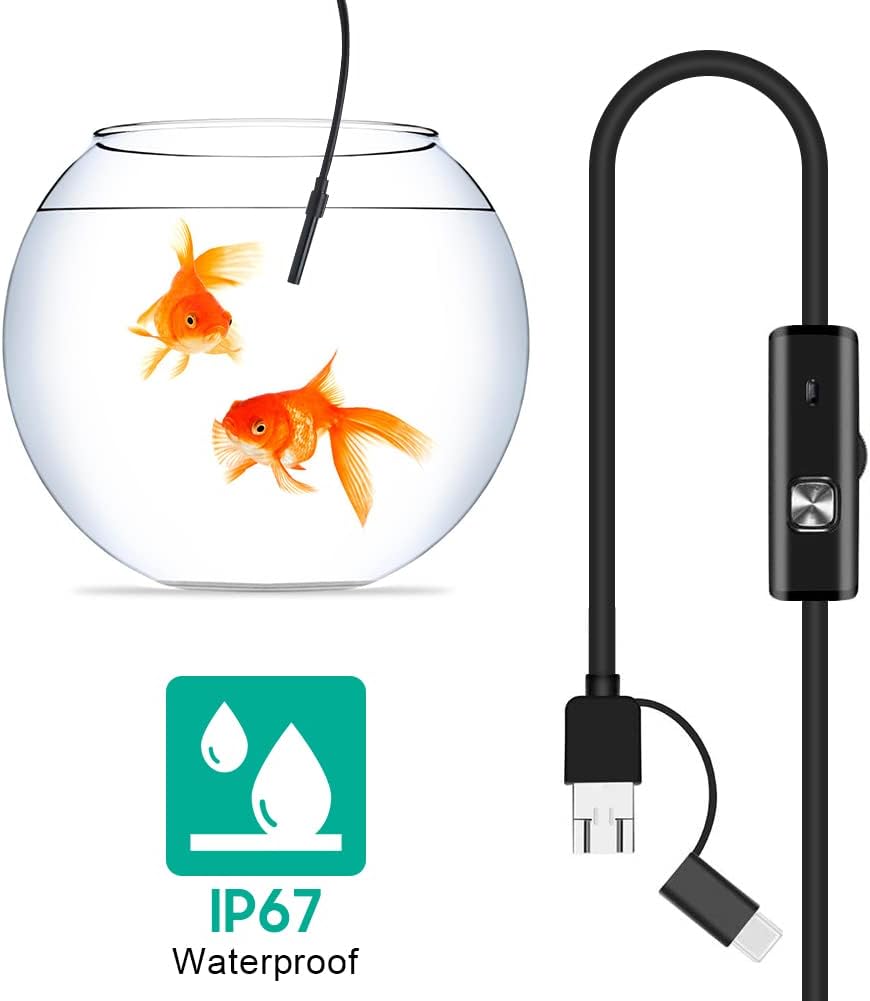


3. 설정
3.1 시스템 요구 사항
- 안드로이드 기기: Android 4.4 or higher with OTG (On-The-Go) and UVC (USB Video Class) support.
- 컴퓨터: Windows XP, Windows 7, Windows 8, Windows Vista, Windows 10.
3.2 소프트웨어 설치
For Android devices, download and install a compatible camera application from the Google Play Store that supports USB OTG endoscopes. Recommended applications include 'USB Camera', 'AN98', or 'CameraFi'. For Windows computers, the device typically functions with the built-in 'Camera' application or other webcam software. Drivers are usually installed automatically upon connection.
3.3 Connecting the Endoscope
- 안드로이드의 경우: Connect the appropriate connector (Micro-USB or USB-C) of the endoscope cable to your smartphone. Ensure your phone's OTG function is enabled in settings if it doesn't automatically detect the device.
- PC의 경우: Connect the standard USB-A connector of the endoscope cable to an available USB port on your computer.
- Open the installed camera application on your device. The endoscope feed should appear.
4. 사용 설명서
4.1 LED 밝기 조정
The control unit on the cable features a wheel or button to adjust the brightness of the 6 LED lights at the camera tip. Rotate the wheel or press the button to increase or decrease illumination as needed for clear view다양한 환경에서.
4.2 액세서리 사용
- 사이드미러: Attach the side mirror to the camera tip to view objects at a 90-degree angle. This is useful for inspecting walls of pipes or tight corners.
- 자석 : Attach the magnet to the camera tip to retrieve small metallic objects from inaccessible areas.
- 훅: Attach the hook to the camera tip to retrieve small non-metallic objects.
4.3 이미지 및 비디오 캡처
Use the functions within your chosen camera application to capture still images or record video footage from the endoscope. Refer to your application's specific instructions for these features.

5. 유지관리
5.1 청소
- After each use, gently wipe the camera lens and probe with a soft, dry cloth.
- 완고한 먼지의 경우 약간 damp cloth can be used, ensuring no liquid enters the control unit or connectors.
- Do not use abrasive cleaners or solvents, as these can damage the lens or casing.
5.2 보관
- 내시경은 직사광선과 극한 온도 변화를 피해 서늘하고 건조한 곳에 보관하십시오.
- 케이블이 내부 손상을 일으키지 않도록 꼬이거나 심하게 구부리지 마십시오.
- Keep the lens cap on when not in use to protect the lens from dust and scratches.
6. 문제 해결
- No Image/Device Not Detected:
- Ensure the endoscope is securely connected to your device.
- For Android, verify that OTG function is enabled in your phone's settings.
- 컴퓨터의 다른 USB 포트를 사용해 보십시오.
- Ensure the correct camera application is open and selected (if multiple cameras are detected).
- 기기를 재시작하고 다시 시도해 보세요.
- 흐릿한 이미지:
- The endoscope has a fixed focal length. Ensure the object being viewed is within the optimal focal range (typically a few centimeters from the lens).
- Clean the camera lens for any smudges or debris.
- Adjust the LED brightness to prevent overexposure or underexposure.
- LED 조명이 작동하지 않음:
- Check the LED brightness adjustment wheel/button on the control unit.
- Ensure the endoscope is properly connected and receiving power.
- 애플리케이션 충돌/멈춤 현상:
- Try a different compatible camera application.
- 기기의 운영체제가 최신 상태인지 확인하세요.
- Close other background applications to free up system resources.
7. 사양
| 특징 | 사양 |
|---|---|
| 모델 번호 | AYNEFY0oxm4abc37 |
| 렌즈 직경 | 5.5mm |
| 카메라 해상도 | 2.0MP CMOS HD (Video Capture Resolution: 1080p) |
| LED 조명 | 조정 가능한 LED 6개 |
| 케이블 길이 | 5 미터 |
| 방수 등급 | IP67 |
| 연결성 | 3-in-1 USB (USB-A, Micro-USB, USB-C) |
| 호환성 | Android (OTG/UVC support), Windows XP/7/8/VISTA/10 |
| 제품 치수 | 4.72 x 4.72 x 1.38 인치 |
| 품목 무게 | 4.6 온스 |
| 색상 | 검은색 |
| 제조업체 | 제론 |
8. 보증 및 지원
For warranty information or technical support, please refer to the product packaging or contact the retailer from whom the product was purchased. You may also visit the official Zerone web추가 지원은 사이트를 참조하세요.
