소개
This user manual provides detailed instructions for the proper use and maintenance of your AUTOPHIX OM123 OBD2 Scanner. The OM123 is a universal automotive diagnostic scan tool designed to read and clear engine fault codes, view live data, and retrieve vehicle information for OBDII/EOBD+CAN compliant vehicles. Please read this manual thoroughly before operating the device.
제품 끝view
The AUTOPHIX OM123 OBD2 Scanner is a compact and user-friendly diagnostic tool. It features a large LCD display with backlight for clear readability and intuitive navigation buttons.
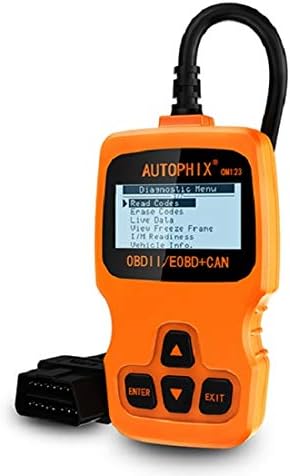
그림 1: 앞쪽 view of the AUTOPHIX OM123 OBD2 Scanner, showing the display and control buttons.
주요 특징:
- 진단 기능: 진단 문제 코드(DTC)를 읽고 삭제하며, 고장 표시등을 끕니다.amp (밀), views live data streams, and displays freeze frame data.
- I/M 준비: Checks the status of emission-related monitors to ensure vehicle readiness for emissions testing.
- 차량 정보 검색: Accesses Vehicle Identification Number (VIN), Calibration ID (CIN), and Calibration Verification Number (CVN).
- 광범위한 호환성: Supports all OBDII protocols, including CAN, J1850 PWM, J1850 VPW, ISO9141, and KWP2000. Compatible with most vehicles manufactured from 1996 onwards.
- 사용자 친화적인 인터페이스: Features a large 128 x 64 pixel LCD display with white backlight and contrast adjustment. Built-in OBD2 fault code definitions eliminate the need for external lookup.
- 배터리가 필요하지 않습니다: Powered directly via the detachable OBDII cable from the vehicle's OBDII port.
- 다국어 지원: Available in English, French, German, Spanish, Dutch, Finnish, Portuguese, and Russian.

그림 2: The OM123 scanner's display showing the main diagnostic menu options: Read Codes, Erase Codes, Live Data, View 정지 화면, I/M 준비 상태 및 차량 정보.
장치 치수:

그림 3: Dimensions of the AUTOPHIX OM123 scanner: approximately 125mm (height), 70mm (width), and 22mm (thickness).
설정
- OBDII 포트를 찾으세요: The OBDII port is typically located under the dashboard on the driver's side of the vehicle. Refer to your vehicle's owner's manual for the exact location.
- 스캐너 연결: With the vehicle's ignition off, firmly plug the OM123 scanner's OBDII connector into the vehicle's OBDII port.
- 전원 켜기: Turn the vehicle's ignition to the "ON" position (do not start the engine). The scanner will automatically power on and display the main menu.
- 언어 선택(필요한 경우): If the device is not in your preferred language, navigate to the "Settings" or "System Setup" menu (if available) to select the desired language.
작동 지침
Once the scanner is connected and powered on, use the UP 그리고 아래에 arrow buttons to navigate through the menu options, the 입력하다 button to confirm a selection, and the EXIT 버튼을 눌러 이전 화면으로 돌아갑니다.
1. 코드 읽기
이 기능은 차량 컴퓨터에서 진단 문제 코드(DTC)를 검색합니다. 이 코드는 차량의 내장 진단 시스템에서 감지된 특정 문제를 나타냅니다.
- 메인 메뉴에서 선택하세요 "코드 읽기" 그리고 누르세요 입력하다.
- The scanner will communicate with the vehicle and display any stored DTCs.
- 사용하세요 UP 그리고 아래에 buttons to scroll through multiple codes if present. The built-in DTC library provides definitions for common codes.
2. 코드 지우기
This function clears all Diagnostic Trouble Codes (DTCs) from the vehicle's computer and turns off the Malfunction Indicator Lamp (MIL), also known as the "Check Engine" light. Ensure any underlying issues are resolved before clearing codes, as they may reappear if the problem persists.
- 메인 메뉴에서 선택하세요 "코드 지우기" 그리고 누르세요 입력하다.
- 메시지가 나타나면 선택 사항을 확인하세요.
- The scanner will clear the codes and the MIL should turn off.
3. 라이브 데이터
This function displays real-time operational parameters from the vehicle's sensors and modules. This data can be useful for diagnosing intermittent problems or verifying repairs.
- 메인 메뉴에서 선택하세요 "실시간 데이터" 그리고 누르세요 입력하다.
- 스캐너는 사용 가능한 데이터 매개변수 목록을 표시합니다.
- 사용하세요 UP 그리고 아래에 buttons to scroll through the data.
4. View 정지 프레임
When an emission-related fault occurs, the vehicle's computer stores a "freeze frame" of data, capturing the engine conditions at the moment the fault was detected. This snapshot can help in diagnosing the cause of the problem.
- 메인 메뉴에서 선택하세요 "View 정지 화면 그리고 누르세요 입력하다.
- The scanner will display the stored freeze frame data.
5. I/M 준비
I/M Readiness (Inspection/Maintenance Readiness) indicates whether the various emission-related systems on the vehicle are functioning correctly and have completed their self-tests. This is crucial for emissions testing.
- 메인 메뉴에서 선택하세요 "I/M 준비" 그리고 누르세요 입력하다.
- The scanner will display the status of various monitors (e.g., Catalyst Monitor, O2 Sensor Monitor). "OK" or "Complete" indicates the test has passed; "INC" or "Not Complete" indicates the test has not yet run or failed.
6. 차량정보
이 기능을 사용하면 중요한 차량 식별 정보를 조회할 수 있습니다.
- 메인 메뉴에서 선택하세요 "차량 정보." 그리고 누르세요 입력하다.
- 스캐너에는 VIN(차량 식별 번호), CIN(교정 식별 번호) 및 CVN(교정 확인 번호)과 같은 정보가 표시됩니다.
유지
- 청소: 스캐너의 표면을 닦을 때는 부드럽고 마른 천을 사용하십시오.asing 및 스크린을 사용하십시오. 연마성 세척제나 용제를 사용하지 마십시오.
- 저장: 기기를 깨끗하고 건조한 환경에 보관하고, 극한 온도와 직사광선을 피하십시오.
- 케이블 관리: Ensure the OBDII cable is not kinked or damaged. Always grasp the connector when plugging or unplugging, not the cable itself.
- 소프트웨어 업데이트: 제조사 확인해보세요 web최적의 성능과 호환성을 보장하기 위해 정기적으로 사이트에 소프트웨어 업데이트가 있는지 확인하십시오.
문제 해결
| 문제 | 가능한 원인 | 해결책 |
|---|---|---|
| Scanner does not power on or screen is blank. |
|
|
| 차량과의 통신 오류. |
|
|
| 오류 코드는 삭제할 수 없습니다. |
|
|
명세서
| 특징 | 세부 사항 |
|---|---|
| 모델 번호 | OM123 |
| 표시하다 | 128 x 64 pixel LCD with white backlight and contrast adjustment |
| 운영 볼륨tage | 9-16V (OBDII 포트 경유) |
| 지원되는 프로토콜 | CAN, J1850 PWM, J1850 VPW, ISO9141, KWP2000 |
| 작동 온도 | 0°C ~ 60°C(32°F ~ 140°F) |
| 보관 온도 | -20°C ~ 70°C (-4°F ~ 158°F) |
| 치수 | 약 125mm x 70mm x 22mm |
| 무게 | 약 10.4온스(295그램) |
| 인증 | FCC, CE, RoHS |
보증 및 지원
The AUTOPHIX OM123 OBD2 Scanner comes with a one-year warranty from the date of purchase, covering manufacturing defects. For technical support, warranty claims, or further assistance, please contact AUTOPHIX customer service through their official web제품을 구매한 사이트 또는 소매업체.
자세한 내용은 공식을 방문하세요. AUTOPHIX Store.


