소개
This manual provides comprehensive instructions for the setup, operation, and maintenance of your Zerone Universal Remote Control. This remote is designed to function with various Pioneer DVD player models, offering a convenient replacement or secondary control unit.
호환성
The Zerone Universal Remote Control is compatible with the following Pioneer DVD player models:
- 파이오니어 VXX2811
- 파이오니어 VXX2914
- 파이오니어 VXX3218
- 파이오니어 VXX2801
- 파이오니어 VXX2800
- 파이오니어 VXX2913
For optimal performance, ensure your DVD player model is listed above.
설정
1. 배터리 설치
- 리모콘 뒷면에서 배터리함을 찾으세요.
- 배터리 덮개를 아래로 밀거나 걸쇠를 누르고 들어올려 엽니다.
- Insert two (2) AA 1.5V batteries, ensuring the positive (+) and negative (-) terminals align correctly with the markings inside the compartment.
- 배터리 덮개를 다시 밀어서 제자리에 고정하고 딸깍 소리가 날 때까지 밀어 넣습니다.
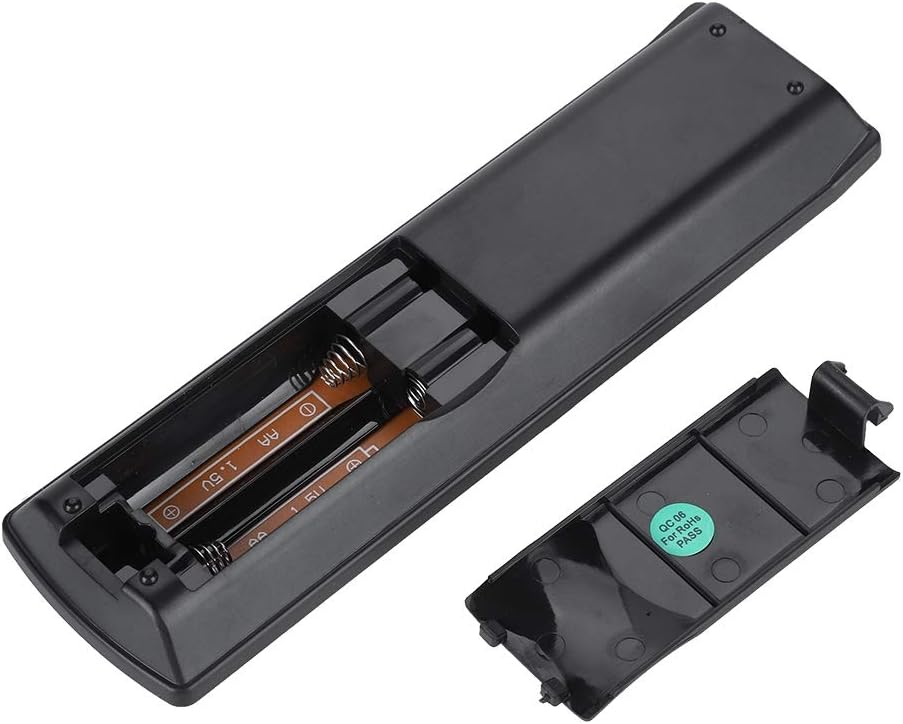
이미지: 후면 view of the Zerone remote control, showing the battery compartment cover.

Image: The battery compartment of the remote control with two AA batteries correctly inserted.
No programming or setup is required. Once batteries are installed, the remote is ready for use with compatible Pioneer DVD players.
작동 지침
Point the remote control directly at your Pioneer DVD player. The effective control distance is typically over 8 meters (approximately 26 feet), though this may vary based on environmental factors and the specific DVD player model.

이미지: 앞면 view of the Zerone Universal Remote Control, displaying all buttons and their labels.
주요 기능:
- 대기/켜짐: Powers the DVD player on or off.
- 열기/닫기: 디스크 트레이를 열거나 닫습니다.
- 오디오: Selects audio tracks or languages.
- 부제: 자막 옵션을 켜거나 끕니다.
- 각도: 변경합니다 viewing angle if supported by the DVD.
- 숫자 버튼(0-9): Direct track selection or input.
- 분명한: Clears numerical input.
- 시작하다: 선택 사항을 확인합니다.
- 상위 메뉴: Accesses the main menu of the DVD.
- 메뉴: 디스크 메뉴에 접근합니다.
- HOME MENU: Navigates to the home menu of the DVD player.
- 반품: 이전 화면이나 메뉴로 돌아갑니다.
- Directional Pad (Up, Down, Left, Right) & ENTER: 메뉴를 탐색하고 선택 사항을 확인합니다.
- Playback Controls (Play, Pause, Stop, Fast Forward, Rewind, Skip Forward, Skip Backward): 표준 미디어 재생 기능.
- 플레이 모드: 재생 모드(예: 반복, 셔플)를 선택합니다.
- 주변: Adjusts surround sound settings.
- 줌: Zooms in or out on the video.
- 디스플레이: 화면에 표시되는 정보를 보여줍니다.

Image: A hand holding the Zerone remote control, demonstrating its ergonomic design and ease of use.

Image: The remote control positioned in front of a television displaying content, illustrating its intended use.

Image: A visual representation of the remote control's effective operating distance, indicating a range of over 8 meters.
유지
- 청소: 리모컨은 부드럽고 마른 천으로 닦으세요. 액체 세제나 연마제는 사용하지 마세요.
- 배터리 교체: 리모컨의 반응이 느려지거나 작동이 멈추면 배터리를 교체하십시오. 항상 두 개의 배터리를 동시에 새 배터리로 교체해야 합니다.
- 저장: 리모컨은 직사광선과 극한의 온도를 피해 서늘하고 건조한 곳에 보관하세요.
- 손상을 방지하세요: Do not drop the remote or expose it to water.
문제 해결
- 리모컨이 응답하지 않음:
- 배터리가 올바른 극성으로 올바르게 설치되었는지 확인하세요.
- 오래된 배터리를 새 AA 배터리로 교체하세요.
- Check for any obstructions between the remote control and the DVD player's infrared sensor.
- Ensure you are within the effective operating range (typically within 8 meters).
- 일부 기능이 작동하지 않습니다.
- Verify that your Pioneer DVD player model is listed in the compatibility section.
- Some advanced functions may be specific to the original remote or not supported by all DVD player models.
명세서
| 쉘 소재 | 고품질 ABS |
| 제어 거리 | > 8 meters (316 inches) |
| 배터리 유형 | 2 x AA 1.5V Batteries (Not included) |
| 치수 | 약 174 x 49 x 20mm(6.85 x 1.93 x 0.79인치) |
| 무게 | 약 75g (2.46온스) |
| 모델 번호 | 743562180017 |
보증 및 지원
For warranty information or technical support, please refer to the documentation provided with your purchase or contact the manufacturer, Zerone, directly through their official channels. Keep your purchase receipt as proof of purchase.
