1. 소개 및 이상view
The Fender Tone Master Twin Reverb amplifier faithfully models the circuitry and 85-watt power output of an original Twin tube amp using advanced digital processing. It features a high-performance 200-watt digital power amp to achieve the headroom and dynamic range of a vintage Twin tube amp. Equipped with two Jensen N-12K neodymium speakers and housed in a resonant pine cabinet, this amplifier delivers authentic Twin Reverb tone and volume at approximately half the weight of an all-tube original. Front panel controls provide a playing experience identical to the tube version, including Fender's renowned reverb and tremolo effects. Rear panel features offer modern convenience, such as an output power selector, balanced XLR line output with Impulse Response (IR) cabinet simulations, a mute switch for silent use, and a USB port for firmware updates.
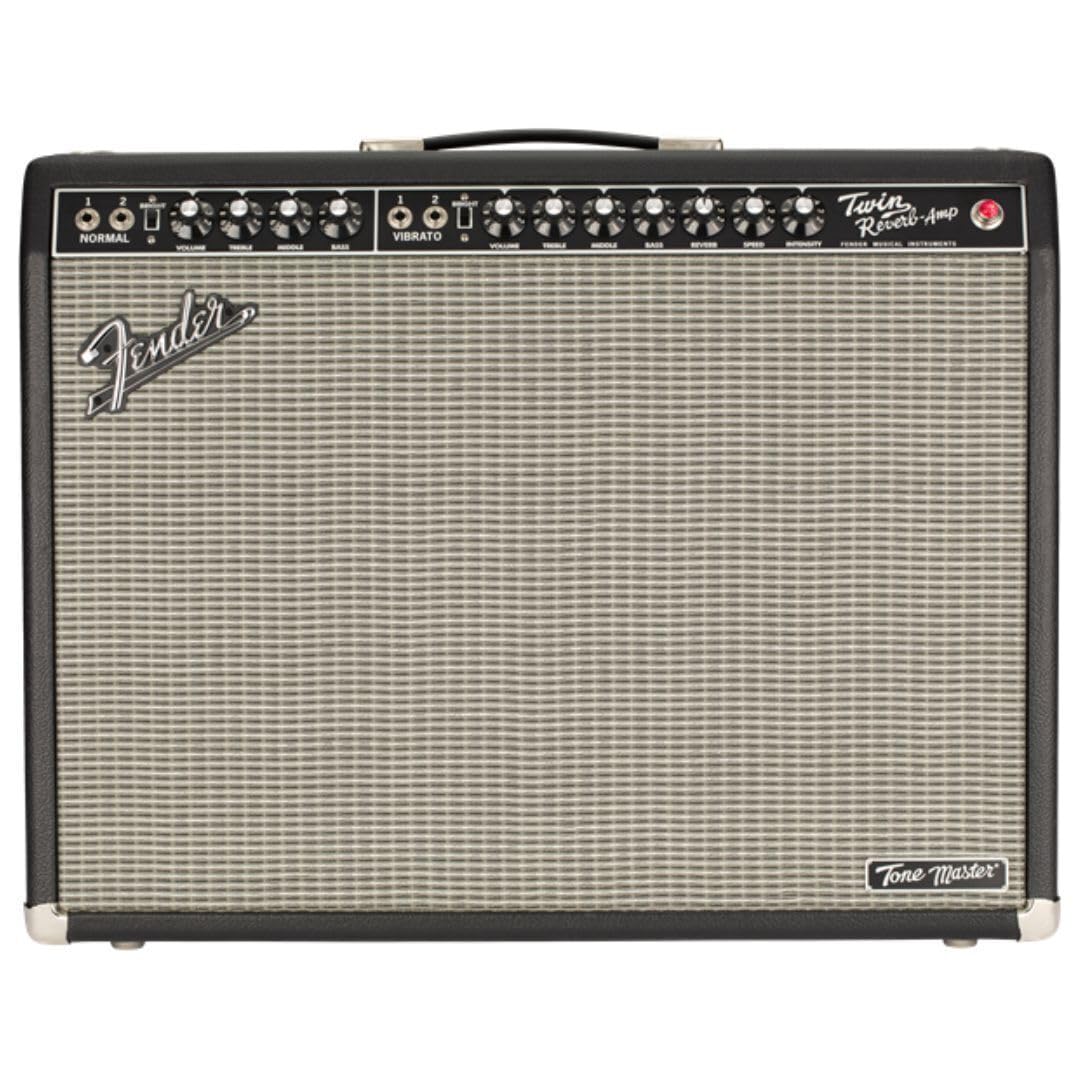
그림 1: 전면 view of the Fender Tone Master Twin Reverb Guitar Amp리퍼.
2. 설정
2.1 풀기
조심스럽게 amplifier from its packaging. Retain all packing materials for future transport or service needs. Inspect the amp앰프에 손상 흔적이 있는지 확인하십시오. 손상이 발견되면 즉시 판매점에 연락하십시오.
2.2 연결
- 입력 잭 : Connect your guitar to the INPUT jack on the front panel using a standard 1/4-inch instrument cable.
- 전원 케이블 : Connect the supplied power cable to the AC INPUT on the rear panel and then to a grounded AC outlet.
- 풋스위치: Connect the optional footswitch to the FTSW jack on the front panel for remote control of certain functions.
- Balanced XLR Line Output: Use this output on the rear panel to connect to a mixing console or recording interface. This output includes Impulse Response (IR) cabinet simulations.
- USB 포트: The USB port on the rear panel is used for firmware updates.
2.3 전원 켜기/끄기
- Ensure all connections are secure and volume controls are set to minimum.
- Flip the POWER switch on the rear panel to the ON position. The power indicator light on the front panel will illuminate.
- Wait a few seconds for the amp초기화할 lifier입니다.
- To turn off, reverse the procedure: turn down volume, then flip the POWER switch to OFF.

그림 2: 후면 view 의 amplifier, highlighting power input, speaker outputs, and XLR line out.
3. 운영
3.1 전면 패널 컨트롤
The front panel provides intuitive controls mirroring a traditional Twin Reverb tube amp리퍼.
- 일반 채널: Features VOLUME, TREBLE, MIDDLE, and BASS controls for a clean, uncolored tone.
- Vibrato Channel: Offers VOLUME, TREBLE, MIDDLE, BASS, REVERB, INTENSITY, and SPEED controls. This channel includes built-in reverb and tremolo effects.
- 밝은 스위치: Located on both channels, this switch adds a high-frequency boost for a brighter tone.

그림 3: 확대 사진 amp앰프의 전면 패널 컨트롤.
3.2 후면 패널 기능
- 출력 전력 선택기: Allows selection between full 85-watt output and five attenuated settings for reduced volume without sacrificing tone.
- Balanced XLR Line Output: Provides a professional-grade output for direct connection to PA systems or recording equipment. Includes switchable Impulse Response (IR) cabinet simulations for versatile tone shaping.
- 음소거 스위치: Silences the amplifier's speakers for silent practice or recording.
- USB 포트: For connecting to a computer to perform firmware updates, ensuring your amplifier always has the latest features and performance enhancements.
4. 유지관리
4.1 일반 관리
수명과 최적의 성능을 보장하려면 amplifier, keep it in a clean, dry environment away from extreme temperatures and humidity. Avoid placing heavy objects on top of the amp리퍼.
4.2 청소
부드럽고 마른 천을 사용하여 외부를 청소하십시오. amplifier. Do not use abrasive cleaners or solvents, as these can damage the finish. Ensure the amplifier is unplugged before cleaning.
4.3 환기
Always ensure adequate ventilation around the amp과열을 방지하기 위해 증폭기를 사용하십시오. 통풍구를 막지 마십시오.
5. 문제 해결
5.1 전원 없음
- Check that the power cable is securely connected to both the amp앰프와 작동하는 AC 콘센트.
- Verify that the POWER switch is in the ON position.
- Ensure the AC outlet is functioning by testing it with another device.
5.2 소리가 나지 않습니다
- Confirm your guitar is properly connected to the INPUT jack.
- Check that the VOLUME controls on both the amp앰프와 기타 볼륨이 커져 있습니다.
- Ensure the MUTE switch on the rear panel is not engaged.
- Test with a different instrument cable and guitar to rule out faulty equipment.
5.3 왜곡된 소리
- Reduce the VOLUME or GAIN settings on the amp리퍼.
- Check your guitar's output level; some active pickups can be very hot.
- 확인하십시오 amplifier is not set to an excessively attenuated power setting if you desire a clean tone at high volume.
5.4 Hum/Noise
- 모든 케이블이 적절하게 차폐되어 있고 양호한 상태인지 확인하십시오.
- 플러그를 꽂으십시오. amplifier into a different AC outlet or a power conditioner.
- 이동하다 amp앰프는 간섭을 일으킬 수 있는 다른 전자 기기에서 멀리 떨어뜨려 놓으십시오.
6. 사양
| 모델명 | Tone Master Twin Reverb |
| 모델 번호 | 2274200000 |
| 출력 와트tage | 200 Watts (simulates 85-watt tube amp) |
| 스피커 | Two (2) 12-inch Jensen N-12K Neodymium Speakers |
| 캐비닛 소재 | Resonant Pine |
| 치수(높이 x 너비 x 깊이) | 31.7 x 26.3 x 15.9 인치 |
| 품목 무게 | 45.2파운드 |
| 효과 | 리버브, 트레몰로 |
7. 보증 및 지원
This Fender Tone Master Twin Reverb Guitar Amplifier comes with a 2-year warranty. For warranty service, technical support, or any questions regarding your amplifier, please contact Fender customer support or visit the official Fender website for detailed information and service center locations.


