1. 서론
구매해주셔서 감사합니다asing the VIVIBRIGHT GP100UP LED Projector. This manual provides essential information for the safe and efficient operation of your device. Please read it thoroughly before use and retain it for future reference.
The VIVIBRIGHT GP100UP is an Android 6.0-based LED projector featuring built-in Wi-Fi and Bluetooth, designed for home theater and office presentations. It supports Full HD content and offers a bright projection experience.
2. 안전 정보
- 전원 공급 장치: 지정된 전원 어댑터만 사용하세요. 볼륨을 확인하세요.tage는 귀하의 지역 전원 공급 장치와 일치합니다.
- 통풍: 환기구를 막지 마십시오. 프로젝터 주변의 공기 흐름이 원활하여 과열을 방지하십시오.
- 액체 노출: Keep the projector away from water or other liquids. Do not operate in damp 환경.
- 청소: 청소하기 전에 전원을 차단하십시오. 부드럽고 마른 천을 사용하십시오. 액체 또는 에어로졸 세척제 사용은 피하십시오.
- 객체 삽입: Never insert objects of any kind into the projector openings as they may touch dangerous voltage 포인트 또는 단락 부품.
- 서비스: 이 제품을 직접 수리하려고 하지 마십시오. 모든 서비스는 자격을 갖춘 서비스 담당자에게 문의하십시오.
- 눈 보호: l을 사용할 때 프로젝터 렌즈를 직접 쳐다보지 마십시오.amp 켜져 있습니다. 밝은 빛은 눈에 손상을 줄 수 있습니다.
3. 패키지 내용
아래 나열된 모든 품목이 패키지에 포함되어 있는지 확인하세요.
- VIVIBRIGHT GP100UP Projector
- 전원 케이블
- VGA 케이블
- AV 케이블
- 원격 제어
- 사용 설명서 (본 문서)
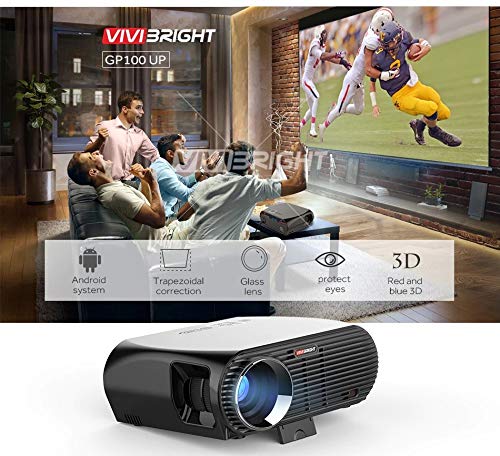
그림 3.1: Included accessories with the VIVIBRIGHT GP100UP projector, including power cable, VGA cable, remote control, and AV cable.
4. 제품 오버view
4.1. 프로젝터 크기
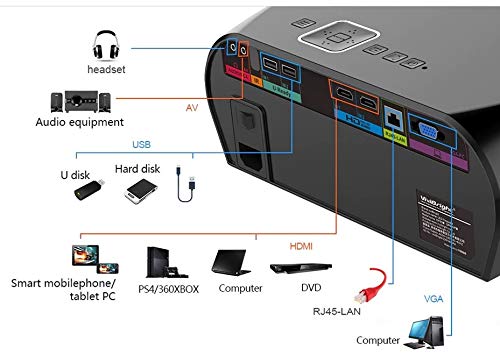
그림 4.1: 전면 및 상단 view of the VIVIBRIGHT GP100UP projector with approximate dimensions: 11 inches (length), 8.85 inches (width), and 4 inches (height).
4.2. 입/출력 포트
The projector features various ports for connecting external devices:
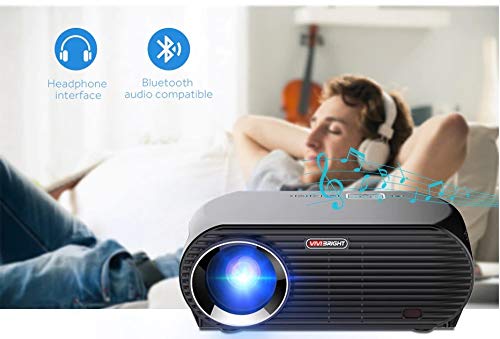
그림 4.2: Detailed diagram of the projector's rear panel, illustrating connectivity options including headset, audio equipment (AV), USB ports for U disk and hard disk, HDMI ports, RJ45-LAN, and VGA port.
- HDMI : Connect to Blu-ray players, gaming consoles, laptops, or other HDMI-enabled devices.
- USB: For connecting USB drives (U disk) or external hard drives.
- 유명인 : 컴포지트 비디오 및 스테레오 오디오를 사용하는 구형 장치 연결용입니다.
- VGA : VGA 출력 단자가 있는 컴퓨터나 노트북에 연결하기 위한 용도입니다.
- RJ45-LAN: 유선 네트워크 연결용.
- 헤드폰 잭: 외부 헤드폰이나 스피커를 연결하는 데 사용합니다.
4.3. 원격 제어
The included remote control allows for convenient operation of the projector.
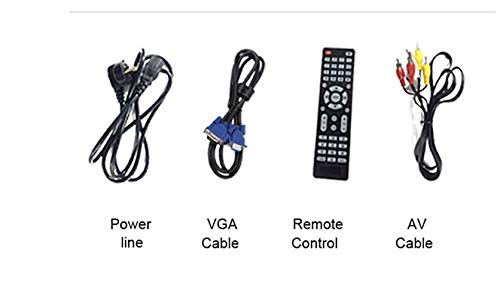
그림 4.3: Remote control layout with key functions: ON/OFF, Volume Up/Down, OK, Menu, Home, Speed, Mute, Back, Mouse Mode, and the USB receiver.
- 켜기/끄기: Power on or off the projector.
- 볼륨 +/- : 오디오 볼륨을 조절합니다.
- OK : 선택을 확인합니다.
- 메뉴: 프로젝터 설정에 액세스하세요.
- 집: Return to the main Android interface.
- 뒤쪽에: 이전 화면으로 돌아갑니다.
- 마우스 모드: Activate/deactivate air mouse function (if applicable).
- 무음: 오디오를 음소거하거나 음소거 해제합니다.
5. 설정
5.1. 배치
Place the projector on a stable, flat surface or mount it to the ceiling. Ensure there are no obstructions to the lens or ventilation ports. The optimal projection distance for a clear image is between 1 to 5 meters.
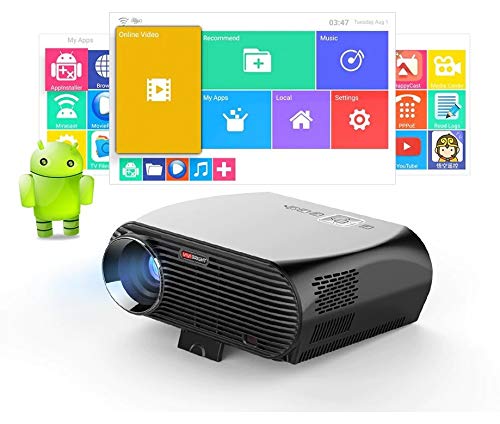
그림 5.1: Illustration of projection distances and corresponding screen sizes, along with the location of the keystone correction and focus rings on the projector.
- For a 72-inch screen, the recommended distance is approximately 7.2 feet (2.2 meters).
- For a 120-inch screen, the recommended distance is approximately 11.8 feet (3.6 meters).
5.2. 전원 연결
- 프로젝터의 전원 입력 단자에 전원 케이블을 연결하세요.
- 전원 케이블의 다른 쪽 끝을 적절한 콘센트에 꽂으십시오.
- 프로젝터의 전원 표시등에 불이 들어와야 합니다.
5.3. 초점 및 핵심 수정
After powering on, adjust the image for clarity and proper geometry.
- 집중하다: 렌즈 근처의 초점 링을 돌려 투영된 이미지가 선명하고 깨끗해질 때까지 조정하십시오.
- 키스톤 보정: If the projected image appears trapezoidal (wider at the top or bottom), use the keystone correction ring or lever (usually located near the focus ring) to adjust the image until it is rectangular. The GP100UP supports +/- 15 degrees vertical keystone correction.
6. 사용 설명서
6.1. Initial Power On and Android Interface
Press the power button on the projector or remote control to turn on the device. The projector will boot into its Android 6.0 operating system interface.
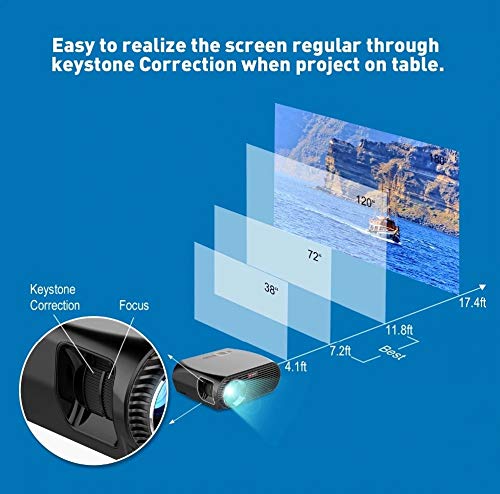
그림 6.1: The VIVIBRIGHT GP100UP projector in operation, highlighting its Android system capabilities and other features.
Navigate the Android interface using the remote control. You can access pre-installed applications, settings, and media files.
6.2. 외부기기 연결하기
To project content from external sources:
- Connect your device (e.g., laptop, gaming console, USB drive) to the appropriate port on the projector (HDMI, USB, AV, VGA).
- On the projector's Android interface, navigate to the "Input Source" or "Source" option.
- Select the corresponding input source (e.g., HDMI1, USB, AV, VGA) to display content from your connected device.
6.3. Wireless Connectivity (Wi-Fi, Bluetooth, Screen Mirroring)
The GP100UP supports various wireless functions:
- 와이파이:
- Go to "Settings" on the Android interface.
- "Wi-Fi"를 선택하고 켜세요.
- Choose your desired network and enter the password to connect.
- 블루투스:
- Go to "Settings" on the Android interface.
- "블루투스"를 선택하고 켜세요.
- Pair with Bluetooth audio devices like headphones or speakers.
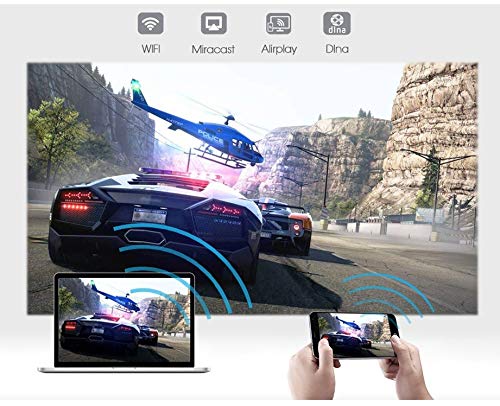
그림 6.2: The projector's Bluetooth audio compatibility, allowing connection to wireless headphones or speakers.
- Screen Mirroring (Miracast/Airplay/DLNA):
The projector supports mirroring content from compatible smartphones, tablets, and laptops via Wi-Fi, Miracast, Airplay, and DLNA.
- Ensure both your device and the projector are connected to the same Wi-Fi network.
- On the projector's Android interface, open the relevant screen mirroring application (e.g., Miracast, Airplay, DLNA).
- On your smartphone/tablet/laptop, activate its screen mirroring function (e.g., "Screen Mirroring," "Smart View," "Cast," "AirPlay").
- Select the projector from the list of available devices to begin mirroring.

그림 6.3: Wireless screen mirroring capabilities, enabling content from mobile devices and laptops to be displayed on the projector.
7. 유지관리
7.1. 렌즈 청소
광학 렌즈 전용으로 제작된 부드럽고 보풀 없는 천을 사용하십시오. 렌즈를 부드럽게 닦아 먼지나 얼룩을 제거하십시오. 연마성 재질이나 강한 화학 약품은 사용하지 마십시오.
7.2. 프로젝터 청소 Casing
프로젝터 외부를 부드럽고 마른 천으로 닦으십시오. 잘 지워지지 않는 얼룩은 약간 거친 천으로 닦아내십시오.amp 젖은 천으로 닦은 후 마른 천으로 다시 닦아주세요. 통풍구에 액체가 들어가지 않도록 주의하십시오.
7.3. Air Filter (if applicable)
While LED projectors typically have sealed optical engines, regularly check ventilation openings for dust accumulation. Use a soft brush or compressed air to clear any blockages.
8. 문제 해결
| 문제 | 가능한 원인 | 해결책 |
|---|---|---|
| 이미지가 표시되지 않음 |
|
|
| 이미지가 흐릿함 |
|
|
| 이미지는 사다리꼴입니다 |
|
|
| 소리가 나지 않습니다 |
|
|
| Wi-Fi/블루투스 연결 문제 |
|
|
9. 사양
| 특징 | 세부 사항 |
|---|---|
| 모델 번호 | GP100UP |
| 디스플레이 기술 | 액정표시장치 |
| 네이티브 해상도 | 1280x800dpi (WXGA) |
| 명도 | 3500루멘 |
| 대비율 | 1000:1-2000:1 |
| 광원 | 주도의 |
| 빛의 근원 생명 | Not specified (typically 20,000+ hours for LED) |
| 투사 거리 | 1-5m |
| 투영된 차원 | 40-300 inches (Best image size: 72-120 inches) |
| 스크린 스케일 | 4:3/16:9 |
| 키스톤 보정 | Manual Correction, +/- 15 degrees (vertical) |
| 체계 | Android 6.0.1, CPU: Quad core ARM Cortex-A53 |
| 메모리(램/롬) | RAM: 1G / ROM: 8G |
| 무선 연결 | Wi-Fi, Bluetooth, DLNA, Miracast, Airplay |
| 입력 포트 | HDMI, USB, AV, VGA, RJ45-LAN |
| 전원 공급 장치 | 교류 90-240V, 50/60Hz |
| 전력 소비 | 140와트 |
| 크기(대략) | 37 x 30.5 x 15.9cm |
| 무게(대략) | 2.6kg |
| 3D 기능 | Red-blue 3D |
10. 보증 및 지원
The VIVIBRIGHT GP100UP Projector comes with a 1년 보증 구매일로부터. 본 보증은 정상적인 사용 중 발생한 제조상의 결함에 적용됩니다.
For technical support, warranty claims, or service inquiries, please contact your retailer or the official VIVIBRIGHT customer service channel. Please have your product model number (GP100UP) and proof of purchase ready when contacting support.


