1. 안전 지침
Please read these safety instructions carefully before operating the device. Failure to comply with these instructions may result in electric shock, fire, or serious injury.
- Always connect the dehumidifier to a properly grounded power outlet.
- 손상된 전원 코드나 플러그로 기기를 작동하지 마십시오. 손상된 경우, 자격을 갖춘 서비스 담당자에게 문의하십시오.
- 제품을 물이나 기타 액체로부터 멀리하십시오. 제품을 물에 담그지 마십시오.
- 기기 주변에 적절한 환기가 이루어지도록 하십시오. 공기 흡입구와 배출구를 막지 마십시오.
- 통풍구에 물건을 넣지 마세요.
- 청소, 유지 보수 또는 사용하지 않을 때는 제품의 전원을 뽑으십시오.
- 본 기기는 신체적, 감각적 또는 정신적 능력이 저하된 사람(어린이 포함)이나 경험 및 지식이 부족한 사람이 사용하도록 의도된 것이 아니며, 안전을 책임질 사람으로부터 기기 사용에 관한 감독이나 지시를 받은 경우에만 사용할 수 있습니다.
- 어린이가 이 제품을 가지고 놀지 않도록 감독해야 합니다.
2. 제품 오버view
The TROTEC TTK 71 E is a comfort dehumidifier designed for efficient moisture control in residential and office spaces. It features electronic humidistat control, automatic defrost, a two-stage fan, a timer function, and a digital display.
주요 특징:
- Electronic humidistat control for precise humidity settings.
- 자동 제상 기능.
- 두-stage fan for adjustable air circulation.
- 예정된 작업을 위한 타이머 기능.
- Digital display showing current humidity levels.
- Option for continuous drainage.
구성 요소:
Familiarize yourself with the main components of your TTK 71 E dehumidifier.

이미지 1: 앞쪽 view of the TROTEC TTK 71 E dehumidifier. This image shows the compact design of the unit, highlighting its dimensions: approximately 22 cm in width, 35 cm in depth, and 55 cm in height. The Trotec logo is visible on the front panel.
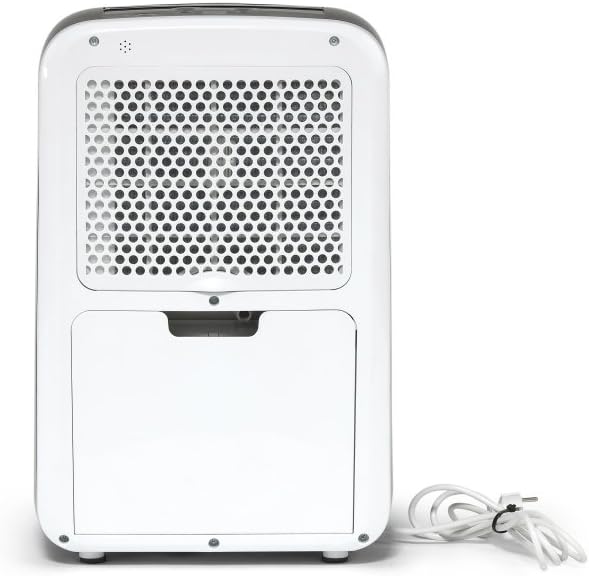
이미지 2: 뒤쪽 view of the TROTEC TTK 71 E dehumidifier. The back panel features a large grille covering the air filter and the power cord neatly coiled to the side.

이미지 3: 뒤쪽 view of the TROTEC TTK 71 E dehumidifier with the water tank removed. This view exposes the internal compartment where the water tank sits, and the continuous drainage port is visible for hose connection.

이미지 4: Close-up of the top control panel of the TROTEC TTK 71 E dehumidifier. The digital display and various control buttons (Fan, Mode, Auto, Timer, Defrost, On/Off) are visible, with the air outlet vent in a closed position.

이미지 5: Close-up of the top control panel of the TROTEC TTK 71 E dehumidifier with the air outlet vent open. This shows the operational state where air is expelled from the top of the unit.
3. 설정
포장 풀기 및 배치:
- 제습기를 포장에서 조심스럽게 꺼내세요.
- 단단하고 평평한 표면에 장치를 똑바로 세우십시오.
- Ensure there is at least 20 cm of space around the unit for proper air circulation.
- The TTK 71 E is suitable for rooms up to 50 m² (125 m³).
전원 연결:
- 전원 코드를 올바른 볼륨으로 접지된 전기 콘센트에 꽂으세요.tage (refer to the rating label on the unit).
물 탱크 설치:
- Ensure the water tank is correctly inserted into its compartment at the rear of the unit. The unit will not operate if the tank is not properly seated or is full.
연속 배수(선택 사항):
For continuous operation without manually emptying the water tank, you can connect a hose for direct drainage.
- Locate the continuous drainage port at the rear of the unit (visible when the water tank is removed).
- Connect a suitable drainage hose (not included) to this port.
- Ensure the hose is routed downwards to a drain or container, allowing gravity to facilitate water flow. Avoid kinks or blockages in the hose.
4. 사용 설명서
제어판:
The control panel is located on the top of the unit and features a digital display and several buttons.
- 켜기/끄기 버튼: 장치의 전원을 켜거나 끕니다.
- 모드 버튼: Selects operating modes (e.g., automatic, continuous).
- 팬 버튼: 팬 속도를 조절합니다(낮음, 높음).
- 습도 조절 버튼(위/아래 화살표): 원하는 습도 수준을 조절합니다.
- 타이머 버튼: 작동 타이머를 설정합니다.
- 디지털 디스플레이: Shows current room humidity, set humidity, or timer settings.
기본 작업:
- 전원 켜기: Press the On/Off button to start the dehumidifier. The digital display will show the current room humidity.
- 원하는 습도 설정: Use the Up/Down arrow buttons to set your target humidity level. The adjustable range is between 30% and 80% relative humidity, in 10% increments. The unit will automatically turn on when the room humidity exceeds the set value and turn off when the desired level is reached.
- 팬 속도 조정: Press the Fan button to cycle between Low and High fan speeds.
- 타이머 기능: Press the Timer button to set an operating duration (e.g., 2, 4, 8 hours). The unit will automatically turn off after the set time.
- 연속 작업: Select the continuous operation mode (often indicated by a 'Cont' or similar symbol via the Mode button) for non-stop dehumidification, ideal for very damp environments or when using continuous drainage.
- 전원 끄기 : Press the On/Off button again to turn off the unit.
5. 유지관리
정기적인 유지관리를 통해 최적의 성능을 보장하고 제습기의 수명을 연장할 수 있습니다.
물탱크 비우기:
- When the water tank is full, the unit will automatically stop operating, and an indicator light will illuminate.
- Carefully pull out the water tank from the rear of the unit.
- 모은 물을 비웁니다.
- Reinsert the empty water tank firmly into its position. The unit will resume operation if the humidity level is above the set point.
공기 필터 청소:
공기 필터는 사용량과 공기 질에 따라 2주에 한 번 또는 그 이상 자주 청소해야 합니다.
- 장치의 전원을 끄고 전원 콘센트에서 플러그를 뽑으세요.
- Remove the air filter cover located at the rear of the unit.
- 에어 필터를 조심스럽게 제거하세요.
- Clean the filter with a vacuum cleaner or wash it with lukewarm water and a mild detergent.
- 필터를 다시 삽입하기 전에 완전히 건조시키십시오.
- Replace the air filter and secure the cover.
장치 외부 청소:
- 부드러운 천으로 기기 외부를 닦아주세요.amp 천. 연마성 세척제나 용매를 사용하지 마십시오.
저장:
- 장기간 기기를 보관할 경우, 물탱크가 비어 있고 깨끗한지, 필터가 깨끗하고 건조한지 확인하세요.
- 본 제품은 직사광선을 피해 서늘하고 건조한 곳에 세워서 보관하세요.
6. 문제 해결
고객 지원팀에 문의하기 전에 일반적인 문제에 대한 다음 문제 해결 가이드를 참조하세요.
| 문제 | 가능한 원인 | 해결책 |
|---|---|---|
| 기기가 켜지지 않습니다. | 전원 공급이 없습니다. 물탱크가 가득 찼거나 잘못 삽입되었습니다. | 전원 코드 연결과 콘센트를 확인하세요. 물탱크를 비우고 올바르게 다시 설치하십시오. |
| 기기는 작동 중이지만 제습이 되지 않습니다. | 공기 필터가 막혔습니다. 실내 온도가 너무 낮습니다. 습도 설정이 너무 높습니다. | 공기 필터를 청소하세요. Dehumidifiers operate less efficiently in very cold conditions. 원하는 습도 설정을 낮추세요. |
| 물탱크 만수 표시등이 켜져 있지만 탱크가 가득 차지 않았습니다. | 물탱크가 잘못 설치되었습니다. 플로트 스위치 오작동. | Ensure the water tank is fully and correctly seated. 문제가 지속되면 고객 지원에 문의하십시오. |
| 이 장치는 시끄럽습니다. | 장치가 수평면에 있지 않습니다. 공기 필터가 막혔습니다. | 장치를 평평하고 안정된 표면에 놓습니다. 공기 필터를 청소하세요. |
7. 사양
Technical data for the TROTEC TTK 71 E dehumidifier.
- 상표: TROTEC
- 모델 번호: 1120000071
- 제품 크기: 22 x 35 x 55 cm (폭 x 깊이 x 높이)
- 품목 무게: 13kg
- 제습 능력 : Max 24 L/day
- 권장 객실 크기: 최대 50m² / 125m³
- 사운드 레벨: 50데시벨
- Hygrostat Adjustment Range: 30% to 80% Relative Humidity (in 10% steps)
8. 보증 및 지원
For warranty information and customer support, please refer to the documentation provided with your purchase or visit the official TROTEC web사이트. 보증 청구를 위해 구매 증빙 자료를 보관하세요.
- 제조업체: TROTEC
- ASIN: B07TTP56GP
- 첫 번째 가능한 날짜: 17년 2021월 XNUMX일


