1. 서론
Thank you for choosing the Soundmaster Eliteline IR300SI Internet DAB+ FM Radio. This device offers a wide range of audio entertainment options, including Internet Radio, DAB+ digital radio, FM radio, Bluetooth connectivity, and USB playback. It also features Amazon Alexa compatibility for voice control and can be managed via the UNDOK app. This manual provides essential information for setting up, operating, and maintaining your radio.
2. 안전 정보
- 사용 전에 모든 지침을 주의 깊게 읽고 나중에 참조할 수 있도록 보관하십시오.
- 기기를 비, 습기 또는 극한의 온도에 노출시키지 마세요.
- 적절한 환기를 확보하세요. 환기구를 막지 마세요.
- 장치와 함께 제공된 전원 어댑터만 사용하십시오.
- 직접 기기를 열거나 수리하지 마십시오. 모든 정비는 자격을 갖춘 기술자에게 맡기십시오.
- 장치를 강한 자기장에서 멀리 두십시오.
3. 패키지 내용
모든 항목이 있는지 확인하세요.
- Soundmaster Eliteline IR300SI Internet DAB+ FM Radio
- 전원 어댑터
- 원격 제어
- 사용 설명서 (본 문서)
- Installation material (e.g., antenna, if separate)
4. 제품 오버view
Familiarize yourself with the various parts and controls of your Soundmaster IR300SI radio.

그림 4.1: 앞쪽 각도 view of the Soundmaster IR300SI radio, showing the display, speakers, and control buttons.
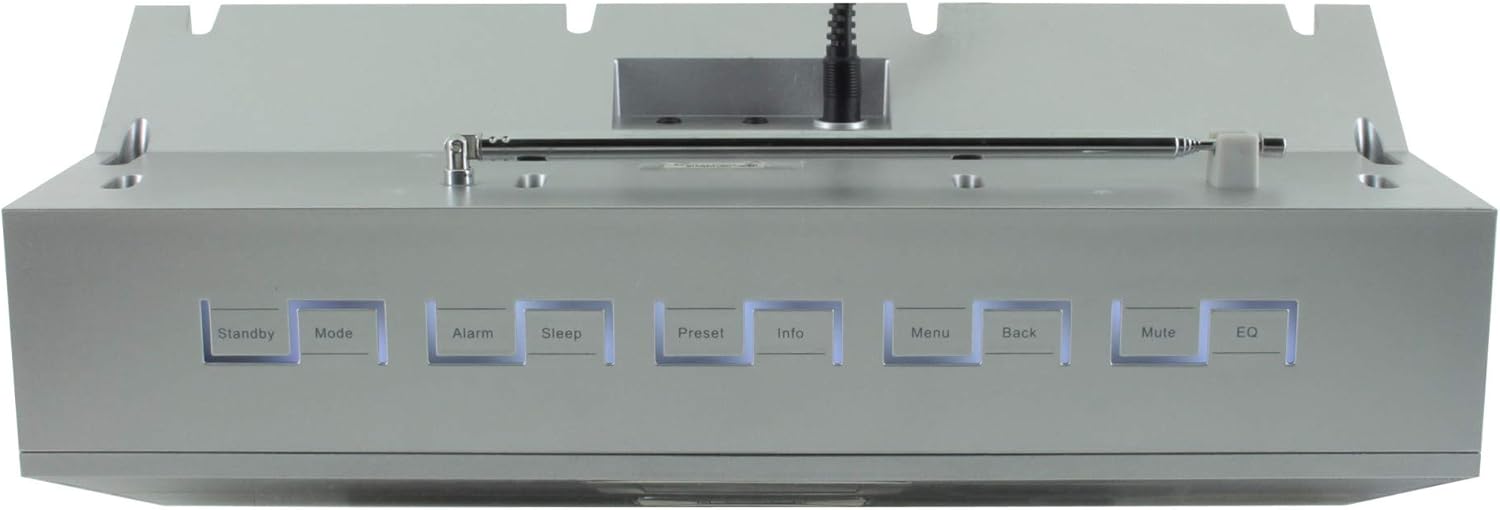
그림 4.2: 상단 view of the Soundmaster IR300SI radio, highlighting the control buttons: Standby, Mode, Alarm, Sleep, Preset, Info, Menu, Back, Mute, and EQ.
전면 패널
- 2.4" / 6 cm TFT Color Display: Shows station information, menus, and time.
- 스피커: 스테레오 사운드 출력.
- 제어 다이얼/버튼: 탐색 및 선택을 위해.
상단 패널 컨트롤
- 대기: 전원 켜기 / 끄기.
- 방법: Switch between Internet Radio, DAB+, FM, Bluetooth, USB, AUX.
- 경보: 알람을 설정하고 관리합니다.
- 잠: Activate sleep timer.
- 사전 설정: 즐겨찾는 방송국에 접속하고 저장하세요.
- 정보: Display additional information about the current broadcast.
- 메뉴: 시스템 설정 및 옵션에 액세스하세요.
- 뒤쪽에: 이전 메뉴로 돌아갑니다.
- 무음: 오디오를 음소거/음소거 해제합니다.
- EQ : 이퀄라이저 사전 설정을 선택하세요.
Rear/Side Panel Connections
- 전원 입력: 제공된 전원 어댑터를 연결합니다.
- 텔레스코픽 안테나: DAB+ 및 FM 수신용입니다.
- USB 포트: USB 저장 장치에서 MP3 파일을 재생합니다.
- 3.5mm Aux-In Port: 외부 오디오 소스를 연결하세요.
- 헤드폰 잭: 개인적으로 듣기 위한 것입니다.
5. 설정
5.1 전원 연결
- Connect the power adapter to the DC input on the rear of the radio.
- 전원 어댑터를 벽면 콘센트에 꽂으세요.
- 를 누르세요 대기 button on the top panel or remote control to turn on the radio.
5.2 안테나 설정
최적의 DAB+ 및 FM 라디오 수신을 위해 텔레스코픽 안테나를 완전히 펼치십시오.
5.3 Initial Wi-Fi Network Setup
Upon first power-on, the radio will guide you through the initial setup wizard:
- Select your preferred language using the control dial and confirm.
- 라디오는 사용 가능한 Wi-Fi 네트워크를 검색합니다.
- 목록에서 네트워크를 선택하세요.
- Enter your Wi-Fi password using the on-screen keyboard and control dial. Confirm to connect.
- Once connected, the radio will display the main menu.
6. 사용 설명서
사용하세요 방법 button to switch between different audio sources.
6.1 인터넷 라디오
- 누르다 방법 to select "Internet Radio".
- Navigate through categories (e.g., Location, Genre, Popular) using the control dial.
- 재생을 시작할 방송국을 선택하세요.
- 방송국을 사전 설정으로 저장하려면 다음을 길게 누릅니다. 사전 설정 button, then select a preset number.
6.2 DAB+ 라디오
- 누르다 방법 to select "DAB+ Radio".
- 라디오는 자동으로 사용 가능한 DAB+ 방송국을 검색합니다.
- Use the control dial to browse and select stations.
- 누르고 있으세요 사전 설정 to save a station.
6.3 FM 라디오
- 누르다 방법 to select "FM Radio".
- The radio will automatically scan for available FM stations.
- Use the control dial to browse and select stations.
- 누르고 있으세요 사전 설정 to save a station.
6.4 블루투스 연결
- 누르다 방법 to select "Bluetooth". The radio will enter pairing mode.
- 모바일 기기(스마트폰, 태블릿)에서 Bluetooth를 활성화하고 사용 가능한 기기를 검색하세요.
- Select "Soundmaster IR300SI" from the list to pair.
- 연결되면 기기에서 라디오로 오디오를 스트리밍할 수 있습니다.
6.5 USB 재생
- Insert a USB storage device (formatted as FAT32) containing MP3 fileUSB 포트에 s.
- 누르다 방법 to select "USB".
- Navigate through folders and select tracks using the control dial.
6.6 AUX 입력
- Connect an external audio device (e.g., MP3 player) to the 3.5mm Aux-In port using an audio cable (not supplied).
- 누르다 방법 to select "AUX".
- 외부 장치에서 재생을 제어합니다.
6.7 알람 및 취침 타이머
- 경보 : 를 누르세요 경보 button to set up to two alarms. Configure time, source (buzzer, radio), and frequency (daily, weekdays, weekends).
- 수면 타이머 : 를 누르세요 잠 button to set a countdown timer (e.g., 15, 30, 60 minutes) after which the radio will automatically turn off.
6.8 이퀄라이저(EQ)
를 누르세요 EQ button to cycle through pre-programmed sound settings (e.g., Normal, Jazz, Rock, Classical, Pop, News) to optimize audio output for different content.
6.9 Amazon Alexa and UNDOK App Control
- 아마존 알렉사: The radio is compatible with Amazon Alexa. Follow the instructions in the Alexa app to link your Soundmaster IR300SI for voice control functionalities.
- UNDOK App: Download the UNDOK app from your mobile device's app store. Ensure your mobile device and the radio are on the same Wi-Fi network. The app allows you to control the radio, browse stations, and manage settings remotely.
7. 유지관리
7.1 청소
- 라디오를 청소하기 전에는 항상 전원 콘센트에서 플러그를 뽑으세요.
- 부드럽고 마른 천으로 외부 표면을 닦으세요.
- 연마성 세척제, 왁스 또는 용제는 마감재를 손상시킬 수 있으므로 사용하지 마십시오.
7.2 보관
If you plan to store the radio for an extended period, unplug it from the power source and store it in a cool, dry place, away from direct sunlight and extreme temperatures.
8. 문제 해결
문제가 발생하면 다음의 일반적인 문제와 해결 방법을 참조하세요.
| 문제 | 가능한 원인 | 해결책 |
|---|---|---|
| 전원이 없습니다 | 전원 어댑터가 연결되지 않았거나 콘센트에 결함이 있습니다. | 전원 연결을 확인하세요. 다른 콘센트에 꽂아 보세요. |
| 소리가 나지 않습니다 | 볼륨이 너무 작거나, 음소거되었거나, 잘못된 소스가 선택되었습니다. | 볼륨을 높이려면 누르세요. 무음. Ensure correct mode (Internet Radio, DAB+, etc.) is selected. |
| Wi-Fi에 연결할 수 없습니다 | 비밀번호가 잘못되었거나, 신호가 약하거나, 라우터 문제입니다. | Verify password. Move radio closer to router. Restart router. |
| DAB+/FM 수신 불량 | 안테나가 펼쳐지지 않았거나 신호가 약한 지역입니다. | Fully extend the telescopic antenna. Reposition the radio. |
| 블루투스 페어링 실패 | Radio not in pairing mode, or device too far. | Ensure radio is in Bluetooth mode. Move devices closer. Restart Bluetooth on both devices. |
9. 사양
| 특징 | 사양 |
|---|---|
| 모델명 | IR300SI |
| 상표 | 사운드마스터 |
| 연결 기술 | 블루투스, USB, Wi-Fi |
| 특별 기능 | Integrated Clock, Internet Radio, DAB+, FM, Bluetooth, USB MP3 Playback, AUX-In, Headphone Jack, 2 Alarms with Weekend Function, Sleep Timer, Equalizer, Amazon Alexa Compatible, UNDOK App Control, Network Music Player (DLNA) |
| 오디오 출력 모드 | 스테레오 재생 |
| 최대 스피커 출력 전력 | 2 x 10와트 RMS |
| 표시하다 | 2.4" / 6 cm TFT Color Display |
| 제어 방법 | Remote Control, UNDOK App, On-device Buttons |
| 전원 | AC Powered (100 Volts input) |
| 제품 크기(L x W x H) | 17 x 18 x 15cm |
| 품목 무게 | 2.3 킬로그램 |
| 색상 | 은 |
| 호환 장치 | Personal Computer, Television, Tablet, Smartphone, Laptop |
| 장착 유형 | 테이블탑 |
10. 보증 및 지원
The Soundmaster Eliteline IR300SI comes with a spare parts availability period of 1 year from the date of purchase. For technical support, warranty claims, or further assistance, please contact your retailer or the Soundmaster customer service department. Refer to the contact information provided with your purchase documentation.


