1. 서론
This manual provides detailed instructions for the installation, operation, and maintenance of your ESX VN715-E39-DAB In-Car Navigation and Multimedia System. Please read this manual thoroughly before using the device to ensure proper functionality and to prevent damage. Keep this manual for future reference.
2. 제품 오버view 및 기능
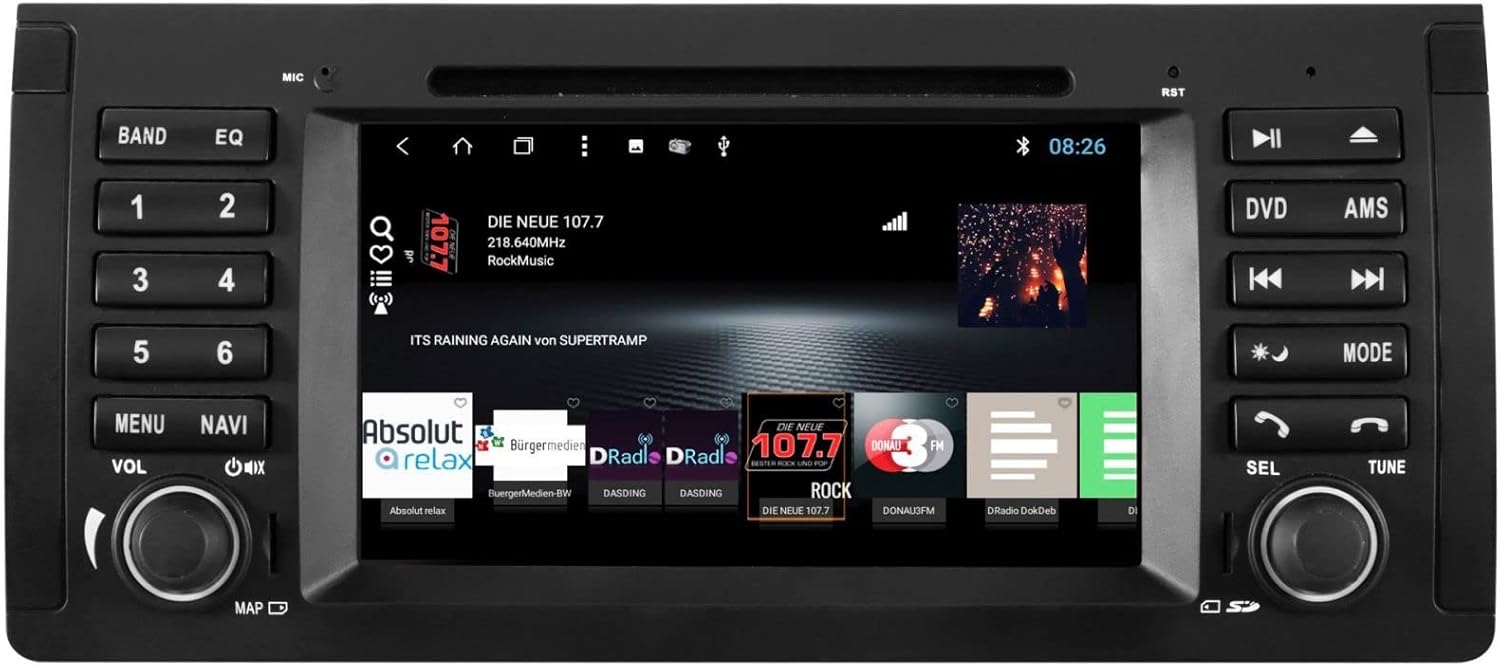
The ESX VN715-E39-DAB is an advanced in-car multimedia system designed to enhance your driving experience with navigation, entertainment, and connectivity features. It integrates seamlessly into compatible BMW vehicles.
주요 특징:
- High-Resolution 8-inch Touchscreen: Provides clear visuals and intuitive control.
- Advanced Android i15 Operating System: Offers a familiar and customizable user interface.
- Google Maps Navigation: Supports both online and offline navigation for reliable route guidance.
- Mobile Internet Connectivity: Connects via Wi-Fi hotspot for online services.
- DAB+ 디지털 라디오: Includes a DAB antenna for high-quality digital radio reception with station logos.
- AM/FM Radio with RDS: Standard analog radio reception with Radio Data System functionality.
- Multi-format DVD Player: Supports DVD, DVD-R/RW, DVD+R/RW, VCD, CD, CD Text, CD-R/RW, and MP3 formats.
- Bluetooth Hands-Free Kit: Enables safe phone calls and audio streaming with an internal microphone and optional external microphone connection.
- 스마트폰 통합: Connect iPhone or Android smartphones via USB for various functions.
- 음성 제어: Utilize voice commands through a connected smartphone.
- 오디오 출력 : 사전amplifier outputs for front, rear, subwoofer, and center channels.
- 카메라 입력: One adjustable camera input for reverse cameras.
- 보조 입력/출력: One AUX video input, two audio/video outputs, and one AUX audio input.
- USB 포트: Two USB ports for media and connectivity.
- 마이크로 SD 카드 슬롯: Dedicated slot for navigation data and media files.
- 사용자 정의: Personalize with customizable logos and wallpapers.
- Authenticity Certificate: Included with the product.
3. 설정 및 설치
Installation of the ESX VN715-E39-DAB system requires technical knowledge and should ideally be performed by a qualified professional. Incorrect installation can lead to damage to the device or vehicle electrical system.
호환성:
This unit is compatible with specific BMW models and connector types:
- BMW 5 Series E39 (1996-2001) with 17-pin system connector.
- BMW 5 Series E39 (2002-2003) with 40-pin system connector.
- BMW X5 E53 (2000-2001) with 17-pin system connector.
- BMW X5 E53 (2002-2007) with 40-pin system connector.
- BMW M5 (1996-2003) with 17/40-pin system connector.
일반 설치 단계 (전문가 설치를 권장합니다):
- 배터리 분리: 전기 작업을 시작하기 전에 항상 차량의 배터리를 분리하십시오.
- 기존 장치 제거: Carefully remove the factory radio or navigation system from the dashboard.
- 배선 하네스 연결: Connect the appropriate wiring harness (17-pin or 40-pin) to the vehicle's electrical system and the ESX unit. Ensure all connections are secure.
- 안테나 연결: Connect the GPS antenna, DAB antenna, and radio antenna to their respective ports on the unit. Position the antennas for optimal reception.
- 주변기기 연결: Connect any optional accessories such as a reverse camera, external microphone, USB devices, or auxiliary inputs/outputs.
- 장치 장착: Securely mount the ESX unit into the dashboard opening.
- 배터리를 다시 연결하십시오: 차량 배터리를 다시 연결하고 시스템을 테스트하십시오.

4. 사용 설명서
Familiarize yourself with the touchscreen interface and physical buttons for optimal use.
4.1 기본 작업
- 전원 켜기/끄기: Press and hold the power button (usually the VOL knob) to turn the unit on or off. A short press typically mutes or unmutes the audio.
- 볼륨 조절: VOL 노브를 돌려 오디오 볼륨을 조절하세요.
- 터치스크린 인터페이스: Navigate through menus and applications by tapping, swiping, and pinching on the 8-inch touchscreen.

4.2 탐색
Access the navigation application (e.g., Google Maps) from the home screen. Input your destination, and the system will provide turn-by-turn directions. Ensure GPS antenna is properly connected for accurate positioning.

4.3 Radio (DAB+/AM/FM)
- 모드 선택: Tap the 'Radio' or 'DAB+' icon on the home screen or press the 'BAND' button.
- 스캔 스테이션: Use the 'AMS' (Auto Memory Store) button or on-screen controls to scan and save available stations.
- 곡조: Manually tune using the 'TUNE' knob or on-screen frequency controls.
- 사전 설정 : Save your favorite stations to preset buttons (1-6) for quick access.

4.4 블루투스 연결
- 편성: Go to the Bluetooth settings on the unit and your smartphone. 검색 available devices and select 'ESX VN715-E39-DAB'. Enter the PIN if prompted (usually '0000' or '1234').
- 핸즈프리 통화: 페어링이 완료되면 기기를 통해 직접 전화를 걸고 받을 수 있습니다.
- 오디오 스트리밍 : Play music from your smartphone via Bluetooth A2DP.
4.5 Media Playback (DVD/USB/SD)
- DVD: Insert a DVD into the disc slot. The system will automatically switch to DVD mode or prompt you to select it.
- USB/SD: Insert a USB drive into a USB port or an SD card into the Micro SD slot. Access media files through the 'Media' or 'File Explorer' application.
5. 유지관리
Regular maintenance ensures the longevity and optimal performance of your ESX VN715-E39-DAB system.
- 화면 청소: 부드럽고 보풀이 없는 천을 사용하여 터치스크린을 부드럽게 닦으세요. 잘 지워지지 않는 얼룩은 가볍게 닦아주세요.amp천에 물이나 화면에 안전한 세척제를 묻혀 닦아주세요. 강한 화학 물질은 피하세요.
- 소프트웨어 업데이트: 제조사 공식 웹사이트에서 정기적으로 소프트웨어 업데이트를 확인하세요. website or through the unit's system settings (if available) to ensure you have the latest features and bug fixes.
- Disc Drive Care: Keep the DVD slot free of dust and debris. Avoid inserting damaged or non-standard discs.
6. 문제 해결
기기 사용 중 문제가 발생하면 다음의 일반적인 문제 해결 단계를 참조하십시오.
| 문제 | 가능한 원인 | 해결책 |
|---|---|---|
| 전원이 없습니다 | 전원 연결이 느슨하거나, 퓨즈가 끊어지거나, 차량 배터리에 문제가 있습니다. | Check power cables and fuse. Ensure vehicle battery is charged. Consult a professional if issues persist. |
| 소리가 나지 않습니다 | Volume muted, speaker wires disconnected, incorrect audio source. | Check volume level and mute status. Verify speaker connections. Select the correct audio source. |
| GPS 신호 끊김 | GPS antenna improperly connected or obstructed, unit in an area with poor satellite reception. | GPS 안테나가 단단히 연결되어 있고 시야가 확보되었는지 확인하십시오. view 하늘의. 열린 공간으로 이동하세요. |
| 블루투스 페어링 실패 | Bluetooth not enabled on device, incorrect PIN, device out of range. | Ensure Bluetooth is active on both devices. Re-enter PIN. Bring devices closer. Restart both devices. |
| 터치스크린이 반응하지 않음 | 시스템이 정지되고 화면에 먼지가 묻어있습니다. | Perform a soft reset (refer to device settings or power cycle). Clean the screen. |
이러한 조치를 취해도 문제가 해결되지 않으면 고객 지원 센터 또는 자격을 갖춘 서비스 기술자에게 문의하십시오.
7. 사양
Detailed technical specifications for the ESX VN715-E39-DAB unit:
- 상표: ESX
- 모델: VN715-E39-DAB
- 화면 크기: 8 인치
- 디스플레이 유형: 액정표시장치
- 운영 체제: Android i15
- 연결 기술 : Bluetooth, USB, Wi-Fi (via hotspot)
- 미디어 유형: DVD, DVD-R/RW, DVD+R/RW, VCD, CD, CD Text, CD-R/RW, MP3, USB, Micro SD
- 라디오 튜너: DAB+, AM/FM with RDS
- 항해: Google Maps (online/offline)
- 호환성: BMW 5 Series E39 (1996-2003), BMW X5 E53 (2000-2007), BMW M5 (1996-2003)
- 기원: 중국
8. 보증 및 지원
For warranty information, please refer to the documentation provided with your purchase or contact your retailer. For technical support, please visit the official ESX website or contact their customer service department. Ensure you have your model number (VN715-E39-DAB) and proof of purchase available when seeking support.


