1. 서론
This manual provides detailed instructions for the installation, operation, and maintenance of your Aerocool Streak Mid-Tower ATX PC Gaming Case. Designed for both new and experienced PC builders, the Streak case offers a compact design with a polished aluminum front panel, vibrant RGB lighting, and a full tempered glass side panel to showcase your components. It supports various cooling configurations to ensure optimal performance for your system.
2. 안전 정보
Please read and understand all safety instructions before installing or operating the PC case. Failure to do so may result in personal injury or damage to the product.
- 설치 또는 유지 보수 작업을 하기 전에 항상 벽면 콘센트에서 전원 공급 장치를 분리하십시오.
- Be aware of sharp edges inside the case. Handle components with care to avoid cuts.
- 작은 부품과 나사는 어린이의 손이 닿지 않는 곳에 보관하십시오.
- 감전을 방지하려면 올바르게 접지하십시오.
- Do not expose the case to water or excessive humidity.
3. 패키지 내용
패키지에 모든 품목이 들어 있는지 확인하세요.
- Aerocool Streak Mid-Tower ATX PC Gaming Case
- 부속품 상자 (나사, 스탠드오프, 케이블 타이 등)
- 사용 설명서 (본 문서)
4. 케이스 구성 요소 이상view
Familiarize yourself with the various parts of your Aerocool Streak case.

그림 4.1: 각진 view of the Aerocool Streak PC case, showcasinRGB 전면 패널과 강화 유리 측면 패널이 있습니다.

그림 4.2: 위에서 아래로 각도가 있는 view of the Aerocool Streak PC case, highlighting the top panel and front I/O ports.
4.1 전면 I/O 포트
The front I/O panel provides convenient access to essential connections.
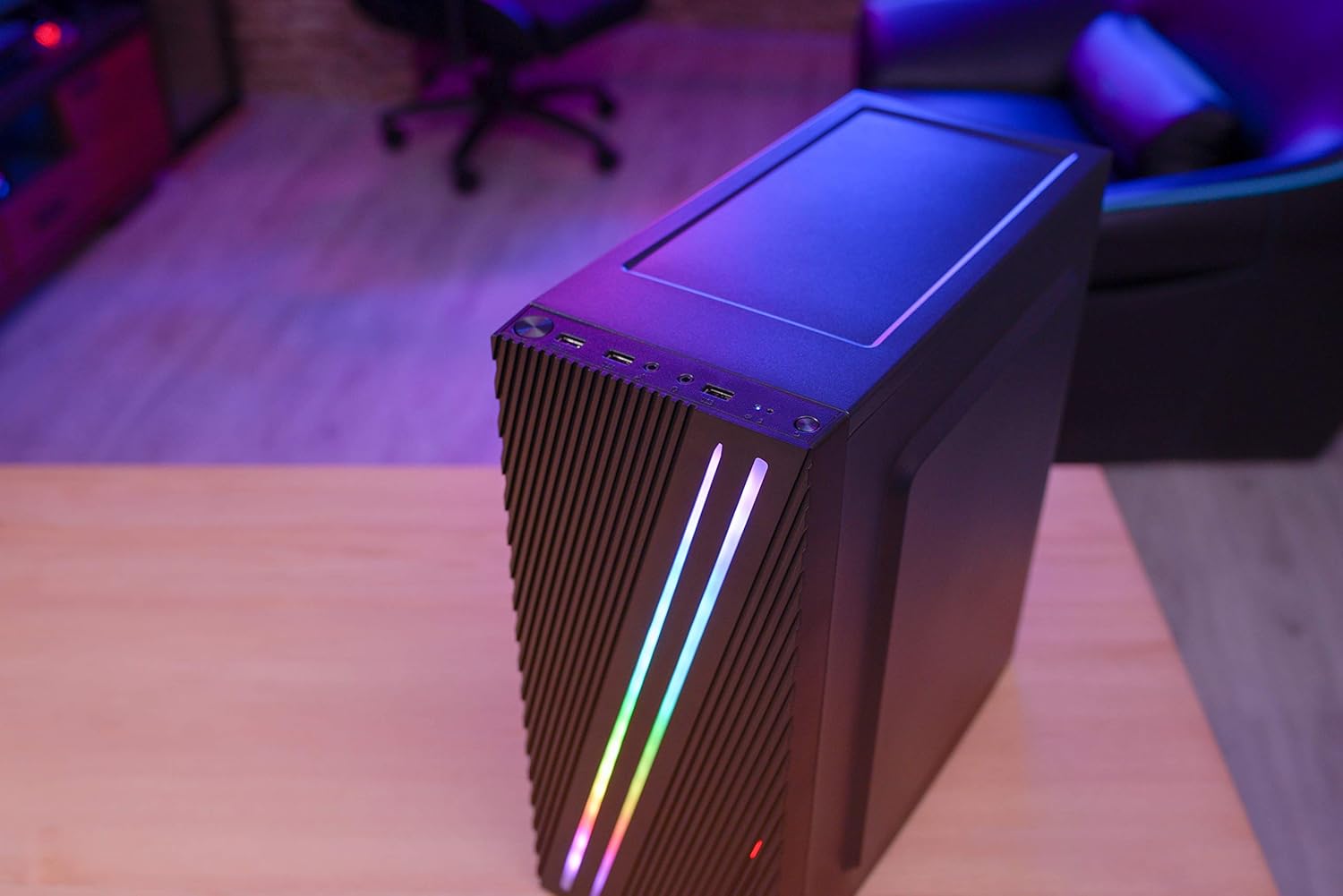
그림 4.3: Close-up of the front I/O panel, showing the power button, LED control button, USB 3.0 port, two USB 2.0 ports, and HD audio/microphone jacks.
- 전원 버튼: 시스템을 켜거나 끄려면.
- LED 제어 버튼: To cycle through RGB lighting modes.
- USB 3.0 포트(x1): 고속 데이터 전송을 위해.
- USB 2.0 포트(x2): 표준 USB 장치용.
- HD Audio & Mic Jacks: 헤드폰과 마이크를 연결합니다.
4.2 내부 레이아웃
The interior is designed for efficient component installation and cable management.

그림 4.4: 내부 view of the Aerocool Streak PC case, showing the motherboard tray, drive bays, and cable routing cutouts.
5. 설정 및 설치
Follow these steps to assemble your PC components within the Aerocool Streak case.
5.1 준비
- 케이스를 개봉하고 모든 포장재를 제거하세요.
- 케이스를 안정적이고 평평한 표면에 놓으세요.
- Gather necessary tools: Phillips head screwdriver, cable ties (included in accessory box).
- Remove the tempered glass side panel by unscrewing the four thumb screws.
5.2 마더 보드 설치
The Aerocool Streak supports ATX, Micro-ATX, and Mini-ITX motherboards.

그림 5.1: Diagram illustrating the compatible motherboard sizes (Mini-ITX, Micro-ATX, ATX) within the case.
- 사용 중인 마더보드의 폼 팩터에 맞는 마더보드 스탠드오프를 마더보드 트레이에 설치하십시오.
- Place your motherboard carefully onto the standoffs, aligning the screw holes.
- 제공된 나사로 마더보드를 고정합니다.
5.3 전원 공급 장치(PSU) 설치
The case features a bottom-mount PSU design.
- PSU를 케이스 뒷면 하단의 지정된 칸에 밀어 넣습니다.
- Secure the PSU to the case rear with screws.
5.4 저장 드라이브 설치
Install your 2.5" SSDs and 3.5" HDDs.
- 2.5인치 SSD: Mount SSDs to the designated 2.5" drive trays or mounting points on the motherboard tray.
- 3.5인치 HDD: PSU 덮개 아래에 있는 드라이브 케이지에 HDD를 설치합니다.
5.5 Expansion Card Installation (Graphics Card, etc.)
The case supports high-end graphics cards up to 335mm in length.
- 케이스 뒷면에서 필요한 PCIe 슬롯 커버를 제거합니다.
- Insert your expansion card into the corresponding PCIe slot on the motherboard.
- 카드를 나사로 고정하세요.
5.6 냉각 시스템 설치
The Aerocool Streak supports both air and liquid cooling solutions.

그림 5.2: Diagram showing air cooling options, including front 120mm fans (optional) and a rear 80mm fan (included).

그림 5.3: Diagram illustrating liquid cooling support, specifically a 240mm radiator at the front (optional).
- 공랭식: The case supports up to two 120mm fans at the front (optional) and includes one 80mm fan at the rear.
- 액체 냉각: A 240mm radiator can be installed at the front of the case (optional).
- Install fans or radiators into their respective mounting points and secure them with screws.
5.7 케이블 관리
메인보드 트레이 뒤쪽의 케이블 정리용 홈과 고정 지점을 활용하여 케이블을 정리하면 공기 흐름을 개선하고 미관을 향상시킬 수 있습니다.
- Route all power and data cables through the designated cutouts.
- Use cable ties to bundle and secure cables neatly.
6. 사용 설명서
6.1 시스템 전원 켜기
- 모든 구성 요소가 올바르게 설치되었는지, 모든 케이블이 단단히 연결되었는지 확인하십시오.
- Connect the power cable to your PSU and then to a wall outlet.
- PSU의 전원 스위치를 'ON' 위치로 돌립니다.
- 케이스 전면 I/O 패널의 전원 버튼을 눌러 시스템을 시작하세요.
6.2 RGB 조명 제어
The Aerocool Streak features 18 distinct RGB lighting modes on its front panel.

그림 6.1: The Aerocool Streak PC case with its vibrant RGB lighting illuminated on the front panel.
- 를 누르세요 LED 제어 버튼 on the front I/O panel to cycle through the 18 available lighting modes.
- These modes include 11 RGB flow modes and 7 static color modes.
7. 유지관리
정기적인 유지 관리는 PC 케이스와 구성 요소의 수명과 최적의 성능을 보장하는 데 도움이 됩니다.
7.1 케이스 청소
- 외부: 부드러운 d를 사용하세요amp 외부 표면을 닦을 때는 천을 사용하세요. 연마성 세제는 사용하지 마세요.
- 내부: Periodically use compressed air to remove dust buildup from inside the case, especially around fans and heatsinks.
7.2 먼지 필터 유지 관리
The case may include removable dust filters to prevent dust ingress. Clean these filters regularly.
- Locate and carefully remove any dust filters (e.g., top, bottom, front).
- Clean the filters with water and mild soap, or use compressed air.
- 필터를 다시 설치하기 전에 완전히 건조되었는지 확인하십시오.
8. 문제 해결
If you encounter issues with your Aerocool Streak case, refer to the following common problems and solutions.
- 시스템 전원이 켜지지 않습니다.
- Check all power connections, including the PSU to the wall, PSU switch, and motherboard power cables.
- 전면 패널 전원 스위치 케이블이 마더보드에 올바르게 연결되어 있는지 확인하십시오.
- RGB 조명이 작동하지 않습니다.
- Verify that the RGB lighting cables are properly connected to the power supply or motherboard RGB header.
- Press the LED control button to cycle through modes, as it might be on a static black mode.
- Poor airflow/overheating:
- Ensure all case fans are spinning correctly.
- 먼지 필터와 내부 부품을 청소하십시오.
- Verify proper fan orientation for optimal airflow (intake/exhaust).
9. 사양
| 특징 | 사양 |
|---|---|
| 모델명 | 줄 |
| 모델 번호 | ACCM-PV19012.11 |
| 케이스 유형 | 미드타워 |
| 마더보드 호환성 | ATX, 마이크로 ATX, 미니 ITX |
| 재료 | 강화유리(측면 패널) |
| 색상 | 검은색 |
| 전면 I / O 포트 | 1x USB 3.0, 2x USB 2.0, HD Audio, Mic, LED Control Button, Power Button |
| RGB 조명 | 18 Lighting Modes (11 flow, 7 static) |
| CPU 쿨러 여유 공간 | 최대 151mm |
| 그래픽 카드 길이 | 최대 335mm |
| PSU 마운팅 | 바텀 마운트 |
| 냉각 방식 | 공기, 물 |
| 포함된 팬 | 80mm 후면 팬 1개 |
| Optional Fan Support | 앞면 : 2x 120mm |
| 라디에이터 지원 | Front: 1x 240mm (optional) |
10. 보증 및 지원
The Aerocool Streak PC Gaming Case comes with a 2-year warranty on parts. For technical support, warranty claims, or further assistance, please contact your retailer or the official Aerocool support channels. Keep your proof of purchase for warranty validation.


