1. 서론
This manual provides comprehensive instructions for the setup, operation, and maintenance of your NETUM NT-G5 Bluetooth Thermal Label Printer. Please read this guide thoroughly to ensure proper use and optimal performance of your device.
2. 제품 오버view
2.1 패키지 내용
패키지를 열면 모든 품목이 들어 있는지 확인하세요.
- NETUM NT-G5 Thermal Label Printer
- USB 충전 케이블
- 빠른 시작 가이드(포함된 경우)
- One roll of labels (pre-installed or separate)
2.2 프린터 구성 요소
Familiarize yourself with the main parts of the NT-G5 printer:

이미지 2.2.1: 상세한 view of the NETUM NT-G5 printer, highlighting key components such as the top cover open button, paper exit, OLED display, power/setting button, USB interface, power interface, and feed/OK button.
- Top Cover Open Button: Used to open the printer cover for label roll installation.
- 용지 배출: Where printed labels emerge. Maximum width: 57mm.
- Paper Tear-off Knife: For cleanly detaching printed labels.
- OLED 디스플레이: Shows printer status and settings.
- 전원/설정 버튼: Powers the device on/off and navigates settings.
- Feed/OK Button: Feeds labels or confirms selections. Controls print speed (20-50mm/s).
- USB 인터페이스: For charging and data connection (1500mAh battery).
- 전원 인터페이스: 입력: 5V 2A.
3. 설정 가이드
3.1 프린터 충전
Before first use, fully charge the printer. Connect the USB charging cable to the printer's USB interface and a 5V 2A power adapter. The OLED display will indicate charging status.
3.2 Loading the Label Roll
- Press the Top Cover Open Button to open the printer's top cover.
- Adjust the paper plate to match the width of your label roll. The adjustable paper plate supports label roll diameters from 20mm to 50mm, with a maximum paper width of 54mm and a largest print width of 48mm.
- Insert the label roll with the printing surface facing upwards. Ensure the leading edge of the labels extends slightly out of the paper exit.
- 윗덮개를 딸깍 소리가 나면서 제자리에 고정될 때까지 단단히 닫으세요.
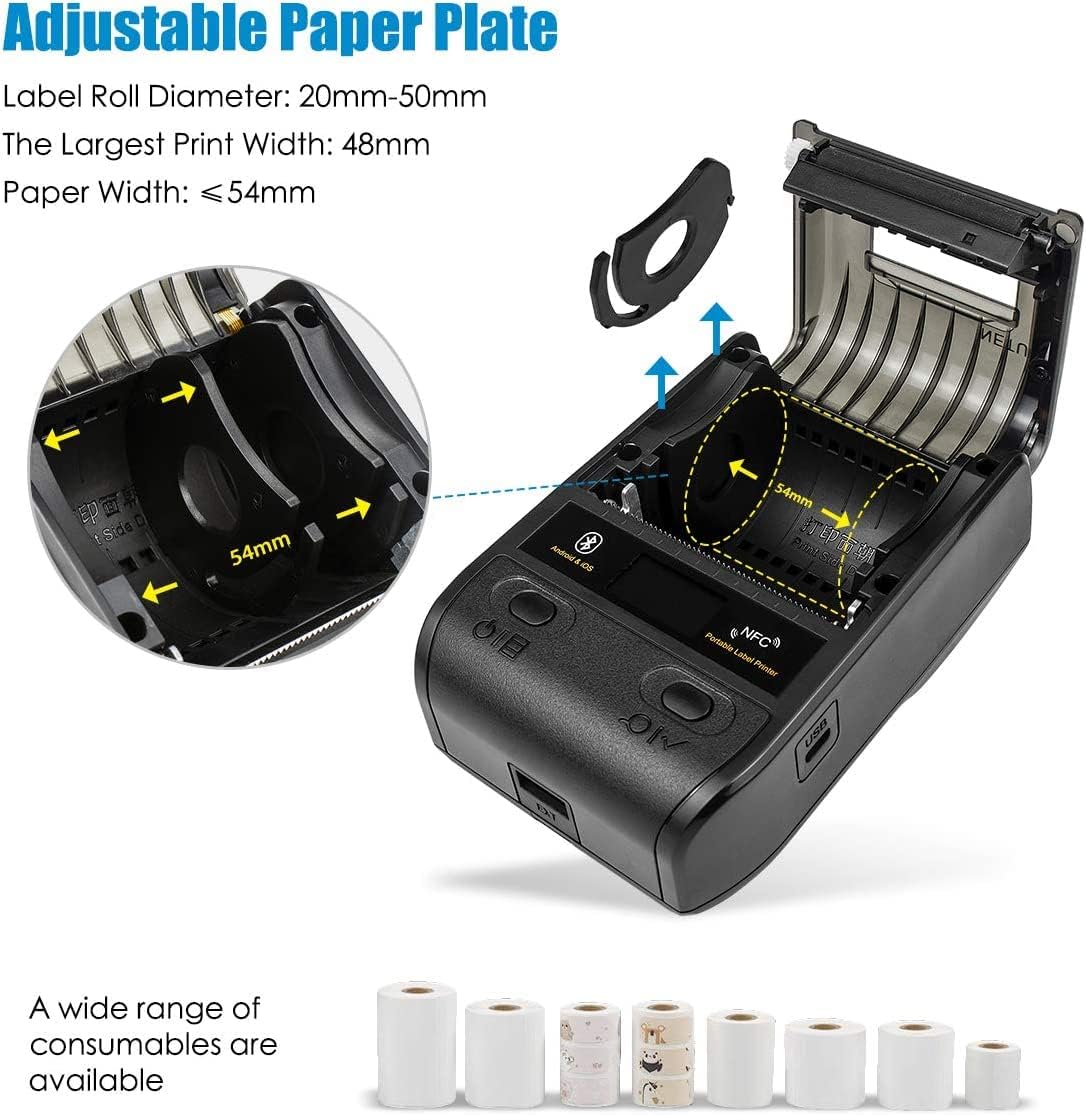
이미지 3.2.1: Illustration of the adjustable paper plate mechanism and proper label roll insertion. The printer accommodates label rolls with diameters between 20mm and 50mm, and paper widths up to 54mm.
3.3 앱 설치 및 블루투스 연결
The NETUM NT-G5 printer operates via Bluetooth connection with a dedicated mobile application.
- 앱 다운로드: 검색 the "WeiDa" barcode design app on the Apple App Store (for iOS devices) or Google Play Store (for Android devices).
- 블루투스 활성화: 스마트폰이나 태블릿에서 Bluetooth가 활성화되어 있는지 확인하세요.
- 프린터 전원 켜기: Press and hold the Power/Setting Button to turn on the printer.
- 앱을 통해 연결: Open the WeiDa app, navigate to the device connection section, and select your NT-G5 printer from the list of available Bluetooth devices. The app will guide you through the pairing process.

이미지 3.3.1: Visual representation of the Bluetooth connection process between a mobile device and the NT-G5 printer, along with icons for downloading the companion app from major app stores.
4. 작동 지침
4.1 기본 인쇄 단계
Follow these general steps to print labels:

이미지 4.1.1: A simplified three-step process for operating the NT-G5 printer, covering paper loading, Bluetooth pairing, and label printing.
- Ensure the paper roll is correctly installed (refer to Section 3.2).
- Connect the printer to your smartphone via Bluetooth using the WeiDa app (refer to Section 3.3).
- Within the WeiDa app, design your label using available templates or create a custom layout.
- Once your label design is complete, initiate the print command from the app.
- The printer will produce your high-quality thermal label.
4.2 지원되는 레이블 유형 및 응용 프로그램
The NT-G5 printer is versatile and supports various label types for different applications:

이미지 4.2.1: A collage demonstrating various label applications for the NT-G5 printer, such as jewelry tags, name labels, address labels, clothing tags, 가격 tags, and cable labels.
- 보석류 Tags: For pricing and product information.
- Name Labels: For organization and identification.
- 주소 라벨: For mailing and shipping.
- 의류 Tags: For retail pricing and product details.
- 가격 Tags: General use for product pricing.
- Cable Labels: For organizing and identifying cables.
4.3 호환 운영 체제
The NETUM NT-G5 printer is compatible with a range of operating systems, primarily through its dedicated mobile application:
- iOS: 애플 아이폰 및 아이패드와 호환됩니다.
- 기계적 인조 인간: 안드로이드 스마트폰 및 태블릿과 호환됩니다.
- 윈도우: Limited compatibility, typically requiring specific drivers or software.
- 리눅스: Limited compatibility, typically requiring specific drivers or software.
5. 유지관리
5.1 프린트 헤드 청소
To maintain print quality and extend the life of your printer, regularly clean the thermal print head. Use a soft cloth dampened with isopropyl alcohol. Gently wipe the print head surface. Ensure the printer is turned off and cooled down before cleaning.
The print head has an estimated life of 50KM of print.
5.2 배터리 관리
The printer uses a Lithium Polymer battery. To maximize battery life:
- 배터리를 자주 완전히 방전시키지 마세요.
- 장기간 사용하지 않을 때는 프린터를 서늘하고 건조한 곳에 보관하십시오.
- Charge the printer regularly, even if not in frequent use, to prevent deep discharge.
6. 문제 해결
6.1 일반적인 문제 및 해결 방법
| 문제 | 가능한 원인 | 해결책 |
|---|---|---|
| 프린터가 블루투스로 연결되지 않습니다. | Bluetooth is off on device; printer is off; app not recognizing printer. | Ensure Bluetooth is enabled on your mobile device. Turn the printer off and on again. Restart the WeiDa app. Ensure the printer is within range. |
| 인쇄 품질 불량 / 라벨 색바램 | Low battery; dirty print head; incorrect label type; print density settings. | Charge the printer fully. Clean the print head (refer to Section 5.1). Ensure you are using thermal labels. Adjust print density settings in the app. |
| 라벨이 제대로 공급되지 않음 | Label roll incorrectly installed; paper plate not adjusted; labels jammed. | Re-install the label roll, ensuring it's properly seated and the paper plate is adjusted to the label width (refer to Section 3.2). Clear any jammed labels. |
| App issues / Crashes | 앱 버전이 오래되었거나 소프트웨어 충돌이 발생했습니다. | Update the WeiDa app to the latest version. Restart your mobile device. Reinstall the app if issues persist. |
7. 사양
| 특징 | 세부 사항 |
|---|---|
| 모델 번호 | NT-G5 |
| 제품 치수 | 4.33 x 3.15 x 2.36 인치 |
| 품목 무게 | 10.9 온스 |
| 배터리 | 1개의 리튬 폴리머 배터리(포함) |
| 최대 용지 너비 | 54mm |
| Largest Print Width | 48mm |
| 라벨 롤 직경 | 20mm~50mm |
| 인쇄 속도 | 20-50mm/초 |
| 프린트 헤드 수명 | 50km |
| 전원 입력 | 5V 2A |
| 연결성 | 블루투스 4.0, NFC |
| 운영 체제 호환성 | iOS, Android, Windows, Linux (via app/drivers) |
8. 보증 및 지원
NETUM products are manufactured to high-quality standards. For specific warranty details, please refer to the warranty card included with your product or visit the official NETUM web사이트. 구매 증빙 자료로 구매 영수증을 보관하세요.
For technical support, troubleshooting assistance, or inquiries regarding replacement parts and accessories, please contact NETUM customer service through the contact information provided on the official web사이트 또는 제품 포장 내부에 있습니다.