1. 서론
The LILYTECH ZL-7918A is an advanced intelligent temperature and humidity controller designed for precise environmental management. It offers stable and reliable performance, making it ideal for applications such as incubators, climate chambers, and warehouses. This manual provides comprehensive instructions for the installation, operation, and maintenance of your ZL-7918A controller.

Figure 1: LILYTECH ZL-7918A controller with connected temperature and humidity sensors, showing the main unit and external probes.
2. 주요 특징
The ZL-7918A controller is equipped with a range of features to ensure optimal environmental control:
- 온도 조절: Precise management of heating elements.
- 습도 조절: Accurate regulation of humidity levels.
- 조명 제어: Manages illumination cycles.
- 보조 난방: Supports an additional heating output.
- Egg Turning Control: Configurable periods and durations for automatic egg turning (left and right).
- Timing Ventilation Control: Schedules ventilation cycles.
- 경보 제어: Alerts for deviations from set parameters.
- 온도 및 습도 교정: Allows for sensor calibration to maintain accuracy.
- Hatching Day Display: Tracks and displays the number of hatching days (up to 99 days).
3. 설정 및 설치
3.1 Device Dimensions and Installation
The ZL-7918A controller has a device size of 160x80x95 mm. The recommended installation drilling size for mounting is 151.5x76.5 mm.
3.2 배선 지침
Proper wiring is crucial for the safe and correct operation of the controller. Refer to the wiring diagram below for connections. Ensure all connections are secure and follow local electrical codes.

그림 2: 후면 view of the ZL-7918A controller, displaying the terminal block for electrical connections.
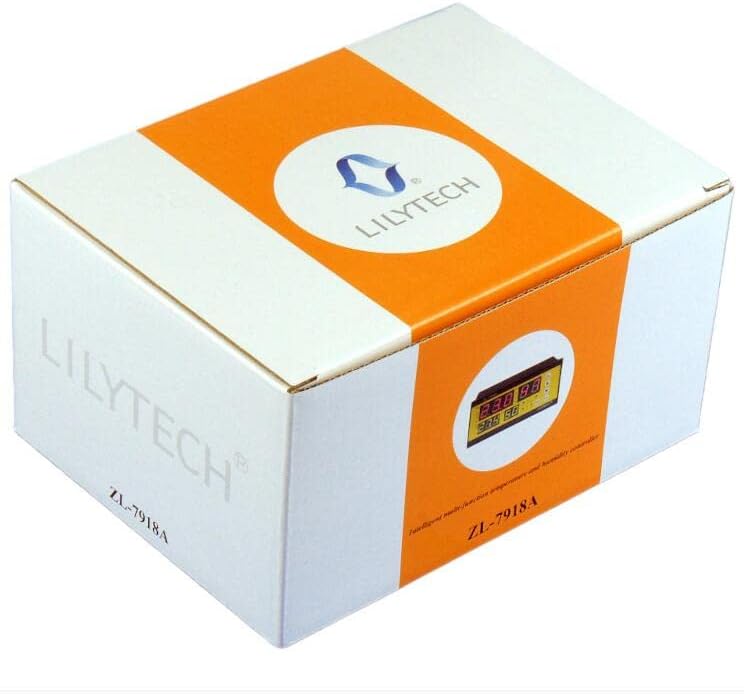
Figure 3: Detailed wiring diagram for the ZL-7918A controller, illustrating connections for power supply, sensors, and output loads.
전원 공급 장치: Connect AC100~240V 50/60Hz to terminals L and N (13 and 14).
센서:
- 습도 센서: Connect the Red, Yellow, Black, and Orange wires to terminals 1, 2, 3, and 4 respectively.
- 온도 센서: 5번 및 6번 단자에 연결하십시오.

Figure 4: ZL-SHr05A Humidity Sensor, showing its compact design and connection points. This sensor is designed for accurate humidity measurement within a range of 0-80% RH.
출력 제어: The controller provides 7 output controls. Ensure the load for heaters does not exceed 1500W, illumination does not exceed 100W, and humidity, fan, and egg turning outputs do not exceed 1A/250Vac.
- 팬 : Terminals 15 (COM) and 16.
- Egg Turning Left: Terminals 15 (COM) and 17.
- Egg Turning Right: Terminals 15 (COM) and 18.
- 습기: Terminals 15 (COM) and 19.
- Illumination (Lamp): Terminals 15 (COM) and 20.
- Auxiliary Heater (HEAT2): Terminals 21 and 22.
- Main Heater (HEAT1): Terminals 23 and 24.
4. 운영
4.1 디스플레이 오버view
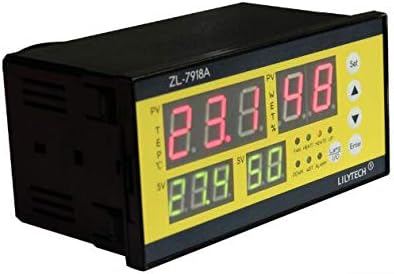
그림 5: 전면 view of the ZL-7918A controller, highlighting the digital display and control buttons for setting parameters.
The controller features a clear digital display showing current temperature (PV TEMP), set temperature (SV TEMP), current humidity (PV WET%), and set humidity (SV WET%). Indicator lights show the status of various outputs (FAN, HEAT1, HEAT2, UP, DOWN, WET, ALARM, L/R for egg turning).
4.2 파라미터 설정
Use the "Set" button to enter the parameter setting mode and the arrow keys (Up/Down) to navigate and adjust values. The "Enter" button confirms selections.
- 온도 설정 범위: 1~65℃
- 습도 설정 범위: 10~80% 상대습도
- Egg-Turning Control:
- Period: 1~999 minutes
- Turning Time: 0~999 seconds
- Turning Times: 0~999 times
- 환기 제어:
- Period: 1~999 minutes
- Ventilating Time: 0~999 seconds
- 조명 제어:
- Period: 1~999 minutes
- Illuminating Time: 0~999 seconds
Refer to the detailed programming guide (not included in this general manual) for specific parameter codes and advanced settings.
5. 유지관리
To ensure the longevity and accuracy of your ZL-7918A controller, follow these maintenance guidelines:
- 청소: 컨트롤러 표면을 부드럽고 마른 천으로 정기적으로 닦아주세요. 연마성 세척제나 용제를 사용하지 마세요.
- 센서 관리: Keep the temperature and humidity sensors clean and free from dust or debris. Avoid exposing sensors to extreme physical shock or moisture beyond their operating limits.
- 사이: 모든 배선 연결부를 주기적으로 점검하여 안전하고 부식되지 않았는지 확인하세요.
- 구경 측정: If accuracy issues are suspected, perform temperature and humidity calibration as per the advanced settings guide.
6. 문제 해결
This section addresses common issues you might encounter with your ZL-7918A controller. For problems not listed here, please contact customer support.
| 문제 | 가능한 원인 | 해결책 |
|---|---|---|
| 컨트롤러의 전원이 켜지지 않습니다. | 전원 공급이 안 됨; 배선이 잘못됨. | Check power source (AC100~240V). Verify L and N wiring connections. |
| 온도/습도 측정값이 정확하지 않습니다. | Dirty or faulty sensor; need for calibration. | Clean sensors. Perform temperature and humidity calibration. Replace sensor if faulty. |
| Output (e.g., heater, fan) not activating. | Incorrect settings; faulty wiring; overloaded output. | Check set parameters. Verify output wiring. Ensure load does not exceed specified limits (e.g., heaters ≤ 1500W). |
| 경보기가 계속 작동 중입니다. | Parameters outside set limits; alarm threshold too narrow. | Adjust set temperature/humidity or alarm thresholds. Ensure environmental conditions are within desired range. |
7. 기술 사양
| 매개변수 | 값 |
|---|---|
| 전원 공급 장치 | 교류 100~240V 50/60Hz |
| 온도 센서 | 1 (L=2M) |
| 습도 센서 | 1 (L=2M) |
| 습도 설정 범위 | 10~80% 상대습도 |
| 온도 설정 범위 | 1~65℃ |
| 습도 표시 범위 | 0~99% 상대습도 |
| 온도 표시 범위 | -20~80℃ |
| Humidity Measuring Accuracy | ±3% (under temperature 20~60℃) |
| 온도 측정 정확도 | ±1% |
| 출력 제어 | 7 outputs (heater, aux-heater, fan, egg left-turning, egg right-turning, humidity, illumination) |
| Heater Output Load | ≤ 1500와트 |
| Illumination Output Load | ≤ 100와트 |
| Humidity, Fan, Egg Turning Output Load | ≤ 1A/250Vac |
| Hatching Day Record | 최대 99일 |
| 운영 환경 | -10~45℃, <90%RH without dew |
| 장치 크기 | 160x80x95mm |
| Installation Drilling Size | 151.5x76.5mm |
| 재료 | 플라스틱 |
| 디스플레이 유형 | LCD 또는 LED |
8. 보증 정보
LILYTECH products are manufactured to high quality standards. For specific warranty terms and conditions, please refer to the warranty card included with your product or contact LILYTECH customer support directly. Keep your purchase receipt as proof of purchase for any warranty claims.
9. 고객 지원
If you require further assistance or have questions regarding your ZL-7918A controller, please contact LILYTECH customer support. Contact details can typically be found on the product packaging or the official LILYTECH web대지.
For technical inquiries, please have your product model (ZL-7918A) and a detailed description of the issue ready.


