1. 서론
This manual provides comprehensive instructions for the setup, operation, and maintenance of your Drawmer CMC2 Compact Monitor Controller. Please read this manual thoroughly before using the device to ensure proper functionality and to maximize its performance.
2. 안전 정보
- 전원 공급 장치: Use only the factory-supplied 15V DC power supply. Using an incorrect power supply may damage the unit and void the warranty.
- 통풍: 장치 주변에 충분한 환기가 이루어지도록 하세요. 환기구를 막지 마세요.
- 수분: 본 제품을 비, 습기 또는 과도한 습도에 노출시키지 마십시오.
- 청소: 청소하기 전에 전원을 분리하세요. 부드럽고 마른 천을 사용하세요. 액체 세제나 에어로졸은 사용하지 마세요.
- 서비스: 모든 서비스는 자격을 갖춘 서비스 담당자에게 의뢰하십시오. 제품을 직접 열거나 수리하려고 시도하지 마십시오.
3. 패키지 내용
패키지에 다음 품목이 포함되어 있는지 확인하십시오.
- Drawmer CMC2 Compact Monitor Controller
- 15V DC Power Supply Unit
- 사용 설명서 (본 문서)
4. 제품 오버view
4.1 전면 패널 컨트롤
The front panel provides all primary controls for audio monitoring and source selection.

그림 4.1: 전면 view of the Drawmer CMC2 Compact Monitor Controller, showing all knobs and buttons for input selection, speaker selection, master volume, headphone control, and mix check functions.
- AUX INPUT Knob: Adjusts the level of the auxiliary input.
- SOURCE SELECT Buttons (I/P1, I/P2, AUX): 활성화된 오디오 입력 소스를 선택합니다.
- SPEAKER SELECT Buttons (A, B, SUB): Activates the selected speaker outputs.
- 볼륨 조절 노브: Controls the overall output level to the selected speakers.
- 음소거 버튼: Mutes all speaker outputs.
- HEADPHONE Knob: 헤드폰 출력의 볼륨을 조절합니다.
- MIX CHECK Buttons (ØREV, MONO, DIM): Provides phase reverse, mono sum, and dim functions for mix analysis.
- AUX INPUT (3.5mm Jack): Front panel auxiliary input for portable devices.
- HEADPHONE Output (6.35mm Jack): Front panel headphone output.
4.2 후면 패널 연결
The rear panel houses all audio input and output connectors, along with the power input.

그림 4.2: 후면 view of the Drawmer CMC2 Compact Monitor Controller, displaying the DC power input, speaker outputs (Mono/Sub, R-B-L, R-A-L), and inputs (R-2-L, R-1-L).
- DC=15V 입력: 제공된 15V DC 전원 어댑터를 여기에 연결하십시오.
- 전원 스위치: Toggles the unit's power on/off.
- SPEAKER OUTPUTS (MONO/SUB, R-B-L, R-A-L): Balanced XLR outputs for connecting up to two pairs of stereo monitors (A and B) and a mono subwoofer.
- INPUTS (R-2-L, R-1-L): Balanced XLR inputs for two stereo audio sources.
5. 설정
Follow these steps to set up your CMC2 controller:
- 전원 연결: Connect the supplied 15V DC power adapter to the 'DC=15V' input on the rear panel. Plug the adapter into a suitable power outlet. Do not power on the unit yet.
- 입력 연결:
- Connect your primary audio source (e.g., audio interface, mixer) to the 'INPUTS R-1-L' using balanced XLR cables.
- Connect a secondary audio source to the 'INPUTS R-2-L' using balanced XLR cables.
- For portable devices, connect to the front panel 'AUX INPUT' (3.5mm jack) or the rear panel RCA auxiliary inputs (if available on your model, refer to specific product documentation).
- 스피커 연결:
- Connect your main studio monitors to the 'SPEAKER OUTPUTS R-A-L' using balanced XLR cables.
- If using a second pair of monitors, connect them to 'SPEAKER OUTPUTS R-B-L'.
- If using a subwoofer, connect it to the 'SPEAKER OUTPUTS MONO/SUB'.
- 헤드폰 연결: If desired, connect your headphones to the front panel 'HEADPHONE' 6.35mm jack.
- 전원 켜기: Once all connections are secure, press the power switch on the rear panel to turn on the CMC2.
6. 사용 설명서
This section details the functions of the CMC2's controls.
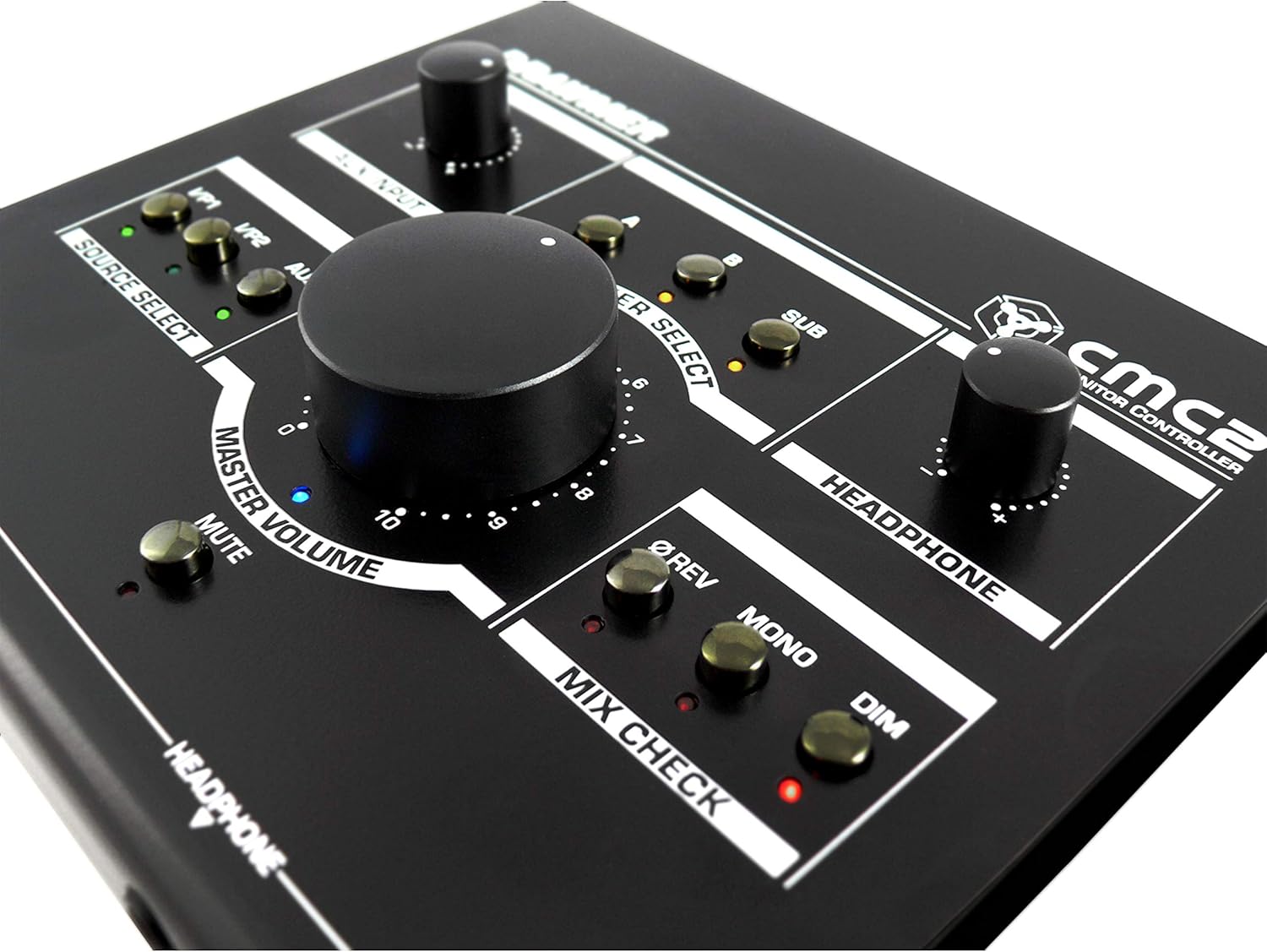
그림 6.1: 클로즈업 view of the Drawmer CMC2 front panel, highlighting the master volume, source select, speaker select, headphone, and mix check controls.
6.1 소스 선택
- 를 누르세요 I/P1 button to select the audio source connected to Input 1.
- 를 누르세요 I/P2 button to select the audio source connected to Input 2.
- 를 누르세요 보조 button to select the auxiliary input (front panel 3.5mm jack).
- Only one source can be active at a time. The LED next to the selected button will illuminate.
6.2 스피커 선택
- 를 누르세요 A button to route the selected source to Speaker Output A.
- 를 누르세요 B button to route the selected source to Speaker Output B.
- 를 누르세요 보결 button to route the selected source to the Subwoofer Output.
- Multiple speaker outputs can be active simultaneously (e.g., A and SUB). The LEDs indicate active outputs.
6.3 볼륨 조절
- 큰 것을 회전시키다 마스터 볼륨 knob clockwise to increase the output level to the selected speakers, and counter-clockwise to decrease it.
- 회전하다 헤드폰 knob to adjust the listening level for connected headphones.
- 회전하다 보조 입력 knob to adjust the input level of the auxiliary source.
6.4 Mix Check Functions
- 를 누르세요 ØREV button to reverse the phase of the right channel, useful for checking phase compatibility.
- 를 누르세요 단핵증 button to sum the stereo signal to mono, allowing you to check for mono compatibility issues in your mix.
- 를 누르세요 어둑한 button to temporarily reduce the output volume by a fixed amount, useful for quick listening level changes without losing your main volume setting.
6.5 음소거 기능
- 를 누르세요 음소거 button to instantly silence all active speaker outputs. The LED will illuminate when mute is active. Press again to unmute.
7. 유지관리
The Drawmer CMC2 is designed for reliable operation with minimal maintenance.
- 청소: 제품을 깨끗하게 유지하려면 보풀이 없는 부드러운 마른 천으로 닦아주십시오. 연마성 세척제나 용제 사용은 피하십시오.
- 환경: Operate the unit in a clean, dry environment, away from direct sunlight, heat sources, and excessive dust.
- 통풍: 과열을 방지하기 위해 통풍구가 막히지 않도록 하십시오.
8. 문제 해결
If you encounter issues with your CMC2, refer to the following common problems and solutions:
- 전원 없음:
- Ensure the 15V DC power adapter is securely connected to the unit and a working power outlet.
- Check that the rear panel power switch is in the 'ON' position.
- 오디오 출력 없음:
- Verify that the correct input source (I/P1, I/P2, or AUX) is selected and its LED is illuminated.
- Ensure that at least one speaker output (A, B, or SUB) is selected and its LED is illuminated.
- Check that the MASTER VOLUME knob is turned up and the MUTE button is not active (LED off).
- Confirm all audio cables are securely connected to both the CMC2 and your speakers/audio sources.
- Test with different cables or audio sources to isolate the problem.
- 왜곡된 오디오:
- 오디오 소스의 입력 레벨을 줄이세요.
- Lower the MASTER VOLUME on the CMC2.
- 오디오 케이블이 손상되었는지 확인하세요.
- Headphone Output Not Working:
- Ensure headphones are fully plugged into the front panel jack.
- Adjust the HEADPHONE volume knob.
- Test with a different pair of headphones.
If the problem persists, contact Drawmer customer support or your authorized dealer for assistance.
9. 사양
| 모델명 | CMC2 |
| 상표 | 드로머 |
| 추천 용도 | 오디오 모니터링 |
| 연결 기술 | XLR, RCA (Auxiliary) |
| 오디오 출력 모드 | 스테레오 재생 |
| 스피커 유형 | 감시 장치 |
| 제품 치수 | 13 x 9 x 3인치(33 x 22.86 x 7.62cm) |
| 품목 무게 | 3파운드(1.36kg) |
| 제조업체 | 드로머 |
10. 보증 및 지원
The Drawmer CMC2 Compact Monitor Controller is covered by a manufacturer's warranty. Please refer to the warranty card included with your product or visit the official Drawmer web자세한 보증 약관은 해당 사이트에서 확인하세요.
For technical support, service, or further inquiries, please contact your authorized Drawmer dealer or the Drawmer customer support team through their official channels.


