1. 서론
This manual provides comprehensive instructions for the setup, operation, maintenance, and troubleshooting of your Canyon CNS-SW71SS Smartwatch. Please read this manual carefully before using your device to ensure proper function and longevity.
The Canyon CNS-SW71SS Smartwatch is designed to help you monitor your fitness activities and stay connected. It features a 1.22-inch color screen, multi-sport modes, heart rate monitoring, sleep tracking, and notification alerts. Its IP68 water resistance makes it suitable for various environments.
2. 제품 오버view
2.1 주요 특징
- 1.22-inch color touch screen display.
- Multi-sport mode for tracking various activities.
- Daily activity monitoring: calories, steps, heart rate, and sleep.
- Notifications for incoming calls, SMS, emails, calendar events, and social media.
- Music control and remote camera function.
- Smart alarm and weather data display.
- 배터리 수명은 최대 7일입니다.
- IP68 water resistance (submersible up to 1 meter for 30 minutes).
- Bluetooth 4.0 연결.
- Compatible with iOS and Android operating systems.
- Comes with two interchangeable wristbands: metal and TPU.
2.2개의 구성요소
The Canyon CNS-SW71SS Smartwatch consists of the main watch unit, interchangeable wristbands, and a charging cable.

그림 1: 전면 view of the Canyon CNS-SW71SS Smartwatch, showing the display with steps, distance, calories, and heart rate data.

그림 2: 각도 view of the Canyon CNS-SW71SS Smartwatch, featuring a silver metal mesh strap and a round display.
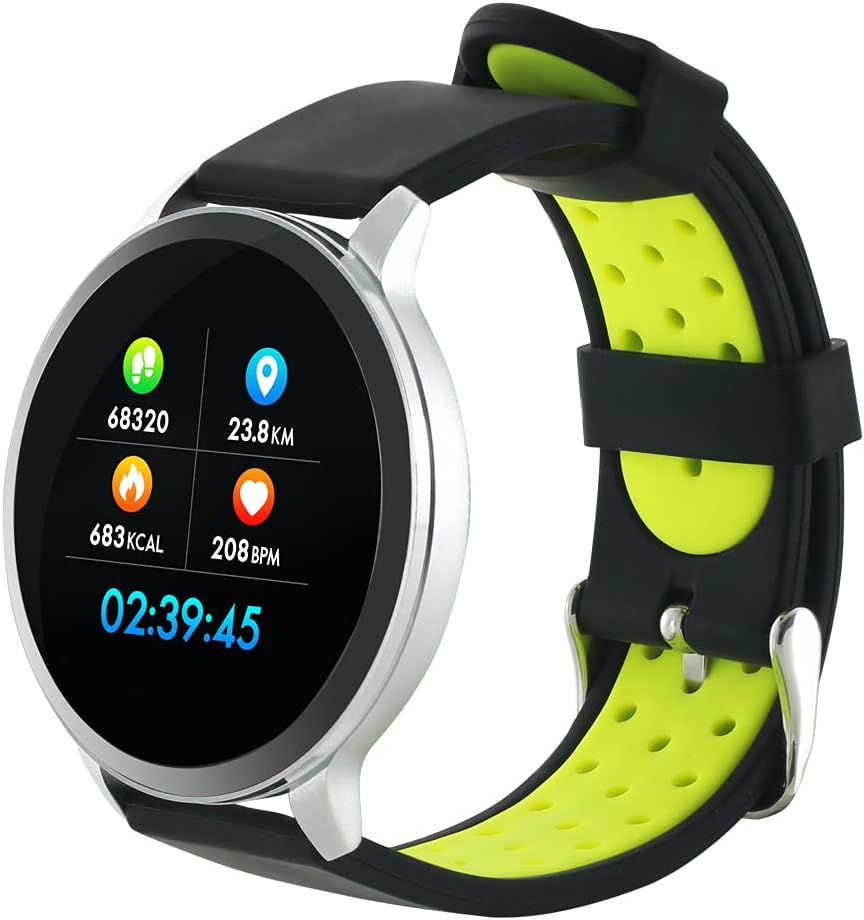
Figure 3: The Canyon CNS-SW71SS Smartwatch shown with an alternative black and lime green TPU strap, highlighting its interchangeable design.

그림 4: 후면 view of the Canyon CNS-SW71SS Smartwatch, displaying the optical heart rate sensor and magnetic charging contacts.

Figure 5: The retail packaging for the Canyon CNS-SW71SS Smartwatch, illustrating key features and the included two straps.
3. 설정
3.1 스마트워치 충전
- 충전 케이블을 USB 전원 어댑터(별도 구매) 또는 컴퓨터의 USB 포트에 연결하세요.
- Align the magnetic charging pins of the cable with the charging contacts on the back of the smartwatch. The watch will vibrate and display a charging icon.
- Allow approximately 2-3 hours for a full charge. A full charge provides up to 7 days of usage.
3.2 Installing the Canyon Fit Application
- Scan the QR code provided in the packaging or search for "Canyon Fit" in your smartphone's app store (Google Play Store for Android, Apple App Store for iOS).
- 응용 프로그램을 다운로드하여 설치하십시오.
- Open the Canyon Fit app and follow the on-screen instructions to create an account and set up your profile.
3.3 스마트폰과 페어링
- 스마트워치가 충전되어 있고 전원이 켜져 있는지 확인하세요.
- 스마트폰에서 블루투스를 활성화하세요.
- Open the Canyon Fit application.
- Navigate to the device pairing section within the app (usually found under 'Device' or 'Profile').
- Select your smartwatch (e.g., "CNS-SW71SS") from the list of available devices.
- 스마트폰과 스마트워치 모두에서 페어링 요청을 확인하라는 메시지가 표시되면 확인하세요.
3.4 Attaching/Changing Wristbands
The smartwatch comes with two wristbands (metal and TPU) that can be interchanged. To attach or change a wristband, locate the quick-release pins on the underside of the strap. Slide the pin to detach the current strap and then align and slide the pin of the new strap into the corresponding holes on the watch body until it clicks into place.
4. 사용 설명서
4.1 기본 탐색
- 터치 스크린: Swipe left/right to navigate through different functions and menus. Swipe up/down to view 알림이나 빠른 설정.
- 측면 버튼: Press the side button to return to the main watch face or to wake up the screen. A long press may access power options or specific features depending on the context.
4.2 피트니스 추적
- 멀티 스포츠 모드: Access the 'Workout' or 'Sport' menu on your watch. Select your desired activity (e.g., running, cycling, walking) to start tracking. The watch will record duration, distance, calories burned, and heart rate.
- 일일 활동: 이 시계는 하루 종일 걸음 수, 이동 거리, 소모 칼로리를 자동으로 추적합니다. View these statistics on the watch face or in the Canyon Fit app.
- 심박수 모니터링 : The watch continuously monitors your heart rate. You can also manually initiate a heart rate measurement from the heart rate interface.
- 수면 추적: Wear the smartwatch to bed, and it will automatically track your sleep patterns, including deep sleep, light sleep, and wake times. View detailed sleep analysis in the Canyon Fit app.
4.3 알림
Once paired with your smartphone and with notification permissions granted in the Canyon Fit app, your smartwatch will display alerts for:
- 수신 전화
- SMS 메시지
- 이메일
- 캘린더 이벤트
- Social Media Apps (e.g., WhatsApp, Facebook, Instag램)
시계 화면을 위로 살짝 밀어서 view recent notifications. You can dismiss notifications from the watch.
4.4 추가 기능
- 음악 제어: While music is playing on your phone, you can use the watch to play/pause, skip tracks, and adjust volume.
- 원격 카메라: Open the camera function in the Canyon Fit app. Use your smartwatch as a remote shutter button to take photos on your phone.
- 스마트 알람 : Set alarms through the Canyon Fit app. The watch will vibrate to wake you up gently.
- 날씨 데이터: Once connected to your phone, the watch will display current weather conditions and forecasts for your location.
5. 유지관리
5.1 청소
- 시계 화면과 본체는 부드러운 천으로 닦아주세요.amp 옷감.
- For the metal strap, use a soft brush to gently clean any debris. For the TPU strap, wash with mild soap and water.
- 충전하기 전에 충전 접점이 깨끗하고 건조한지 확인하세요.
- 청소 시 독한 화학물질이나 연마재를 사용하지 마십시오.
5.2 방수(IP68)
The Canyon CNS-SW71SS Smartwatch is IP68 rated, meaning it is resistant to dust and can be immersed in water up to 1 meter deep for a maximum of 30 minutes. While it can withstand splashes, rain, and brief immersion, it is not recommended for hot showers, saunas, or diving, as steam and high water pressure can compromise the seals.
- 시계가 물에 잠겨 있는 동안에는 버튼을 누르지 마십시오.
- 시계가 물에 닿은 후에는 완전히 말리세요.
5.3 배터리 관리
- 배터리를 자주 완전히 방전시키지 마세요.
- 배터리 수명 유지를 위해 사용하지 않을 때에도 정기적으로 기기를 충전하십시오.
- 장시간 사용하지 않을 때는 시계를 서늘하고 건조한 곳에 보관하세요.
6. 문제 해결
- 시계가 켜지지 않음: 시계가 완전히 충전되었는지 확인하세요. 충전기에 최소 30분 동안 연결해 두세요.
- 스마트폰과 페어링할 수 없습니다:
- 휴대폰에서 Bluetooth가 활성화되어 있는지 확인하십시오.
- Ensure the Canyon Fit app has necessary permissions.
- 휴대폰과 스마트워치를 모두 다시 시작하세요.
- 앱을 통해 기기의 페어링을 해제하고 다시 페어링해보세요.
- 알림이 나타나지 않음:
- Check notification settings in the Canyon Fit app and your phone's system settings.
- 시계가 Bluetooth로 연결되어 있는지 확인하세요.
- 부정확한 심박수/활동량 데이터:
- 시계를 손목에 꼭 맞게 착용하세요. 너무 꽉 조이거나 너무 느슨하지 않도록 하세요.
- 시계 뒷면의 센서를 청소하세요.
- 환경적 요인이나 특정 움직임이 정확도에 영향을 미칠 수 있습니다.
- 화면이 반응하지 않음: Try restarting the smartwatch by holding down the side button. If unresponsive, allow the battery to fully drain and then recharge.
7. 사양
| 모델명 | CNS-SW71SS |
| 상표 | 깊은 협곡 |
| 디스플레이 크기 | 1.22인치 |
| 운영 체제 호환성 | 안드로이드, iOS |
| 연결 기술 | 블루투스 4.0 |
| 방수 등급 | IP68 |
| 특별 기능 | Wireless Charging (implied by product data), Multi-Sport Mode, Heart Rate Monitor, Sleep Tracker, Notifications |
| 호환 장치 | 스마트폰 |
| 배터리 | 충전식 (1개 포함) |
| 색상 옵션 | Black, Lime Green, Silver |
8. 보증 및 지원
For warranty information and technical support, please refer to the documentation included with your purchase or visit the official Canyon website. You can also contact Canyon customer service for assistance with product issues or inquiries.
온라인 지원: https://canyon.eu/support/ (전amp링크는 공식 지원 페이지를 확인해 주세요)